I have WS-FTP Pro 7.0 on both multiple computers as well as the newly released IE7.
One computer has no troubles. The other gives me this interesting error when I try to start it up:
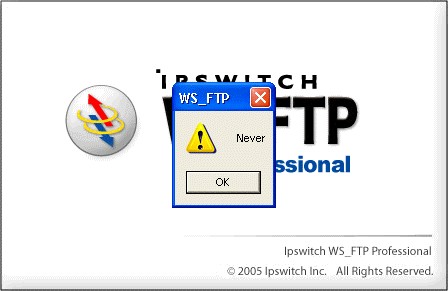
The only solution is to click ok and then kill the app from task manager.
Luckily, I found this thread in the Ipswitch forums (which also decries a lack of support from WS-FTP) where a user (who is clearly a pit-bull and chose not to give up on finding a solution – thank you Suzy!!!) has managed to find how to fix the problem, which calls for “hiding” an outdated file.
navigate to where your WSFTP is installed e.g.
c:/program files/ipswitch/ws_ftp professional
and rename PSAPI.dll to PSAPI.dll.old and then reboot
It worked. Yay.
 Sign up for my newsletter so you don't miss my conference & Pluralsight course announcements!
Thank you very very much
Thanks alot!Worked.You don’t have to reboot though.
Worked for me too, thanks! I didn’t need to reboot either.
Thanks, been driving me nuts.
Thanks!! reboot was not needed for me.
Unfortunately that didnt work for me. I do access this software via an RDP session though. There are 2 different versions of the psapi.dll. Ipswitch installes version 4 and windows xp SP2 installes version 5. The fix I found to work is this:
I copied psapi.dll from "C:\WINDOWS\system32" to "C:\Program Files\Ipswitch\WS_FTP Professional", basically replaced .DLL version 4 with version 5 and this now works. Previously it renaming or deleting psapi.dll from "C:\Program Files\Ipswitch\WS_FTP Professional" didnt resolve the issue.
Hope this works for everyone else.
Hey Monty, thanks A LOT, it WORKS!!!
I don’t know how you managed to find this, but I do appreciate!
Monty,
Your suggestion worked great! Thanks!
I just encountered this issue. Thanks so much for posting a solution.
Thanks, reaming file worked for me. Great POST!
Thank you! Worked like a charm.
WHAT A GREAT POST! Thank you so much for taking the time to put this information out for everyone. The renaming of the file worked wonderfully! ( I did not have to reboot either…running WS_FTP with XP PRO)