Not that I thought I was the first person to think about this or anything 🙂 … I just had to get it off my chest! But Scott Watermasysk assures us that they are way ahead of us and we’ll see some really great changes this summer.
Daily Archives: April 29, 2004
How do you set up your VS.NET environment?
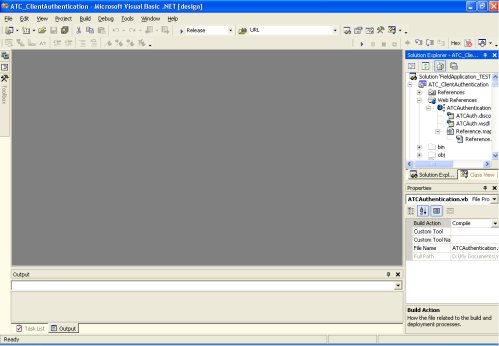
As I’m contemplating Loren’s post (just wrote about it in my previous post) on using VS.NET on a tablet, I am thinking about screen real estate. I work with a 19” monitor set at 1024×768. I can’t make the resolution any smaller, and a larger screen is really hard on my eyes – focusing back and forth. A smaller screen just doesn’t give me the room to do what I need with the different windows that are open. So in thinking about this, I also noted that I think I use VS.NET in the default setup mode (hmmm. maybe I set it up that way because it does match my VB6 setup. But I can’t remember now). Server & Tools explorer to the left. Mostly on auto-hide, but sometimes pinned. I have the solution explorer on and class explorer on the right in a tab view and rarely switch to the class explorer. And I share that right pane with the properties window below. Then on the bottom are the tabbed collection of output, command and task window with the watch window to the left when I am debugging.
And lots of toolbars on the top. Debug/Layout/Standard and Text Editor
Here’s what that looks like when all of my class windows are closed. So I was just curious what others find productive? This is just what I have carried over from years of how I had VB6 set up. It’s what I’m used to.
Program FOR Tablets? Program ON a Tablet?
Loren Heiny, who is a developer first and a tablet pc (MVP and) expert second (that ranking is my own personal opinion), (and even an author) — spent some time using his new Toshiba M200 as a development machine to answer the question many developers have asked – “but can I use a tablet as my development box?”
I can tell you that as much as I LOVE LOVE LOVE my little Acer C110, that would be impossible with the tiny little screen and the tiny little resolution. There is, however, a chance of an M200 in my near future, but I wish I could keep my Acer for travelling (when I don’t have to do any programming).
However, Loren was surprised that his experiment resulted in him wanting to use the tablet full time as his dev box. His post discusses the many pros and cons, keyboarding, inking, landscape, portrait, etc…. click here for the details!!!
[BTW – he says he is using Visual Studio and I wanted to point out that it is, of course, VS.NET, oh unless he’s talking about Visual Studio 2005 Technical Developer mid-March Preview or whatever that really long name that seems to include every word in the dictionary except for .NET]
TabletPC Development tricks leaked
Oh no! Someone “leaked” the decks from the MDC talks on developing applications for TabletPC with the TabletPCSDK. This is terrible. Now anyone will be able to write tabletpc applications! So please, don’t show anyone these links!
Found by way of whatisnew.com and tabulapc, too. Naughty leakers… (and just in time for me to prepare my DevTeach presentation….heh)
weblogs.asp.net growth
When there were only 200 people on dotNetWeblogs, there were already some problems with too much content and a good chunk of it was personal, when I believe the original mission of the blogs was to be about .Net. I learned quickly to stick to the .net focus after a few weeks of totally random “here I am“ posts. The biggest problem was in the main feed. People who subscribed to the main feed looking for .NET info were having to filter through a lot of stuff. Enter personal categories. The categories are for individual bloggers. So you can subscribe to a particualr blogger’s own feed separately from the main feed and choose only to subscribe to a particular category. But that does not stop stuff from still going onto the main feed. Everything goes to the main feed. Then Scott implemented a great feature: “Include on Main Feed”/”Do not include on Main Feed”. But does it get used? Do the bloggers who start up new blogs know that it exists? Is anyone ever told something like – “so it’s a good idea to try to keep main feed posts .net related, but we trust you to use your judgement. Sometimes a post that is not about .NET is still very relevant. You can post as much about anything on your blog as you want, but think about the main feed/main website page when you are selecting to include it there or not“ or is it just “here’s your blog. Have fun!“
There are now 950 (today’s count) bloggers on this site. Many people, many wonderful ideas, many interesting personalites. Many posts on the main feed. Too many to read. Too many to filter through – do you go by person’s name? by post title? By MS blogger? Non-MS Blogger? Bloggers can specifiy posts to either go the main feed or not. However, if readers are not subscribed to that person’s particular blog, then these posts will never be seen.
I keep thinking about unsubscribing to the main feed and just doing individual subscriptions. But then I’ll miss soooooo much.
I know that solutions have been tossed around for a long time now and it is hard to come up with an idea that seemed to solve all of the problems.
But I think that having some general group categories might not be a bad idea at this point.
.net related
Microsoft inside scoop related
community related
personal
even those 4 might help a lot. I would be happier to subscribe to those 4 feeds individually and have some kind of organization. Then when I’m just looking for random entertainment from my fellow geeks, I’ll go to personal. Yes, it means it is still up to the bloggers to specifiy a group category , but that’s can become habitual. And even if someone doesn’t remember to do it all of the time, it could still be a huge help. Implementation is a completely different story of course. Here I am making a suggestion that I can’t help to do the work of implementing. However, I just wanted to put it out there for the next time changes are being made to the way .Text works or at least so that people can talk about and fine-tune the idea.