this isn’t an announcement (cause you all know by now) but just public congrats to my buds and yours, Andrew Duthie who is Microsoft’s newest Developer Evengelist (though I think they changed the titles again at MGB) and Scott Watermasysk who is now working with Rob Howard and Jason Alexander at Telligent Systems. The best part for both of them is neither one had to move!
Daily Archives: July 27, 2004
Just a reminder to move your custome visualizers
In Scott Nonnenberg’s blog post on how to write debugger visualizers that he wrote after the March preview of VS2005 was released, he mentioned that the location where you need to place the resulting dll would change in the future releases. That time has come (I noticed today when I tried to use one of my custom visualizers).
Previously you put those files inside Visual Studio’s install directory. Now they go here:
My Documents\Visual Studio\Visualizers
And now back to our regularly scheduled program…(pun intended)
XML Tools in VS2005
I remember sitting with Kathleen Dollard at the regional MVP Summit in L.A. last fall while Ken Levy demo’d the then-NDA XML Tools for Whidbey. Kathleen (who is BIG on XSLT) was nearly peeing in her pants with excitement. She kept poking Don Kiely (sitting on her right) in the arm, giggling and jumping up and down in her seat. (sorry Kathleen, there was no NDA on your reaction!) Now we get to play with them in VS2005. Ken Levy points to a new whitepaper on the XML Dev Center. (I missed a week of blogs so thanks, Christa, for pointing that out.)
Holy Canoli They’ve DONE IT (in VB)! Drill all the way into data objects in the debugger
Update – see THIS POST to find out why I added the words “(in VB)” to the title!
In case you missed this in the previous bits (not PDC, but March & May), I am having a repeat episode of the thrill of debugging datasets in Whidbey.
HOORAY!!!!!!!!!!!!!!!!!!!
Hooray Hooray Hip Hip Hooray Whooppee Yeahaw I’m going to Disneyland! (oh scratch that last one.)
The Whidbey Beta1 lets me drill ALL THE WAY INTO DATAOBJECTS in the debug window.
Open the dataset. Open the tables collection. See all the tables listed. OPen a table. See all of it’s objects. See the rows collection. Open that up. View it’s contents. See the columns collection. Open it up. See Spot Run. See the column names all of the properties. There is so much information in there.

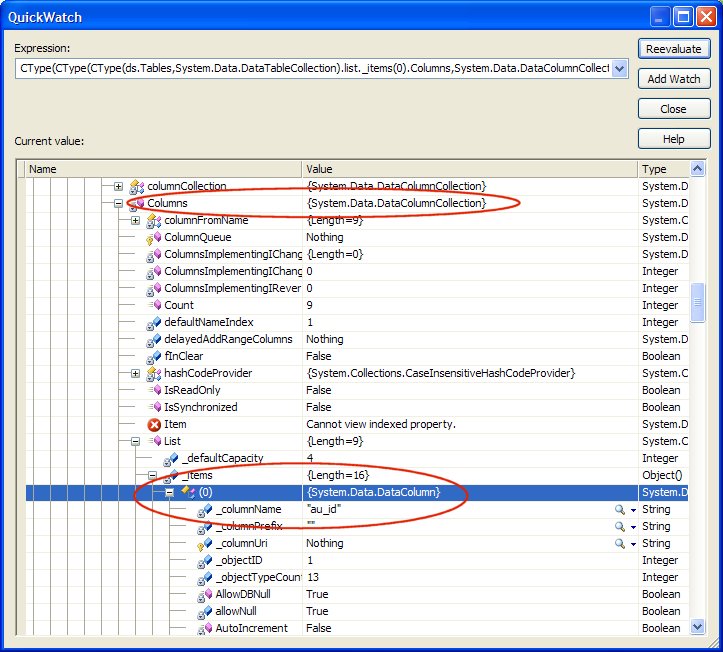
If you were never a VB6 programmer you may not understand. This was a normal function of the watch window that disappeared in .Net and has not appeared again until this particular the March preview release (the Beta1) of Whidbey. It was one of my biggest pet peeves (though I accepted that it was just really hard to do in .net) and is now my greatest elation.
Thank you debugger team. Thank you Data Team. Thank you thank you thank you. I don’t know what you did to hook into that (could it be those serializable datatables?) but thank you. (Oh did I already say that?)
Some benchmarks with Nullable.HasValue in Beta1
Call me crazy. I’m so swamped but just got bit by the curiousity bug and did some very silly perf tests on Beta1. A few months back, Krzysztof Cwalina posted some Design Guidelines for Generics. In it, the BCL team recommends using <nullable> for value types. At that time I was curious about the performance although he did say : “We will work to make these two important generic types as efficient as possible.“ (he was also referring to <EventHandler T>).
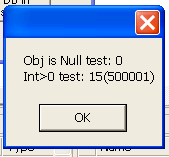
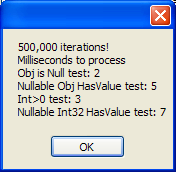
Testing against the March bits of Whidbey, HasValue was a LOT slower than just testing, say for an int32, if it is >0 . So I went back and played with this again with the beta. I started with 100 iterations. All tests returned 0 milliseconds! (I also tested a random object just for fun). I pushed the iterations to 1,000, then 10,000. Still 0 milliseconds for everything. Finally at 100,000 I saw a glimmer of difference but not in favor of HasValue. At 500,000, you can see (below) that both functions are finally sweating a little at a whole 2 , 3, 5 and 7 milliseconds – if you can call 3 milliseconds “sweating“. Pretty fast! However, the HasValue is still slower. In my little test case, of course, this is not earth shattering. But obviously in more complex scenarios, stuff like this does matter.
At this point, they are still working to make a real performance case for nullable and hasvalue (remember, this is all in VB where I am playing) and I’m sure they will.
Just for fun, I checked the performance in .Net 1.1. Now that is on a machine with 2GB of ram and 2.8 GHz processor speed. The Whidbey tests are on a machine that is 1.6 GHz with only 512MB of RAM. So, looking at the test of int>0; the whidbey performance compared to 1.1 is even more impressive than what I saw here. THe 1.1 is on the left. Beta1 is on the right.
God only knows why I just wasted all this time thinking about this itty bitty little thing. I certainly have bigger fish to fry this week.
What’s new in Whidbey Browser: THANK YOU .Net2TheMax and Code Architects!
By way of Peter Provost, I found Code Architects’ and .NET2TheMax’s .NET Browser where they have highlighted new, changed and removed classes in Whidbey. Thank goodness someone has taken the time to do this. EVery time I look at the Whidbey help files, and see those bright red “new in .net 2.0” notes at the top of classes or their members I wish to heck that I could just SEARCH or FILTER the library on that phrase.
I have literally sat with two computers browsing through the help for 1.1 and the help for 2.0 so that I can find what’s new myself.
THANK YOU THANK YOU THANK YOU.