Posted from BLInk!
Monthly Archives: December 2004
New Speakers added to INETA Speaker Bureau
INETA has added 8 new speakers to the North American Speaker Bureau!!
They are:
- Don Kiely
- Kathleen Dollard
- Joel Semeniuk
- Russ Nemhauser
- Stephen Forte
- Jim Duffy
- Phil Weber
- Craig Utley
🙂.
If you want to be considered for the INETA Speaker Bureau please refer to this blog post by Committee Chair, Scott Bellware.
Posted from BLInk!
Vermont Software Dev Alliance meeting today at 11:45
Just a reminder!!
www.vtsda.org
Posted from BLInk!
Code Camp III call for speakers – hey, any chicks???
Code Camp III is looking for speakers for the Mar 12/13th event in Waltham MA. Code Camp II had 62 speakers. Out of all of them, there was one chick and she was a ‘Softie. Surely there are some women developers in the Boston area who have something cool and .NET-ty or related to talk about?? This is not an event where the coordinators invite speakers. Anyone can submit sessions. You don’t have to be an experienced speaker even. There are not only session rooms, but chalk talks, which are small and you would lead a discussion but not necessarily stand in front of a crowd doing powerpoints and demos. Here is a document that you can use to submit ideas for talks. Here is where you can see what the schedule looked like for Code Camp II.
Posted from BLInk!
PERFECT Powder Day
Over the last few days it has been snowing lightly but constnalty. Now there is a beautiful blanket of fluffy white snow about 6″ deep. It would have been a perfect day to play hookey and go ski out in the fields. Lucky for everyone who’s waiting for stuff from me that I’m stuck at home in front of my computer with a broken foot! :'(
Posted from BLInk!
VS2005 – DataTips oddity
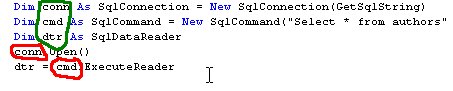
I have to look further into this but look at the pattern of where DataTips are available (green) and where they are not (red)
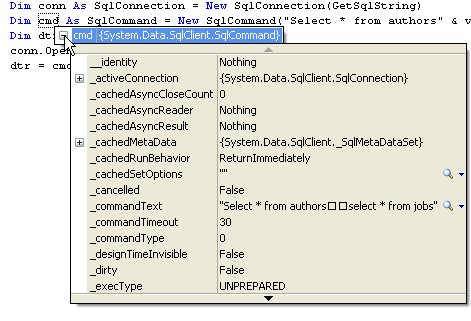
If you haven’t seen DataTips yet, it’s like an inline quick watch window during debug
Posted from BLInk!
A visit with John Robbins and wife, Pam
John Robbins is speaking tomorrow night in Montreal at GUVSM . He and his wife, Pam, decided to take advantage of being in that fantastic city and went up a little early, passing through Burlington. So we met up yesterday for lunch at the Burlington Pub and Brewery and then wandered around Church St for a while, visiting some of my favorite places I like to show off to out of towners: Frog Hollow State Craft Center and incredible shop featuring some of the finest crafts people (and even companies like Simon Pearce) in Vermont, Lake Champlain Chocolates (mmmmmmm…) and some others. I couldn’t lure them into Kiss The Cook, but Rich and I got to go afterwards.
It is really fun to hang out with fellow geeks and NOT talk shop! It’s kind of rude to geek out when 1/2 of the group (i.e. Pam and Rich) are not geeks. So we got to just have a normal time talking about normal things – food, travel, food, travel and beer, too. (just kidding).
Posted from BLInk!
It’s WORKING! SqlDependency!! Here’s how I did it.
read this and then this post to understand the problem.
Well … I started out trying this against pubs and it didn’t work and then I tried it with AdventureWOrks and it didn’t work. I focused on pubs and made a lot of changes without it working. Then I finally went back to AdventureWorks and it did work!! So I’m not sure exactly which thing I changed previously, but the to get pubs to work with query notification was in the DataBase, I needed to set the Database Properties/Options/Miscellaneous: “Database Compatibility Level” to Version90. It had been at Version80.
Note that all of the other Miscellaneous options for pubs were set to false and I did not have to change them for it to work.
Wally McClure and I talked about some of the issues about when to make particular calls. I found that the samples in the docs and Bob Beauchamin’s article were fine in terms of creating the connection, creating the command, opening the connection, creating the dependency, creating an event handler, etc worked fine.
Here are some things that I was unsure about.
All of the samples I saw showed doing a read on the SqlDataReader that was returned by the command that I attached the dependency to. So I started out with this code (which works):
SqlDataReader rdr=cmd.ExecuteReader();
while (rdr.Read())
Console.WriteLine(rdr[0]);
rdr.Close();
Once I had that working, I did what I really wanted to do which was return the SqlDataReader to my form (in real life, maybe a middle tier) which then loaded it into a DataTable and did something with the DataTable. So I changed the code to:
SqlDataReader rdr=cmd.ExecuteReader();
return rdr;
and that worked just fine. So according to this test it is NOT necessary to do a read on the SqlDataReader for the notification to fire.
The placement of the Open method of the connection did not seem to affect the notification query. Of course, just so long as it’s before you try to execute the command. I tried it before creating the dependency and I tried it after the dependency and event handlers were already created. This makes perfect sense to me. But it was something I was worrying about when things weren’t working. So that eases my mind to know that my instincts are okay.
So there were NOT a gazillion other things I had to do in SQL Server besides the frequently advertised ones.
1. Be sure the CLR is enabled in SQL Server
the tsql for that is
EXEC sp_configure ‘show advanced options’, ‘1’
go
RECONFIGURE
go
EXEC sp_configure ‘clr enabled’, 1
go
RECONFIGURE
2. Make sure that Enable_Broker is ON in your database
Wally explains how here
3. Make sure that SQLNotification will send messages with this TSQL statement
GRANT SEND send on service::SqlQueryNotificationService to guest
a) note that the word SqQueryNotificationService is case sensitive
b) you have to have admin priveleges in order to successfully run this command
4. The database user needs permission to subscribe to notification
GRANT SUBSCRIBE QUERY NOTIFICATIONS TO [the user]
–that is, whatever user the calling application is that is making requests. I haven’t tried ASP.NET yet, but I’m guessing that will be the Network Service account if IIS6 is your webserver.
5. Follow the query rules.
You have to write a query that can be parsed and that needs to follow some very specific rules. The three most notable are
a) The projected columns in the SELECT statement must be explicitly stated (i.e. select id, name, lastname from mytable not select * from mytable)
b)Table names must be qualified with two-part names (eg dbo.authors or person.contact)
c) Due to the above one, this means that all tables referenced in the statement must be in the same database.
I posted a full list here
Even though I fiddled for 2 days with this, I think the above represents the right combination of things to attend to.
The last caveat is that this is still a beta. From reading Bob’s article, we can rest assured that MS is going to simplify this stuff. As for limiting your queries to “hello world“ applications (I’m exaggerating… but see Roman’s comment) maybe they’ll make it smarter or maybe the more full blown notification services will be the way to go. I don’t really know – that’s just a completely wild guess.
Posted from BLInk!
Query Notification SELECT QUERY rules
There are SO many caveats to using query notification wtih SQL Server. Things like the fact that it is not based on transactions (eg you will get a notifcation even if something is rolled back). You have to do a LOT of trolling around in the books online to find all of this stuff and frankly, I still do NOT have my notifications firing yet.
So here is a list from the Books Online for the October CTP of SQL Server 2005 of rules to follow when you are building a query with which you want to susbcribe to the service.
Query notifications are supported for SELECT statements that meet the following requirements:
- The projected columns in the SELECT statement must be explicitly stated, and table names must be qualified with two-part names. Notice that this means that all tables referenced in the statement must be in the same database.
- The statement may not use the asterisk (*) or table_name.* syntax to specify columns.
- The statement may use unnamed columns or duplicate column names.
- The statement must reference a base table.
- The projected columns in the SELECT statement may not contain aggregate expressions unless the statement uses a GROUP BY expression. When a GROUP BY expression is provided, the select list may contain the aggregate functions COUNT_BIG() or SUM(). However, SUM() may not be specified for a nullable column. The statement may not specify HAVING, CUBE, or ROLLUP.
- A projected column in the SELECT statement that is used as a simple expression must not appear more than once.
- The statement must not include PIVOT or UNPIVOT operators.
- The statement must not include the INTERSECT or EXCEPT operators.
- The statement must not reference a view.
- The statement must not contain any of the following: DISTINCT, COMPUTE or COMPUTE BY, or INTO.
- The statement must not reference server global variables (@@variable_name).
- The statement must not reference derived tables, temporary tables, or table variables.
- The statement must not reference tables or views from other databases or servers.
- The statement must not contain subqueries, outer joins, or self-joins.
- The statement must not reference the large object types: text, ntext, and image.
- The statement must not use the CONTAINS or FREETEXT full-text predicates.
- The statement must not use rowset functions, including OPENROWSET and OPENQUERY.
- The statement must not use any of the following aggregate functions: AVG, COUNT(*), MAX, MIN, STDEV, STDEVP, VAR, or VARP.
- The statement must not use any nondeterministic functions, including ranking and windowing functions.
- The statement must not contain user-defined aggregates.
- The statement must not reference system tables or views, including catalog views and dynamic management views.
- The statement must not include FOR BROWSE information.
- The statement must not reference a queue.
- The statement must not contain conditional statements that cannot change and cannot return results (for example, WHERE 1=0).
That’s just the query rules. There are also rules for the connection and a lot of setup to do on the database. I will eventually succeed at this! I swear I will. Of course, by then, I will probably have been fired from all of the other contract work I am supposed to be doing. (Not really…)
Posted from BLInk!
Author Webcast
Talk with Bill Evjen about his book ASP.NET 2.0 Beta Preview tomorrow morning on the first Microsoft Book Club Author Webcast!! This is an evolution of the .NET Book Club started by Jeff Julian!!
Posted from BLInk!