www.acehaid.org
Monthly Archives: July 2005
TDD Workshop in Montreal August 16th
www.acehaid.org
The $10million tabletPC promotion idea…
Loren Heiny asked “if you have $10million to promote TabletPCs, how would you do it.” Robert Scoble suggests buying 5 tabletpcs for every airline so people can play with them while they are flying. Oddly enough, Don Kiely emailed me the other day to tell me that Lenovo (the makers of the new ThinkPad TabletPC) had a kiosk at one of the airports that he flew through on his latest multi-user group INETA trip and he got to play with it for a while (and was hooked!). It makes perfect sense, all of our best stories about showing Tablets to strangers are those which happened while we were in airports or airplanes.
There is a growing list of comments to Loren’s original post.
www.acehaid.org
In the trenches thoughts and tips on starting a user group
www.acehaid.org
Micrsoft Agent goodies for the Tablet PC?
New Web Services Book hits the shelves
I was truly amazed to see this new web services book at the checkout counter at the grocery store the other day!

Keeping up with the Joneses #1
I’m going to start a new category. It is called “Keeping up with the Joneses”.
Here I will get to vent for each time I see someone working with a technology that I haven’t had the time to play with yet. Every time I see someone writing about their Indigo or Avalon projects, there is a little demon on my shoulder whispering “you are SUCH a loser and a dumb-ass, cause you don’t even know how to do that yet!” Of course it’s all very silly of me. I spend a lot of time on certain technologies and who can do it all? And the folks doing those Avalon projects are probably focused on Avalon and not working with a lot of other technologies either. I keep telling myself that, anyway.
So today’s Keeping up with the Joneses is:
- Firefox Update Nope I have never even LOOKED at Firefox
- New WS SecurityPolicy Published Whoa – *this* I need to look at! But I’m stuck on this darned Sharepoint (with a tight deadline) project
- Hacking MSN Virtual Earth I’ve been thinking about Virtual Earth. Check out Dr. Neil’s project.
- Small CodeSmith Template effort launched Nope, never done any CodeGen. Not used any of the tools. Happily, Kathleen still likes me.
- Concurrency: What Every Dev Must Know About Multithreaded Apps Ahh yes, threading. I grok it okay I guess, but I would like to be much more knowledgable about it.
www.acehaid.org
another test
my website is broken and I am testing again
of course, my last 3 posts were there for a while and then disappeared into thin air, so we will see what happens!
www.acehaid.org
MSDN Tablet PC Development WebCast Series!!
Tablet / Mobile PC Webcast Series 2005
| Tune in as presenters from the Tablet/Mobile PC team share our most popular sessions: showcasing introductory and advanced Tablet PC topics, Mobile PC development considerations, and network awareness and data access strategies. |
The series of 7 webcasts starts July 12 and runs through the end of the year.
www.acehaid.org
Web UI trick with ImageButtons inside of Data Repeaters
[this is for v 1.1]
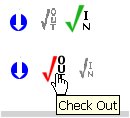
On a web page I have an ImageButton with some server side action to take place when it is clicked. But there are scenarios where I would like it to be disabled. The Enabled property disables any command action, but you still get the “index finger” cursor when you hover over the icon. I didn’t even want that. I think that’s pretty confusing because it still looks like the user can *do* something.
To make it more interesting, I have this happening inside of a Data Repeater. Here is how I got this to work.
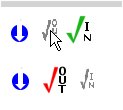
Just after the ImageButton, I placed an <asp:image> with the same image as it’s source. The default “visible” parameter on this is False. Since I am doing this in a Repeater, I am hand coding it, so remember to add runat=server. In my case, I actually have a different image, so it is extra obvious to the user that the state of the icon has changed.
By making the visible property false, not only is the image not visible, but it does not take up any real estate on the page.
<asp:Imagebutton id=”CheckOut” runat=”server” ImageUrl=”images/checkout_red.gif” AlternateText=”Check Out” CommandName=”CheckOut” />
<asp:Image ID=”CheckOutNoLink” Runat=server ImageUrl=”images/checkout_small.gif” Visible=False/>
In the repeaters “ItemCommand” event, when the state calls for the inactive image I just flip the Imagebutton’s visible property to false and the Image control’s visible property to true. Again, by making the Imagebutton not visible, it no longer takes up the space on the page, and the Image slides over to fill in the hole that the Imagebutton left behind.
CType(e.Item.FindControl(“CheckOutNoLink”), System.Web.UI.WebControls.Image).Visible = True
CType(e.Item.FindControl(“CheckOut”), System.Web.UI.WebControls.Image).Visible = False
I’m sure this has been done plenty of times before, but I didn’t intuit the solution at first and couldn’t find anything on google, so here ya go!
www.acehaid.org