The new Entity Framework tools create an EDMX file which contains all three models: Conceptual, Mapping and Storage, in one file. When your project is built, individual files are created for the models, in the [familiar to those who have been using Entity Framework already] CSDL (conceptual), MSL (mapping) and SSDL (storage) files.
The connection string used by the Entity Framework contains not only the database connection string, but a metadata parameter with pointers to the three mapping files separated by a pipe character.
The Default Locations
Assuming that you put your EDM in the main folder of your project, in Windows Forms, Console and Class Library projects, you will see by default:
connectionString=
“metadata=.\Model.csdl|.\Model.ssdl|.\Model.msl;provider=System.Data.SqlClient;provider connection string=’Data Source=.\SQLEXPRESS;AttachDbFilename="C:\Program Files\Microsoft SQL Server\MSSQL.1\MSSQL\Data\AdventureWorksLT_Data.mdf";Integrated Security=True;Connect Timeout=30;User Instance=True'”
When the project is built, those 3 files will land in the debug or release folder of the BIN directory for the app.
In a web app, the default location is different:
connectionString=
“metadata=~/bin/Model1.csdl|~/bin/Model1.ssdl|~/bin/Model1.msl;provider=System.Data.SqlClient;provider connection string=’Data Source=.\SQLEXPRESS;AttachDbFilename="C:\Program Files\Microsoft SQL Server\MSSQL.1\MSSQL\Data\AdventureWorksLT_Data.mdf";Integrated Security=True;Connect Timeout=30;User Instance=True'”
This pushes the files into the bin folder of the site as well.
Sharing EDM with another project or another developer
If you have your EDM in it’s own project and then want to reference it from another project, you need to perform two steps.
1) Add a reference to the compiled DLL which represents the EDM.
2) Modify the config file of your consuming application to point to the location of the csdl, msl and ssdl files.
Here is an example of a web.config’s connection string at design time that needs to use a model which is in a different project folder. I had to manually enter this long file path. Yucch.
connectionString=”metadata=C:\Documents and Settings\julie\My Documents\Visual Studio 2008\Projects\EFBeta2Windows\AdventureWorksModel\bin\Debug\Model.csdl|
C:\Documents and Settings\julie\My Documents\Visual Studio 2008\Projects\EFBeta2Windows\AdventureWorksModel\bin\Debug\Model.ssdl|
C:\Documents and Settings\julie\My Documents\Visual Studio 2008\Projects\EFBeta2Windows\AdventureWorksModel\bin\Debug\Model.msl;
provider=System.Data.SqlClient;
provider connection string=’Data Source=.\SQLEXPRESS;AttachDbFilename="C:\Program Files\Microsoft SQL Server\MSSQL.1\MSSQL\Data\AdventureWorksLT_Data.mdf";Integrated Security=True;Connect Timeout=30;User Instance=True'” providerName=”System.Data.EntityClient” />
There’s a better way
In the ADO.NET Orcas forums, Craig Lee pointed out that the build task for EDMDeploy which creates these files is placed in the project file and can be edited. I went looking.
You can get at it right in the UI for editing the project.
Go to the Compile tab, then to Build Events.
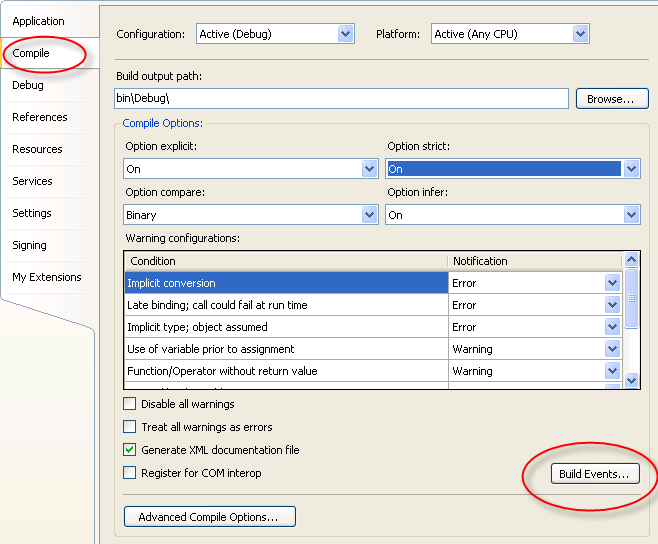
You can see the EdmxDeploy code in the Post-build event command line.
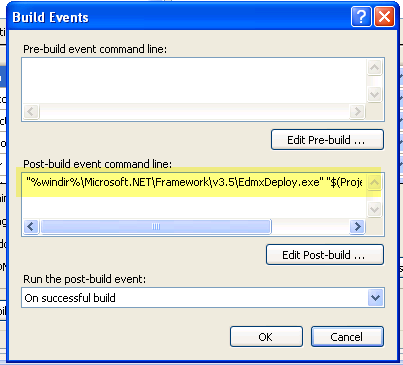
By editing, you can see the whole thing and the target directory parameter.
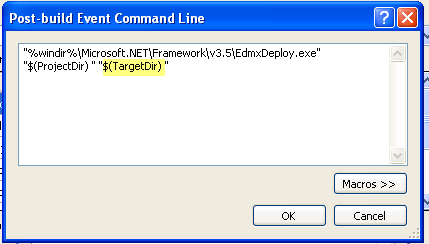
I changed the target to point to an existing (easy access for demos!) folder on my drive.
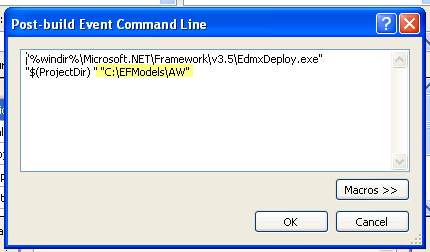
Then after I built the model project again, the csdl, msl and ssdl files were all in c:\efmodels\aw.
Now I can easily modify the metadata paths of any projects that consume my model to simple paths such as “C:\efmodels\aw\model.csdl”.
If I am in a team environment, then my files need to be available on a shared location or from source control.