Note: With the RTM of Entity Framework, the model’s Metadata Artifact Processing property is set to Embed in Output Assembly by default, whcih is the opposite of what is described in this blog post based on Beta 3.
One of the new features in Entity Framework Beta3 is the ability to embed the csdl, msl and ssdl schema files into the assembly which contains the model.
This is useful in scenarios where, like in a few of my solutions, you want to have a separate project to host the model and then use that project in various applications. In that case you need to make a reference to the dll with the model and the application using the model will need to know where to find the schema files through the metadata property of the special connection string.
At design time, you work with the EDMX file in the designer and you can also manually edit it’s XML if and when necessary. When the project is compiled, the 3 key sections of the EDMX file are spit out to the separate schema files (*.csdl, *.mls, *.ssdl) which are used by the EF APIs.
With the schema files embedded into the dll, we don’t have to keep track of the files.
Here’s how to pull it off. Note that there is a workaround in these instructions for a known bug.
My project that hosts the model is called AdventureWorksModel. In it are the model as well as some additional code that extends the functionality of the code generated classes.
By default, the EDMX file’s Build Action property is set to “EntityDeploy”. This is important to note in case you change it for some reason. It does need to be “EntityDeploy”. (I learned that the hard way, which is why I make a point of mentioning it.
Open the EDMX file in the design window and then you will see a new property in the property window called Metadata Artifact Processing. The default of this is “Copy to Output”.
To get around a current known bug, build the project with the property set to “Copy to Output”. Then change the Metadata Artifact Processing property to “Embed in Output Assembly”. Eventually you won’t need to build with Copy to Output first.
Build the project. After building, if you use a tool like Reflector, you can see the files have been compiled into the dll as in the screenshot below.
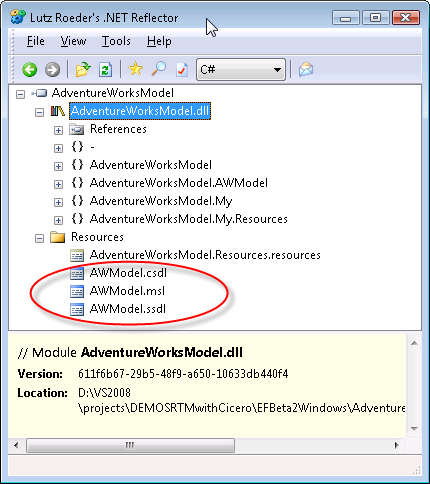
If you check the connection string in the app.config for the project you will see that there is a reference to the projects resources in the metadata properties, rather than to a file path.
<add name=“Entities”
connectionString=“metadata=res://*/AWModel.csdl|res://*/AWModel.ssdl|res://*/AWModel.msl;
provider=System.Data.SqlClient;provider connection string="
Data Source=127.0.0.1;Initial Catalog=AdventureWorksLT;Integrated Security=True;MultipleActiveResultSets=True"” providerName=“System.Data.EntityClient” />
Now you can reference the project or the dll directly, I have been successful with both methods.
The connection string in the model’s project needs to get copied into the config file of the app.
Then you should be good to go.
I did deploy the solution copying only the exe, the dll for the model and the app.config for the exe and it worked like a charm. No ssdl, csdl or msl files came along for the ride.
Thanks to Mike Kaufman and some others on the team for help as I tried to figure out how to get through this.
An arhitectural note… embedding the files will be useful in a number of scenarios. However there will also be many scenarios in which you do not want the schema files compiled into the dll so that you can replace them easily as needed without having to redeploy a dll. Granted with .NET, deploying a dll can be just as easy as deploying a new xml file, but I know there will be cases where I will prefer the loose coupling.
For those cases, I’ll want to work with the EntityDeploy msbuild task directly so that I can define the output location of the files that are built and easily maintain a common location as I did in this blog post which showed how to do it in Beta 2 (though that particular solution is no longer applicable). I’ll be fiddling with the msbuild task shortly.