Danny Simmons has posted the code for his EntityBag class (aka “Perseus”) on the MSDN Code Gallery Site here.
I grabbed it last night and set up a test project so that I could see what the payload looks like.
The results of that test are in this blog post, Testing out the EntityBag.
There were a few tricks for getting the web service to work properly if you are not familiar with using WCF, so I wanted to show that code.
I started by creating a DLL library just to host my EDM.
Then I created a WCF Service. The WCF service references the EDM project and the Perseus project.
I created my interface along with a HelloWorld op which is always handy for testing.
<OperationContract()> _
<ServiceKnownType(GetType(SalesOrderHeader))> _
<ServiceKnownType(GetType(SalesOrderDetail))> _
Function GetData(ByVal value As Integer) As Perseus.EntityBag(Of SalesOrderHeader)
<OperationContract()> _
Function HelloWorld() As String
There’s something critical in the above example. Without the ServiceKnownType declarations for the SalesOrderHeader and SalesOrderDetail, you will get an error when the service tries to serialize the return data. You can read more about this here. In C#, you use typeof() where I have GetType().
Then I created the methods that implement these interfaces in my Service class.
Public Function GetData(ByVal value As Integer) As Perseus.EntityBag(Of SalesOrderHeader) _
Implements IService1.GetData
Using aw As New awEntities
Dim order = (From ord In aw.SalesOrderHeaders.Include(“SalesOrderDetails”) _
Where ord.SalesOrderID = value _
Select ord).First
Return aw.CreateEntityBag(Of SalesOrderHeader)(order)
End Using
End Function
Public Function HelloWorld() As String Implements IService1.HelloWorld
Return “Hello World”
End Function
Next is the ConsoleApp that will call the service.
Nothing fancy here, I make a service reference to the service in the project and a references to the Perseus project and the project that hosts my EDM. In code, I instantiate the service, then call HelloWorld to make sure things are wired up properly and finally the GetData method passing in an OrderNumber. Not sure why I didn’t use orderid. Just too focused on other things at the time!
Dim ordEntityBag As Perseus.EntityBag(Of SalesOrderHeader)
Dim svc = New ServiceReference1.Service1Client
Dim s = svc.HelloWorld
Try
ordEntityBag = svc.GetData(71780)
Catch timeout As TimeoutException
svc.Abort()
Catch commException As System.ServiceModel.CommunicationException
svc.Abort()
End Try
This returns an unmodified object. Next I wanted to see what it looked like if it was modified so I just added some code into the GetData method in the service.
Public Function GetData(ByVal value As Integer) As Perseus.EntityBag(Of SalesOrderHeader) Implements IService1.GetData
Using aw As New awEntities
Dim order = (From ord In aw.SalesOrderHeaders.Include(“SalesOrderDetails”) _
Where ord.SalesOrderID = value _
Select ord).First
order.Comment = “12345”
Dim i As Int32
For Each sd As SalesOrderDetail In order.SalesOrderDetails
sd.OrderQty = 25
If i = 10 Or i = 12 Then
sd.OrderQty = 0
End If
i += 1
Next
Dim sod = From s In order.SalesOrderDetails Where s.OrderQty = 0 Select s
For i = sod.Count To 1 Step -1
aw.DeleteObject(sod(i – 1))
Next
Return aw.CreateEntityBag(Of SalesOrderHeader)(order)
End Using
End Function
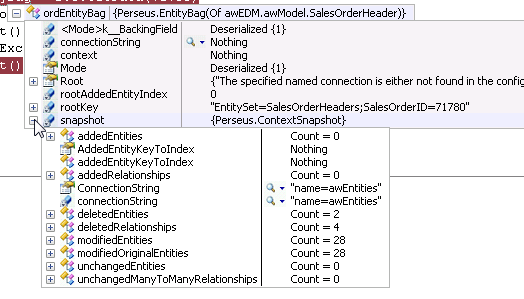
Here’s what the EntityBag for this looks like when it gets back to the client: