I thought I would give the Xceed WPF DataGrid (it’s free!) a whirl with Entity Framework databinding. So far I have only explored the basics – no anonymous types or sprocs and I am only working with a READ-ONLY scenario. (I did notice something in their docs about being able to modify and delete but not add when binding to LINQ to SQL queries.) I have, however, at least used a multi-level object graph.
Here’s what I’ve come up with.
Add the grid
- Drop an Xceed WPF DataGrid on a WPF Window
Preparing the data
- I created an EDM from AdventureWOrksLT. The namespace is awModel and the EntityContainer is awEntities. I also fixed up some naming, plurazing the EntitySets and the navigation properties that point to collections. (This is my standard routine when creating EDMs)
- In the Loaded event for the WIndow, add the following
Dim aw = New awModel.awEntitiesMe.DataGridControl1.ItemsSource = From ord In aw.SalesOrderHeaders.Include(“Customer”) _
Select ord
Setting up the grid for Databinding
If you’ve never used WPF, or done databinding in WPF, there are definitely a lot of new things to learn! The easiest thing to do for now is just copy and paste all of this XAML below.
Here’s what the entire XAML looks like.
<Window x:Class=”Window2″
xmlns=”http://schemas.microsoft.com/winfx/2006/xaml/presentation”
xmlns:x=”http://schemas.microsoft.com/winfx/2006/xaml”
Title=”Window2″ Height=”300″ Width=”300″ Name=”Window1″ xmlns:xcdg=”http://schemas.xceed.com/wpf/xaml/datagrid”
xmlns:local=”clr-namespace:WpfApplication1.awModel”>
<Grid>
<Grid.Resources>
<DataTemplate DataType=”{x:Type local:SalesOrderHeader}”>
<TextBlock Text=”{Binding TotalDue}”/>
</DataTemplate>
<DataTemplate DataType=”{x:Type local:Customer}”>
<TextBlock Text=”{Binding Customer.CompanyName}”/>
</DataTemplate>
</Grid.Resources>
<xcdg:DataGridControl Margin=”10,9,4,0″ Name=”DataGridControl1″ ItemsSource=”{Binding}” >
<xcdg:DataGridControl.Columns>
<xcdg:Column FieldName=”Customer.CompanyName” Title=”Company” />
<xcdg:Column FieldName=”TotalDue” Title=”Total Due”/>
</xcdg:DataGridControl.Columns>
</xcdg:DataGridControl>
</Grid>
</Window>
The xml namespace tag xdcg get’s added automatically when you drop the DataGrid on the window.
The xml namespace tag “local” is something I added. It’s necessary for subsequent references to classes from my EDM. Intellisense will help you pick the right namespace (your app and your model name) if you start with clr-namespace:.
In my query, I queried for SalesOrderHeaders plus their customer EntityRefs. In the DataTemplates, you can see that I’m referencing the actual object model types and then binding to the property from the SalesOrderHeader that is returned in my query. “TotalDue” gets me “SalesOrderHeader.TotalDue” and “Customer.CompanyName” gets me “SalesOrderHeader.Customer.CompanyName”. The DataTemplate provides binding to the data source (defined in the ItemsSource setting in the code above). Then the DataGrid column tie back to the bindings by way of the FieldName property.
Run the app
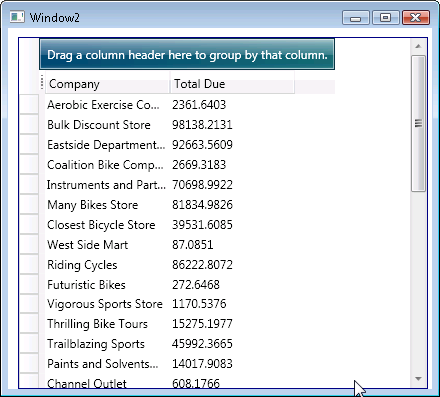
Note that I did not sort in my query. I wanted to demonstrate the grid’s built in sorting , but for some reason it’s not working in this scenario (stay tuned…I’ll get to the bottom of that).
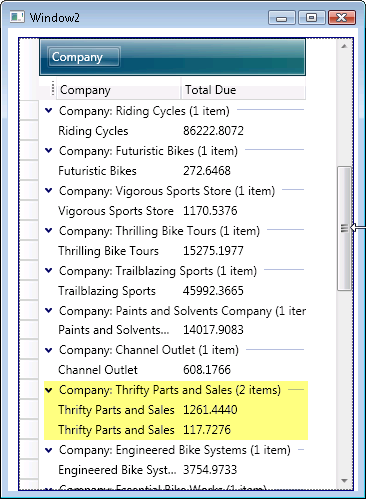
The automatic grouping does work, though. AdventureWorksLT is not great for seeing this. Only Thrifty Parts and Sales happens to have more than one order.