I was experimenting with creating data services from IQueryables. Rather than use the canonical example of creating a set of 3 person objects on the fly and exposing them, I decided to create a service for my application log. (Not something I plan to expose to the web, just a learning tool ;-)).
I created a wrapper class for the System.Diagnostics.EventLogEntry class because I needed to have an ID field that could be read. Thanks to Jonathan Carter’s blog post, I knew that there was no property of the real class that would work, so I needed to create my own class with a valid field for a discoverable identity property.
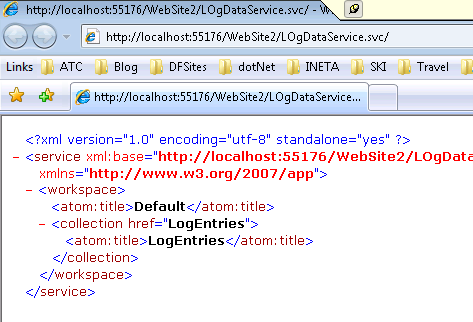
Having done this, I tested my service which worked just fine:
Since I knew there are a LOT of entries in my application log file (I don’t have a sysadmin to do that maintenance for me) I thought it would be smart to filter the entries by adding /LogEntries?$top=10 to the URI. I wasn’t sure how Vista would handle that and wasn’t shocked to see in the debugger that the filtering was going to be left up to the dataservice:
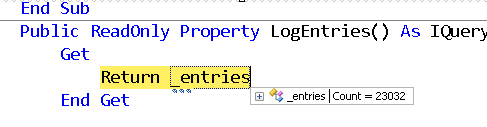
It’s definitely a huge advantage to be able to expose (or interact with) any IQueryable through Astoria, but don’t forget that it’s the database that has the query processor. In this case, I was returning 23,000 items to my service to be processed.
If I do the same filter to a service that exposed a database via an Entity Data Model, for example Northwind
http://localhost:55176/DataServices/NWDataService.svc/Categories?$top=10
the query is processed by the Entity Frawework and the filter is part of query sent to the database:
SELECT TOP (10)
[Extent1].[CategoryID] AS [CategoryID],
[Extent1].[CategoryName] AS [CategoryName],
[Extent1].[Description] AS [Description],
[Extent1].[Picture] AS [Picture]
FROM [dbo].[Categories] AS [Extent1]
ORDER BY [Extent1].[CategoryID] ASC
Only 10 items are returned for the service to process.
LINQ to SQL will do the same … i.e. create a filter query that gets sent to the database.
Yes exposing my entire un-maintained application event log is not a real-life scenario and in a real network, I might even use the nice filters that Vista provides for event logs.
But the point is just to pay attention to what you may be asking your service to do.