Monthly Archives: May 2008

TechEd Women in Technology Luncheon – Not For Women Only

Come to the Tech·Ed Women in Technology (WIT) luncheon and join in the discussion about challenges that women face today—including how to break through the corporate “glass ceiling”—as well as the tools, initiatives, and organizations that support women who work in the IT industry. Please bring your success stories to share with others.

Date: Wednesday, June 4
Time: 11:45am– 2:00pm

While the Women in IT luncheon is a great way for women who are in IT to get together, meet one another, share stories, opinions and lessons, in the past it has not been a way to exclude men from the lunch table. There’s nothing in the description that says “women only”.

Having led BOFs on the topic before and attended this luncheon many times, I know there are many men who have questions about women in IT – whether it’s how to encourage their own daughters, how to enable women in their companies or an interest in the age old question about why the percentage of women in IT is so low. If you are a man in IT and you are interested in attending the luncheon, c’mon along.

Eileen Brown, Manager for the IT Pro Evangelist team in Microsoft’s Developer and Platform Group, is hosting the panel again.

I’ll be on the panel this year along with Meryem Tom, a Director at Microsoft and Deborah Arhelger, COO of JNBridge.

See you there!

Full frontal entities? A little privacy please!

In Beta3 of Entity Framework there was a teaser in the properties window for Entities and their properties. We saw properties for Access, Getter and Setter but they were inactive.

With the latest bits (available in the VS2008 SP1 Beta) those properties have come to life. Here’s what you’ll find and where you’ll find them.

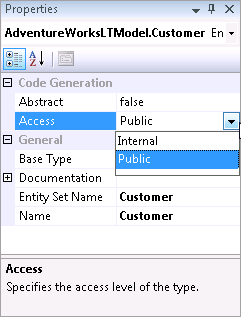
Entity has an Access property that can be set to Internal or Public.

entityaccess

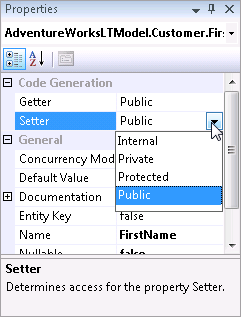
Each property (scalar as well as navigation) has a Getter and Setter that can be Public, Private, Protected or Internal.

propertyaccess

EntitySets have a Getter property that can be Public, Private, Protected or Internal. To get to this property, select the EntitySet in the Model Browser.

entitysetaccess

The settings are dependant on each other. For example if you change an Entity to Internal, but its EntitySet is public , you’ll get this error:

EntityType ‘Customer’ has ‘Internal’ accessibility and EntitySet ‘Customer’ has a get property with ‘Public’ accessibility. EntitySet’s get property must not have less restrictive access than containing EntityType’s access.   

You’ll see the impact of these settings as attributes in the model in the generated class. For example, setting the FirstName property’s Setter to Internal results in the a:SetterAccess attribute added to the Property definition in CSDL.

<Property Name="FirstName" Type="String" Nullable="false" MaxLength="50" a:SetterAccess="Internal" />

and in the Customer class, the FirstName’s Set becomes Friend Set, limiting access to it.

<Global.System.Data.Objects.DataClasses.EdmScalarPropertyAttribute(IsNullable:=false),  _
    Global.System.Runtime.Serialization.DataMemberAttribute()>  _
   Public Property FirstName() As String
       Get
           Return Me._FirstName
       End Get
       Friend Set
           Me.OnFirstNameChanging(value)
           Me.ReportPropertyChanging("FirstName")
           Me._FirstName = Global.System.Data.Objects.DataClasses.StructuralObject.SetValidValue(value, false)
           Me.ReportPropertyChanged("FirstName")
           Me.OnFirstNameChanged
       End Set
   End Property

TechEd speakers – toes yes, jeans no

In the past, there has always been this funny rule about representing Microsoft at TechEd that said “no open toe shoes”. Yesterday we finally got the email about our attire and there was nothing about open toe shoes. However, I was not happy to see “khaki or black pants/skirt” only. (And they were clear to note “where appropriate” next to “skirt” heh.) But the color restriction (which I should have expected) was a bummer because I have lost some weight and my khaki and black pants are awfully baggy and my Patagucci khaki’s from my pre-.NET days when I had loads of time to exercise are still a little snug and now a little out of fashion (“Expecting a FLOOD, Julie?”). I do have to go to “the big city” (that’s Burlington VT, pop. 40,000) on Friday, so perhaps I’ll go buy some new pants. But at least I get to wear my Tevas.

Onward and downward

In keeping with the theme of the last few posts (about eSqlBlast written by Zlatko Michailov), Zlatko has just broken his news (a big surprise to me and I am definitely bummed) that he has “decided to take on new challenges unrelated to EDM and Entity Framework. Starting [yesterday] [he]’ll be working on the lower levels of the SQL Server Connectivity stack.

He has promised me that there are others on the team who know EntitySQL as well as he does (it’s hard to imagine).

So he’s going further down into the plumbing and I’m sure this will still benefit all of us who use SQL SErver in our apps.

But still…. :-(.

eSqlBlast tip

I meant to mention this in my last blog post (An excerpt from my book about eSqlBlast) which is that with the new Entity Framework bits, the schema files that are generated when you build your EDM project are embedded into the assembly by default. Yet eSqlBlast depends on files that are accesible via the file directory.

What I’ve been doing is temporarily changing the MetaData Artifact Processing property of the model to Copy to Output Directory, building the project, then copying the newly created files (csdl, msl and ssdl) to a separate folder. Then I can point eSqlBlast to those files and set the model back to Embed in Output Assembly so that the other projects depending on the model can access the schema files.

An excerpt from my book about eSqlBlast

eSqlBlast – Entity SQL Query Helper
I could not have figured out some of these more complex Entity SQL queries without the help of a tool called eSqlBlast written by Zlatko Michailov (in his free time) who is the Program Manager for Entity SQL. The tool is available on Code Gallery along with a number of other tools for Entity Framework at http://code.msdn.com/adonetefx. With eSqlBlast, you can test queries and receive immediate feedback, whether it is an error message describing a problem with the query, or the results along with the generated SQL for the database. I have used the tool in its early stages and look forward to seeing it evolve.

Days and Days with QueryViews

I have been learning a lot about EDM QueryViews lately, though more of what I’m learning (the hard way) is what you can’t do with QueryViews.

Most of what you’ll find documented about QueryViews is to replace mappings so that your resulting entity is read only. But there are more uses for QueryViews. THe problem is that I"m having a very hard time discovering what those are and therefore it’s trial and error (and some help from Srikanth on the EF team who seemed to get stuck with Holiday Weekend forum duty).

It started with an old hope of mine to be able to embed a FullName property directly into the model. I thought I could do this with QueryViews by adding a new property to the Entity called FullName and then using EntitySQL string concatenation syntax to combine Trim(LastName) + ", " + FirstName or at the least Concat(LastName, ",", FirstName).

After working out the various validation errors and then weeding out what causes them (Trim, Contact and +) I have come to the conclusion that you just can’t use any functions at all. I could be wrong, but so far that’s where I’m at.

In fact it took me a while to realize that this error

The query view specified for ‘Contacts’ EntitySet’s type(s) ‘IsTypeOf(BAModel.Contact)’ contains an unsupported expression of kind ‘Function’.


might not be telling me that the Trim function wasn’t supported but that no Functions are supported. I still can’t tell, but expect to get some confirmation one way or another (and it *is* a holiday weekend in the U.S. so I’ll be patient).


I’m still waiting for confirmation of my conclusion, but after going around in circles for days, I wonder if I’ve finally hit the nail on the head.


I also sent an email to the doc team to please include more details about writing QueryViews.


QueryView does support a bunch (but not all ) of the Entity SQL operators. You can do things like write CASE statements, perform UNIONS, test for ISNULL. So you can write some logic into them.


It also supports operators that can’t be used in Conditional Mapping. WIth Conditional Mapping you can only test for = or IS NULL or IS NOT NULL. By using a QueryView you can add int greater than and less than, BUT  – on what?


I thought – ah okay, I’ll try a condition on a date field.

SELECT VALUE BAModel.Contact(c.ContactID,c.FirstName,c.LastName,c.Title,c.AddDate,c.ModifiedDate)
FROM dbo.Contact as c
WHERE c.AddDate>="1/1/2007"


I was trying to emulate T-SQL here but I need a date, not a string. I thought that without a function I was hosed again, until I discovered Entity SQL’s Literals and rewrote the query successfully this way.

SELECT VALUE BAModel.Contact(c.ContactID,c.FirstName,c.LastName,c.Title,c.AddDate,c.ModifiedDate)
FROM dbo.Contact as c
WHERE c.AddDate>= DATETIME’2007-01-1 00:00′

So this gives me two benefits over Conditional Mapping. Not just the greater than operator, but testing against literals. Conditional mappings with "=" can only be used with strings and integers as strings (which therefore also covers booleans). However I haven’t pushed the envelope on those, so maybe there’s a way after all to use a Date in a literal as well.


At the same time, I’m still working out when I would use a Defining Query over a QueryView. One obvious scenario would be when I can’t even express the query with a QueryView.


With a DefiningQuery, you can write native queries. Above, I’m close to doing that anyway, since this EntitySQL is written against the store layer not against the CSDL layer. So I can just back down one step further and write T-SQL queries inside the model which will return (read only, but updatable via function mappings) entities for me.


Not to say that QueryView is as limited as I’m discovering. We just need more code samples of when to use them besides the scenario of creating a read-only entity.
Summer’s here – must mean Snakes are back

Well, not snakeS (pl.), just snake. I’m convinced that every time I see a snake around here, it’s just the same one.

So THE snake reappeared a few days ago in an interesting place.

We have something called a Doggie Dooley buried in our yard.

I went to make a “deposit” in it a few days ago, opened the lid, and much to my surprise, there was a snake curled up on top of the contents. And this Dooley was nearly full.

Now I’ll leave it to you to find out what a Doggie Dooley would be filled with and then you might understand why I found this a little surprising. I guess I have a lot to learn about snakes.

I did amuse myself for the rest of the day with a little song I made up dedicated to this snake that any five year old would have been proud of. But I’ll keep that to myself.