Earlier this month, Rob Hale presented at the Vermont.NET User Group on what he learned at PDC. There was a lot of great information; but oddly, two tiny little Visual Studio features stood out for me.
One is not even new to VS2010.
Recent Project Tricks on Start Page
There are a zillion new productivity features in VS2010 but this one had escaped me (and surely a few thousand others as well).
In VS2008, I modified my startup settings so that I didn’t have to look at the start page. I will absolutely leave it in place in VS2010.
I really like the way the recent projects are displayed on the VS2010 Start Page, but did you know that you can control how those projects are displayed?
You can PIN projects that you want to stay on the start page and unpin them when they are no longer necessary.
Just by hovering your mouse over to the space to the left of the project, the pin will appear and you can click it to pin the project down.

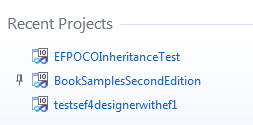
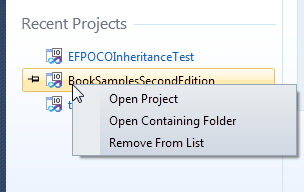
You can also remove projects from the list and open their containing folder right from the start page.
Block Selection in Code Editor
Another IDE trick Rob showed us is not even new to VS2010 – block selection – which can be used vertically.
If you hold down the alt key while dragging your mouse across and down, you can highlight text vertically.
Rob pointed out a useful example.
Say you have some repeated code, such as instantiating some objects with values, but you need to change something
Here, I have used ALT and dragged down in front of the F of FirstName. Notice the faint blue line. I could drag across and highlight text in a column if I wanted also.

Now I start typing to add in the ModifiedDate property.

Whatever I type is mirrored in all of the rows of my selected block. Really cool.
Recent Project Templates
Matt Kleinwaks brought this one up on a listserv today and I was again, surprised. This one is new to VS2010 but I had overlooked it.
Visual Studio remembers which project templates you have used recently and make it easy for you to select them.
I’ve never paid attention to the Recent Templates section much less ever clicked on it an opened it up. Matt wrote up a quick blog post about it this morning, so I’ll just point you over there if you need your eyes opened to this little feature: Avoid Template Overload in VS2010
So many tips & tricks
I have a few of the wonderful VS Tips & Tricks books written by various authors. Maybe I should place them on the kitchen counter and make a habit learn new tricks while I’m eating breakfast or lunch.


