All posts by Julie

CSS Friendly Control Adapter Toolkit Version 3 is released

From Russ Helfand, creator of the CSS Friendly Control Adapter Toolkit, announcing a new version! (Of course, this comes just weeks after my article about them in aspnetPRO is published :-), but I knew that was coming…)

I’m pleased to announce that we have upgraded the CSS Friendly ASP.NET 2.0 Control Adapter kit.  The new release is Beta 3. 

The whole kit now serves as a sample of designing markup and CSS that scales gracefully. This includes scaling of the menus, trees and forms.

All forms rendered by the adapters (think: membership controls) now implement a solution for the accesskey issue. It’s simple but incredibly effective… and totally addictive.

There are other things in beta 3 besides accessibility improvements. The TreeView adapter now restores the tree’s expansion state. That’s a huge usability improvement but more importantly it’s our first demonstration of an adapter that leverages the ASP.NET view state framework.

To get familiar with all the new features, please read the “what’s new” section of the kit’s home page at http://www.asp.net/cssadapters.  Also, try out the “quick cool demos” listed in that section.  They are:

  • Go to the Menu sample. Increase your browser’s font size. In Internet Explorer use View > Text Size > Larger.
  • Go to the CreateUserWizard sample. Navigate with accesskeys. If using Windows, press Alt + e to set the focus to the textbox for the Email address. (In Internet Explorer you must also hold down the Shift key to use the accesskey for the password textbox.)
  • Try out the redesigned TreeView sample. Expand several nodes in the tree. Select a node to cause the page to post back. Notice that the tree maintains its expansion, visibly marks the selected node and uses its value to change the page’s sample content.
  • Play with cascading checkboxes.
  • Validate that these pages conform to the XHTML 1.1 Strict standard.

    Best regards,


    Russ Helfand

  • WS-FTP Pro 2006 and IE7 : “NEVER!” ?

    I have WS-FTP Pro 7.0 on both multiple computers as well as the newly released IE7.

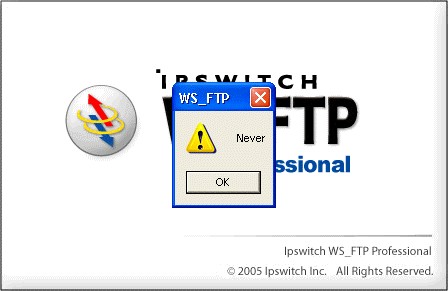
    One computer has no troubles. The other gives me this interesting error when I try to start it up:

    The only solution is to click ok and then kill the app from task manager.

    Luckily, I found this thread in the Ipswitch forums (which also decries a lack of support from WS-FTP) where a user (who is clearly a pit-bull and chose not to give up on finding a solution – thank you Suzy!!!) has managed to find how to fix the problem, which calls for “hiding” an outdated file.

    navigate to where your WSFTP is installed e.g.
    c:/program files/ipswitch/ws_ftp professional
    and rename PSAPI.dll to PSAPI.dll.old and then reboot

    It worked. Yay.

    .NET Jobs: ASP.NET Developers in Lebanon, New Hamphire

    Nexus Energy Software is growing again. Headquartered in Wellesley, MA, we are looking for professional Software Engineers for our Lebanon, NH office.

    We’re looking for mid-level and senior Engineers to join our talented development team who like to keep their software skills up-to-date and take pride in delivering high quality solutions to satisfied customers.

    We offer competitive salaries, medical, dental, 401K, and more in a dynamic yet relaxed work place. www.nexusenergy.com.

    Work as a member of our development team in designing, developing and unit testing company applications using solid software development processes and practices. Our applications provide billing, account management and energy analysis functionality for utility customers.

    5-10 years of SW development experience, VB.NET and/or C#, ASP.NET, JavaScript, XML, XSLTs, SQL, source control software and Visual Studio, maintaining code written by others, strong problem solving skills required. Experience with build and installation tools a plus.

    Please forward your resume with salary requirements to:

    Nexus Energy Software;

    laurie.nexusenergysoftware@comcast.net

    Fax: 508.879.3898

    Equal Opportunity Employer

    No phone calls or third parties, please.

    Code Camp 6 (Boston) Schedule is up – NOTE SATURDAY ONLY!

    The schedule for this weekend’s Code Camp in Waltham, Mass is live. This Code Camp will be packing all of the sessions into one day – Saturday, rather than spread out over two.

    If you haven’t registered to attend yet, you can register here.

    I’ll be doing three talks throughout the day:

    9am: Managing and Deploying ASP.NET 2.0 Website: This talk is aimed at sorting out all of the options for creating, compiling and deploying ASP.NET 2.0 websites along with tips for making the best choices.

    1:15 pm: Persisting Ink on the Web. If you are interested in creating ASP.NET Web apps with ink capabilities for Tablet PC users, this session offers a slew of information about what to do with the ink once it’s collected. Handling ink in a website is very different than working with it in a windows application. This session will deal with things like how to deal with postbacks, sending the ink to another web page, storing ink into a database and retriving it and getting ink to and from web services and more.

    4:45 pm: Handling Big Data in ADO.NET 2.0: Most demos and samples for ADO.NET deal with small amounts of data and simplistic functions. This session will take a look at how to design and code your data layer for dealing with real-world, high-end, data-intensive applications. We’ll look at some advanced patterns for handling more sophisticated scenarios such as updating huge amounts of data, leveraging middle-tier caching for heavy traffic Web sites, and an inmemory query processor that the ADO.NET team has built that we can use today. Much of what will be shown will leverage features of ADO.NET 2.0 as well as some of the performance improvements that have been made to the internals.