Aaron Skonnard is the author of the the great WSE2 Hands On Lab that I have been working with in my WSE education. (find it on this page) I just needed to thank him.
All posts by Julie
A few points on WSE Policy
WS-Policy is one of the very cool things that you get to leverage with WSE. I kind of love and hate the fact that there’s a lot of “magic” happening here. When you define policies, your application behaves based on those policies. So on the client end if you say “usernametoken needs to be encrypted”, it just happens, you don’t write code to do the encryption. On the receiving end, you can say “I won’t take anything where the usernametoken is not encrypted” and it does the checks for you – no coding involved.
So given that (very light explanation), there is a tool in WSE that helps you build these policies. The output of this tool is a policycache.config file. Since you can edit the config file manually (and do a lot more than the tool will let you do) remember that the tool cannot open a config file back up for editing.
Here’s what’s really important about this, and (I’ve noted this before) but that was before I had worked with this myself. At TechEd, in response to a question I asked, Don Box said that “non-plumbers” can do security with WSE without having to learn the deeper stuff, but you won’t be able to fix problems. This is very true. I am trying to learn WSE well enough so that I won’t be dangerous. You can get away with using the tools, but you should really know what’s going on in the background, even if you are just doing some simplistic stuff.
Another thing that I think is notable about about Policies is this list of Policy Limitations in the WSE documentation. This is not about the limitations of WS-Policy, but of WSE2’s implementation of it. Information like this is your best bet for not being a dangerous programmer. You don’t have to learn WSE inside and out to use it (thank you WSE2) but know where you might get in trouble, know enough to fix problems or do a little tweaking. I am doing a LOT of work to get myself to at least this point. Hopefully I’ll be able to make some of the info more digestable for non-plumbers (like myself) but my message will still be that you have to know what you are working with. Don’t think you can click a few buttons and get away with it.
Using Hands on Labs to get used to C#
When I was at TechEd, I did the TabletPC hands on lab. It was in C#. It was the first time I realized that those poor people have to declare every event when they are coding (we get them for free in VB). But it also got me practicing constructors in C# and the curly braces and all.
When I wrote my doodle app, I started with some C# code from a demo and wrote the whole thing in C#. It’s a pretty straightforward app. But again, just more time in the saddle getting used to some little differences like constructing if statements, try/catch blocks etc and the totally anal capatilization.
Now I’m back into the WSE2 Hands on Lab again. It’s all C#. The first part of it is gobs and gobs of coding.
I like the flexibility of being able to go back and forth.
And I was really happy that I didn’t have to learn a new way to create a new line since I’ve been using System.Environment.NewLine in VB since.net came out. reading this post of Sam Gentile’s on BCL Types. I wrote THIS one in response, which same saw and wrote “my work here is done.”
new computer and setting ntfs permissions
I was having some, umm, difficulty (heh) setting NTFS permissions on my new tablet for folders. I couldn’t for the life of me find the security tab. It has been a loooooong time since I had to do this on a new computer and I had forgotten why I was having this problem. I decided it had to be something new in XP SP2 and googled forever. Finally I found security whiz Anil John online on i.m. and asked him. It took him a moment because I distracted him by saying “I think it’s something new in SP2”. But then, he kindly pointed me to Explorer/Tools/Folder Options/View/Advanced Settings. That STUPID “simple file sharing” setting is on by default when you first install XP. (okay, it’s not stupid…) Now this is really embarrassing, but it’s one of those things that is easy to totally forget if you haven’t touched it in years. I was not googling the right words. So it is now just here as a reminder.
Using my digital signature with wse2
Aha! I had seen many samples of getting a digital certificate out of the client machines certificate store, but all of the examples were sending in some pre-defined private key.
Let me back up. When you get a digital certificate and install it on your machine, it has a private key associated with it. So when you are using WSE2’s FindCertificateByKeyIdentifier method, you pass in that key and it gives you back the certificate so you can sign whatever it is you want to sign.
In all of the examples I was looking at, the key was “predetermined“. For example in one article it passed in a variable and said “by the way, this private key is stored in the app.config”, or “previously stored private key” pr in the example of the hands on labs, you just manually pasted the key into your code after copying it from the WSE Certificate Tool (a UI that comes with WSE so you can easily work with your X509 certs). But I could never figure out how the key was being retrieved dynamically.
What was bugging me was this: if you have a client application and an end user installs it on their machine, what is the end-user experience when dealing with the key? How is that pre-determined key being discovered?
Now I see that basically you need to get the user to tell you which of their digital signatures they want to use when using this client to access your web service. D’uh, that’s not so bad. So either you have some setup routine where the user can choose the signature and then store the key in a settings file or just have them choose the key dynamically during the application execution. There are of course different scenarios where you would want one method over the other. There is a Quickstart sample (AsymmetricEncryptionCode) that demonstrates how to popup a dialog box and have the user choose from the correct signatures included with the WSE2 install.
There are other methods for getting a digital signature besides by the private key. Again, based on what you are trying to accomplish, you would choose what method to use. But this was the most common scenario in the samples I have looked at so far.
(I’m very open to corrections if I have stated anything incorrectly here. And James, just because I’m a little thick, doesn’t mean this stuff is *so* hard that we should all switch to smalltalk :-))
MSDN article on Inking Web Applications
Shawn van Ness has another article on Tablet PC development (will soon be on the MSDN Tablet PC Developer Center page) This one is on ink enabled web apps.
oh NOW they publish it. AFTER I had to figure it out all myself. 🙂 (Umm with some help from Shawn and Casey and Stefan on the side …)
The end of Shawn’s article poses this question:
Only one burning question remains: who will the first to Ink-enable their blog?
A Disgruntled Reader of my weblog
I used to enjoy your blog, but not anymore. You don’t provide any useful or knowledgable content anymore, and who wants to keep up with your 15 posts per day? If you quit posting useless information so much, maybe you’d have time to to accomplish something and actually scale it down to one useful blog per day.
You need a dog. Or maybe a cat.
Sorry for my ranting. I just hate it when good blogs go bad.
But I HAVE a dog & cat! 🙂
I SPY: Bill, Steve & Scott
as in Gates, Ballmer and McNealy
not me, but Jackie Goldstein
Is Code Obfuscation another nemesis of the open source community
Once again, I’m getting it from James (though he and I agree to respectfully disagree with each other) for *considering* the DotFuscator Community Edition that is bundled in with Visual Studio .NET.
Here are his posts:
http://www.artima.com/forums/flat.jsp?forum=155&thread=67231http://www.cincomsmalltalk.com/blog/blogView?showComments=true&entry=3270899203
James is a passionate guy. I’m just a curious girl.
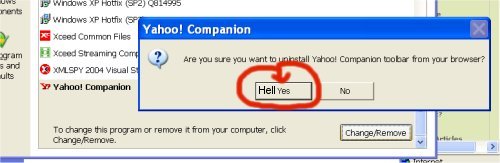
Yahoo Toolbar – Where the f did *that* come from
I explicitly chose to put the google toolbar in my i.e.. I *never* installed a Yahoo toolbar and I was never asked. It just appeared out of nowhere. That ticks me off – quite a lot. What’s going on here? Is Yahoo being run by the we-are-going-to-take-over-your-computer Real Networks, now? I wonder if it was because I went to a website that uses MacroMedia Shockwave and I said yes to installing that but changed my mind and aborted.

Well, here’s another pretty picture for you, Yahoo..