All posts by Julie

Fun with ComicLife for our “christmas” letter

I had been thinking that I don’t want to write up a whole story about our year to put into the christmas cards for those distant relatives that we hardly ever see, yet I wanted to at least have a little something to share with them.

Then today, I got the perfect solution in the form of a friend’s holiday letter – she created a comic strip from a handful of pictures using Comic Life from plasq. THere are versions for WIndows and Mac. We printed out a bunch and also exported it to a jpg. Mine’s a little lame, but you can get very creative. Definitely a fun tool!

Click on the mini version to see it full size.

Embedding EDM schema files in Entity Framework Beta 3

Note: With the RTM of Entity Framework, the model’s Metadata Artifact Processing property is set to Embed in Output Assembly by default, whcih is the opposite of what is described in this blog post based on Beta 3.

One of the new features in Entity Framework Beta3 is the ability to embed the csdl, msl and ssdl schema files into the assembly which contains the model.

This is useful in scenarios where, like in a few of my solutions, you want to have a separate project to host the model and then use that project in various applications. In that case you need to make a reference to the dll with the model and the application using the model will need to know where to find the schema files through the metadata property of the special connection string.

At design time, you work with the EDMX file in the designer and you can also manually edit it’s XML if and when necessary. When the project is compiled, the 3 key sections of the EDMX file are spit out to the separate schema files (*.csdl, *.mls, *.ssdl) which are used by the EF APIs.

With the schema files embedded into the dll, we don’t have to keep track of the files.

Here’s how to pull it off. Note that there is a workaround in these instructions for a known bug.

My project that hosts the model is called AdventureWorksModel. In it are the model as well as some additional code that extends the functionality of the code generated classes.

By default, the EDMX file’s Build Action property is set to “EntityDeploy”. This is important to note in case you change it for some reason. It does need to be “EntityDeploy”. (I learned that the hard way, which is why I make a point of mentioning it.

Open the EDMX file in the design window and then you will see a new property in the property window called Metadata Artifact Processing. The default of this is “Copy to Output”.

To get around a current known bug, build the project with the property set to “Copy to Output”. Then change the Metadata Artifact Processing property to “Embed in Output Assembly”. Eventually you won’t need to build with Copy to Output first.

Build the project. After building, if you use a tool like Reflector, you can see the files have been compiled into the dll as in the screenshot below.
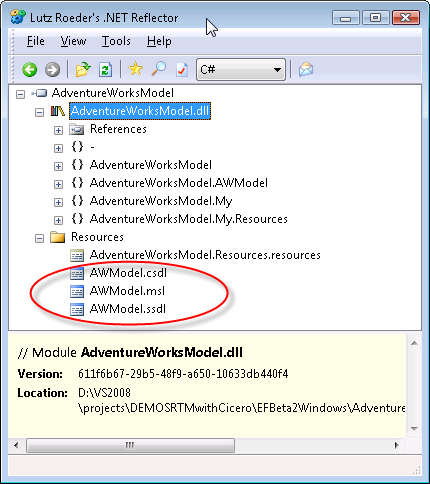
If you check the connection string in the app.config for the project you will see that there is a reference to the projects resources in the metadata properties, rather than to a file path.

<add name=“Entities”
connectionString=“metadata=res://*/AWModel.csdl|res://*/AWModel.ssdl|res://*/AWModel.msl;
provider=System.Data.SqlClient;provider connection string=&quot;
Data Source=127.0.0.1;Initial Catalog=AdventureWorksLT;Integrated Security=True;MultipleActiveResultSets=True&quot;”
providerName=“System.Data.EntityClient” />

Now you can reference the project or the dll directly, I have been successful with both methods.

The connection string in the model’s project needs to get copied into the config file of the app.

Then you should be good to go.

I did deploy the solution copying only the exe, the dll for the model and the app.config for the exe and it worked like a charm. No ssdl, csdl or msl files came along for the ride.

Thanks to Mike Kaufman and some others on the team for help as I tried to figure out how to get through this.

An arhitectural note… embedding the files will be useful in a number of scenarios. However there will also be many scenarios in which you do not want the schema files compiled into the dll so that you can replace them easily as needed without having to redeploy a dll. Granted with .NET, deploying a dll can be just as easy as deploying a new xml file, but I know there will be cases where I will prefer the loose coupling.

For those cases, I’ll want to work with the EntityDeploy msbuild task directly so that I can define the output location of the files that are built and easily maintain a common location as I did in this blog post which showed how to do it in Beta 2 (though that particular solution is no longer applicable). I’ll be fiddling with the msbuild task shortly.

ASP.NET Dynamic Data Support – use LINQ to SQL and (in the future) LINQ to Entities

Scott Guthrie has a post on Dynamic Data Support for ASP.NET that’s in the Extensions CTP. Based on my little rant from yesterday, I wanted to point out this:

One of the cool new features is something we call “ASP.NET Dynamic Data Support”.  In a nutshell this enables you to really quickly build data driven web-sites that work against a LINQ to SQL (and in the future LINQ to Entities) object model – and optionally allows you to-do this without having to build any pages manually.

Jonathan Carter … the new Technical Evangelist for Visual Studio and .NET Framework

When I was at ReMix Boston in early October, I remember that Stan Shultes told me that someone was doing user group presentation on Entity Framework in Florida but couldn’t think of the person’s name at the moment. Shortly afterwards, I had an email conversation with someone who had asked an interesting question on the ADO.NET forums and when he said he lived in Florida, I correctly put two and two together. It was Jonathan Carter who had been doing the presentations.

I met Jonathan a few weeks later at an SDR at Microsoft and, although I’m used to how young many programmers seem to me now (it’s all relative … only because I”m so friggin’ old now ;-)), I was surprised how young he was, but oh so smart. And of course, we had our passion for Entity Framework and Astoria in common!

This didn’t go unnoticed and now Jonathan is wearing a blue badge! He is now the technical evangelist for Visual Studio and .NET Framework – a pretty impressive position to start with.

You can read more about Jonathan’s new job here and then check out the rest of his blog because he’s been blogging up a storm.


EF ObjectStateManager.GetObjectStateEntries (plural)

I’ve been using the GetObjectStateEntry method for a while so that I can view and interact with the state of a particular entity that I have in hand.

Today I used the plural version of this method for the first time and boy do I like it!

GetObjectStateEntries takes as a parameter an EntityState enum: Added, Modified, Deleted, Unchanged or Detached.

It provides a perfect opportunity to do some work on entities prior to hitting the datastore during a save changes event.

For example, if you have an entity with a property to track the modification date you could update that property any time any other property in the entity is changed which might be wasteful. But with the GetObjectStateEntries method, I am able to just update the Modified Date property on all changed objects at once just before I save changes.

Here’s some code for dealing with the Customer entity that is derived directly from the customer table in the AdventureWorks database.

Now, this poses an architectural question and you may want to put this particular business logic elsewhere, but it’s merely a demonstration of what you can do with this method.

Because the generated classes are partial classes, I just create another partial class for my AdventureWorksLTEntities class and intercept the SaveChanges method. Then I grab all of the modified objects, use the Entity property to filter just Customers, then changed the Modified Date property. Next I grab the Added objects, change the Modified Date and also add in a default password hash and password salt. These are required for customer rows. (Read more about hashing passwords here on Beth Massi’s blog.)

Namespace AdventureWorksLTModel
 
  Partial Public Class AdventureWorksLTEntities

    Private Sub AdventureWorksLTEntities_SavingChanges(ByVal sender As Object, ByVal e As System.EventArgs) Handles Me.SavingChanges
      Dim changedEntities = Me.ObjectStateManager.GetObjectStateEntries(EntityState.Modified)
      For Each stateEntryEntity In changedEntities
        If TypeOf stateEntryEntity.Entity Is Customer Then
          Dim cust As Customer = stateEntryEntity.Entity
          cust.ModifiedDate = Now
        End If
      Next
      Dim addedEntities = Me.ObjectStateManager.GetObjectStateEntries(EntityState.Added)
      For Each stateEntryEntity In addedEntities
        If stateEntryEntity.Entity.GetType() Is Customer Then
          Dim cust As Customer = stateEntryEntity.Entity
          cust.ModifiedDate = Now
          ‘password hash cannot be null
          ‘for demo purposes just put a default string in there
          Dim strPassword As String = “p@ssw0rd”
          Dim encoder As New System.Text.UTF8Encoding()
          Dim SHA1Hasher As New Security.Cryptography.SHA1CryptoServiceProvider
          Dim hashedBytes As Byte() = SHA1Hasher.ComputeHash(encoder.GetBytes(strPassword))
          cust.PasswordHash = Convert.ToBase64String(hashedBytes)
          ‘customer table also needs salt for hash
          Dim buffer() As Byte = New Byte(5) {}
          Dim rng As New System.Security.Cryptography.RNGCryptoServiceProvider()
          rng.GetBytes(buffer)
          cust.PasswordSalt = Convert.ToBase64String(buffer)
        End If
      Next
    End Sub

  End Class
End Namespace

I have a feeling that this existed in Beta2, but I have updated both of my boxes and don’t feel like digging into a VPC just to verify.

ADO.NET DataServices and ANY IQueryable

One of the changes with the new CTP release of ADO.NET Data Services (formerly Astoria) is that you can create a service against any iQueryable, not just Entity Framework. This is huge.

Roger Jennings points to Guy Burstein’s how-to with Astoria (I guess it’s time to update my own now outdated posts) and makes the following comment:

“Like Andy Conrad, Guy uses LINQ to SQL instead of the Entity Framework as the data source. I have the feeling this substitution will become universal, at least until RDBMS vendors other than Microsoft deliver EntityClient data providers.”

So this bugs me a little. Why? Because the issue is that right now, Entity Framework only works with SQL Server. But hello, what do you people think LINQ to SQL works with? It’s called LINQ to SQL for a reason! 😉

Okay, rant over, back to work…