All posts by Julie

ReMIX Boston – October 8th & 9th

Another one of the “satellite” MIX07 events will take place in Boston in early October – REMIX07 Boston.

Brad Abrams will be doing the keynotes. I see Rocky Lhotka and Jeff Prosise doing talks too. The Eastern Region D.E.s who have organized this have also brought in some “local talent”. Luckily people like Fritz Onion (Maine) and Richard Hale Shaw (Boston) are part of our local talent! Additionally, they have allowed me a session on Astoria and I see fellow use group leaders Bill Wolff, Andy Beaulieu doing talks on WPF and Silverlight, respectively.

This is a two day event with 7 session slots and each session has 5 talks to choose from. Not quite as stressful as the number of talks to select from at MIX07 in Las Vegas, but enough to make you have to think pretty hard!

It’s only $299 for a registration fee. And it is also pretty easy to figure out how to attend for a lot less (or even free).

read more on Chris Bowen’s blog

LINQ to SQL Performance

Developers have been playing with LINQ to SQL long enough now that they are past the “how to” and thinking about performance. Jim Wooley blogs about LINQ to SQL Perf and using CompiledQuery.Compile to get the best performance. He also points to a series of posts on LINQ to SQL Performance by msdn blogger, Rico Mariani.

Of course, the next question for me is how LINQ to SQL will compare to LINQ to Entities and some of the other methods of extracting data via Entity Framework. While Entity Framework is still in earlier stages than LINQ to SQL and I’m guessing they are still working out perf, I did ask about this on the ADO.NET Orcas forums and was told that they’ll be working on writing something up about this.

Nullables in lambda expressions in LINQ to Entities – today’s gotcha

It took me a while to figure out what caused this problem, so I thought I’d share it here.

I was trying to write a query in VB to grab customers who have orders placed after July 1, 2007.

The query looks like this:

Dim q = From cust In nwentities.Customers _
  Where (cust.Orders.Any(Function(o) _
     o.OrderDate > New DateTime(2007, 7, 1)))

But it would not compile. I have Option Strict On and the error was

Option Strict On disallows implicit conversions from ‘Boolean?’ and ‘Boolean’.

What the heck was this “Boolean?”. Not google-able, that’s for sure!

Then I noticed that OrderDate was being defined as a “Date?”.

What I’m seeing is the shortcut for Nullables in VB. It’s really hard to google for that. But if you look it’s everywhere! Such as in this post by Bill McCarthy. (See Bill? I found it all by myself! :-))

OrderDate is nullable. “Date?” means nullable date.

And the VB’s compiler is casting the entire expression to a nullable Boolean then telling me “Yo! A Nullable boolean is NOT the same as a boolean! Sorry”.

Note that the designer showed Nullable as false but the actual database has Nullable=true.

So, while I can write a regular query with this model, such as:

  Dim ords = From ord In nwentities.Orders Where ord.OrderDate > New DateTime(2007, 7, 1)

and I can write my exact query in C# with no worries:

   var q=from cust in nw.Customers where cust.Orders.Any(o=>o.OrderDate>new DateTime(2007,7,1)) select cust;

I believe that in my scenario, I just need to rethink my query. But later…

Ripening the tomatoes

It has been an amazing summer for growing. there are still lots and lots of tomatoes in my garden. I’ve been picking the tomatoes before they are ripe and letting them finish in the sun. I decided that this will help the rest of the tomatoes that are still growing on the vines. I have a whole bunch in the dining room ready to be processed but waiting for this batch so I can do them all at once. There are a few different varieties.

Sharing Entity Framwork models between projects (or teams) when developing

The new Entity Framework tools create an EDMX file which contains all three models: Conceptual, Mapping and Storage, in one file. When your project is built, individual files are created for the models, in the [familiar to those who have been using Entity Framework already] CSDL (conceptual), MSL (mapping) and SSDL (storage) files.

The connection string used by the Entity Framework contains not only the database connection string, but a metadata parameter with pointers to the three mapping files separated by a pipe character.

The Default Locations

Assuming that you put your EDM in the main folder of your project, in Windows Forms, Console and Class Library projects, you will see by default:

connectionString=
metadata=.\Model.csdl|.\Model.ssdl|.\Model.msl;provider=System.Data.SqlClient;provider connection string=’Data Source=.\SQLEXPRESS;AttachDbFilename="C:\Program Files\Microsoft SQL Server\MSSQL.1\MSSQL\Data\AdventureWorksLT_Data.mdf";Integrated Security=True;Connect Timeout=30;User Instance=True'”

When the project is built, those 3 files will land in the debug or release folder of the BIN directory for the app.

In a web app, the default location is different:

connectionString=
“metadata=~/bin/Model1.csdl|~/bin/Model1.ssdl|~/bin/Model1.msl;provider=System.Data.SqlClient;provider connection string=’Data Source=.\SQLEXPRESS;AttachDbFilename="C:\Program Files\Microsoft SQL Server\MSSQL.1\MSSQL\Data\AdventureWorksLT_Data.mdf";Integrated Security=True;Connect Timeout=30;User Instance=True'”

This pushes the files into the bin folder of the site as well.

Sharing EDM with another project or another developer

If you have your EDM in it’s own project and then want to reference it from another project, you need to perform two steps.

1) Add a reference to the compiled DLL which represents the EDM.
2) Modify the config file of your consuming application to point to the location of the csdl, msl and ssdl files.

Here is an example of  a web.config’s connection string at design time that needs to use a model which is in a different project folder. I had to manually enter this long file path. Yucch.

connectionString=”metadata=C:\Documents and Settings\julie\My Documents\Visual Studio 2008\Projects\EFBeta2Windows\AdventureWorksModel\bin\Debug\Model.csdl|
 C:\Documents and Settings\julie\My Documents\Visual Studio 2008\Projects\EFBeta2Windows\AdventureWorksModel\bin\Debug\Model.ssdl|
 C:\Documents and Settings\julie\My Documents\Visual Studio 2008\Projects\EFBeta2Windows\AdventureWorksModel\bin\Debug\Model.msl;
provider=System.Data.SqlClient;
provider connection string=’Data Source=.\SQLEXPRESS;AttachDbFilename="C:\Program Files\Microsoft SQL Server\MSSQL.1\MSSQL\Data\AdventureWorksLT_Data.mdf";Integrated Security=True;Connect Timeout=30;User Instance=True'” providerName=”System.Data.EntityClient” />
   

There’s a better way

In the ADO.NET Orcas forums, Craig Lee pointed out that the build task for EDMDeploy which creates these files is placed in the project file and can be edited. I went looking.

You can get at it right in the UI for editing the project.

Go to the Compile tab, then to Build Events.
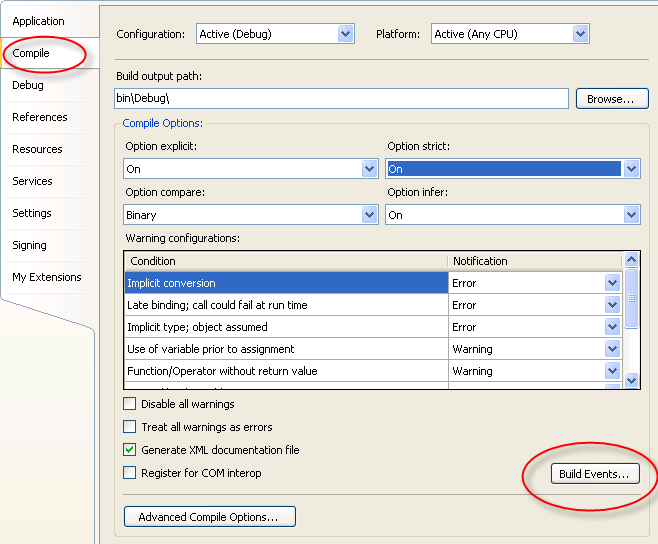
You can see the EdmxDeploy code in the Post-build event command line.
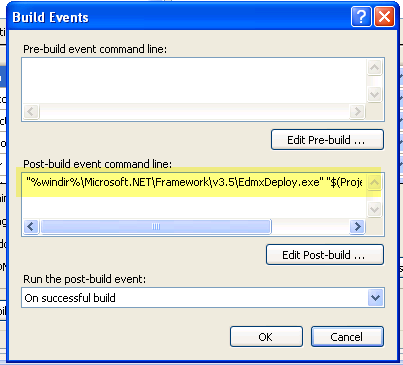
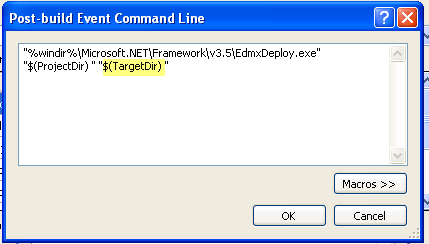
By editing, you can see the whole thing and the target directory parameter.
I changed the target to point to an existing (easy access for demos!) folder on my drive.
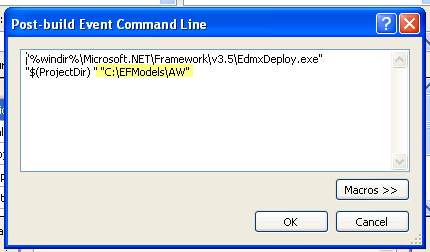
Then after I built the model project again, the csdl, msl and ssdl files were all in c:\efmodels\aw.

Now I can easily modify the metadata paths of any projects that consume my model to simple paths such as “C:\efmodels\aw\model.csdl”.

If I am in a team environment, then my files need to be available on a shared location or from source control.

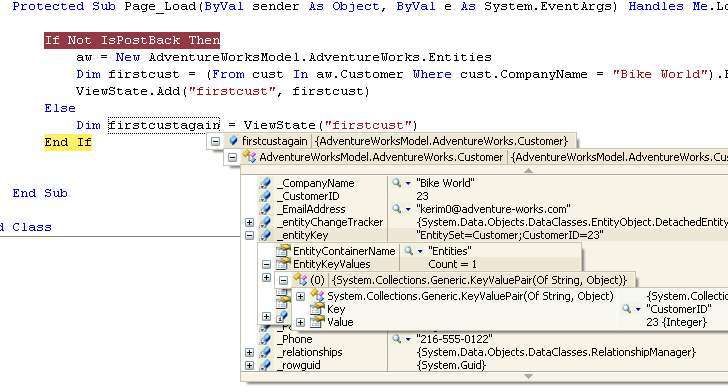
EntityKey and ASP.NET ViewState

Just to see another aspect the before and after difference of serializable EntityKeys in the Beta2 of EntityFramework, I simply stored a single Customer entity into viewstate, posted back and then looked at the entity in debug to see that yes, the EntityKey is there.

I went back to my Beta1 VPC and when I try to add a single customer entity object to viewstate, I get all kinds of serialization errors. No point in analyzing them since it works now.

I’ll probably explore some asp.net databinding scenarios next.

Jersusalem Trail hike and lots of pretty berries I don’t want to eat

On Saturday, Rich and I hiked up the Jersusalem trail which is only a short drive from our house. It is one of the many trails that take you up to the Long Trail. This one lands about half way between the App Gap and Mt. Abe.

Alongo the way there were lots of berries growing, none which looked the least bit appetizing. So I took their pics and came home to find out what they were. i’ve only got one id’d so far. And I’m STILL trying to figure out what the flowers were that I saw on an early summer hike that are here. I think I saw them on a wildflower poster somewhere and tried to memorize the name, but forgot by the time I got home. uggh.

The first turns out to be a White Baneberry, aka “Doll’s eyes”, which I identified thanks George Africa’s blog post. George is one of those fairytale gardeners. You’ll see what I mean if you poke around his blog.

Here is a really unpalatable blue berry which really is probably just a dried up seed pod from whatever flower was here. The leaves are reminiscent of a bleeding heart.

This last one looks like maybe it’s some type of viburnum and it’s something I’ve seen frequently. I’ve just looked at pictures of many varieties, but can’t find one quite like this. So maybe it’s something else. but the most important thing is not to eat the darned things.

Speaking of eatingi things in the woods, the chanterelles have finally arrived! They were much later this year than the past few years. I’ve only had one sumptuous batch so far – about 2 pounds that I picked and brought to a recent party and cooked up in pounds of butter. Over the past few years, my skill as a chanterelle cook have definitely improved. High heat, loads of butter and lots of salt & pepper. Very French, just don’t tell my doctor. 😉

Entity framework Tools: Package Load Failure when opening up EDMX in designer (FAQs are coming)

In the forums, Craig Lee responds to the  problem reported in this thread:

We are planning on releasing an FAQ of known issues, but here is a preview to see if this helps you.

Issue
Visual Studio displays a Package Load Failure error message for Package ‘Microsoft.Data.Entity.Design.Package.MicrosoftDataEntityDesignPackage’ when you double-click on a .edmx file

Workaround

This issue is caused by earlier installations of the MCrit June CTP.

1.    If it is installed, uninstall the ADO.NET Entity Framework Tools CTP from “Add/Remove Programs” in control panel

2.    Use gacutil.exe to verify that the following DLLs are not in the GAC. 

a.    Microsoft.Data.Entity.Design.dll

b.    Microsoft.Data.Entity.Design.EntityDesigner.dll

c.    Microsoft.Data.Entity.Design.Package.dll

d.    Microsoft.Data.Tools.XmlDesignerBase.dll

3.    Use Regedit.exe to check for and remove the CodeBase value from the registry at:

a.    HKEY_LOCAL_MACHINE\SOFTWARE\Microsoft\VisualStudio\9.0\Packages\{8889E051-B7F9-4781-BB33-2A36A9BDB3A5}

4.    Reinstall the the ADO.NET Entity Framework Tools CTP