Category Archives: Data Access

When Entity Framework 5 (EF5) is not Entity Framework 5 (EF5)

Installing EntityFramework 5 to my project.

image

EF5 has been successfully installed.

But I installed it to a project targeting .NET 4, not .NET 4.5. Check out the version of Entity Framework that got installed. It’s not 5.0.0.0. It’s 4.4.0.0.

SNAGHTML16ea8760

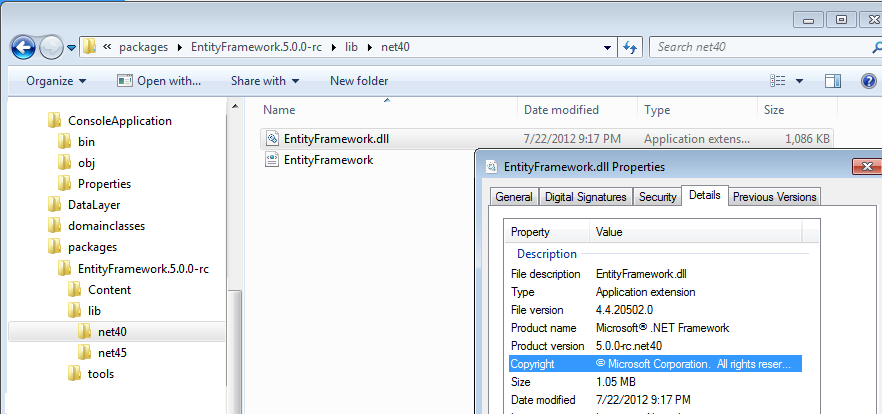
So what’s with that version number? Here is the folder created when I installed the EF5 package. (EntityFramework.5.0.0.-rc).

There are two folders in the lib folder – net40 and net45. Inside net40 there’s an EntityFramework.dll that has the product version name “5.0.0-4c.net40” and its File version is 4.4.20502.0.

SNAGHTML16f06907

In the net45 folder is the EntityFramework.dll file that is version 5.0.0.0.

The 4.4 version understands what’s in System.Data.Entity.dll in .NET 4.

The 5.0 version understands what’s in System.Data.Entity.dll in .NET 4.5. .NET 4.5 is where enum support lives, where System.ComponentModel.DataAnnotations.Schema lives, where System.Data.Spatial lives, etc.

We have two versions of EntityFramework coming via a single NuGet so that YOU don’t have to worry about downloading the correct version to align with the version of .NET that your project is targeting.

This makes a lot of sense, but there are a lot of people who ask me “I just downloaded EF5 but where are the enums”.

Hope this clears things up for some of you. Smile

Email Q&A: Entity Framework Modified State and SaveChanges

I get a lot of Entity Framework questions in email. Some from friends, some from people I don’t know. I like to help & answer when I can but this format means that nobody else gets to learn from the question. That’s one of the benefits of asking (or first researching) on the forums, stackoverflow.com and other community forums are so great…others can learn from your questions. Or you can learn from theirs!

Here is one of the 10 or so questions I got over the weekend. I was happy to answer because it was an easy one for me. (They aren’t all so easy for me… Winking smile)

The developers was hitting a very common point of confusion about setting Entry.State with graphs.

Question:

Hi julia!

what am I missing…

I have code first entities:

MaritalStatus

{

int id {get;set}

string Description {get;set}

}

Person

{

int Id {get;set;}

string FirstName {get;set;}

string LastName {get;set;}

MaritalStatus MaritalStatus {get;set}

}

I am binding control DataContext to a selected person

I have text boxes bound to the name parts, I have a combo box bound to a list of marital status.

the bindings all work – I change the combo, I can see in the debugger that is putting the selected marital status on my bound object

I execute this code to save the person:

using (var context = new PersonnelContext())

{

context.Entry(Person).State = System.Data.EntityState.Modified;

context.SaveChanges();

}

the name parts persist, but the marital status doesn’t.

Any ideas????


Answer:

Setting the State of an Entry to modified affects ONLY the object whose state you are setting. I t will have no affect whatsoever on other objects in the graph.

By passing Person into context.Entry, the full graph attached to Person will also get attached to the context. But initially, everything will be marked as Unchanged. Then the code changes the state of the Person object to Modified. The rest of the objects in that graph remain Unchanged.

SaveChanges will only send an UPDATE command to the database for the Person object.


Hope it helps.

P.S. This same information is in Chapter 4 of Programming Entity Framework: DbContext, starting on page 88.

Open Source Entity Framework

In case you missed it, yesterday (that’s July 19, 2012), the EF team announced that starting with EF6, Entity Framework will be open source. They’ve already got the development moved to CodePlex.

In this case, open source does not mean everyone and their sister will be committing *their* changes. The team will continue to control the code base and commits so in that regard, you should not think of this as anything new. It’s still a very important piece of Microsoft technology.

I’m really happy about this change for a number of reasons.

  1. #1 is about community involvement that’s become more and more important to how EF has evolved in it’s more recent iterations. While the team will continue to ultimately control the code base, the fact that they are doing this openly on CodePlex means that we developers can see what’s going on, provide feedback not just on ideas and features but on their code. This is a even more transparent than what they were doing on the EFDesign blog (which was retired recently, btw).

    More importantly, we can submit contributions as well.  

    Here’s how it’s explained on the CodePlex site:

    There are lots of ways to contribute to the project.

    You can contribute by reviewing and sending feedback on code checkins, suggesting and trying out new features as they are implemented, submit bugs and help us verify fixes as they are checked in, as well as submit code fixes or code contributions of your own. Note that all code submissions will be rigorously reviewed and tested by the Entity Framework team, and only those that meet an extremely high bar for both quality and design/roadmap appropriateness will be merged into the source.

    You may have a feature in mind that you want to add into EF or you can go work on one of the bugs listed in the Issues page. Or you can go look at ideas submitted on UserVoice. Or you may know a better way to implement something that they are working on. Or you might just want to know what’s going on so you can plan ahead for your own development schedule.

    One of the things I have seen people misunderstand and therefore they worry about, is that OSS equates to Microsoft throwing EF over the wall. That is just not true. The team remains committed to taking EF forward. This is just what’s happened with ASP.NET MVC + when those went open source in March.

    I think the EF team was very clear in their announcement post:

    Same Support, Same Developers, More Investment

    Very importantly – Microsoft will continue to ship official builds of Entity Framework as a fully supported Microsoft product both standalone as well as part of Visual Studio (the same as today). It will continue to be staffed by the same Microsoft developers that build it today, and will be supported through the same Microsoft support mechanisms. Our goal with today’s announcement is to increase the development feedback loop even more, allowing us to deliver an even better product. 

  2.  

  3. It provides the ability to fork EF for your own needs. We’ve been complaining for years that EF is not extensible enough. So, download it, extend it where you want and use it in your apps. Okay, that’s not going to be for everyone, but it will be incredible for many.
  4. The CORE part of EF that currently lives in .NET will no longer be tied to .NET releases. Since the release of EF 4.1 on NuGet, we’re starting to get into the rhythm of how the EF team is bringing us new features when they are ready– Code First, DbContext API, Code First migrations –without waiting for a .NET release. Up through EF5, this stuff sits on top of the CORE entity framework APIs (System.Data.Entity) that live in .NET. Big changes to how EF works need to be made in the core and so we had to wait for the next version of .NET (e.g. .NET 4.5) to get those bigger changes. For example, enum support required changes to the core. I’m guessing that the hold up for stored procedure support for code first is because maybe there’s something in the core that is a show stopper (honestly it’s a completely wild guess). Those core APIs are being lifted out of .NET and will become part of EF6 (and beyond) and part of the OSS package. So *all* of EF will now be more fluid.


On the codeplex site, you’ll find that the development has transitioned over from their internal development. For example, while the site became public on July 19th, here’s an item that was added and modified by team members (Diego and Rowan) in April:

image

And so…

While EF is now open source,

  • it still reigns as Microsoft’s primary .NET API for accessing relational databases.
  • it is still fully supported by Microsoft
  • the EF team is still in place with the same power-devs that brought us code first, dbcontext and more
  • it continues to move forward and the team has already begun work on
    • task-based async support
    • Stored Proc support for code first (yay)
    • finishing up the customizable code first conventions that didn’t make it into EF4.1 (double yay).
  • we won’t have to wait for the next version of .NET for modifications that need to be made in the core

Stuff to read about this move:

Team Blog Post Announcement: Entity Framework and Open Source

Scott Guthrie’s Announcement (same title, different blog post): Entity Framework and Open Source

Series of posts by Arthur Vickers who is one of the key folks on the EF team:

Of course, the Entity Framework CodePlex Site->http://entityframework.codeplex.com/

Rowan Miller’s blog

Diego Vega’s blog

Video: Entity Framework 5 Enums and Moving Solution from EF 4.3

I moved a small EF 4.3 solution to EF5 (and to .NET 4.5) so I can add the new enum support to it. Then I started the process all over again and captured it as a screencast.

Pluralsight is hosting it on their blog here: Video: Entity Framework 5 New Features Sneak Peek. It’s 14 minutes long. I learned a whole bunch of tricks along with way which I’ve shared here.

  • Moving a solution from EF4.3 +.NET 4 to EF5 +.NET 4.5
  • Using the new SQL Server Object Explorer in Visual Studio 11
  • Working with the new DbLocal database
  • Seeing the enum support in action : how it impacts the database, inserting and querying data with enums.

Update to EF5 and DbLocal Default in Config

A few weeks ago I wrote a blog post showing how EF5 uses DbLocal as its default database along with a screenshot of the configuration info that EF5 puts into your config (web.config or app.config) of the project that you’ve installed EF5 into.

Since then, EF5 Beta 2 was released and the details have changed ever so slightly.

Now, instead of having a SqlConnectionFactory and critical elements of a connection string, we have a new factory, the LocalDbConnectionFactory.

Here is what the element looks like with EF5 Beta 2:

  <entityFramework>
    <defaultConnectionFactory 
type="System.Data.Entity.Infrastructure.LocalDbConnectionFactory, EntityFramework"> <parameters> <parameter value="v11.0" /> </parameters> </defaultConnectionFactory> </entityFramework>

EF5: Where are my DataAnnotations?

EF 4.x:

EF 4.1+ has a DataAnnotations namespace for the new EF related annotations. Most of them are related to database schema.

image

EF 5

Not even a DataAnnotations namespace in here. That’s because the annotations got incorporated into .NET 4.5.

image


.NET 4.5

A new namespace within System.ComponentModel.DataAnnotations: “Schema”

All of the EF schema annotations are in here now. MaxLength and MinLength are in the DataAnnotations namespace.

image

Added the following thanks to a suggestion from Cecil Phillip

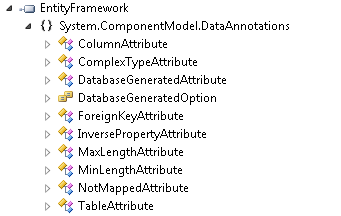
If you are using EF5 with .NET 4, there is a special version of the Entity Framework assembly which actually has the version 4.4.*.

The EF related DataAnnotations *are* in this assembly but notice they’ve been organized into regular and schema as they are in  .NET 4.5.

image

Moving Projects from EF 4.1,2,3–> EF5Beta: Don’t do what I did

What did I do? I wasted hours and hours so that I can share this lesson with you. The bottom line is that I’m kindofa dope sometimes.

I had an EF 4.3 project that I moved onto a new machine with VS11 Beta.

I wanted to see the new enum support in action.

So, I installed the new EF 5 by opening up the Package Manager Console and typing in

install-package entityframework –pre

(The pre ensures that you get the latest pre-release version rather than the latest RTM…very clever Smile )

I added in my enums and fixed up my classes and then since I was on a new machine, I ran enough code to initialize the database.

I had done this before on another machine and already seen this work, so I wasn’t quite as excited this time when I opened up the database to see what Code First had given me. But the properties that were based on my new enums were NOT THERE.

Fast forward to about 2 hours later, then sleep, then another hour this morning.

In all of that time one thing I had noticed but NOT realized was my biggest clue was that the version of EntityFramework.dll in my projects as 4.4. I thought that maybe the team had decided not to number it 5 until it was released. (No only someone as dumb as me would think of that excuse, I guess )

Finally this morning after my 2nd cup of coffee I figured it out.

Installing EF5 (beta) installs TWO packages. One that can be used with .NET 4 and one that can be used with .NET 4.5. Note that it is .NET 4.5 that brings the goods for the enum support.

So then the question was, “why did I get the .NET 4 version of EF5?” and I know the answer.

I installed the package BEFORE I updated my projects from targeting .NET 4 to targeting .NET 4.5.

So, to update an EF 4.x project to EF5 + .NET 4.5 goodies the steps are:

  1. Update the projects to target .NET 4.5 *first*
  2. Install the EF5 package into each of the relevant projects.

Hoping this saves someone the grief and waste of time that it cost me. You know…it’s just how I roll! Winking smile

EF Code First Migrations Update-Database Parameters Documentation?

In my recent Code First Migrations course on Pluralsight.com, I showed how you can get detailed information about the parameters of update-database. These can also be used if you want to execute the migrations from the command line using the counterpart migrate.exe command rather than from within Visual Studio.

You can get at the details from the Package Manager Console in Visual Studio with the get-help commandlet as shown below. Or if you are using the command line just type migrate –? as you can see in this blog post I wrote about executing migrations from the command line. I don’t know how to get the “full” information from the command line but it’s available in the Package Mgr Console and displayed below.

  • -detailed gives a description of each parameter.
  •  –full provides the description and then even more detail about how to use each parameter. I show that output below the output of the DETAILED display.

(Note, I just had to correct the misspelling of omitted when I pasted this in. Smile )

PM> get-help update-database -detailed

NAME
    Update-Database
   
SYNOPSIS
    Applies any pending migrations to the database.
   
   
SYNTAX
    Update-Database [-SourceMigration <String>] [-TargetMigration <String>] [-Script] [-Force] [-ProjectName <String>] [-StartUp
    ProjectName <String>] [-ConfigurationTypeName <String>] [-ConnectionStringName <String>] [<CommonParameters>]
   
    Update-Database [-SourceMigration <String>] [-TargetMigration <String>] [-Script] [-Force] [-ProjectName <String>] [-StartUp
    ProjectName <String>] [-ConfigurationTypeName <String>] -ConnectionString <String> -ConnectionProviderName <String> [<Common
    Parameters>]
   
   
DESCRIPTION
    Updates the database to the current model by applying pending migrations.
   

PARAMETERS
    -SourceMigration <String>
        Only valid with -Script. Specifies the name of a particular migration to use
        as the update’s starting point. If omitted, the last applied migration in
        the database will be used.
       
    -TargetMigration <String>
        Specifies the name of a particular migration to update the database to. If
        omitted, the current model will be used.
       
    -Script [<SwitchParameter>]
        Generate a SQL script rather than executing the pending changes directly.
       
    -Force [<SwitchParameter>]
        Specifies that data loss is acceptable during automatic migration of the
        database.
       
    -ProjectName <String>
        Specifies the project that contains the migration configuration type to be
        used. If omitted, the default project selected in package manager console
        is used.
       
    -StartUpProjectName <String>
        Specifies the configuration file to use for named connection strings. If
        omitted, the specified project’s configuration file is used.
       
    -ConfigurationTypeName <String>
        Specifies the migrations configuration to use. If omitted, migrations will
        attempt to locate a single migrations configuration type in the target
        project.
       
    -ConnectionStringName <String>
        Specifies the name of a connection string to use from the application’s
        configuration file.
       
    -ConnectionString <String>
        Specifies the the connection string to use. If omitted, the context’s
        default connection will be used.
       
    -ConnectionProviderName <String>
        Specifies the provider invariant name of the connection string.
       
    <CommonParameters>
        This cmdlet supports the common parameters: Verbose, Debug,
        ErrorAction, ErrorVariable, WarningAction, WarningVariable,
        OutBuffer and OutVariable. For more information, type,
        "get-help about_commonparameters".


PM> get-help update-database -full

NAME
    Update-Database
   
SYNOPSIS
    Applies any pending migrations to the database.
   
SYNTAX
    Update-Database [-SourceMigration <String>] [-TargetMigration <String>] [-Script] [-Force] [-ProjectName <String>] [-StartUp
    ProjectName <String>] [-ConfigurationTypeName <String>] [-ConnectionStringName <String>] [<CommonParameters>]
   
    Update-Database [-SourceMigration <String>] [-TargetMigration <String>] [-Script] [-Force] [-ProjectName <String>] [-StartUp
    ProjectName <String>] [-ConfigurationTypeName <String>] -ConnectionString <String> -ConnectionProviderName <String> [<Common
    Parameters>]
   
   
DESCRIPTION
    Updates the database to the current model by applying pending migrations.
   

PARAMETERS
    -SourceMigration <String>
        Only valid with -Script. Specifies the name of a particular migration to use
        as the update’s starting point. If omitted, the last applied migration in
        the database will be used.
       
        Required?                    false
        Position?                    named
        Default value               
        Accept pipeline input?       false
        Accept wildcard characters? 
       
    -TargetMigration <String>
        Specifies the name of a particular migration to update the database to. If
        omitted, the current model will be used.
       
        Required?                    false
        Position?                    named
        Default value               
        Accept pipeline input?       false
        Accept wildcard characters? 
       
    -Script [<SwitchParameter>]
        Generate a SQL script rather than executing the pending changes directly.
       
        Required?                    false
        Position?                    named
        Default value               
        Accept pipeline input?       false
        Accept wildcard characters? 
       
    -Force [<SwitchParameter>]
        Specifies that data loss is acceptable during automatic migration of the
        database.
       
        Required?                    false
        Position?                    named
        Default value               
        Accept pipeline input?       false
        Accept wildcard characters? 
       
    -ProjectName <String>
        Specifies the project that contains the migration configuration type to be
        used. If omitted, the default project selected in package manager console
        is used.
       
        Required?                    false
        Position?                    named
        Default value               
        Accept pipeline input?       false
        Accept wildcard characters? 
       
    -StartUpProjectName <String>
        Specifies the configuration file to use for named connection strings. If
        omitted, the specified project’s configuration file is used.
       
        Required?                    false
        Position?                    named
        Default value               
        Accept pipeline input?       false
        Accept wildcard characters? 
       
    -ConfigurationTypeName <String>
        Specifies the migrations configuration to use. If omitted, migrations will
        attempt to locate a single migrations configuration type in the target
        project.
       
        Required?                    false
        Position?                    named
        Default value               
        Accept pipeline input?       false
        Accept wildcard characters? 
       
    -ConnectionStringName <String>
        Specifies the name of a connection string to use from the application’s
        configuration file.
       
        Required?                    false
        Position?                    named
        Default value               
        Accept pipeline input?       false
        Accept wildcard characters? 
       
    -ConnectionString <String>
        Specifies the the connection string to use. If omitted, the context’s
        default connection will be used.
       
        Required?                    true
        Position?                    named
        Default value               
        Accept pipeline input?       false
        Accept wildcard characters? 
       
    -ConnectionProviderName <String>
        Specifies the provider invariant name of the connection string.
       
        Required?                    true
        Position?                    named
        Default value               
        Accept pipeline input?       false
        Accept wildcard characters? 
       
    <CommonParameters>
        This cmdlet supports the common parameters: Verbose, Debug,
        ErrorAction, ErrorVariable, WarningAction, WarningVariable,
        OutBuffer and OutVariable. For more information, type,
        "get-help about_commonparameters".

VS11 and EF5: Where’s that database that Code First created?

Visual Studio 11 brings a new development database — SQL Server Local Database. Bye bye SQL Server Express dependency.

I typically let Code First run with it’s default database of choice – up to now that’s been SQL Server Express — when I’m creating simple samples where  I don’t care too much about keeping the sample database around.

But I’m so used to opening up SSMS to look at detailed information about the database, especially when Code First is involved in creating it’s schema. I like to see what’s happening.

In Visual Studio 2010’s server explorer, I can’t typically glean the details I’m after. (Maybe I need more instruction here? Smile) For example, I have to open a column’s properties window to see details.

vs2010server

In SSMS, I prefer the view:

ssms


With EF5 however, the default database for code first is the new SQL Server 2012 LocalDb.

When you add EntityFramework 5 to your project it adds some configuration elements to the application’s config file and in there is where EF is setting the default ConnectionFactory for Code First to use LocalDb.

defaultconn

NOTE: April 3, 2012: This connection factory info has changed a bit with EF 5 Beta 2. See this updated blog post: Update to EF5 and DbLocal Default in Config

I’m sure lots of people won’t think to look in there and will just be happy that the database is magically there. (Not me. I can’t bear not knowing how things work. Winking smile)

So if you want to look at your data, forget the Server Explorer. Check out the new SQL Server Object Explorer in Visual Studio. It will look very familiar … if you use SSMS, that is. They’ve pulled the explorer from SSMS into Visual Studio and improved upon it. Very nice!!

Also, take note that last time I checked, you could not open up localdb databases in SSMS. That may not longer be the case. But I don’t feel like installing full blown SQL Server on my virtual machine to verify since I now have what I need inside of Visual Studio.

To see your database in the new Object Explorer:

1. Click the New Database icon/glyph/blob (circled)

ssoe1

2. In Connect to Server window, TYPE IN “(localdb)/v11.0”. Don’t click the dropdown unless you want to wait for the wizard to explore the outer reaches of the universe for every possibly accessible SQL Server instance.

ssoe2

3. Then after connecting, you can expand the new connection to explore your database, in detail, inside of Visual Studio. (yay)

ssoe3

There are some nice improvements over the SSMS 2008 UI I’m used to. For example, if you right click a table you can choose View Data and there is an option box in the viewer to choose how many rows you want to look at. That’s just one little example. Another example is if you do something like delete a table, you will get the options of creating a script or just executing the change on the database. I’m sure you’ll find lots of information on these types of changes.

Now when you are working with Code First and using default behavior, you know where to find the database it’s created for you and how to inspect that database.

Updating to Entity Framework v.Latest the Easy Way

Entity Framework is evolving rapidly which is why they are releasing via NuGet rather than being strapped to the .NET release cycle. (You can read more about the how’s and why’s of EF’s release cycle here: http://blogs.msdn.com/b/diego/archive/2012/01/15/why-entity-framework-vnext-will-be-ef5-and-nothing-else.aspx ).

The following is about keeping current with Entity Framework Code First and DbContext, not about upgrading the core API that is in .NET.
EF 4.1 – 4.3.1 work with .NET 4.0.
EF 5 (currently in beta) will work with .NET 4.5 (also currently in beta).

It’s recommended that you keep your apps that use EF (Code First/DbContext) up to date. The updates add functionality and fix some bugs, so this is a fairly safe prospect (granted there were a few problems for some very particular scenarios in the past but those have been corrected).

Thanks to the NuGet integration in Visual Studio it’s really easy to update EF assemblies across a solution without having to update each project that might need it. (You’ll need NuGet installed in VS which you can do via the Extension Manager.)

Right click the solution in Solution Explorer and click Manage NuGet Packages for Solution.

nugetefupdate1

Select Updates (circled in the image). The dialog will show you any packages for which updates are available. My solution has 5 projects and I am using EF 4.1 in four of them. So the tool sees that I’ve got those installed and that there’s a newer version available, so it presents that to me. Click Update.

nugefupdate2


Now I am presented with all of the projects that are using an out-of-date version of Entity Framework. By default, they are all checked to have the most current version installed. Click OK.

nugetefupdate3


As NuGet updates the packages in your projects, it will show the progress for each package. Here I can see that my console app project has just been updated from 4.1 to 4.3.1.

nugetefupdate4