Category Archives: Data Access

Creating Models from Databases with Billions of Tables

By now you know I’m prone to exaggeration so that “billions” thing is a stretch, but you get the point hopefully.

Lots of legacy databases have hundreds or even more tables in them.

People building Entity Data Models by reverse engineering a database often bring every table and view from the database into a single model.

Here’s an untouched model built from all of the tables and view of the AdventureWorks database – totalling about 95 entities.

awmodelbig

This is already unmanageable and causes design time performance issues, and it’s not even 100 entities.

I get questions all of the time from developers asking what to do  with large models.

Here is a recent question I got via email":

“I have a database with 150+ tables. Would you break the model up into multiple edmx files?”

My response (with some enhancements for the sake of this blog post):

Yes I would. I have lots of clients working with multiple models. One approach is to think of a model per transaction. E.g., if you have a data entry screen that only needs 6 entities, build a model for that. (That may be exaggerated).

Take a look at:

http://www.ideablade.com/WardsCorner/WardsCorner_home.aspx  scroll down to his large model discussion & demo. Ward and I have come up with the same conclusion. Ward has written something like a dissertation as he goes through the pros & cons of various approaches to the problem.

Also, another approach to consider (with or without breaking up the model) is a different designer that doesn’t try to visualize all of the entities (which makes things so cumbersome with the EDMX designer). LLBLGen Pro is already a great ORM in its own right. But they’ve taken their knowledge and built a deisgner specifically for EF4 with the goal of dealing with larger models.

http://weblogs.asp.net/fbouma/archive/2010/04/28/llblgen-pro-v3-0-with-entity-framework-v4-0-12m-video.aspx

Finally, just as an FYI, I’m guest editing an upcoming issue of DevPro Connections magazine and specifically asked Patrik Lowendahl to write an article on this very topic.
Windows Azure SDK Update 1.2: .NET 4 Support & more

In case you missed it (and are interested) there is an update (came in June) for Windows Azure dev tools. It’s version 1.2 and is supported in VS2008 & VS2010.

(http://www.microsoft.com/downloads/details.aspx?FamilyID=2274a0a8-5d37-4eac-b50a-e197dc340f6f&displaylang=en)

Most important to me is the .NET 4.0 support: now I can use EF4 in Azure services.

Windows Azure Tools for Microsoft Visual Studio 1.2 (June 2010)

Windows Azure Tools for Microsoft Visual Studio extend Visual Studio 2010 and Visual Studio 2008 to enable the creation, configuration, building, debugging, running, packaging and deployment of scalable web applications and services on Windows Azure.
New for version 1.2:

  • Visual Studio 2010 RTM Support: Full support for Visual Studio 2010 RTM.
  • .NET 4 support: Choose to build services targeting either the .NET 3.5 or .NET 4 framework.
  • Cloud storage explorer: Displays a read-only view of Windows Azure tables and blob containers through Server Explorer.
  • Integrated deployment: Deploy services directly from Visual Studio by selecting ‘Publish’ from Solution Explorer.
  • Service monitoring: Keep track of the state of your services through the ‘compute’ node in Server Explorer.
  • IntelliTrace support for services running in the cloud: Adds support for debugging services in the cloud by using the Visual Studio 2010 IntelliTrace feature. This is enabled by using the deployment feature, and logs are retrieved through Server Explorer.

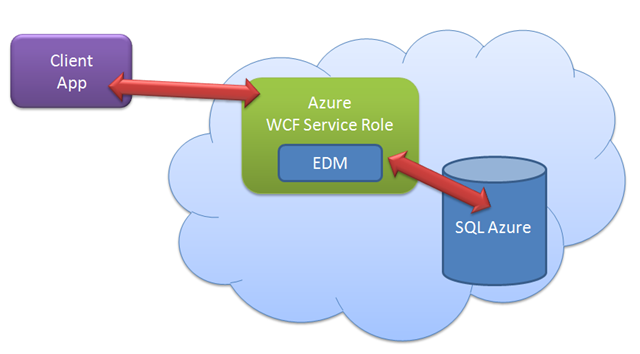
As a test, I just built a new WCF Service Role (verifying that it is, indeed, a .NET 4 project), added a EDM to it (it’s not architecture, it’s a proof of concept) and pointed my EDM to one of my SQL Azure databases. I created a simple service operation to return data via the EDM. Then I created a client app which retrieved the data through that service operation. Easy-peasie.

azuretest

My Inbox: How to save changes coming from disconnected POCOs

I receive a lot of random emails from developers with Entity Framework questions. (This is not a request for more! :)) If I’m too busy to even look or if it’s something I can’t answer off the top of my head, I swallow my pride and ask the person to try the MSDN forums. If the email is from a complete stranger and has gobs and gobs of code that email will surely get a "please try MSDN forums" reply. 

But sometimes I’m not in my usual state of “too much to do” panic and get a question that is short & sweet and I can answer it effortlessly. This is one of those types of questions.

Question from Arda Çetinkaya

Hi;

I am contacting with you with a suggestion of my friend who is one of the best MVPs of Turkey…So I have a small question if you can answer it I will be very happy…

What I am trying to do is updating a poco entity with entity framework…My poco entity is not in context,so I am attaching it first…But no change is done…How can I update my poco entities…If you have any resource for it,I really need it…

Reply

You would have the same problem with EntityObjects as with POCOs. If you are using EF4, then you have a lot of options that you did n ot have in EF1.

Assuming it’s EF4, the simplest is to use the new ObjectContext.ObjectStateManager.ChangeState (might be ChangeObjectState) method. But that means you need to know what the state should be …added, updated or deleted.

That’s just one way and might be just what you need or might not fit your scenario.

If you search for changestate/changeobjectstate and Entity Framework on the web you should find lots of blog posts and articles on this.

Good Luck

julie

Follow-up from Arda 20 minutes later

Thanks a lot for your reply…It helped me to clear it out…

With the following code change, I got it…Thanks a lot…You saved my life (:

 public static void UpdateConfigurationSetting(ConfigurationSetting configurationSettingToUpdate)
{
  try
  {
    using (DBEntities entities = new DBEntities ())
    {
      entities.ConfigurationSetting.Attach(configurationSettingToUpdate);
      ObjectStateEntry entry = entities.ObjectStateManager
.GetObjectStateEntry(configurationSettingToUpdate); entry.ObjectStateManager
.ChangeObjectState(configurationSettingToUpdate, System.Data.EntityState.Modified); entities.SaveChanges(); } } }

Mapping Help in the EDM Designer

The mapping details window that displays the mappings between an entity and database table(s) is pretty straightforward.

When you join two related tables in a Table Per Hierarchy inheritance things can get a little confusing when it comes to the mappings for inherited properties.

But did you know that the Mapping Details window uses the Properties window to help?

Here are two entities in a TPH hierarchy.

mappingA

Customer inherits Contact. Customer maps to a Customers table which uses “ContactID” as its primary key. It entity no longer has its own ContactID property though because it inherits ContactID from the Contact entity.

Here is the Mapping Details window for the Customer entity.

 mappingB

The column on the left displays the database columns while those on the right show which entity property the column is mapped to.

Before I created the hierarchy, Customers.ContactID mapped to a ContactID property in the Customer entity. But that’s gone now. Might be a bit confusing because it says ContactID there still.

If you have the properties window open though it will show you the properties of whatever column or property you have selected.

Click the ContactID in the Value/Property table and you can see that it’s mapping to the Contact.ContactID property, as it should since Customer.ContactID no longer exists.

 mappingD

You can also see properties of selected database columns which are read In the store schema. Here, I have selected the ContactID column on the left. The property window shows that it is from the ContactID column defined in the BreakAwayModel.Store.Customers which is the schema representation of what’s in the database.

mappingC

And now for the footnote. I just discovered this today in VS2010 but before I blogged about this great new feature (really it can be helpful if you need it) I opened up VS2008 and discovered its been there all along. 🙂 I just happened to have the Properties window open today when clicking around in the mapping and noticed something changing.

Hard Core EF4 Full-Day Workshop, June 24th, Stockholm

 The date (Thursday, June 24th), the city (Stockholm) and the abstract are firm.

REGISTER HERE: http://www.dotnet4ever.se/ or directly at http://www.informator.se/utbildningar/seminarier/seminarier/hard-core-entity-framework-40.aspx

Now I have to wait for the person organizing this workshop on my behalf to provide registration details. This will be a public workshop.

I will update this blog post, write a new one and also tweet (twitter.com/julielerman) the details as soon as I have them. (They’re here now)

Hard Core EF4

Full Day of Advanced Entity Framework 4 Workshop with Julie Lerman

You’ve been working with Entity Framework 3.5 or maybe even Entity Framework 4, but are ready to take your EF4 code further. You’ve got nagging questions and wish you could just spend a day with an Entity Framework guru!

Now’s your chance! On June 24th Julie Lerman will be conducting a full day Advanced Entity Framework 4 workshop in Stockholm.

The day will focus on the benefits of EF4’s new POCO support.

You’ll learn the different ways that you can enable POCO support in Entity Framework

You’ll then see how to take advantage of the POCO support.

  • Customizing the code generation templates.
  • Using POCOS in WCF services without pulling your hair out to deal with change tracking
  • Building smarter architectures with repositories, Unit of Work
  • Unit testing with fake contexts and fake data without hitting the database.

½ day of demos + ½ day of Q&A with the pro= 
1 day of Hard Core Entity Framework 4.

REGISTER at http://www.dotnet4ever.se

or directly on informator’s website at:
http://www.informator.se/utbildningar/seminarier/seminarier/hard-core-entity-framework-40.aspx

Querying Literals in Entity SQL

Entity SQL might surprise you if you are building query expressions with some non-string types.

I’ve blogged about this before with the DateTime literal after trying to use a string to represent the date in my query as I’m used to with TSQL. Here is a snip from that post:

SELECT VALUE BAModel.Contact(c.ContactID,c.FirstName,c.LastName,c.Title,c.AddDate,c.ModifiedDate)
FROM dbo.Contact as c
WHERE c.AddDate>="1/1/2007"

I was trying to emulate T-SQL here but I need a date, not a string. I thought that without a function I was hosed again, until I discovered Entity SQL’s Literals and rewrote the query successfully this way.

SELECT VALUE BAModel.Contact(c.ContactID,c.FirstName,c.LastName,c.Title,c.AddDate,c.ModifiedDate)
FROM dbo.Contact as c
WHERE c.AddDate>= DATETIME’2007-01-1 00:00′

I’ve had  number of emails recently with people using Entity SQL and having problems similar to this, most commonly with decimals & doubles (e.g., 123.24). First I will point you to the MSDN documentation page on Literals for Entity SQL.

The clues to expressing the queries are in this doc, however they are REALLY easy to miss.

Let me highlight a few of these with some emphasis on the specific clues:

Integer

Integer literals can be of type Int32 or Int64. An Int32 literal is a series of numeric characters. An Int64 literal is series of numeric characters followed by an uppercase L.

Decimal

A fixed-point number (decimal) is a series of numeric characters, a dot (.) and another series of numeric characters followed by an uppercase "M".

Float, Double

A double-precision floating point number is a series of numeric characters, a dot (.) and another series of numeric characters possibly followed by an exponent. A single-precisions floating point number (or float) is a double-precision floating point number syntax followed by the lowercase f.

Notice those “followed by” notes now? 🙂

So, this ESQL expression will fail:

select p.amount from BAEntities.Payments as p where p.amount=125.25

The exception message is “The argument types ‘Edm.Decimal’ and ‘Edm.Double’ are incompatible for this operation. Near WHERE predicate, line 1, column 61.

The correct way to express this query is to be sure the decimal is followed by an uppercase "M".

select p.amount from BAEntities.Payments as p where p.amount=125.25M

That query works like a charm.

Funky Behavior NoTracking Query Entities

I’ve been using a lot of NoTracking queries to grab lists of data that I don’t need change tracked. It enhances performance and cuts down on resources. There are some nuances about these entities, however.

One of the interesting behaviors of EF4’s Lazy Loading is that even if you have entities that you have queried with NoTracking on, they will still lazy load related entities.

Unless you’ve read this somewhere (it’s on the ADO.NET team’s blog post which introduces lazy loading) or experienced it yourself (that’s me, since I had forgotten about that point in the blog post) you may not expect, or plan ahead, for this behavior.

You’d think that because the entity is not attached  to the context, it would not be able to pull this off. But it does. The related entity or collection will get automatically retrieved and the results are also detached and deep inside of the EntityObject sealed properties, there’s a flag that indicates they are NoTracking entities.

Another surprise is in store when you use NoTracking entities…again it’s only a surprise if you don’t happen to be aware of this behavior and it’s not what you might expect.

Normally when you join a detached entity to an attached entity, EF’s relationship span will kick in and automatically pull that detached entity into the context to be managed. However, this won’t happen with NoTracking entities and you’ll receive a very explicit exception message that explains this. You need to attach the “NoTracking” entity to the context first and then you can attach it to the other entity.

Ken Cox explores EF4’s Pluralization Service with a WCF Service

When I have done “what’s new in EF4” talks at user groups and conferences, I like to show off the new pluralization support in the EDM Wizard. I also like to have a little fun showing some cases where it doesn’t do so well. For example, it correctly singularized Breweries to Brewery, but uses the same rule on Movies, turning it to Movy.

The wizard uses a runtime feature referred to as the Pluralization Service which you can code against yourself.

Ken Cox recently built a WCF Service that uses the pluralization service to provide his own cloud plurlization service. And then ran a bunch of words against it. This is a lot easier than testing it in the designer! Here’s his blog post about the service: EF 4’s PluralizationService Class: A Singularly Impossible Plurality

A warning, though. Do not try to say the title of his blog post out loud or you may not be able to untwist your tongue until EF5 is released!

Today is last chance for EF Profiler 30% discount

Ayende has reminded us that Entity Framework Profiler’s Beta period ends tomorrow when it goes RTM. But that means the 30% discount also ends. It will go from $220US to $315US tomorrow.

I spend a lot of time looking at what’s going on in my database when using EF and the views that EFProf provide are indispensible. It’s organized by context instance and provides links back to the .NET code that executed each command.

I sure wish I had stock in this tool!

efprof