Category Archives: Data Access

Vs2010 IntelliTrace and Entity Framework Database Interaction

I knew that Intellitrace existed, but not until I saw Nikhil Kotahari’s tweet from PDC09

Cool VS demo – intellitrace – see your db queries, and track it back to your LINQ code #pdc09

did I think to look at what IntelliTrace reports with respect to Entity Framework database interaction.

I fired up a sample that executed a query and then demanded some lazy loading to take place.

IntelliTrace picked up the explicit query execution but not the queries executed by lazy loading. They must be too deep in the pipeline.

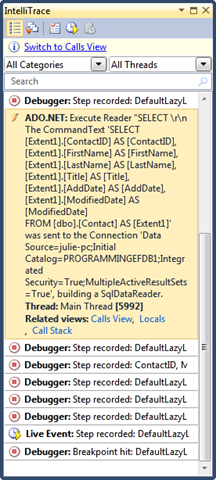
In the screenshot below, tracing is displayed from the top to the bottom. I can see the step just before the query is executed , the actual command that was sent to the database and then a number of steps after that.

image

By the time the 8 steps were hit after the first query, my code had performed two hits to the database for lazy loading. So unfortunately, IntelliTrace is not picking them up.

I checked what happens with an explicit load (e.g., myContact.Addresses.Load()) and I can see the query in IntelliTrace. The first query (highlighted) is the explicit query, the second one, expanded, is the result of the call to Load.

image

I ran another bit of code that did an update via SaveChanges, and IntelliTrace did pick up the database call.

image

Of course, now that I have EFProf, I can see each and every call to the db, including Lazy loading calls, plus I get extra bells & whistles.

Self-Contained Entity Framework Models and ASP.NET Dynamic Data

In an earlier post, I wrote about the new awesomeness that ASP.NET 4.0’s Dynamic Data brings to many to many relationships.

I frequently notice that most DD demos demonstrate creating the data model within the same project as the DD website.

Even though a typical Dynamic Data app is for RAD development and isn’t focused on application architecture (come on, the data access is buried in the UI), I still can’t bare to store my model inside of the UI project. All of my EF Entity Data Model’s are housed in their own projects.

This is not a problem at all for a Dynamic Data site. Like any other project that leverages an EDM in a separate project, you only need to perform three steps to point to the external model:

  1. Add a reference to the project that contains the data model
  2. Add a reference to System.Data.Entity.dll
  3. If it’s the executing app (in this case it is), provide the EntityConnection string, most typically by adding it into the web.config file

For Dynamic Data, there is one additional consideration that I was torn over.

I have my model in it’s own project because I like to be able to reuse it in other applications.

In a DD site, I typically do  not expose the *entire* model for the scaffold (e.g., for use in the dynamic application). Instead, I set ScaffoldAllTables to false in the global asax file:

 DefaultModel.RegisterContext(typeof(MyEDM.MyEntities), 
new ContextConfiguration() { ScaffoldAllTables = false });

and explicitly mark the classes which I want to include with the scaffold attribute:

[ScaffoldTable(true)]

And here is where I run into the conundrum.

The ScaffoldTable attribute is something that I specifically want for the Dynamic Data site. It’s not needed by any other apps that might be using my model. The only way to add it to the generated class in my model project is to use partial classes. As far a I know*, partial classes need to be in the same project as the rest of the partial classes so that the compiler can pull them all together. That means, I’m forced to “dirty” my model project with the attributes that are meaningless to any other application that might also use my model. Fortunately, the ScaffoldTable attribute is in System.ComponentModel.DataAnnotations, not System.Web.DynamicData, so it doesn’t feel so bad. I suppose that because I’ve been focused on repositories and MVC lately, this is why I’m feeling so anal about this and perhaps it’s overkill.

My first instinct, because I was looking for separation, was to put the partial classes with the attributes into the dynamic data project, but of course I was quickly reminded by the error message telling me that I had ScaffoldAllTables set to false but I had not designated any classes to be used, that the extra partial class logic was not getting picked up by my classes because it was in the wrong project. So I bit my tongue and put them where they belonged, into the model’s project.

An approach that I’m considering is having different code generation templates for my model, so that I can generate entity classes to be used in different applications. Even so, I wouldn’t automatically mark all of the entities as a ScaffoldTable anyway. So I’ll have to think a bit more about that if I’m going to really worry about implementing it.

In the meantime, the key takeaway here is that you can have the model in a separate project to be used by Dynamic Data apps and you can specify which entities to use. You just need to include the partial classes with the ScaffoldTable attributes in the EDM’s project, not the Dynamic Data project where you might think you really want them to be.

*just a small caveat on the partial classes rule in case something changed in .NET 4.0 that I’m unaware of.  I don’t know how they would pull it off, but hey, you never know! 🙂
An Improved Entity Framework Tip for EF4 thanks to Zeeshan

In my EF Tips & Tricks talk that I just did at DevConnections, I have a suggestion to reduce redundant methods where you might expose queries to generate reference lists.

E.g.

static List<CustomerType> CustomerTypeList(MyEntities context)
  {
    return context.CustomerTypes.OrderBy(ct => ct.Type).ToList();
  }

static List<States> StatesList(MyEntities context)
  {
    return context.States.OrderBy(ct => ct.StateName).ToList();
  }

Instead I have a single generic method, GetRefernenceList<TEntity> that uses some tricks with Entity SQL and MetadataWorkspace  to dynamically build the query and return the requested list.

This is still the right way to do it in VS2008. However, Zeeshan Hirani suggested to me that with EF4, there’s a better way – the new CreateObjectSet method.

This let’s me pass in the entity type and create a queryable set.

A simple version would be:

public List<TEntity> ReturnSomeObjects<TEntity>()

{ context.CreateObjectSet<TEntity>(); }

Easy peasie.

Now what if I want to provide a field for sorting. I could use functional programming to pass in and use a strongly typed property to sort on. Alternatively, I could pass in a string and append a Query Builder method to the object set.

context.CreateObjectSet<TEntity>().OrderBy(“it.” + sortproperty)

Sweet. Much easier than dealing with MetadataWorkspace.

Thanks for getting me to think a little harder on this, Zeeshan!

New Entity Framework Feature CTP for VS2010 Beta 2

The EF team just released the newest version of the Feature CTP that is now compatible with VS2010 Beta2. Hooray for compatibility, but more importantly, we can now work with a greatly enhanced version of the Code Only feature and Self-Tracking Entities. Code-Only is the API that allows you to use EF without a model at all. Self-Tracking Entities provides tracking for entities across WCF Services and their clients .

I’ll talk a bit about Code Only here, which will be of great interest to Domain Driven  Developers.

Under the covers, EF depends on the metadata for a model. Code Only will create this metadata on the fly based on your classes.

Code Only uses convention over configuration. First with convention, it builds the metadata using whatever it finds in your classes combined with a set of assumptions. However, you can do some major tweaking to those assumptions and force it, through configuration, to define the metadata more to your liking. there are two important benefits to this. the first is that if you are leveraging code-only’s ability to generate DDL and therefore define your database schema, you can have more control over how inheritance is "translated” in to tables, more control over attributes of columns, tables and constraints as well as constraints between tables.

The configuration is not done through attributes, but through code.

Here’s a very simple example.

By convention, Code Only will use any property named “ID” as an identifying property (EntityKey) as well as the presumed primary key in the back end data store. However, if you don’t happen to follow this pattern in naming your identity properties, then you can instruct code only which property to use as the identifier.

ContextBuilder is the class that knows how to build the ObjectContext and metadata from your classes.

This code modifies how the entity for the Category class should be configured beyond the initial assumptions. Specifically, it uses the HasKey property to define that the CID property should be used as the key rather than ID (which doesn’t exist in the Category class).

builder.Entity<Category>()
            .HasKey(c => c.CID);

This is merely the tip of the iceberg.

The ADO.NET team has a list of improvements to Code Only and Self-Tracking Entities to look for and will be providing detailed walkthroughs of the new features in their blog post ADO.Net Entity Framework Community Technology Preview Released!

You can get the new bits here: update of the Entity Framework Feature CTP

Designer Support for One-Way navigations in Entity Framework 4

In EF v1, it is possible to have one way navigations where you have an association between two entities but a navigation in only one of them. But the designer didn’t support this. If you deleted a navigation, the association was automatically removed.

You could, however, go into the XML and remove the navigation property manually, leaving the association, association mappings and the partner navigation property in tact.

The new designer now supports one way relationships – both for models with foreign keys and models without foreign keys.

Here is a model that does not use foreign keys. The associations, by the way, are called “independent associations” when there is no foreign key involved.

I start with a Customers property in the CustomerType entity and a CustomerType property in the Customer entity.

TwoWayA

Delete CustomerType.Customers and association and Customer.CustomerType property are still there.

twoWayB 

Next, I delete the CustomerType.Customer navigation property but the association/relationship still remains in tact. The navigations are no longer exposed in the classes but you the model is still valid as are the generated classes (I’m using the default code gen).

TwoWayC

If you want the association to be gone, you have to explicitly delete it. But for this case, you could just delete the association to begin with and the navigations will automatically be removed. That is the same behavior as in EFv1.

Although the screenshots are from a model with independent associations, the behavior is the same for foreign key associations.

Why the “no-way” association? Either there is some unknown-to-me value to having the association defined in the metadata, or it is the only way the designer is able to pull off keeping the association intact as a result of removing a navigation.

I have asked about this last bit and will share what I learn.

In the meantime, now that it is more discoverable and simpler to create one way relationships, I bet more people will take advantage of it.

Eager Deferred Loading of related entities

“Eager Deferred” is a bit of an oxymoron, but let me explain.

Example:

You have queried for customers.

For particular customers you want to get their orders AND order details.

customer.Orders.Load will only get the order entities.

But what if you wanted to do something similar to Include in there?

eg customer.Orders.Load.Include(“Details”)

That syntax is not possible. and is something Ben S added to the Entity Framework v2 Wish List started by John Papa.

Here’s how to pull it off in V1, as explained by Danny Simmons.

customer.Orders.Attach(customer.Orders.CreateSourceQuery().Include(“Address”))

It’s logical and it works, but it’s awfully convoluted. Two years of futzing with Entity Framework and 300 pages into my book and yet, here is something I have never seen or thought up before. And while it’s a neat trick, it’s still pretty hard to get to.

I much prefer the Load.Include() idea. It’s discoverable and feeds on something we already know how to do. But for now, at least I know how to do it in V1.

There’s so much in V1 and for many scenarios where you think you are stuck, whether it’s with the model or with code, as with Danny’s example, EF and EDM are robust enough that there is generally SOME way to pull it off. But it takes a good understanding of the APIs or someone like Danny sitting by your side to figure some of these things out.

Another great example is Jarek Kowalski’s code to perform transparent Lazy Loading in EF. Lack of lazy loading has been an EF showstopper for some, but it is possible to add it in.

More of this functionality will be hidden under the covers in V2 with much simpler ways to tap into it (at least I”m assuming and counting on this for V2). For now, folks (on the team and in the community) are writing extensions and code to make many tasks easier to perform. Don’t forget to check out the team’s code gallery (http://code.msdn.microsoft.com/adonetefx as well as the www.codeplex.com/EFContrib site.

A better Include method for eager loading in Entity Framework?

Matthieu has written a very clever method extension that allows the important eager loading method, Include, to accept a lambda expression (strongly typed) rather than a string for its parameter.

I like this better than my method of ensuring that I type the strings correctly, which is to start entering the parameter without the quotes and let intellisense help me, then add the quotes after the fact.

Here is the actual documentation that covers Include (look under “Query Path” in this topic) if you’re not sure what we’re talking about.

TechEd Women in Technology Luncheon – Not For Women Only

Come to the Tech·Ed Women in Technology (WIT) luncheon and join in the discussion about challenges that women face today—including how to break through the corporate “glass ceiling”—as well as the tools, initiatives, and organizations that support women who work in the IT industry. Please bring your success stories to share with others.

Date: Wednesday, June 4
Time: 11:45am– 2:00pm

While the Women in IT luncheon is a great way for women who are in IT to get together, meet one another, share stories, opinions and lessons, in the past it has not been a way to exclude men from the lunch table. There’s nothing in the description that says “women only”.

Having led BOFs on the topic before and attended this luncheon many times, I know there are many men who have questions about women in IT – whether it’s how to encourage their own daughters, how to enable women in their companies or an interest in the age old question about why the percentage of women in IT is so low. If you are a man in IT and you are interested in attending the luncheon, c’mon along.

Eileen Brown, Manager for the IT Pro Evangelist team in Microsoft’s Developer and Platform Group, is hosting the panel again.

I’ll be on the panel this year along with Meryem Tom, a Director at Microsoft and Deborah Arhelger, COO of JNBridge.

See you there!

Full frontal entities? A little privacy please!

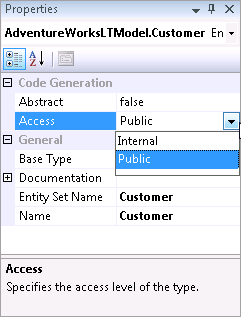
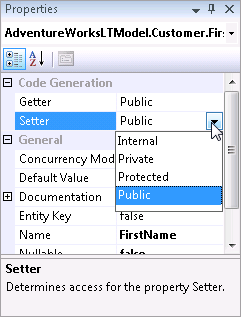
In Beta3 of Entity Framework there was a teaser in the properties window for Entities and their properties. We saw properties for Access, Getter and Setter but they were inactive.

With the latest bits (available in the VS2008 SP1 Beta) those properties have come to life. Here’s what you’ll find and where you’ll find them.

Entity has an Access property that can be set to Internal or Public.

entityaccess

Each property (scalar as well as navigation) has a Getter and Setter that can be Public, Private, Protected or Internal.

propertyaccess

EntitySets have a Getter property that can be Public, Private, Protected or Internal. To get to this property, select the EntitySet in the Model Browser.

entitysetaccess

The settings are dependant on each other. For example if you change an Entity to Internal, but its EntitySet is public , you’ll get this error:

EntityType ‘Customer’ has ‘Internal’ accessibility and EntitySet ‘Customer’ has a get property with ‘Public’ accessibility. EntitySet’s get property must not have less restrictive access than containing EntityType’s access.   

You’ll see the impact of these settings as attributes in the model in the generated class. For example, setting the FirstName property’s Setter to Internal results in the a:SetterAccess attribute added to the Property definition in CSDL.

<Property Name="FirstName" Type="String" Nullable="false" MaxLength="50" a:SetterAccess="Internal" />

and in the Customer class, the FirstName’s Set becomes Friend Set, limiting access to it.

<Global.System.Data.Objects.DataClasses.EdmScalarPropertyAttribute(IsNullable:=false),  _
    Global.System.Runtime.Serialization.DataMemberAttribute()>  _
   Public Property FirstName() As String
       Get
           Return Me._FirstName
       End Get
       Friend Set
           Me.OnFirstNameChanging(value)
           Me.ReportPropertyChanging("FirstName")
           Me._FirstName = Global.System.Data.Objects.DataClasses.StructuralObject.SetValidValue(value, false)
           Me.ReportPropertyChanged("FirstName")
           Me.OnFirstNameChanged
       End Set
   End Property