Category Archives: Data Access

To SPROC or not to SPROC

I’ve been spending a lot of time futzing with stored procedures in Entity Framework and losing sight of the fact that one of EF’s core features is its ability to do query processing – and that is something it does very very well.

The Stored Proc support is obviously critical for many and while it’s there, some scenarios are pretty easy to pull off, while many others are possible  but not so easy to implement and that can get frustrating.

What I’m trying to do is just truly see which things are easily pulled off in the designer (and discovering more than I realized), which are doable and which might take a hack or two to get around.

I think that in my case I was focused on the trees and forgot the the forest.

Thanks to the person who helped remind me of that.

Command Execution of directly called ImportFunctions (stored procs) in Entity Framework

I hadn’t noticed this before.

If you have a stored procedure that is mapped to an entity such as "GetCustomersSince" which returns Customer entities, the command is executed when you create the query, not, like with normal queries, when the data is first needed.

In case that sentence was too convoluted…

Here is a LINQ to Entities query (the same is true for LINQ to anything and also for Object Services (context.CreateQuery))

Dim query= From c In context.Customers Select c

For Each cust in Query  <– command is executed here

‘do something

End For

But when calling a function import:

dim custs= From c in context.GetCustomersSince(New Date("2008","01","01")) <–command is executed here

For Each cust in custs

‘do something

End For

Looking at the code gen for the function I can see that ObjectContext.ExecuteFunction is called.

Responses to Danny Simmons "Why Entity Framework" post

I’m definitely interested in what people have to say about Danny’s post so I have subscribed to the Bloglines citations of it:

http://www.bloglines.com/search?q=bcite:blogs.msdn.com/dsimmons/archive/2008/05/17/why-use-the-entity-framework.aspx

RSS

Don’t forget the comment thread in Danny’s post as well.

Not surprisingly, the folks who have already made it clear that EF is way too data-centric for them are up in arms and there are some very interesting discussions in their blogs (as well as the comment threads).

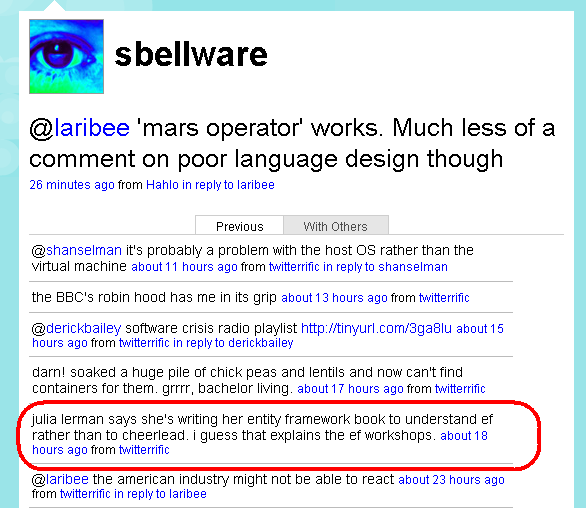
I’m not sure if I would compare the investment I am making in understanding how EF works and writing a whole book to share what I’ve learned to being brainwashed by a "shiny brochure on your desk". Nor do I feel like a "cheerleader" or "parrot". But… whatever… (lame response? Yep! But it’s all I have time (or patience) for).

Great fix in the EDM designer – Inheritance doesn’t trash mappings

In the earlier bits, if you changed an association to an inhertiance, the type that becamse the derived type lost its mappings and th emappings for any associations.

Depending on how complex that type is, recreating all of that could be challenging.

I just tried this out in the new bits and the mappings and association mappings all remain intact.

This is great and it will save a tree too, since I can go remove all of that explanation about how to deal with that problem from Chapter 5 of my book!

Safe Mode in the Entity Data Model designer

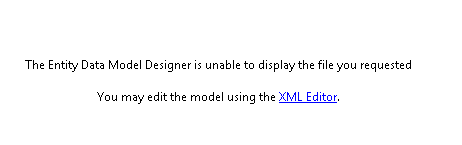
If you have screwed up your Entity Data Model, you may be familiar with safe mode when you try to open the model up in the designer.

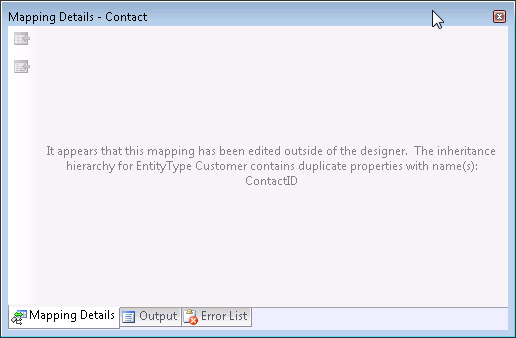
But the mapping designer has Safe Mode now, too.

Here is what I get when I am in the middle of creating an inheritance in my model which means that some of my mappings are still a big goofy. I tried to get to the mapping details of the derived type and here is what I see:

The error messages for Entity Framework and the designers are really very helpful.

Danny Simmons on “Why use the Entity Framework?” – A must read

Having just done a presentation at DevTeach called “.NET 3.5 Data Access Guidance”, which I will be doing again at TechEd in a few weeks and I have a CoDe Magazine article on this topic coming up as well, it is definitely interesting to me to see what is probably the first somewhat official looking (it’s a blog post, not a white paper) guidance from someone at Microsoft about Why to use Entity Framework.  Outside of a direct comparison of LINQ to Entities vs LINQ to SQL by Elisa Flasko earlier this year , there hasn’t been a Microsoft white paper on Entity Framework since June 2006. That’s almost 2 years. And that was written when they were first going public with the technology. What Danny is doing here is definitely a first.

In my presentation/article I need to be objective. Granted I am only addressing what’s “in the box” – datasets, LINQ to SQL and EF, not nHibernate/ORMs. And I have to be sure not to lean towards EF, which is difficult not to do since I am so focused on it.

But Danny’s list is definitely right on. He is highlighting the benefits of EF compared to datasets, compared to LINQ to SQL and also compared directly to nHibernate. It’s funny how we (Danny, myself, maybe others) tend to include nHibernate, which has a LOT less users than datasets or LINQ to SQL in these discussions because it is the [relatively] small # of nHibernate users that make the most noise and Danny and I have both been beaten up quite a bit by them, so we now have a natural tendency to be sure to address them at every turn. I think it’s become self-defense measure more than anything else. (I shouldn’t really speak for Danny here, since he may have different reasons. I know that this is true for me, though.)

One thing that I need to do differently than Danny’s post when I do the overall guidance presentation is not just list the places where EF totally outshines the other options, but I also need to address areas where you may prefer the others.

Every time I have done this guidance presentation, I have had someone say to me after the fact, “but I really love typed datasets? Why should I move to EF or LINQ to SQL”. My response to them is that if after seeing my presentation, if there is nothing that was truly compelling to them to want to make the change, then typed datasets are probably just the right choice for them.

Presenting on the bleeding edge

When VS2008 SP1 beta was released on Monday, I was getting ready to head for Toronto to present three sessions at DevTeach which would be on Wednesday and Thursday. One session was on Astoria another touched LINQ to SQL/EF and DataSets and the last was a deep dive into EF with respect to tiered programming.

The new bits would impact these talks, especially the Astoria and deep dive EF talk a lot and I truly did not want to show people what were now incorrect namespaces, classes whose names had changed, Entity Graphs that did not serialize with services, etc etc.

I made a scary decision and took a huge risk. I updated all of my demos to align with SP1 – this  I did on my dev box at home. This was more than a matter of tweaking some EDMX files and changing class names. The tiered applications needed to be completely reconsidered, rearchitected and rewritten. When I had gotten far enough in this process that I was confident I could finish the transition up, I knew it was time to get the SP1 bits onto my presentaiton laptop.

This didn’t go so well. I started the install just before I headed off to my user group meeting. Six hours later I returned to see the install failed because the vista windows sidebar was on. This was 10:30pm. I worked at trying to get the new bits installed until 9am the next morning and then had to give up and head for the airport. To be safe, I threw my CPU, which had what I needed, into my suitcase!

At the speaker dinner that night in Toronto, I was offered a VPC by scott Hanselman who is my savior for the month of May. It already had Vista on it, with VS2008, the Service pack and even Fiddler which I needed for the Atoria session. It was a full day since I began this installation. I hadn’t slept and I hadn’t been able to complete the demo transitions but I was fully committed.

Or perhaps should be committed.

I pushed my EF debugging skills full bore. But there was more to deal with since the VPC wasn’t quite the same as my setup. I had to install all of my databases and change all of the connection strings (there were a lot) inthe many many projects for the 3 sessions in addition to running thorugh every single demo to see where things weren’t working.

I didn’t get everything fixed on  time and had to go into my presentations knowing that I’d have to skip a few demos and hoped that the bulk of the attendees would feel the same as I did about being able to see how things are not how things were. I think the feelings were mixed (sorry to anyone who found my decision not to be the best).

There is still one entity sql query that is driving me nuts. It keeps saying that “customer” doesn’t exist, though the query looks at Customers. Almost as though I had cached something.

I got a few hours of sleep, had chocolate and coffee as my critical helpers, bit the bullet and went for it.

But boy oh boy, I’m not sure if I really need this kind of excitement in my life! 🙂

I still need to tighten the rest up so I can get the demos up ontot he DevTeach website, but since not many of the session attendees have SP1 installed yet, hopefully they won’t mind waiting a few days.
Notes from updating an Astoria project to the new SP1 Beta bits

The Astoria Team has provided a very impressive list of what’s changed and what’s new in the new bits for Astoria that were released with VS2008 SP1 today.

I was surprised to see they already have the Batching and Optimistic Concurrency stuff in there that they were only just recently considering.

Here are my own notes from trying to get an Astoria demo working before I had access to the nice list that is now available.

1) If you are using an Entity Framework EDM as your data source , there are some easy to fix (and easy to discover) breaking changes to the model.

See this post on my notes for updating an Entity Framework solution to SP1.

2) The service file is very different. You will be best to create it from scratch then move your logic into the new SVC file.

3) Namespaces and classes have changed.

  • Microsoft.Data.WebClient namespace becomes System.Data.Services
  • WebDataContext becomes DataServiceContext
  • WebDataQuery becomes DataServiceQuery

4) Methods for limiting access and the enums have changed

OLD config.SetResourceContainerAccessRule("*", ResourceContainerRights.AllRead);
NEW config.SetEntitySetAccessRule("*", EntitySetRights.AllRead);

SetServiceOperationAccessRule stays the same

5) WebDataGen is now DataSvcUtil and can be found in C:\Windows\Microsoft.NET\Framework\v3.5\DataSvcUtil. The parameters for this were simplified, too.

I recommend using DataSvcUtil to recreate any classes you want to use in Astoria clients. I actually fixed one up manually before I found DataSvcUtil and it was a pain.

6) The Attribute used to identify the Key field (needed when the field names are not discoverable by Astoria) has changed.

It was <System.Web.DataWebKey()> and was used on the property.

Now it is System.Data.Services.Common.DataServiceKey(propertyname) and is used on the class. It can also take an array of strings if there are multiple keys.

7) The Silverlight and AJAX client libraries are not included with these bits but the AJAX one is  on CodePlex.

That’s two of my four demos from my Astoria talk. I’m currently trying to figure out how to retrofit the old ajax data services library into a new application.

http://www.codeplex.com/aspnet/Release/ProjectReleases.aspx?ReleaseId=13357

There are probably lots more goodies in there, but these notes represent the pain I had to go through to get my Astoria demos that I’m doing this week at DevTeach working again.