Category Archives: Data Access

Notes from updating some Entity Framework apps to the SP1 Beta bits

Along with Soma and others, the ADO.NET team has announced that the next beta of Entity Framework is available with the VS2008 Service Pack 1 BETA bits. The Astoria team already has a list of changes on their blog and there will be one coming for EF as well.

In the meantime….

Never a dull moment. I have two EF sessions this week at DevTeach and have to very quikly overhaul my demos.

Here are some of my notes.

EDMX Changes

Designer section

<edmx:ReverseEngineer /> has to be removed. I guess it was hopeful thinking.

SSDL

New attribute required inside of schema (Provider=”System.Data.SqlClient”)
These attributes had to be removed: DateTimeKind=”Unspecified” PreserveSeconds=”true”
ProviderManifestToken Attribute in schema declaration needs to be changed from the version number (eg for SS2005 that was ProviderManifestToken=.09.00.3054 now is ProviderManifestToken=2005.

Designer section is now at the bottom of the file. Nice.

You cannot have both the Design view and the XML view of an EDMX open at the same time.

In the Model Browser window, the XML for various pieces of the model are no longer shown in the tool tips. While there are reasons behind this, I REALLY liked this and am sad to see it go. Now I have to always close the designer and open up the XML and trudge through it if I just want to verify something. Oh well.

Designer Changes

Oh my its pretty! It’s cleaned up; the Asscoiation names are no longer clogging up the view, it’s more flexible wrt to what’s available on context menus and it has some nice shortcut icons for zooming etc.

Update from Model

As per a blog post from Noam Ben-Ami a while ago, this has improved enormously. With some minor excpetions (which I have not experienced) the CSDL stays intact when you update even though teh SSDL will be competely rewritten so any changes there will be lost. If you add new fields to a table in the database, and it’s obvious in the model where it should go, it will make it into the CSDL.

Code Generated Classes

Best bet: just delete them and let VS2008 regenerate them.

API Changes that I’ve experienced so far

It is very nice to have full graphs coming in and out of WCF services. 🙂

Believe it or not, I haven’t run into anything else so far that has impacted my apps except for the fact that I need to completely rearchitect my WCF solutions now that I have graphs to pass back and forth. Will I get this done before my session on using Entity Framework across tiers on Wednesday? Nothing like being forever behind the 8-ball. 🙂

The EntityDataSource control

I am not a big fan of drag & drop, but I’m liking this control so far. Here are some of the things that are winning me over.

Easily use inherited types

Easily do eager loading with the IncludePaths property.
Note: There’s a bug which is preventing the combination of eager loading when you are using an inherited types. That will go away with the next available build.

Many opportunities to override behavior. There are lots of events and the most important to me (so far) is the one lets me control what context the control will be tied to. By default, every EntityDataSource spins up its own context. That’s not good if you want to have relationship management happening.

Dynamically build queries with the properties or just entier an EntitySQL string as the command text.

Note that the where parameter takes an Entity SQL predicate, just like you would use with Query Builder methods.

That’s all for now.

Have fun!
Entity Framework’s Golden Rule and its Platinum Rule

I have found myself explaining this in conference sessions so I thought I would write it down in my blog.

Entity Framework has a Golden Rule. Though shalt not do nuttin’ that the developer has not explicitly told you to do. The lack of implicit lazy loading is one of the more notable (and hotly contested by some) example of this.

But one day when I was coding, Entity Framework did something that I did not ask it to do. I emailed Danny Simmons to tattle on the API. But Danny explained something to me about RelationshipSpan that needs to override the Golden Rule.

I now call it the Platinum Rule. (I learned this pecking order from American Express).

The Platinum Rule is that an object graph (for example when a customer is attached to an order which is attached to some line items) must be completely in or completely outside of the ObjectContext.

The way I discovered it was that I had a Customer that was being change tracked by an ObjectContext.

I created a new order and attached the order to the customer.

But I did NOT add or attach the order to the context.

Yet, the order was suddenly within the context and being change tracked. Why? Because of the Platinum rule. By attaching the order to the customer, I was creating a graph. Since the graph can’t have some of its objects in the context and some of its objects out of the context, it has three options.

  1. Don’t allow the objects to be connected. (Now wouldn’t that tick you off?)
  2. Pull the customer out of the context. (Now wouldn’t that really tick you off?)
  3. Pull the order INTO the context.

Okay, works for me.

So this is the same rule that confuses people when they have an object graph that is IN the context and they detach one of its objects. That object leaves the context and “broken”off of the graph. So if you called context.Detach(Customer), then the customer is detached but the Order and its Line Items are still in the context.

You can no longer traverse from the Customer to the Order or from the Order to the Customer.

On the flip side, if you have an object graph that is not being change tracked  – the whole package, Customer, the order and the details and they are all attached to one another, if you attach any one of them to the context, the whole kit n’ caboodle gets pulled into the context – because of the platinum rule.

Another Domain Developer’s view of Entity Framework and Lazy Loading

Like Jeremy Miller, who has Transparent Lazy Loading for Entity Framework on his Christmas Wish List, Timothy Khouri does not like the fact that Entity Framework doesn’t support Lazy Loading. However, since he really likes Entity Framework, he wrote some code that will enforce Lazy Loading for him. Entity Framework promises not to do anything you don’t explicitly tell it to do, so Timothy found a way to keep telling EF to do this for him because that’s what he wants.

After looking at LINQ to SQL’s Lazy Loading and then bumping into Entity Framework’s explicit Deferred Loading, then sorting things out so he understood not only how the two are different but why, he shares his lesson and his workaround in this article: Entity Framework and Lazy Loading

Delete Stored Procs and Navigations in the Entity Data Model

Entity Data Models have a lot of rules. They are necessary for the integrity of the model, though if you are not familiar with depth of EDMs and *why* these rules exist, many of the mapping rules may seem to make no sense when it comes trying to implement them. This gets hairy when you are mapping stored procedures. Roger Jenning’s solution is to create stored procedures that will map properly, rather than suffer wtih the ones that already exist.

The first level of using Stored Procedures is that they work very easily for existing entities that are simple, have no EntityReferences (these involve Foreign Keys) , don’t involve inheritance and map directly to a single table in your database.

The next is stored procs that map nicely to entities which don’t involve inheritance but if your entities have any relationships, you will probably run into a wall with a delete procedure. Here’s why.

Stored Procs become Functions in the Entity Data Model. If you want to use these functions rather than the dynamic SQL that Entity Framework will create, it’s an all or nothing scenario. You need to map an Insert, and Update and a Delete. (Read procs doesn’t come into play here). There are plenty of blog posts and other resources on how to do this including this tutorial I wrote for the DataDeveloper.net site.

If you have a relationship in your entity, you can map that easily enough to a foreign key parameter in the function mappings and this makes sense with Inserts and Updates. With deletes, generally you only have a primary key (eg ContactID) as the parameter for the stored procedure. But here is where the EDM rules come in to play. A foreign key value that is used in a stored proc, would in most cases map to the EntityKey of a navigation property.

In other words, if you have a stored proc to insert SalesOrders, that procedure will have a parameter for CustomerID. The Order Entity this is mapping to has a relationship to the Customer entity and contains a Customer navigation property. The mapping therefore would link the CustomerID paraemter to Order.Customer.CustomerID.

By doing this, you are involving the association that exists between the Customer entity and the Order entity.

The EDM rule is that if you are involving an association in ONE of the function mappings, you have to use it in ALL o the function mappings.

Therefore a stored proc to delete an order, which only has an OrderID parameter will need also to have a CustomerID parameter because you are required to map SOMETHING to the Customer entity.

This then breaks a possible rule. It means you need to go to the dba and beg them to add this parameter into the stored procedure even though it doesn’t get used.

The alternative is to just go in and modify the SSDL to trick it into thinking that that parameter exists which will make the model happy and the database won’t care at all. IT doesn’t ever really get used.

So if the actual stored proc is

PROCEDURE DeleteOrder

@OrderID int

AS

DELETE from ORDERS WHERE OrderID=@OrderID

and the original function in SSDL is

 <Function Name=”DeleteOrder” Aggregate=”false” BuiltIn=”false” NiladicFunction=”false”
            IsComposable=”false” ParameterTypeSemantics=”AllowImplicitConversion” Schema=”dbo”>
     <Parameter Name=”OrderID” Type=”int” Mode=”In” />
 </Function>

You just need to add a new parameter to the SSDL

 <Function Name=”DeleteOrder” Aggregate=”false” BuiltIn=”false” NiladicFunction=”false”
            IsComposable=”false” ParameterTypeSemantics=”AllowImplicitConversion” Schema=”dbo”>
     <Parameter Name=”OrderID” Type=”int” Mode=”In” />
     <Parameter Name=”CustomerID” Type=”int” Mode=”In” />
 </Function>

This is all fine and good until you need to update the model, because the SSDL will lose all customizations.

I keep my customizations listed in a separate text file so that if I must update the model,  I can replace them.

It’s not pretty, but when I don’t have a lot of customizations, I will choose this over bugging the dba. Okay, in my world, I’m the DBA (how pathetic is that) but I’m trying to think about enterprise developers and real DBAs.

I started out wanting to write about dealing with stored procs for entities that are inherited, but I guess that will have to come later!

An extension method for visualizing ObjectStateEntries

EntityStateObjects, to me, are one of the most important little pieces of the EF puzzle. IT is the EntityStateObject that maintains all of the critical info for change tracking. But it’s hard to get the big picture of what’s going on in there when debugging because all of the important stuff is delivered through methods, not properties.

I wanted so badly to write a debugger visualizer for them but they are not serializable (big pout) so instead, I wrote an extension method that uses a ConditionalAttribute to ensure it doesn’t pop up during run time. It’s for my book but I didn’t want to hold onto it until October when the book should be published.

Since it’s not a Debugger Visualiser, I refer to it as a DebugTime visualizer. 🙂

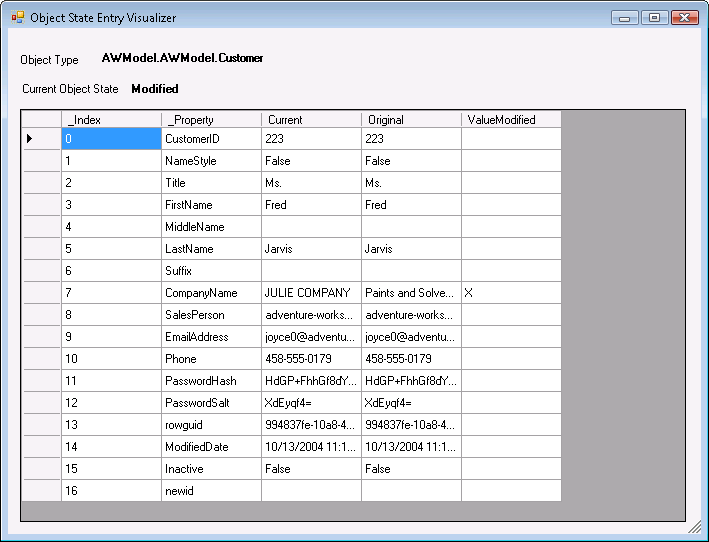
Here’s what my ObjectStateEntry Visualizer looks like in action:

All of the info is pulled from the ObjectStateEntry. At the top it tells the fully qualified name of the type of the object being inspected as well as the object’s EntityState.

Then I use the various methods of the ObjectStateENtry to get the Original Values, the Current Values, the names of the fields and a list of the names of the modified fields.

All of this data I feed into the grid.

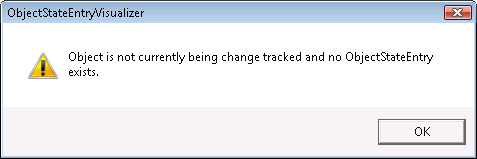
If the object is detached, then there is no ObjectStateEntry and the visualizer shows this message when you try to run it:

So enough with the screenshots. Here’s the code. And here’s a collection of important punctuations for you C# programmers who feel a need to translate

[ ; ; ; ; ; ; ; ; ; ; ; ; ; ; ; ; ;  ; ; ; ; ; ; ; ; ; ; ; ; ; ; ; ; ;  ; ; ; ; ; ; ; ; ; ; ; ; ; ; ; ; ;  ; ; ; ; ; ; ; ; ; ; ; ; ; ;]


Imports System.Runtime.CompilerServicesImports System.Data.Objects'NOTE: The objects in use here are not serializable so they can't be used'in debugger visualizers. Instead, you'll need to use them directly, but you can 'give them a debug attribute so they are only available during debug mode.<Extension()> _Public Module Visualizers<ConditionalAttribute("DEBUG")> _<Extension()> _Public Sub VisualizeObjectStateEntry(ByVal eKey As EntityKey, ByVal context As ObjectContext)Dim ose As ObjectStateEntry = NothingIf Not context.ObjectStateManager.TryGetObjectStateEntry(eKey, ose) ThenWindows.Forms.MessageBox.Show("Object is not currently being change tracked and no ObjectStateEntry exists.", _
"ObjectStateEntry Visualizer", Windows.Forms.MessageBoxButtons.OK, Windows.Forms.MessageBoxIcon.Warning)ElseDim currentValues = ose.CurrentValuesDim originalValues = ose.OriginalValuesDim valueArray As New ArrayListFor i = 0 To currentValues.FieldCount - 1


'you can get from the ObjectStateEntry into the MetaData which actually comes from the EDM
Dim sName = currentValues.DataRecordInfo.FieldMetadata.Item(i).FieldType.NameDim sCurrVal = currentValues.Item(i)Dim sOrigVal = originalValues.Item(i)
'nothing like a little LINQ query to find some infoDim changedProp = (From prop In ose.GetModifiedProperties Where prop = sName).FirstOrDefaultDim propModified As StringpropModified = If(changedProp = Nothing, "", "X")

'the funky property naming in this anonymous type is to get around a wierdness with
'LINQ databinding that only occurs in VB - it alphabetizes the fields
valueArray.Add(New With _
{._Index = i.ToString, ._Property = sName, .Current = sCurrVal, _
.Original = sOrigVal, .ValueModified = propModified})NextDim frm As New debuggerFormWith frm.DataGridView1.DataSource = valueArrayEnd Withfrm.lblState.Text = ose.State.ToStringfrm.lblType.Text = ose.Entity.ToStringfrm.ShowDialog()End IfEnd SubEnd Module

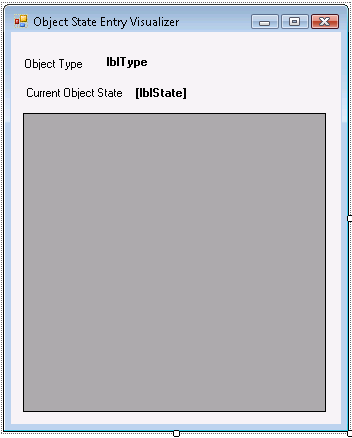
The form has no code, just a few controls:

I created an assembly for my Entity Framework extension methods and just reference the assembly anywhere I want to use it.

Then when I want to use it, I call it against the EntityKey of an Entity Object:

context = new AWModel.AWModel.AWEntities();cust = context.Customers.Where(c => c.CustomerID == 223).First();cust.CompanyName = "JULIE COMPANY";cust.EntityKey.VisualizeObjectStateEntry(context);

This has been an enormously useful tool for when I have been presenting as well as just working.

Enjoy!

Sneak Peek at the EntityDataSource Control

Along with a few hundred other DevConnections attendees, I got a sneak peek of the EntityDatasSource control on Monday during Danny Simmons’ Entity Framework Architecture session.


I think I paid more attention to the control than what Danny was saying because I was desperate to see how it was set up.


Before digging in though, I also wanted to note that the UI of the EDM Designer looks really pretty. I noticed that the association lines/connectors looked different; the whole thing was cleaner looking (were the association names gone?) and the Entities have their own little representative icon now. I can’t wait to see this in more detail.


The EntityDataSource wizard identifies EntityConnections in the config file and offers those to as choices for building the data source from. Once that is selected, the EntityContainer is also identified, offering the list of EntitySets from the container to use for the data source.


Like the LINQDatasource, you have the option of selecting all of the properties at once or selecting specific properties which will perform projection. Like the LINQDataSource, if you project properties, then you won’t get a full type back and the data will not be updatable.


There was a drop down list below the one where you choose which EntitySet you want to work with but I don’t recall what it’s name was. Danny did not drop it down. All I can think of that might be there (hopeful) is derived types since they don’t have their own EntitySet.


Although I don’t remember seeing it during the session, Danny did say that you can choose to eager load related data in the same way that you can with the Include method. I don’t know how this is done or if it will impact updating, but I don’t know why it would.


Like the LinqDataSource,  the EntityDataSource performs server side paging, and it does client side caching – of current AND original data. The original data is not stored as complete objects, but the minimal data necessary to reconstruct state when it’s time to update. Updates happen, like any other data source, one at a time. So you have to pick an item, edit it and update it.


 I’ve got some of my own examples of using series of entities in web apps which are very different from this. My solution, however, is aimed at a different scenario. Where the EntityDataSource is more scalable because of the server side paging and the fact that it is not caching full objects, my solution allows the user to do a bunch of edits then save them all at once. I keep the objects in the client side cache (I know – horrors! – but it’s an option for a developer to choose) and a collection of original objects cached on the server, though it’s an application cache, not a session cache.


Seeing the EntityDataSource has already given me some ideas of taking my solution and making it more scalable without losing the benefit of the bulk editing.


I can’t wait to get my hands on the new bits!

Generating proxies with Astoria’s WebDataGen under Vista UAC

This bit me in the butt … TWICE!

When using WebDataGen so that you can get a proxy class for an Astoria data service, if you are running under UAC, the output file will NOT get created, however the tool reports that the file was created successfully.

I spent a lot of time trying to find the file or figure out what I was doing wrong.

Then a week later, when it was late at night and I was sick so my brain was a little foggy, I had to create another proxy but totally forgot the pain I had gone through previously. It was an hour before I finally remembered that I had to run the command window as admin.

So word to the wise….and I should probably make a not of this in the forums.

Pay heed to what’s returned by iQueryables in ADO.NET Data Services

I was experimenting with creating data services from IQueryables. Rather than use the canonical example of creating a set of 3 person objects on the fly and exposing them, I decided to create a service for my application log. (Not something I plan to expose to the web, just a learning tool ;-)).

I created a wrapper class for the System.Diagnostics.EventLogEntry class because I needed to have an ID field that could be read. Thanks to Jonathan Carter’s blog post, I knew that there was no property of the real class that would work, so I needed to create my own class with a valid field for a discoverable identity property.

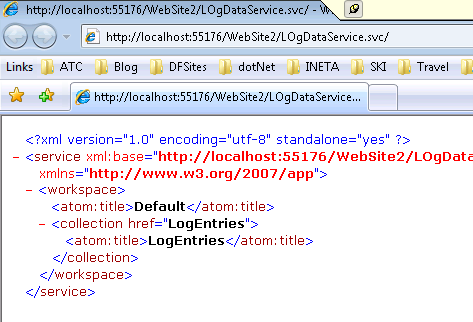
Having done this, I tested my service which worked just fine:

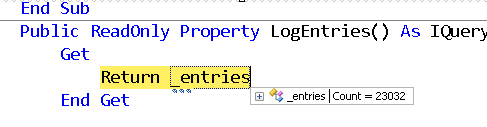
Since I knew there are  a LOT of entries in my application log file (I don’t have a sysadmin to do that maintenance for me) I thought it would be smart to filter the entries by adding /LogEntries?$top=10 to the URI. I wasn’t sure how Vista would handle that and wasn’t shocked to see in the debugger that the filtering was going to be left up to the dataservice:

It’s definitely a huge advantage to be able to expose (or interact with) any IQueryable through Astoria, but don’t forget that it’s the database that has the query processor. In this case, I was returning 23,000 items to my service to be processed.

If I do the same filter to a service that exposed a database via an Entity Data Model, for example Northwind

http://localhost:55176/DataServices/NWDataService.svc/Categories?$top=10

the query is processed by the Entity Frawework and the filter is part of query sent to the database:

SELECT TOP (10)
[Extent1].[CategoryID] AS [CategoryID],
[Extent1].[CategoryName] AS [CategoryName],
[Extent1].[Description] AS [Description],
[Extent1].[Picture] AS [Picture]
FROM [dbo].[Categories] AS [Extent1]
ORDER BY [Extent1].[CategoryID] ASC

Only 10 items are returned for the service to process.

LINQ to SQL will do the same … i.e. create a filter query that gets sent to the database.

Yes exposing my entire un-maintained application event log is not a real-life scenario and in a real network, I might even use the nice filters that Vista provides for event logs.

But the point is just to pay attention to what you may be asking your service to do.

Ruurd Boeke has succeeded in implementing IPOCO across tiers

While this has been an unfolding process on Ruurd’s blog and on the CodePlex/EFContrib site, today marks an impressive day in the evolution of the PostSharp4EF project that Ruurd Boeke has been working on.

He has used the available interfaces for IPOCO in Entity Framework to create a tool for using Entity Framework in a way that is more affable to Domain Driven developers.

His solution enables client side classes that are not dependant on Entity Framework APIs and supports a fully disconnected tiered application – the thing we have all been struggling to achieve.

Ruurd also solved the XML Serialization problem along the way, though in the meantime, changes to WCF actually solve the problem across the board for all WCF XML Serialization, including Entity Framework objects. So I’m sure that was frustrating for him to have this announced shortly after he completed that arduous step, but think of how much you learned, Ruurd and how much respect you have earned as well! 🙂

Here is short description of the project. You can find much more on the PostSharp4EF project site under the CodePlex/EFContrib home as well as on Ruurd’s blog.

PostSharp4EF: Automatically implement IPoco This project uses PostSharp to post-compile your assemblies. When it encounters a simple attribute, it will implement everything needed to use it in EF: Typelevel attributes, EDMscalar attributes, changetracking and default values. This means there are no runtime performance penalties. See Introducing EF Contrib post for more detailed information about this project. The following supporting projects are included as well and will enable the use of full disconnected n-tier usage of your domain objects:

  • Circular Serializer: enables the serialization of object graphs (including circular references) with knowledge of ‘original values’.
  • Editable Business Objects: does changetracking and provides the serializer with the correct values