Category Archives: Data Access

SQL Server delay does not impact Entity Framework

A question came up in the EF forums today asking if the delay of SQL Server 2008’s release will mean EF will be delayed.

The two are not related.

There is a misconception that Entity Framework is tied to SQL Server 2008. It’s definitely not. These are .NET APIs and will work with many database providers (when those providers are written).

As far as I know, the official word on EF’s release remains “1st half of 2008”. Something tells me that won’t be any time in January. 😉

Creating and consuming a WCF service to test the EntityBag class

Danny Simmons has posted the code for his EntityBag class (aka “Perseus”) on the MSDN Code Gallery Site here.

I grabbed it last night and set up a test project so that I could see what the payload looks like.

The results of that test are in this blog post, Testing out the EntityBag.

There were a few tricks for getting the web service to work properly if you are not familiar with using WCF, so I wanted to show that code.

I started by creating a DLL library just to host my EDM.

Then I created a WCF Service. The WCF service references the EDM project and the Perseus project.

I created my interface along with a HelloWorld op which is always handy for testing.

<OperationContract()> _
   <ServiceKnownType(GetType(SalesOrderHeader))> _
   <ServiceKnownType(GetType(SalesOrderDetail))> _
 Function GetData(ByVal value As Integer) As Perseus.EntityBag(Of SalesOrderHeader)

 <OperationContract()> _
 Function HelloWorld() As String

There’s something critical in the above example. Without the ServiceKnownType declarations for the SalesOrderHeader and SalesOrderDetail, you will get an error when the service tries to serialize the return data. You can read more about this here. In C#, you use typeof() where I have GetType().

Then I created the methods that implement these interfaces in my Service class.

 Public Function GetData(ByVal value As Integer) As Perseus.EntityBag(Of SalesOrderHeader) _
  Implements IService1.GetData
    Using aw As New awEntities
      Dim order = (From ord In aw.SalesOrderHeaders.Include(“SalesOrderDetails”) _
                  Where ord.SalesOrderID = value _
                  Select ord).First
      Return aw.CreateEntityBag(Of SalesOrderHeader)(order) 
    End Using 
  End Function

  Public Function HelloWorld() As String Implements IService1.HelloWorld
    Return “Hello World”
  End Function

Next is the ConsoleApp that will call the service.

Nothing fancy here, I make a service reference to the service in the project and a references to the Perseus project and the project that hosts my EDM. In code, I instantiate the service, then call HelloWorld to make sure things are wired up properly and finally the GetData method passing in an  OrderNumber. Not sure why I didn’t use orderid. Just too focused on other things at the time!

   Dim ordEntityBag As Perseus.EntityBag(Of SalesOrderHeader)
   Dim svc = New ServiceReference1.Service1Client
   Dim s = svc.HelloWorld
   Try
     ordEntityBag = svc.GetData(71780)
   Catch timeout As TimeoutException
     svc.Abort()
   Catch commException As System.ServiceModel.CommunicationException
     svc.Abort()
   End Try

This returns an unmodified object. Next I wanted to see what it looked like if it was modified so I just added some code into the GetData method in the service.

Public Function GetData(ByVal value As Integer) As Perseus.EntityBag(Of SalesOrderHeader) Implements IService1.GetData
  Using aw As New awEntities
    Dim order = (From ord In aw.SalesOrderHeaders.Include(“SalesOrderDetails”) _
                Where ord.SalesOrderID = value _
                Select ord).First
    order.Comment = “12345”
    Dim i As Int32
    For Each sd As SalesOrderDetail In order.SalesOrderDetails
      sd.OrderQty = 25
      If i = 10 Or i = 12 Then
        sd.OrderQty = 0
      End If
      i += 1
    Next
    Dim sod = From s In order.SalesOrderDetails Where s.OrderQty = 0 Select s
    For i = sod.Count To 1 Step -1
      aw.DeleteObject(sod(i – 1))
    Next 
    Return aw.CreateEntityBag(Of SalesOrderHeader)(order)

  End Using

End Function

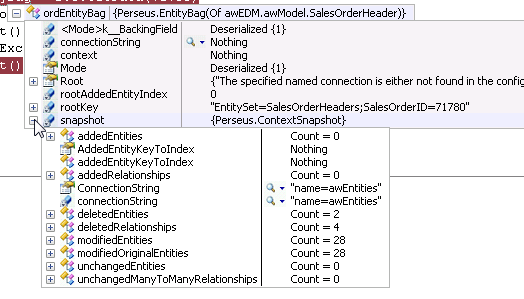
Here’s what the EntityBag for this looks like when it gets back to the client:

Entity Framework Toolkits and Extensions collection on MSDN Code Gallery

Zlatko wrote the eSQLBlast tool.

Danny‘s been writing Extension Methods and the ENtityBag class.

There is also a new tool for examining how code generation is done from an EDMX file. (As well as a blog by Sanjay about how code gen is done.)

All of these and future stuff are now collected under one umbrella, the Entity Framework Toolkits and Extensions page on the new MSDN Code Sharing site.

It also has an RSS feed, so you can see what gets added in the future.

Thanks Diego for pointing it out.

Testing out the EntityBag

I’ve been fiddling with the EntityBag that Danny Simmons wrote. My biggest interest was in how big the payload is.

I created a service that had two operations. The first returns “Hello World” and the second returns an EntityBag for an AdventureWorksLT SalesOrderHeader graph that includes it’s SalesOrderDetails.

Then I created a console app to call the two operations, passing in a sales order number for the second. The particular order I chose had 14 sales order details.

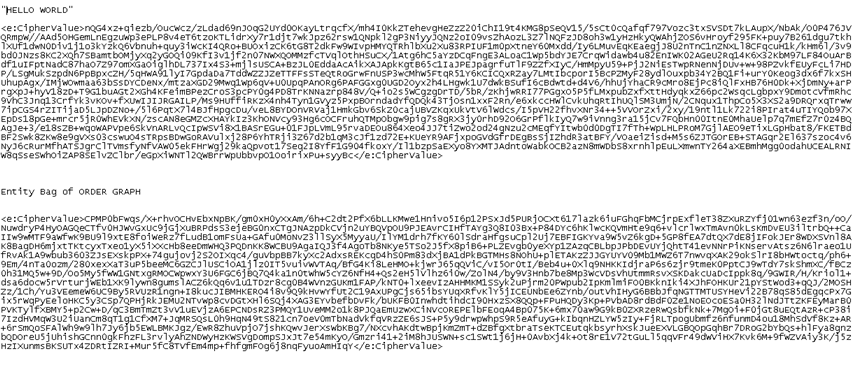
When digging into the message trace, here is the payload of the Hello World (it’s encrypted (symmetric) – so slightly larger than the actual 11 letters :-)) and the payload from the EntityBag when the entity is unmodified.

Next I edited the order. I modified one value in the order and one value in each detail. I deleted two details from the order.

Here’s what the EntityBag looks like after this:

Yet the payload is not very much different in size than before

It’s good to see the size of this as stake in the ground. It’s only one entity graph. Now you can see why serializing an objectcontext can be very expensive! The whole concept is still very interesting. I can see using this thing carefully, for example only sending entitybags for modified entities and not wasting the bandwidth to send a whole entitybag that just says “nothing’s changed”.

I’ll dig further (thanks for the great entertainment Danny) and tomorrow I’ll show how I built the service. There are a few WCF tricks you need to be aware of.

I haven’t fiddled with WCF in a while and it was fun digging in again and poking around in the messages.

Speaking of Ent. Framework providers – what about Access/OleDB?

My last post was about LINQ and EF Data Providers, which made me think of this.

I received an email recently asking if I knew of anyone writing an Entity Framework provider for Access.

I don’t happen to know of any.

However there’s a reason.

In the forums, there is a post from July where Danny Simmons explained the hurdles with a possible Access provider:

The OLE-DB ado.net provider has not been extended to support the entity framework, and we do not currently have plans to do so in our first release.  Further, this would be a fairly difficult effort because OLE-DB doesn’t provide enough information in general to translate CQTs (canonical query trees–the entity framework intermediate query representation) to a particular back-end query syntax.  So, while it would be possible to write an Access provider which would translate from CQTs to the particular query syntax that access uses, we don’t have an access-specific ado.net provider, and the general OLE-DB provider would not be able to do the job.

We have done some internal prototyping of how Access and the entity framework might work great together in the long-run, but those were just explorations, and we will not have direct support for Access in the first release of the entity framework.


Should database providers be targeting LINQ or Entity Framework?

People are always asking “when will I be able to use LINQ against databaseA or databaseB?” and “when will I be able to use Entity Framework against databaseA or databaseB?”

In my mind this is the same question, though most who are asking don’t realize it. Why?

An Entity Framework provider gets all of the benefits of the Entity Framework and also gets LINQ for free by way of LINQ to Entities.

If a database vendor wants developers to be able to perform LINQ queries against their database, it’s not a stretch to think that they might also want developers to be able to use their database within the Entity Framework.

Why write two providers (a LINQ provider AND an EF provider) when they can write just an EF provider and with it, get LINQ capabilities as well?

An added benefit is that with Entity SQL, it is possible to add provider specific functions.  So when a developer reaches a wall trying to write a LINQ query, the can just step back and use Entity SQL for those cases.

I’m definitely using LINQ to SQL where it makes sense for me. In fact, I’m waiting for a sysadmin to throw .NET 3.5 on my client’s web server so I can deploy my first production solution that uses LINQ to SQL! 🙂

But for any other db’s, I’m not waiting to see who is writing LINQ providers for their databases, but who is writing EF providers (here’s a current list, by the way).

Danny Simmons is providing guidance for dealing with EF and Web Services

It seems to me that Danny Simmons must be working on v2 of Entity Framework.

The posts he has written in the past week are examples of things that would probably have been in V1 had they had the time and resources. Now they are winding down v1, building up the team and thinking about v2.

Danny has written three blogs posts filled with really handy extension methods for entity framework (and LINQ to Objects) [here’s the third which contains pointers to the first two] and now he is building a state bag for dealing with getting  entities across boundaries SOA style (i.e. web services and dealing with the limitations of XML serialization – something many of us have been writing about for a while).

I”m really pleased to see this coming out of Microsoft (although what happened to whitepapers? ;-)). I have come up with my own methods (some with help from Danny and some on my own) but it’s always a little unnerving when you are just making your best guess at what they might have planned for.

Months ago I started a thread on the MSDN forum about this issue and it ended up being a 3 or 4 page thread because every time someone on the team said “well, just do this” I said “no – that doesn’t really solve the problem”. I was pretty relentless (thanks to all of the work I have done with web services and ws-* in the past) and finally Danny ended the thread with “okay, obviously there’s more we need to look at here.”

Since then I have struggled to come up with disconnected solutions that deal with binary and xml serialization and presented them at a few conferences. This was with Beta2 and there are some new goodies in Beta3 that will ease the pain somewhat but it’s still pretty complex.

For the last week or so, Danny has been writing a series of blogs where he’s using his indepth understanding of entities, object services, statemanagment, etc. to build a “state bag” for transferring the whole kit ‘n caboodle across processes. It’s impressive as hell but there was something bugging me that I was dwelling on, and Roger Jenning’s pointed it out on his blog as well.The answer to “why is ObjectContext not serializable?” is that it’s big and it would not be scalable. And no, I’m not suggesting that Danny forgot this. 🙂 Which is why I’m biding my time to see how it comes out.

I’m assuming that Danny’s state bag is a proof of concept for a v2 solution (though he has been clear that because of some obvious issues with interop, it just may not go in.) And as he suggested in today’s post, readers (like me) are probably “chomping at the bit” to see how he does the object context part so that we can see how streamlined it is.

Most people have no clue how deep Entity Framework goes and what the ADO.NET team is setting up for us to be able to do with it down the road. It’s probably clear by now that I’m really excited about Entity Framework and I’m struggling to keep up with all of the great ideas that people are trying out as evidenced in the forums.

So while we’re all looking forward to the release of Entity Framework, I’m already starting to get excited about what’s going to come in V2.

Thinking about the EntityDataSource

I’ve been thinking about the EntityDataSource that has been mentioned in the forums. It is something that is going to be added to Entity Framework by RTM, but it doesn’t exist in current bits for us to experiment with.

The reason I’ve been thinking about it is because of some of the issues/confusion with the LINQDataSource and I’m really hoping that the EF team will be looking at that, learning from it, and making sure that some of those problems don’t exist in the new component.

Most of the issues with the LINQDataSource are a result of very realistic limitations. But where I see the problem is just the difficulty many users have using it because they don’t understand what’s going on underneath and to work within the limitations, there are some very non-intuitive things they need to do.

I wrote a bunch of LINQDataSource demos for a presentation and spent a lot of time learning workarounds in order to achieve some very common scenarios although not quite as common as the typical demos. That’s where I hope EntityDataSource makes it easier. I don’t want to have to work so hard to discover how to make it work.

Here’s an example of a something I think is a common scenario.

I have an Entity for SalesOrderHeaders from AdventureWorksLT.

I would like to have an editable gridview of these records.

I’d like to display the customer name in the grid not the customer ID.

Not too strange, right?

But there are a lot of issues encountered along the path to create this solution.

1)One of the most often asked questions about the LINQDataSource is “why can’t I edit?”. The answer is most often because the developer selected the fields they wanted displayed in the grid and a huge number of people don’t realize that they are creating an anonymous type by doing this. Yes there are some clues. The “advanced’ button goes away. There’s no “enable delete” etc. checkboxes on eh Task menu.

A better way? It would be much easier if the wizard started out by asking if you have any intention of editing and if the answer was yes, does NOT present the end user with the option to select fields.

An even better way? I know the model won’t allow this but it would be great to have another entity definition (subset of the properties) for this entity without creating an EntityKey conflict.

2) This also means that I can’t really take touch the CustomerName in the EntityRef (SalesOrderHeaders.Customer)unless I create an anonymous type, which I don’t want to do. So the next obvious solution is to create a LINQDataSource for the Customers and format the CustomerID column in my gridview to be a template field with a dependency on the CustomerLINQDataSource.

         <asp:templatefield HeaderText=”CustomerID” SortExpression=”CustomerID”>
                    <edititemtemplate>
                        <asp:DropDownList ID=”DropDownList1″ runat=”server”
                            DataSourceID=”LinqDataSource2″ DataTextField=”CompanyName”
                            DataValueField=”CustomerID” SelectedValue='<%# Bind(“CustomerID”) %>’>
                        </asp:DropDownList>
                    </edititemtemplate>
                    <itemtemplate>
                        <asp:Label ID=”Label1″ runat=”server” Text='<%# Eval(“Customer.CompanyName”) %>’></asp:Label>
                    </itemtemplate>
                </asp:templatefield>

But this creates yet another problem that I may not have any awareness of. The default deferred loading will cause an extra round trip to the database for each SalesOrderHeader record to get the CustomerName.

A better way? Give us a Deferred Loading or Eager Loading option in the wizard!

3) There is a really weird gotcha because we are using EntityRefs for the CustomerID/CustomerName DropDown. Editing doesn’t work properly unless you set the LINQDataSource property to StoreOriginalValuesinViewState to False. It’s logical but again, totally non-intuitive. If you don’t do it, you will get this error message:
“System.InvalidOperationException: Could not find a row that matches the given keys in the original values stored in ViewState.  Ensure that the ‘keys’ dictionary contains unique key values that correspond to a row returned from the previous Select operation.” That’s scary, huh? It took some googling to figure this one out.

A better way? If the LINQDataSource could trap this exception and give some better guidance about what the problem is and how to deal with it. Or something…


These are some of the things I spent a ridiculous amount of time on in order to get this scenario working. And seems like nothing compared to what Roger Jennings banged his head on!

It would be great not to have to go through this again with the ObjectDataSource, if it’s possible to make some of these issues easier to deal with!
Entity Framework Extension Methods

A few weeks ago, I was mooning over Extension Methods. Somehow, in the collection of language enhancements to VB9 and C#3, they have become a bit of a sleeper feature in light of LINQ. Everything is though, right?

So I wrote about them and thought about them, but then went back to my task at hand.

Danny Simmons also recently started seeing the light about Extension MEthods. But instead of going back to what he was doing, he spent quite a bit of time playing with them and is now blogging an Entity Framework Extension Method Extravaganza!

He’s going crazy with it already. What fun!
