Category Archives: Data Access

Implement SELECT Stored Procedures that return miscellaneous data in CTP2 of EF Designer

Note: This blog post explains theory as well as steps to implementing the stored proc. If you read my blog regularly,  you are used to this.

11/30/09:Anoter note! Don’t miss the fact that this is for the verison of EF in VS2008 SP1. Things have been greatly improved in VS2010. Check out this *much newer* post: http://thedatafarm.wpengine.com/blog/data-access/a-big-step-for-stored-procedures-in-ef4/

As with the previous CTP Wizard, the Wizard in the new EF Tools (CTP2) will create functions in the Store Layer of the model to represent stored procedures in the database that the wizard is building a model from.

And as with the previous CTP, that’s all you get. It doesn’t implement it all the way through to the conceptual layer to be used in your applications. The documentation for the previous CTP showed how to complete DML stored procedures (Insert, Update & Delete) but not SELECT stored procedures that return data. So, I wrote a blog post in September that describes how to implement a SELECT stored procedure in EDM.

With the new tools, the Insert/Update/Delete functions are very simple to create now. Which is great. Select stored procedures with results that match an entity is also a breeze (see Guy Burstein’s blog post that walks through these).

But as of yet, there is no help for the Select stored procs that return miscellaneous results.

Therefore I wanted to update the instructions since you can do a few more things with the wizard for this. But you’ll still need to work with the raw XML of the EDMX file.

Let’s start with a simple example.

There is a stored procedure that I added to the AdventureWorksLT db that takes a year as a parameter and returns a list of Company Names with their total sales for the year. The resulting schema contains TotalSales, CustomerID and CompanyName. This result set doesn’t line up with any tables/views in the db or entities in my conceptual layer.

When the EDM is generated from the database the stored proc is realized in the StoreLayer. You can see this in two ways.

The Model Browser
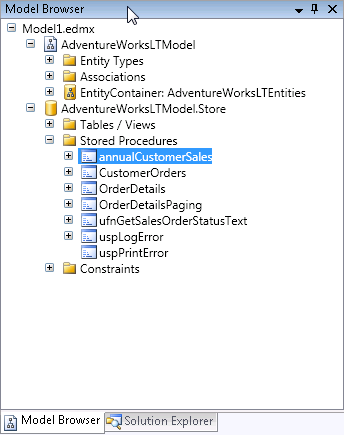
Or in the raw xml of the EDMX file, in the Storage Section:

    <Function Name="annualCustomerSales" Aggregate="false"                 BuiltIn="false" NiladicFunction="false"                 IsComposable="false"                 ParameterTypeSemantics="AllowImplicitConversion"                 Schema="dbo">         <Parameter Name="fiscalyear" Type="char" Mode="In" />       </Function>

You can see that it does not determine the output parameters, which would be a daunting task to build a parser for.

So you need to create the following:

1) An entity that matches the schema of the results (TotalSales, CustomerID, CompanyName)
2) A function in the conceptual layer that maps back to the function in the store layer (called an import function)
3) Every entity needs to map to something in the store layer, therefore you need a fake table in the store layer that matches the entity in the conceptual layer .
4) The entity in the store layer needs an entity set
5) Lastly, the entity in the conceptual layer needs to map back to the entity in the store layer.

#3 through #5 are extraneous to what we are trying to do, but EDM has rules that need to be followed, so we need to throw all that extra stuff in there. It would be great if we could somehow just map the function to the entity – or if we could just use the function and return an anonymous type. But we can’t. So, let’s just move forward.

This seems like a lot of steps, but once you do it, it will make sense.

Step 1) You can create entities using the designer, so this isn’t so bad. Create a new entity and add the properties that are returned in the results. Here’s what mine looks like:
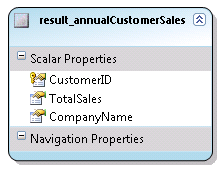
The customerID is flagged as a Key for the entity. An EntitySet will automatically be created. In my model it was named "result_annualCustomerSalesSet". Be sure to set the properties of the properties correctly (type, length, etc.) You can use properties of other entities in the model for clues as to what those values should be.

Save the model.

Step 2) Create an import function. In the Model Browser (right click in the designer and choose Model Browser if it isn’t visible), locate the stored procedure inside the Store layer (see screenshot above for a reminder). Right click on the stored proc and choose Create Function Import. You’ll get a screen where you need to fill out the Function Import Name and select an entity from a drop down list.
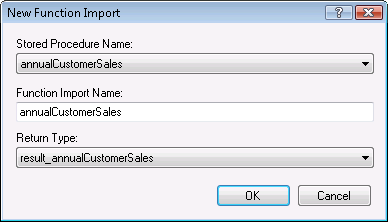
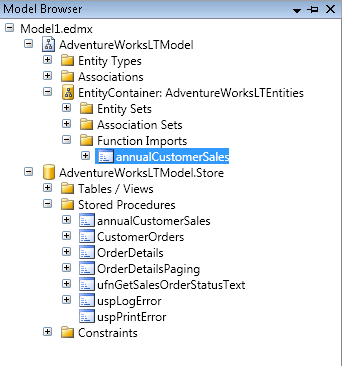
After you hit okay, the EDM will be updated and you will see the function import in the Model Browser.

Note that if the results matched an existing entity (a mapped entity, that is) you would be finished here.
Step 3) Create an Entity in the Store Layer that the result_annualCustomerSales entity will get mapped to. I cheat a little here by copying and pasting the Entity from the conceptual layer into the store layer then make appropriate edits.

In the conceptual layer it looks like this:

    After pasting this into the store layer section with the other EntityType elements, I edit so that the 
store
entity looks like this
        <EntityType Name="result_annualCustomerSales">            <Key>                <PropertyRef Name="CustomerID" />            </Key>            <Property Name="CustomerID" Type="Int32" Nullable="false" />            <Property Name="TotalSales" Type="Decimal" Nullable="true" 
 Precision="19" Scale="4" />            <Property Name="CompanyName" Type="String" Nullable="true" 
 MaxLength="128" Unicode="true" FixedLength="false" />        </EntityType>
 

          <EntityType Name="result_annualCustomerSales">
              <Key>
                  <PropertyRef Name="CustomerID" />
              </Key>
              <Property Name="CustomerID" Type="int" Nullable="false" />
              <Property Name="TotalSales" Type="money" Nullable="true" />
              <Property Name="CompanyName" Type="nvarchar" Nullable="true" />
          </EntityType>

If you need help determining what the property properties (eg type) should be, look at some of the other Entity Types in the store model for clues. I use the same trick with the conceptual entity to figure out precision and scale for the TotalSales property.

Step 4) You also need the EntitySet in the store layer. Copy and paste that, too.

Entity Set in Conceptual Layer
<EntitySet Name="result_annualCustomerSalesSet" 
 EntityType="AdventureWorksLTModel.result_annualCustomerSales" />
 
Entity Set in Store Layer 
<EntitySet Name="result_annualCustomerSalesSet" 
EntityType="AdventureWorksLTModel.Store.result_annualCustomerSales"
 Schema="dbo"/>


Almost done!

Step 5) Map the Conceptual Entity to the Store Entity.

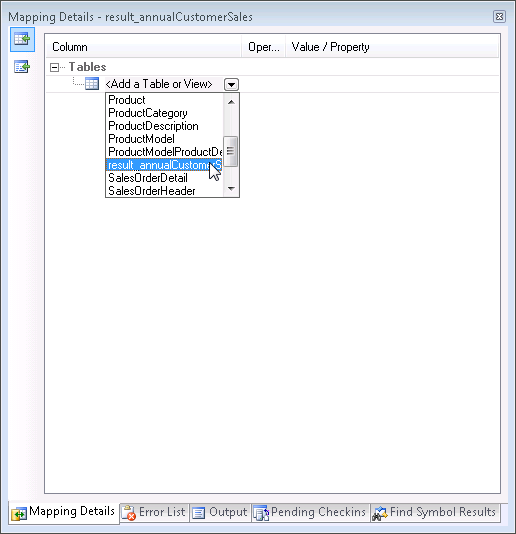
If the Mapping Details are not showing, click anywhere in the designer and choose Mapping Details. By default it will show up in the same area as the error list, etc. in the IDE.

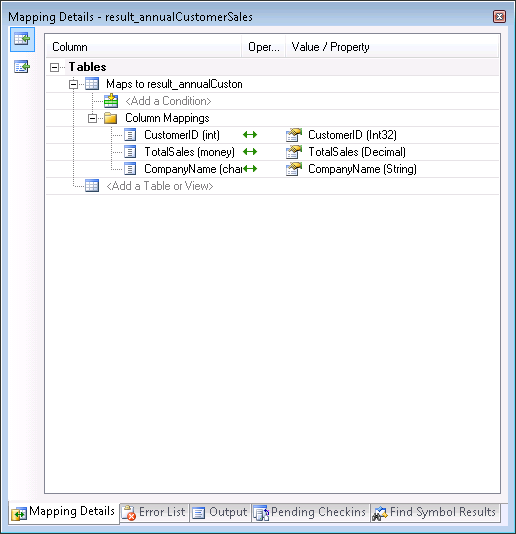
In the designer, select the new Entity. You will see a little info about it in the Mapping Details window. Drop down the list for "Add a Table or View" and choose the table definition you created in the store layer.

All matching properties will automatically be mapped.

FINALLY YOU ARE DONE!

Now let’s go to the code and see the sproc in action!

    Dim aw As New AdventureWorksLTModel.AdventureWorksLTEntities
    Dim qsales = aw.annualCustomerSales("2004")
    For Each cust In qsales
      Console.WriteLine(String.Format("{0}: Sales= {1:C}", cust.CompanyName, cust.TotalSales))
    Next

Here’s a bit of the output

Aerobic Exercise Company: Sales= $2,361.64
Bulk Discount Store: Sales= $98,138.21
Eastside Department Store: Sales= $92,663.56
Coalition Bike Company: Sales= $2,669.32
Instruments and Parts Company: Sales= $70,698.99
Many Bikes Store: Sales= $81,834.98
Closest Bicycle Store: Sales= $39,531.61
West Side Mart: Sales= $87.09
Riding Cycles: Sales= $86,222.81
Futuristic Bikes: Sales= $272.65
Vigorous Sports Store: Sales= $1,170.54
Thrilling Bike Tours: Sales= $15,275.20
Trailblazing Sports: Sales= $45,992.37
Paints and Solvents Company: Sales= $14,017.91
Channel Outlet: Sales= $608.18
Thrifty Parts and Sales: Sales= $1,379.17
Engineered Bike Systems: Sales= $3,754.97
Essential Bike Works: Sales= $45.20
Who’s preparing Entity Framework Providers?

I thought I saw this a week or so ago but couldn’t find it again, but it just appeared on David Sceppa’s blog.

“It” is a list of vendors who will have Entity Framework providers out within 3 months of Entity Framework’s release.

While Oracle is not on there DIRECTLY, there are 3rd party companies working on Oracle providers as well.

In the list are:

Oracle, MySQL, PostgreSQL, SQL Lite, DB2, Informax Dynamic Server, and VistaDB.

DataDirect will have their host of providers out sometime in 2008.

Firebird will have their db also sometime in 2008.

Get the details on David’s blog.


Are you using Entity SQL? Do not miss Zlatko’s blog

Zlatko Michailov has been posting some awesome stuff on his blog.

There are two that I want to highlight.

The first is because it helps me answer a question I am often asked is explaining why Entity Framework is not an ORM and how it compares/contrasts to ORMs.

The second is announcing that his tool that will REAAAAALLY help with writing ENtity SQL is now on codeplex; it’s called eSqlBlast. Zlatko demo’d this in his DevTEach session in Vancouver. HE wrote it himself and it is something like Query Builder for SQL SErver, where you can write queries (with the help of intellisense) and test them out rather than writing and debugging directly in your project (where there could be many other problems in the way that have nothing to do with syntax). It’s a must have tool for writing EntitySQL as we work our way into gaining experience and being more comfortable with it.

I must say that Zlatko’s blog post about eSqlBlast is pretty humble – just a few sentences. It’s a hugely impressive tool and he deserves gobs of praise for it. Try it out and let him know what you think!

Embedding EDM schema files in Entity Framework Beta 3

Note: With the RTM of Entity Framework, the model’s Metadata Artifact Processing property is set to Embed in Output Assembly by default, whcih is the opposite of what is described in this blog post based on Beta 3.

One of the new features in Entity Framework Beta3 is the ability to embed the csdl, msl and ssdl schema files into the assembly which contains the model.

This is useful in scenarios where, like in a few of my solutions, you want to have a separate project to host the model and then use that project in various applications. In that case you need to make a reference to the dll with the model and the application using the model will need to know where to find the schema files through the metadata property of the special connection string.

At design time, you work with the EDMX file in the designer and you can also manually edit it’s XML if and when necessary. When the project is compiled, the 3 key sections of the EDMX file are spit out to the separate schema files (*.csdl, *.mls, *.ssdl) which are used by the EF APIs.

With the schema files embedded into the dll, we don’t have to keep track of the files.

Here’s how to pull it off. Note that there is a workaround in these instructions for a known bug.

My project that hosts the model is called AdventureWorksModel. In it are the model as well as some additional code that extends the functionality of the code generated classes.

By default, the EDMX file’s Build Action property is set to “EntityDeploy”. This is important to note in case you change it for some reason. It does need to be “EntityDeploy”. (I learned that the hard way, which is why I make a point of mentioning it.

Open the EDMX file in the design window and then you will see a new property in the property window called Metadata Artifact Processing. The default of this is “Copy to Output”.

To get around a current known bug, build the project with the property set to “Copy to Output”. Then change the Metadata Artifact Processing property to “Embed in Output Assembly”. Eventually you won’t need to build with Copy to Output first.

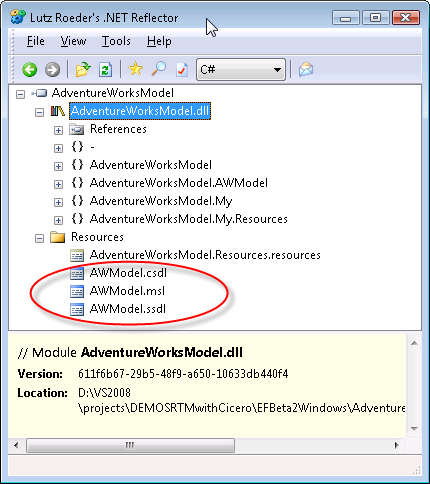
Build the project. After building, if you use a tool like Reflector, you can see the files have been compiled into the dll as in the screenshot below.

If you check the connection string in the app.config for the project you will see that there is a reference to the projects resources in the metadata properties, rather than to a file path.

<add name=“Entities”
connectionString=“metadata=res://*/AWModel.csdl|res://*/AWModel.ssdl|res://*/AWModel.msl;
provider=System.Data.SqlClient;provider connection string=&quot;
Data Source=127.0.0.1;Initial Catalog=AdventureWorksLT;Integrated Security=True;MultipleActiveResultSets=True&quot;”
providerName=“System.Data.EntityClient” />

Now you can reference the project or the dll directly, I have been successful with both methods.

The connection string in the model’s project needs to get copied into the config file of the app.

Then you should be good to go.

I did deploy the solution copying only the exe, the dll for the model and the app.config for the exe and it worked like a charm. No ssdl, csdl or msl files came along for the ride.

Thanks to Mike Kaufman and some others on the team for help as I tried to figure out how to get through this.

An arhitectural note… embedding the files will be useful in a number of scenarios. However there will also be many scenarios in which you do not want the schema files compiled into the dll so that you can replace them easily as needed without having to redeploy a dll. Granted with .NET, deploying a dll can be just as easy as deploying a new xml file, but I know there will be cases where I will prefer the loose coupling.

For those cases, I’ll want to work with the EntityDeploy msbuild task directly so that I can define the output location of the files that are built and easily maintain a common location as I did in this blog post which showed how to do it in Beta 2 (though that particular solution is no longer applicable). I’ll be fiddling with the msbuild task shortly.

ASP.NET Dynamic Data Support – use LINQ to SQL and (in the future) LINQ to Entities

Scott Guthrie has a post on Dynamic Data Support for ASP.NET that’s in the Extensions CTP. Based on my little rant from yesterday, I wanted to point out this:

One of the cool new features is something we call “ASP.NET Dynamic Data Support”.  In a nutshell this enables you to really quickly build data driven web-sites that work against a LINQ to SQL (and in the future LINQ to Entities) object model – and optionally allows you to-do this without having to build any pages manually.

EF ObjectStateManager.GetObjectStateEntries (plural)

I’ve been using the GetObjectStateEntry method for a while so that I can view and interact with the state of a particular entity that I have in hand.

Today I used the plural version of this method for the first time and boy do I like it!

GetObjectStateEntries takes as a parameter an EntityState enum: Added, Modified, Deleted, Unchanged or Detached.

It provides a perfect opportunity to do some work on entities prior to hitting the datastore during a save changes event.

For example, if you have an entity with a property to track the modification date you could update that property any time any other property in the entity is changed which might be wasteful. But with the GetObjectStateEntries method, I am able to just update the Modified Date property on all changed objects at once just before I save changes.

Here’s some code for dealing with the Customer entity that is derived directly from the customer table in the AdventureWorks database.

Now, this poses an architectural question and you may want to put this particular business logic elsewhere, but it’s merely a demonstration of what you can do with this method.

Because the generated classes are partial classes, I just create another partial class for my AdventureWorksLTEntities class and intercept the SaveChanges method. Then I grab all of the modified objects, use the Entity property to filter just Customers, then changed the Modified Date property. Next I grab the Added objects, change the Modified Date and also add in a default password hash and password salt. These are required for customer rows. (Read more about hashing passwords here on Beth Massi’s blog.)

Namespace AdventureWorksLTModel
 
  Partial Public Class AdventureWorksLTEntities

    Private Sub AdventureWorksLTEntities_SavingChanges(ByVal sender As Object, ByVal e As System.EventArgs) Handles Me.SavingChanges
      Dim changedEntities = Me.ObjectStateManager.GetObjectStateEntries(EntityState.Modified)
      For Each stateEntryEntity In changedEntities
        If TypeOf stateEntryEntity.Entity Is Customer Then
          Dim cust As Customer = stateEntryEntity.Entity
          cust.ModifiedDate = Now
        End If
      Next
      Dim addedEntities = Me.ObjectStateManager.GetObjectStateEntries(EntityState.Added)
      For Each stateEntryEntity In addedEntities
        If stateEntryEntity.Entity.GetType() Is Customer Then
          Dim cust As Customer = stateEntryEntity.Entity
          cust.ModifiedDate = Now
          ‘password hash cannot be null
          ‘for demo purposes just put a default string in there
          Dim strPassword As String = “p@ssw0rd”
          Dim encoder As New System.Text.UTF8Encoding()
          Dim SHA1Hasher As New Security.Cryptography.SHA1CryptoServiceProvider
          Dim hashedBytes As Byte() = SHA1Hasher.ComputeHash(encoder.GetBytes(strPassword))
          cust.PasswordHash = Convert.ToBase64String(hashedBytes)
          ‘customer table also needs salt for hash
          Dim buffer() As Byte = New Byte(5) {}
          Dim rng As New System.Security.Cryptography.RNGCryptoServiceProvider()
          rng.GetBytes(buffer)
          cust.PasswordSalt = Convert.ToBase64String(buffer)
        End If
      Next
    End Sub

  End Class
End Namespace

I have a feeling that this existed in Beta2, but I have updated both of my boxes and don’t feel like digging into a VPC just to verify.

ADO.NET DataServices and ANY IQueryable

One of the changes with the new CTP release of ADO.NET Data Services (formerly Astoria) is that you can create a service against any iQueryable, not just Entity Framework. This is huge.

Roger Jennings points to Guy Burstein’s how-to with Astoria (I guess it’s time to update my own now outdated posts) and makes the following comment:

“Like Andy Conrad, Guy uses LINQ to SQL instead of the Entity Framework as the data source. I have the feeling this substitution will become universal, at least until RDBMS vendors other than Microsoft deliver EntityClient data providers.”

So this bugs me a little. Why? Because the issue is that right now, Entity Framework only works with SQL Server. But hello, what do you people think LINQ to SQL works with? It’s called LINQ to SQL for a reason! 😉

Okay, rant over, back to work…

Using Entity Framework entities as Data Sources in a WinForms App

I’ve done this demo many times in conference and user group sessions. Someone on the ADO.NET forums asked how to do it and I thought I would just do a quick tutorial with screenshots.

What this Tutorial does is demonstrate how to create and use a data source from a particular entity in the model. I’m just doing simple drag and drop and no filtering or anything here with the goal of just a quick basic walkthrough for getting started.

Start by creating a Windows Application.

Add an Entity Data Model.

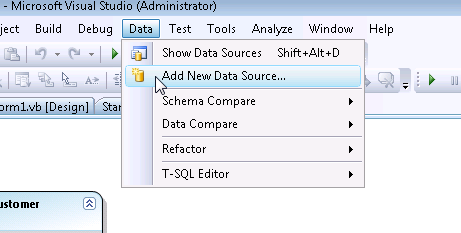
Select Data from the menu and choose Add New Data Source

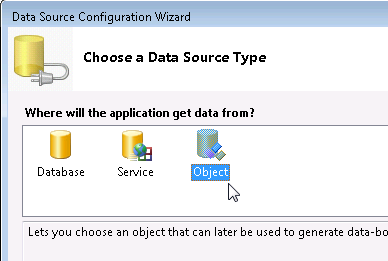
In the first page of the wizard, choose Object as your Data Source Type.

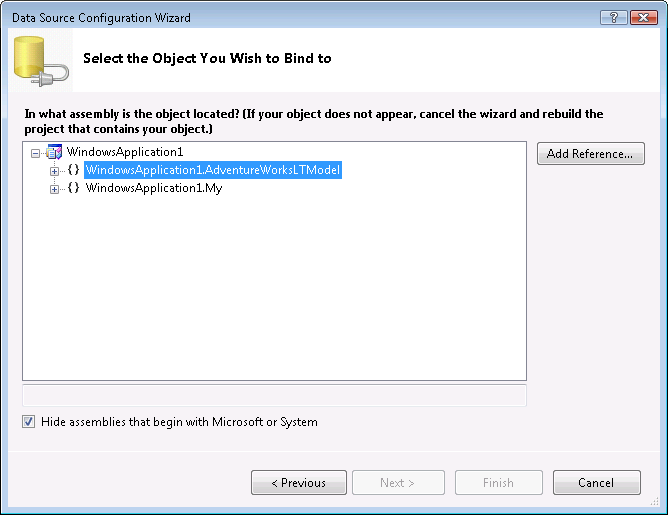
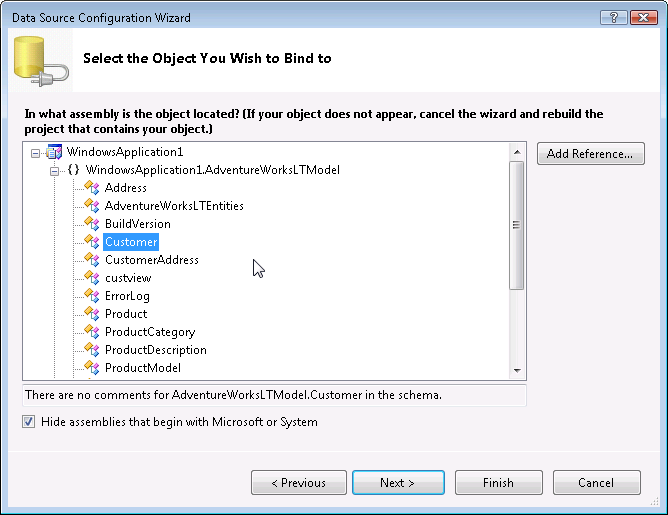
The next screen of the wizard will show the namespaces in the current solution. Open up the namespace for the application

then choose the entity which you want to use as a Data Source. I will pick customer.

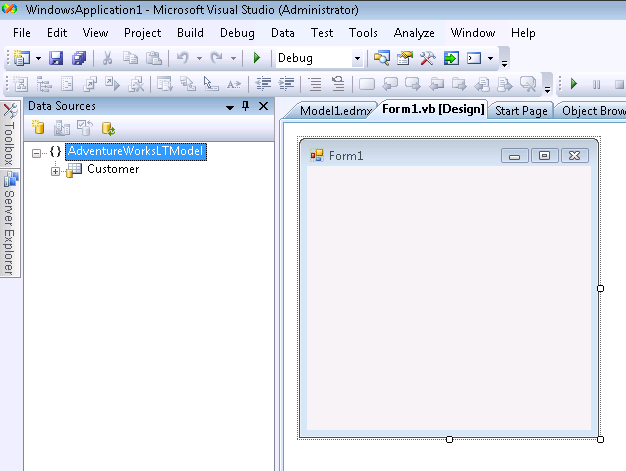
Then you can Finish the Wizard.

Now to get easy access to the datasource, go back to the menu and choose Show Data Sources from the Data menu.

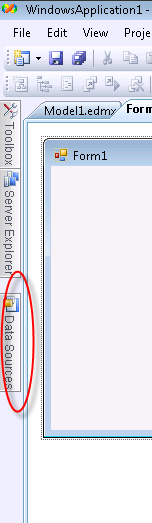
The DataSources Window will be placed in your IDE in it’s default location. Mine docks with the windows on the left.

When it’s not pinned it gets tucked away with the others. You can undock it and put it wherever you want.

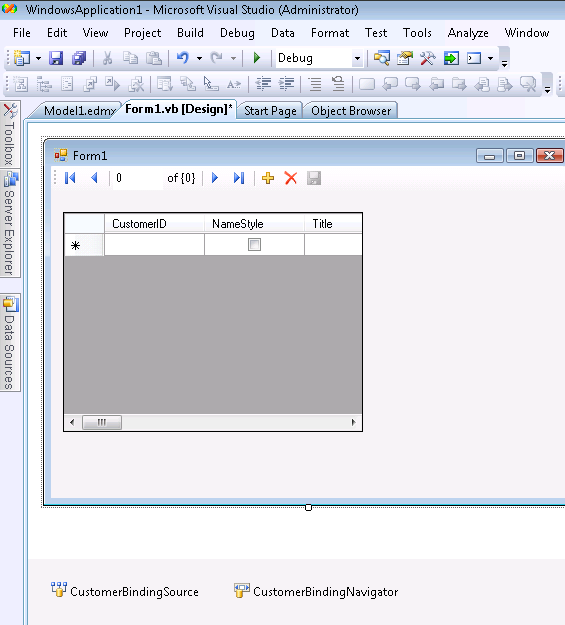
I can now drag and drop the customer data source onto the windows form to get the automatic DataGridView and Navigation toolbar (this is normal behavior for DataSource and not specific to Entity Framework).

There are a few more steps to actually getting user interaction with this. You need to populate the Binding Source and if you want to edit, you’ll need to add a little code to the save button on the toolbar.

You’ll need to enable the BindingNavigatorSaveButton (just click the save icon on the navigator toolbar and change it’s Enabled property to True). Additionally, you’ll probably want to format the grid which you can do easily from it’s SmartTag and more thoroughly through the properties window.

Here’s what the code behind looks like in my form enabling me to view, add, delete, edit and save data.

Imports WindowsApplication1.AdventureWorksLTModel
  Public Class Form1
   Private aw As AdventureWorksLTEntities
   Private Sub Form1_Load(ByVal sender As System.Object, ByVal e As System.EventArgs) _
    Handles MyBase.Load
     aw = New AdventureWorksLTEntities
     CustomerBindingSource.DataSource = aw.Customer.OrderBy(Function(cust) cust.CompanyName)
   End Sub
   Private Sub CustomerBindingNavigatorSaveItem_Click(ByVal sender As System.Object, _ 
   ByVal e As System.EventArgs) Handles CustomerBindingNavigatorSaveItem.Click
     aw.SaveChanges()
   End Sub
 End Class

Note that because the AdventureWorks Customer table has the following constraints: ModifiedDate must be a valid date value and the PasswordHash and PasswordSalt fields cannot be Null, I have extended the entity class to take care of these things when SaveChanges is called.

“Astoria” (ADO.NET Data Services) CTP Released

Finally it’s real live production bits to play with!!

In addition to finally using real bits, key to this release are the finalization of response formats (XML by way of ATOM and JSON), security, an AJAX client, querying with LINQ when you are using one of the clients. THere’s a lot more.

Mike Flasko published 4 blog posts on the Astoria Team weblog yesterday:

ADO.NET Data Services (“Project Astoria”) CTP is Released

Viewing Data Services Responses Using Atom Serialization in Internet Explorer

ADO.NET Data Services Dec2007 CTP – Validation and Access Control

LINQ to ADO.NET Data Services