Category Archives: Data Access

Finishing up READ Stored Procs brought in by the Entity Framework EDM Wizard

When you build an EDM from an existing database in Entity Framework, you can get Views & Stored Procedures in addition to tables. You’ll find that if you select Stored procedures, you will also get your functions.

The stored procedures are only defined in the storage layer. The return type is not determined therefore there is no Entity created or the mapping that would be between the two.

The Entity Framework documentaiton describes how to build Insert, Update and Deleted sprocs but not how to build sprocs that return data.

I got some help on the forums which showed building a stored proc in the EDM from scratch, but I wanted to take one that had been put into the model and complete it. I’ve written a short article that walks you through step by step that will go up on www.DevSource.com shortly, but in the meantime, I wanted to show how I finished up the CustOrderHist procedure. The article goes into more detail and explains the what’s and why’s. I will put a link to it in this post when it goes online.

What you will see created by the wizard is this function in the storage model section of the EDMX.

<Function Name=”CustOrderHist” Aggregate=”false” BuiltIn=”false” NiladicFunction=”false” IsComposable=”false” ParameterTypeSemantics=”AllowImplicitConversion” Schema=”dbo”>
<Parameter Name=”CustomerID” Type=”nchar” Mode=”in” />
 </Function>

You’ll need to create an entity, entityset and FunctionImport in the conceptual model. In the storage model, you’ll need a matching entity and entity set and then you need to map the FunctionImport of the Conceptual model to teh Function in the storage as well as map the entitysets.

Here are what the rest of the code chunks look like.

I created the Entity using the designer and that automatically created the EntitySet.

<EntityType Name=”CustOrderHistResult” >
  <Key >
      <PropertyRef Name=”ProductName” />
  </Key>
   <Property Name=”ProductName” Type=”String” Nullable=”false” MaxLength=”40″ />
   <Property Name=”Total” Type=”Int32″ Nullable=”false”/>
</EntityType>

<EntitySet Name=”CustOrderHistResultSet” EntityType=”NWModel.CustOrderHistResult” />

The FunctionImport in the Conceptual layer which has pointers to the entity and entity set.

<FunctionImport Name=”CustOrderHist” EntitySet=”CustOrderHistResultSet”
ReturnType=”Collection(Self.CustOrderHistResult  >
   <Parameter Name=”CustomerID” Type=”String” Mode=”in” />
</FunctionImport>

In the storage layer, add the matching entity and entity set; they look like this. Remember to put them in the correct sections!

<EntityType Name=”CustOrderHistResult” >
  <Key >
      <PropertyRef Name=”ProductName” />
  </Key>
   <Property Name=”ProductName” Type=”nvarchar” Nullable=”false” MaxLength=”40″ />
   <Property Name=”Total” Type=”int” Nullable=”false”/>
</EntityType>

<EntitySet Name=”CustOrderHistResultSet” EntityType=”NWModel.Store.CustOrderHistResult”/>

And lastly the mappings:

The first one I did manually.

<FunctionImportMapping FunctionImportName=”CustOrderHist”       FunctionName=”NWModel.Store.CustOrderHist”/>

The second I actually created by using the designer. Here is the xml that was generated

<EntitySetMapping Name=”CustOrderHistResultSet” >
   <EntityTypeMapping TypeName=”IsTypeOf(NWModel.CustOrderHistResult)” > 
      <MappingFragment StoreEntitySet=”CustOrderHistResultSet” >
         <ScalarProperty Name=”ProductName” ColumnName=”ProductName” />
         <ScalarProperty Name=”Total” ColumnName=”Total” />
      </MappingFragment>
   </EntityTypeMapping>
</EntitySetMapping>

With all of this in place, I can now use or query the stored procs as I would any of the other entities in my model

Dim query = From CustOrders In nw.CustOrderHist(“ROMEY”) _
    Where CustOrders.Total > 10 Select CustOrders Order By CustOrders.ProductName

Convertinga LINQ to Entities query to a DataTable

[Update at bottom of post]

I wrote this in response to a question on the ADO.NET Orcas forums and thought I would copy it here.

Note that Danny Simmons writes more information about Entity Framework and DataTables in the thread.

Here’s my solution for now…

LINQ to Datasets does allow for conversions from queries to Datatables, but it doesn’t seem to be able to deal with ObjectQueries. I then queried my objectquery to return an IQueryable and also an IEnumerable, but I couldn’t get the datatable conversion to work. Look for CopyToDataTable in the VS2008 documentation for more info on that.

So since I couldn’t get at it I rolled my own using Mike Taulty’s previous example (not for ObjectQueries though) as a start.

This example uses the ObjectStateManager so I can dynamically get at the values. As long as I’m already using the ObjetStateManager, I also use it to get some metadata, even though I could have used the MetadataWorkspace for that.

Assuming we are starting with nwrows which is an ObjectQuery for a simple Linq to Entities query…

  Dim dt As New DataTable

  Dim currow As Integer = 0  ‘just a counter to keep track of my for each position

  For Each r In nwrows
  ‘get statemanager for current row
   Dim stateEntry = nwts.ObjectStateManager.GetObjectStateEntry(CType(r, Data.Objects.DataClasses.IEntityWithKey).EntityKey)

   ‘this will only happen once, build the dataColumns, I’m not bothering with their names

   If dt.Columns.Count = 0 Then
    For i = 0 To stateEntry.CurrentValues.FieldCount – 1
     dt.Columns.Add()
    Next
   End If

   ‘now we can add data, grabbing current values
   Dim dtrow As DataRow = dt.NewRow

   For idata = 0 To stateEntry.CurrentValues.FieldCount – 1
    dtrow.Item(idata) = stateEntry.CurrentValues(idata)
   Next

   dt.Rows.Add(dtrow)

   currow += 1

  Next

[Update]

Note: It looks like Andrew Conrad, who is on the ADO.NET team, also got inspired today by the forum question as he has written a much more indepth (read “not quite the hack that I wrote”) solution to the loss of the datatable conversion capability. In fact he explains why we can’t use it with non-Linq to Dataset queries:

In the original Linq CTP and the first Orcas Beta, we included a DataSet specific Linq operator called CopyToDataTable<T> (It was called ToDataTable at one point also).  For Beta 2 of Orcas, we ended up restricting this method to only work with DataRows (or some derived type) via a generic constraint on the method.  

So, like a good soldier, he wrote up some sweet code to do the job. I was only pulling in the values. He’s got tablenames and types and subtypes as well, with a completely different approach. Definitely check it out. I will probably just use this rather than my hack and try to consider my experimenting with StateObject a good use of my time yesterday! 🙂

How do LINQ to Entities queries surface in the database?

While Jim Wooley is looking at performance in LINQ to SQL, I’ve finally pulled the VS2008 installation on my VPC out of the mysteries of SQL Server Express and installed SQL Server Developer Edition so that I can look at my queries as they come into profiler.

Note that this is all based on VS2008 Beta2 and Entity Framework Beta2. I’m using AdventureWorksLT as my test db.

QUERY #1

A Simple Query

Let’s just grab customers with this code:

Dim custs = aw.Customer

While I might lazily write TSQL that looks like

select * from Customer

EF creates a more explicit query, which makes perfect sense to me.

SELECT
0 AS [C1],
[Extent1].[CustomerID] AS [CustomerID],
[Extent1].[NameStyle] AS [NameStyle],
[Extent1].[Title] AS [Title],
[Extent1].[FirstName] AS [FirstName],
[Extent1].[MiddleName] AS [MiddleName],
[Extent1].[LastName] AS [LastName],
[Extent1].[Suffix] AS [Suffix],
[Extent1].[CompanyName] AS [CompanyName],
[Extent1].[SalesPerson] AS [SalesPerson],
[Extent1].[EmailAddress] AS [EmailAddress],
[Extent1].[Phone] AS [Phone],
[Extent1].[PasswordHash] AS [PasswordHash],
[Extent1].[PasswordSalt] AS [PasswordSalt],
[Extent1].[rowguid] AS [rowguid],
[Extent1].[ModifiedDate] AS [ModifiedDate]
FROM [SalesLT].[Customer] AS [Extent1]

QUERY #2

When I just want to get one particular record, I ask for there are a few ways to do this.

First is to write a query that returns the whole iQueryable with a where clause to filter for the single item. Then I iterate through that one item “list”. Using method or query syntax:

Dim cust = aw.Customer.Where(Function(c) c.CustomerID = 37)
For Each c In cust
   Dim name = c.CompanyName
Next

Dim cust2 = From c In aw.Customer Where c.CustomerID = 37 Select c
  For Each c In cust2
   Dim name = c.CompanyName
  Next

I get a reasonable TSQL query on the other end

SELECT
0 AS [C1],
[Extent1].[CustomerID] AS [CustomerID],
[Extent1].[NameStyle] AS [NameStyle],
[Extent1].[Title] AS [Title],
[Extent1].[FirstName] AS [FirstName],
[Extent1].[MiddleName] AS [MiddleName],
[Extent1].[LastName] AS [LastName],
[Extent1].[Suffix] AS [Suffix],
[Extent1].[CompanyName] AS [CompanyName],
[Extent1].[SalesPerson] AS [SalesPerson],
[Extent1].[EmailAddress] AS [EmailAddress],
[Extent1].[Phone] AS [Phone],
[Extent1].[PasswordHash] AS [PasswordHash],
[Extent1].[PasswordSalt] AS [PasswordSalt],
[Extent1].[rowguid] AS [rowguid],
[Extent1].[ModifiedDate] AS [ModifiedDate]
FROM [SalesLT].[Customer] AS [Extent1]
WHERE 37 = [Extent1].[CustomerID]

QUERY #3

But watch what happens to the TSQL when I make my query more efficient, regardless of method or query syntax.

Dim cust = aw.Customer.Where(Function(c) c.CustomerID = 37).First
 Dim name = cust.CompanyName

SELECT
[Limit1].[C1] AS [C1],
[Limit1].[CustomerID] AS [CustomerID],
[Limit1].[NameStyle] AS [NameStyle],
[Limit1].[Title] AS [Title],
[Limit1].[FirstName] AS [FirstName],
[Limit1].[MiddleName] AS [MiddleName],
[Limit1].[LastName] AS [LastName],
[Limit1].[Suffix] AS [Suffix],
[Limit1].[CompanyName] AS [CompanyName],
[Limit1].[SalesPerson] AS [SalesPerson],
[Limit1].[EmailAddress] AS [EmailAddress],
[Limit1].[Phone] AS [Phone],
[Limit1].[PasswordHash] AS [PasswordHash],
[Limit1].[PasswordSalt] AS [PasswordSalt],
[Limit1].[rowguid] AS [rowguid],
[Limit1].[ModifiedDate] AS [ModifiedDate]
FROM   ( SELECT cast(1 as bit) AS X ) AS [SingleRowTable1]
LEFT OUTER JOIN  (SELECT TOP (1)
 [Extent1].[CustomerID] AS [CustomerID],
 [Extent1].[NameStyle] AS [NameStyle],
 [Extent1].[Title] AS [Title],
 [Extent1].[FirstName] AS [FirstName],
 [Extent1].[MiddleName] AS [MiddleName],
 [Extent1].[LastName] AS [LastName],
 [Extent1].[Suffix] AS [Suffix],
 [Extent1].[CompanyName] AS [CompanyName],
 [Extent1].[SalesPerson] AS [SalesPerson],
 [Extent1].[EmailAddress] AS [EmailAddress],
 [Extent1].[Phone] AS [Phone],
 [Extent1].[PasswordHash] AS [PasswordHash],
 [Extent1].[PasswordSalt] AS [PasswordSalt],
 [Extent1].[rowguid] AS [rowguid],
 [Extent1].[ModifiedDate] AS [ModifiedDate],
 0 AS [C1]
 FROM [SalesLT].[Customer] AS [Extent1]
 WHERE 37 = [Extent1].[CustomerID] ) AS [Limit1] ON cast(1 as bit) = cast(1 as bit)

What’s up with the outer join – to itself? Obviously by asking for First, which is an Element method, it changes the meaning of the query a lot. The more I think about it, if you need the flexibilitiy for First to be able to handle something like:

(From o in orders where o.Total>100 select o).First

where it’s not so obvious what the result may be as it is when filtering on a unique primary key.

I get the same effect if I use First this way, too:

Dim cust2 = From c In aw.Customer Where c.CustomerID = 37 Select c
  Dim cust = cust2.First

So that outer join is somehow necessary to pull it off. While I’d have to really push the envelope to see if there was any kind of performance difference to worry about, but it’s interesting to see the impact that using the method has on the TSQL.

QUERY #4 & QUERY #5

Next up is a table with foreign keys – 3 of them. I query for just one record (no children) in the SalesOrderHeader table.

I want to preface this by saying that I posted this on the ADO.NET Orcas forums here and was told

The Entity Framework (EF) team is aware of issues with this pattern (not the query, but the mapping). We should see huge improvements over the next couple of milestones. … The EF team is working to recognize and optimize for this common pattern, removing the redundant self-joins and including the foreign key values in a single projection.

But I didn’t want all of my exploration to go to waste, so this is what you’ll find today. We’ll just need to check back in later releases.

First I do it by getting the whole iQueryable then iterating through. Second method is to just use the First method and get only one object. I think you will quickly see why I pointed out the three foreign keys on this table.

Dim sorders = aw.SalesOrderHeader.Where(Function(so) so.SalesOrderID = 71797)
  For Each so In sorders
   Dim x = so.Comment
  Next

  Dim sorder2 = (From soh In aw.SalesOrderHeader Where soh.SalesOrderID = 71815).First
  Dim x2 = sorder2.Comment

The first query results in TSQL that creates outer joins for each foreign key, but it’s not too obnoxious.

SELECT
0 AS [C1],
[Extent1].[SalesOrderID] AS [SalesOrderID],
[Extent1].[RevisionNumber] AS [RevisionNumber],
[Extent1].[OrderDate] AS [OrderDate],
[Extent1].[DueDate] AS [DueDate],
[Extent1].[Status] AS [Status],
[Extent1].[OnlineOrderFlag] AS [OnlineOrderFlag],
[Extent1].[SalesOrderNumber] AS [SalesOrderNumber],
[Extent1].[PurchaseOrderNumber] AS [PurchaseOrderNumber],
[Extent1].[AccountNumber] AS [AccountNumber],
[Extent1].[CreditCardApprovalCode] AS [CreditCardApprovalCode],
[Extent1].[SubTotal] AS [SubTotal],
[Extent1].[TaxAmt] AS [TaxAmt],
[Extent1].[Freight] AS [Freight],
[Extent1].[TotalDue] AS [TotalDue],
[Extent1].[Comment] AS [Comment],
[Extent1].[rowguid] AS [rowguid],
[Extent1].[ModifiedDate] AS [ModifiedDate],
[Extent1].[ShipMethod] AS [ShipMethod],
[Extent1].[ShipDate] AS [ShipDate],
CASE WHEN ([Extent2].[SalesOrderID] IS NULL) THEN CAST(NULL AS int) ELSE 2 END AS [C2],
[Extent2].[BillToAddressID] AS [BillToAddressID],
CASE WHEN ([Extent3].[SalesOrderID] IS NULL) THEN CAST(NULL AS int) ELSE 2 END AS [C3],
[Extent3].[ShipToAddressID] AS [ShipToAddressID],
CASE WHEN ([Extent1].[SalesOrderID] IS NULL) THEN CAST(NULL AS int) ELSE 3 END AS [C4],
[Extent1].[CustomerID] AS [CustomerID]
FROM   [SalesLT].[SalesOrderHeader] AS [Extent1]
LEFT OUTER JOIN [SalesLT].[SalesOrderHeader] AS [Extent2] ON ([Extent1].[SalesOrderID] = [Extent2].[SalesOrderID]) AND ([Extent2].[BillToAddressID] IS NOT NULL)
LEFT OUTER JOIN [SalesLT].[SalesOrderHeader] AS [Extent3] ON ([Extent1].[SalesOrderID] = [Extent3].[SalesOrderID]) AND ([Extent3].[ShipToAddressID] IS NOT NULL)
WHERE 71797 = [Extent1].[SalesOrderID]

The second is much crazier.

SELECT
[Limit1].[C1] AS [C1],
[Limit1].[SalesOrderID] AS [SalesOrderID],
[Limit1].[RevisionNumber] AS [RevisionNumber],
[Limit1].[OrderDate] AS [OrderDate],
[Limit1].[DueDate] AS [DueDate],
[Limit1].[Status] AS [Status],
[Limit1].[OnlineOrderFlag] AS [OnlineOrderFlag],
[Limit1].[SalesOrderNumber] AS [SalesOrderNumber],
[Limit1].[PurchaseOrderNumber] AS [PurchaseOrderNumber],
[Limit1].[AccountNumber] AS [AccountNumber],
[Limit1].[CreditCardApprovalCode] AS [CreditCardApprovalCode],
[Limit1].[SubTotal] AS [SubTotal],
[Limit1].[TaxAmt] AS [TaxAmt],
[Limit1].[Freight] AS [Freight],
[Limit1].[TotalDue] AS [TotalDue],
[Limit1].[Comment] AS [Comment],
[Limit1].[rowguid] AS [rowguid],
[Limit1].[ModifiedDate] AS [ModifiedDate],
[Limit1].[ShipMethod] AS [ShipMethod],
[Limit1].[ShipDate] AS [ShipDate],
[Project3].[C1] AS [C2],
[Project3].[BillToAddressID] AS [BillToAddressID],
[Project5].[C1] AS [C3],
[Project5].[ShipToAddressID] AS [ShipToAddressID],
[Project7].[C1] AS [C4],
[Project7].[CustomerID] AS [CustomerID]
FROM      ( SELECT cast(1 as bit) AS X ) AS [SingleRowTable1]
LEFT OUTER JOIN  (SELECT TOP (1)
 [Extent1].[SalesOrderID] AS [SalesOrderID],
 [Extent1].[RevisionNumber] AS [RevisionNumber],
 [Extent1].[OrderDate] AS [OrderDate],
 [Extent1].[DueDate] AS [DueDate],
 [Extent1].[ShipDate] AS [ShipDate],
 [Extent1].[Status] AS [Status],
 [Extent1].[OnlineOrderFlag] AS [OnlineOrderFlag],
 [Extent1].[SalesOrderNumber] AS [SalesOrderNumber],
 [Extent1].[PurchaseOrderNumber] AS [PurchaseOrderNumber],
 [Extent1].[AccountNumber] AS [AccountNumber],
 [Extent1].[ShipMethod] AS [ShipMethod],
 [Extent1].[CreditCardApprovalCode] AS [CreditCardApprovalCode],
 [Extent1].[SubTotal] AS [SubTotal],
 [Extent1].[TaxAmt] AS [TaxAmt],
 [Extent1].[Freight] AS [Freight],
 [Extent1].[TotalDue] AS [TotalDue],
 [Extent1].[Comment] AS [Comment],
 [Extent1].[rowguid] AS [rowguid],
 [Extent1].[ModifiedDate] AS [ModifiedDate],
 0 AS [C1]
 FROM [SalesLT].[SalesOrderHeader] AS [Extent1]
 WHERE 71815 = [Extent1].[SalesOrderID] ) AS [Limit1] ON cast(1 as bit) = cast(1 as bit)
LEFT OUTER JOIN  (SELECT
 [Extent2].[BillToAddressID] AS [BillToAddressID],
 2 AS [C1]
 FROM  [SalesLT].[SalesOrderHeader] AS [Extent2]
 INNER JOIN  (SELECT [Limit2].[SalesOrderID] AS [SalesOrderID], [Limit2].[C1] AS [C1]
  FROM ( SELECT TOP (1)
   [Extent3].[SalesOrderID] AS [SalesOrderID],
   0 AS [C1]
   FROM [SalesLT].[SalesOrderHeader] AS [Extent3]
   WHERE 71815 = [Extent3].[SalesOrderID]
  )  AS [Limit2]
  WHERE [Limit2].[C1] = 0 ) AS [Filter3] ON [Filter3].[SalesOrderID] = [Extent2].[SalesOrderID]
 WHERE [Extent2].[BillToAddressID] IS NOT NULL ) AS [Project3] ON cast(1 as bit) = cast(1 as bit)
LEFT OUTER JOIN  (SELECT
 [Extent4].[ShipToAddressID] AS [ShipToAddressID],
 2 AS [C1]
 FROM  [SalesLT].[SalesOrderHeader] AS [Extent4]
 INNER JOIN  (SELECT [Limit3].[SalesOrderID] AS [SalesOrderID], [Limit3].[C1] AS [C1]
  FROM ( SELECT TOP (1)
   [Extent5].[SalesOrderID] AS [SalesOrderID],
   0 AS [C1]
   FROM [SalesLT].[SalesOrderHeader] AS [Extent5]
   WHERE 71815 = [Extent5].[SalesOrderID]
  )  AS [Limit3]
  WHERE [Limit3].[C1] = 0 ) AS [Filter6] ON [Filter6].[SalesOrderID] = [Extent4].[SalesOrderID]
 WHERE [Extent4].[ShipToAddressID] IS NOT NULL ) AS [Project5] ON cast(1 as bit) = cast(1 as bit)
LEFT OUTER JOIN  (SELECT
 [Extent6].[CustomerID] AS [CustomerID],
 3 AS [C1]
 FROM  [SalesLT].[SalesOrderHeader] AS [Extent6]
 INNER JOIN  (SELECT TOP (1)
  [Extent7].[SalesOrderID] AS [SalesOrderID],
  0 AS [C1]
  FROM [SalesLT].[SalesOrderHeader] AS [Extent7]
  WHERE 71815 = [Extent7].[SalesOrderID] ) AS [Limit4] ON [Limit4].[SalesOrderID] = [Extent6].[SalesOrderID]
 WHERE [Limit4].[C1] = 0 ) AS [Project7] ON cast(1 as bit) = cast(1 as bit)

QUERY #6 & QUERY #7 (#4 & #5 converted to C#)

Now before you go blaming this on VB parsing :-), I ran the last two queries in C#:

 var so1 = aw.SalesOrderHeader.Where(so => so.SalesOrderID == 71797);
 foreach (var so in so1)
   Debug.Print(so.Comment);

  var so2 = (from soh in aw.SalesOrderHeader where soh.SalesOrderID == 71815 select soh).First();
  Debug.Print(so2.Comment);

And these resulted in the same T-SQL as their VB counterparts.

There’s more that I’ve been looking at but this post is way too long already!
LINQ to SQL Performance

Developers have been playing with LINQ to SQL long enough now that they are past the “how to” and thinking about performance. Jim Wooley blogs about LINQ to SQL Perf and using CompiledQuery.Compile to get the best performance. He also points to a series of posts on LINQ to SQL Performance by msdn blogger, Rico Mariani.

Of course, the next question for me is how LINQ to SQL will compare to LINQ to Entities and some of the other methods of extracting data via Entity Framework. While Entity Framework is still in earlier stages than LINQ to SQL and I’m guessing they are still working out perf, I did ask about this on the ADO.NET Orcas forums and was told that they’ll be working on writing something up about this.

Nullables in lambda expressions in LINQ to Entities – today’s gotcha

It took me a while to figure out what caused this problem, so I thought I’d share it here.

I was trying to write a query in VB to grab customers who have orders placed after July 1, 2007.

The query looks like this:

Dim q = From cust In nwentities.Customers _
  Where (cust.Orders.Any(Function(o) _
     o.OrderDate > New DateTime(2007, 7, 1)))

But it would not compile. I have Option Strict On and the error was

Option Strict On disallows implicit conversions from ‘Boolean?’ and ‘Boolean’.

What the heck was this “Boolean?”. Not google-able, that’s for sure!

Then I noticed that OrderDate was being defined as a “Date?”.

What I’m seeing is the shortcut for Nullables in VB. It’s really hard to google for that. But if you look it’s everywhere! Such as in this post by Bill McCarthy. (See Bill? I found it all by myself! :-))

OrderDate is nullable. “Date?” means nullable date.

And the VB’s compiler is casting the entire expression to a nullable Boolean then telling me “Yo! A Nullable boolean is NOT the same as a boolean! Sorry”.

Note that the designer showed Nullable as false but the actual database has Nullable=true.

So, while I can write a regular query with this model, such as:

  Dim ords = From ord In nwentities.Orders Where ord.OrderDate > New DateTime(2007, 7, 1)

and I can write my exact query in C# with no worries:

   var q=from cust in nw.Customers where cust.Orders.Any(o=>o.OrderDate>new DateTime(2007,7,1)) select cust;

I believe that in my scenario, I just need to rethink my query. But later…

Sharing Entity Framwork models between projects (or teams) when developing

The new Entity Framework tools create an EDMX file which contains all three models: Conceptual, Mapping and Storage, in one file. When your project is built, individual files are created for the models, in the [familiar to those who have been using Entity Framework already] CSDL (conceptual), MSL (mapping) and SSDL (storage) files.

The connection string used by the Entity Framework contains not only the database connection string, but a metadata parameter with pointers to the three mapping files separated by a pipe character.

The Default Locations

Assuming that you put your EDM in the main folder of your project, in Windows Forms, Console and Class Library projects, you will see by default:

connectionString=
metadata=.\Model.csdl|.\Model.ssdl|.\Model.msl;provider=System.Data.SqlClient;provider connection string=’Data Source=.\SQLEXPRESS;AttachDbFilename=&quot;C:\Program Files\Microsoft SQL Server\MSSQL.1\MSSQL\Data\AdventureWorksLT_Data.mdf&quot;;Integrated Security=True;Connect Timeout=30;User Instance=True'”

When the project is built, those 3 files will land in the debug or release folder of the BIN directory for the app.

In a web app, the default location is different:

connectionString=
“metadata=~/bin/Model1.csdl|~/bin/Model1.ssdl|~/bin/Model1.msl;provider=System.Data.SqlClient;provider connection string=’Data Source=.\SQLEXPRESS;AttachDbFilename=&quot;C:\Program Files\Microsoft SQL Server\MSSQL.1\MSSQL\Data\AdventureWorksLT_Data.mdf&quot;;Integrated Security=True;Connect Timeout=30;User Instance=True'”

This pushes the files into the bin folder of the site as well.

Sharing EDM with another project or another developer

If you have your EDM in it’s own project and then want to reference it from another project, you need to perform two steps.

1) Add a reference to the compiled DLL which represents the EDM.
2) Modify the config file of your consuming application to point to the location of the csdl, msl and ssdl files.

Here is an example of  a web.config’s connection string at design time that needs to use a model which is in a different project folder. I had to manually enter this long file path. Yucch.

connectionString=”metadata=C:\Documents and Settings\julie\My Documents\Visual Studio 2008\Projects\EFBeta2Windows\AdventureWorksModel\bin\Debug\Model.csdl|
 C:\Documents and Settings\julie\My Documents\Visual Studio 2008\Projects\EFBeta2Windows\AdventureWorksModel\bin\Debug\Model.ssdl|
 C:\Documents and Settings\julie\My Documents\Visual Studio 2008\Projects\EFBeta2Windows\AdventureWorksModel\bin\Debug\Model.msl;
provider=System.Data.SqlClient;
provider connection string=’Data Source=.\SQLEXPRESS;AttachDbFilename=&quot;C:\Program Files\Microsoft SQL Server\MSSQL.1\MSSQL\Data\AdventureWorksLT_Data.mdf&quot;;Integrated Security=True;Connect Timeout=30;User Instance=True'” providerName=”System.Data.EntityClient” />
   

There’s a better way

In the ADO.NET Orcas forums, Craig Lee pointed out that the build task for EDMDeploy which creates these files is placed in the project file and can be edited. I went looking.

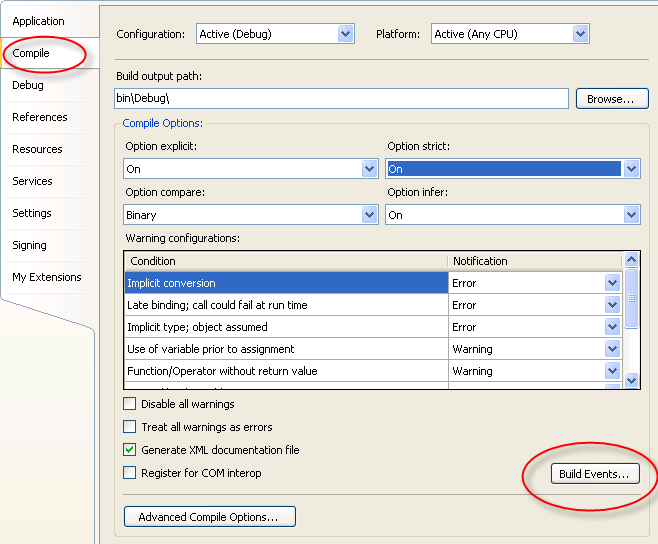
You can get at it right in the UI for editing the project.

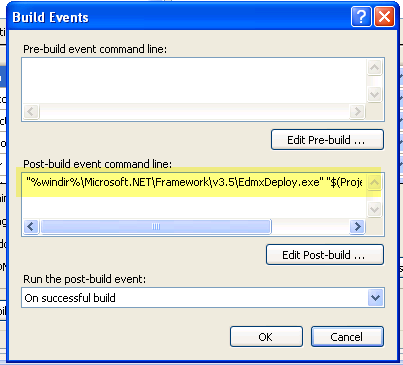
Go to the Compile tab, then to Build Events.

You can see the EdmxDeploy code in the Post-build event command line.

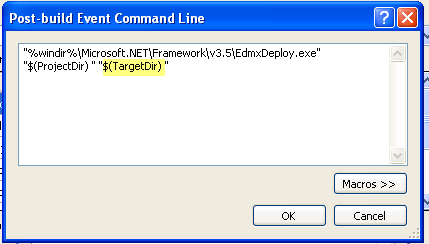
By editing, you can see the whole thing and the target directory parameter.

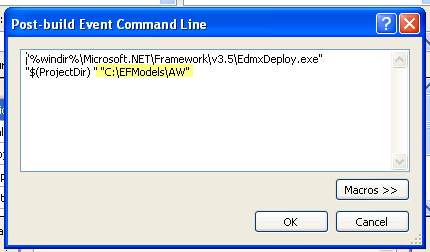
I changed the target to point to an existing (easy access for demos!) folder on my drive.

Then after I built the model project again, the csdl, msl and ssdl files were all in c:\efmodels\aw.

Now I can easily modify the metadata paths of any projects that consume my model to simple paths such as “C:\efmodels\aw\model.csdl”.

If I am in a team environment, then my files need to be available on a shared location or from source control.

EntityKey and ASP.NET ViewState

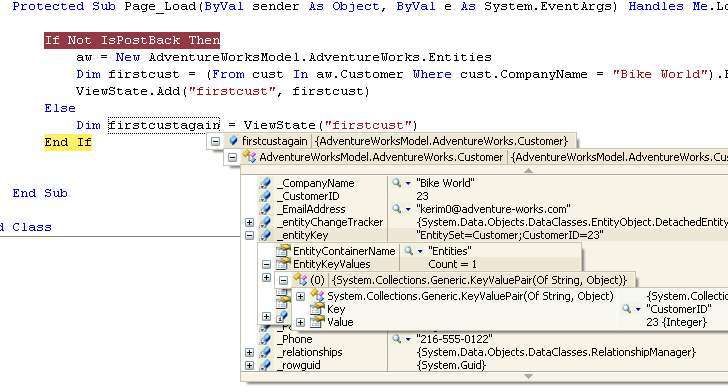
Just to see another aspect the before and after difference of serializable EntityKeys in the Beta2 of EntityFramework, I simply stored a single Customer entity into viewstate, posted back and then looked at the entity in debug to see that yes, the EntityKey is there.

I went back to my Beta1 VPC and when I try to add a single customer entity object to viewstate, I get all kinds of serialization errors. No point in analyzing them since it works now.

I’ll probably explore some asp.net databinding scenarios next.

Entity framework Tools: Package Load Failure when opening up EDMX in designer (FAQs are coming)

In the forums, Craig Lee responds to the  problem reported in this thread:

We are planning on releasing an FAQ of known issues, but here is a preview to see if this helps you.

Issue
Visual Studio displays a Package Load Failure error message for Package ‘Microsoft.Data.Entity.Design.Package.MicrosoftDataEntityDesignPackage’ when you double-click on a .edmx file

Workaround

This issue is caused by earlier installations of the MCrit June CTP.

1.    If it is installed, uninstall the ADO.NET Entity Framework Tools CTP from “Add/Remove Programs” in control panel

2.    Use gacutil.exe to verify that the following DLLs are not in the GAC. 

a.    Microsoft.Data.Entity.Design.dll

b.    Microsoft.Data.Entity.Design.EntityDesigner.dll

c.    Microsoft.Data.Entity.Design.Package.dll

d.    Microsoft.Data.Tools.XmlDesignerBase.dll

3.    Use Regedit.exe to check for and remove the CodeBase value from the registry at:

a.    HKEY_LOCAL_MACHINE\SOFTWARE\Microsoft\VisualStudio\9.0\Packages\{8889E051-B7F9-4781-BB33-2A36A9BDB3A5}

4.    Reinstall the the ADO.NET Entity Framework Tools CTP


Exploring EntityKeys, Web Services and Serialization a little further

I have not been able to stop thinking about EntityKeys, serialization and web services since my post about them yesterday, so I have done a little more experimentation tonight.

ObjectContext does have an AttachTo method. In my scenario of the incoming object from a web service client, the EntityKey is not available as part of the SalesOrderHeader entity because that is currently not being serialized as part of the entity. Note that this is a bug that the Entity Framework team is aware of and will fix.

While Attach allows you attach an entity that has a key, AttachTo does not require the EntityKey. However it does require that you know the name of the EntitySet.

In the type of testing scenario that I am working with , this is not a big problem.

While Attach would let me call

MyObjectContext.Attach(MyEntitythathasanEntityKey)

AttachTo has me call

MyObjectContext.Attach(MyKeylessEntity,”TheEntitySet”)

Once I do this, the EntityKey is created.

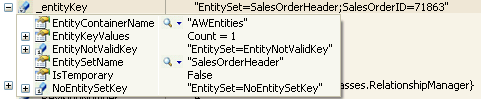
Note the contents of an entity key:

It has the name of the EntitySet in it. (I did not fix up the EntitySet names that the wizard created. I should have done this right after the wizard, and the new designer makes that really easy to do now.) That should be SalesOrderHeaders (plural)).

The EntitySet is nowhere else in the definition of my “incoming” SalesOrderHeader.

So if I didn’t happen to know the name of the EntitySet, I wouldn’t be able to attach it. If I want to have a generic updater, this could be a problem.

And a word or two hundred about concurrency:

The EntityKey itself has no impact on how to handle updates in the service.

As with LINQ to SQL, when I attach an object, it attaches as an unmodified entity. SaveChanges does nothing. The entity keeps track of original and modified values (which you can actually see if you create an ObjectStateEntry object from the entity). I actually tried attaching another instance of the object with different values, then attaching my incoming one to see if the 2nd instance would be seen as modified. No go. (Yah – grabbing at straws…and random ones at that!)

I tried calling Refresh with the ClientWins parameter (along with an array that contained my entity) to see if I could get the database to push it’s original values into the entity and somehow get the incoming values to magically become modified values. There have to be modified values to begin with for any of this to work. That doesn’t change anything because the state of the entity is still unmodified since the time I attached it.

The next thing I tried was updating the ModifiedTime property to see if kicking the ModifiedState of the entity would force all of my changes to get saved. Only ModifiedTime was saved, not the other values that were different.

The last thing I tried was, after attaching the entity, change the value using this funny method:

mySalesOrder.Comment=mySalesOrder.Comment

AND IT WORKED!

The entityState became modified and the Comment column was updated in the database.

So at this point, it still looks like there is no way around explicitly updating the entity properties in order to get them to be seen as modified. But I have no way of knowing WHICH of these things have been changed. Which leaves me a few options (probably more than just these three):

  • Update every property
  • Cache the entities when they are retrieved from the database (though I have to figure out what I want to cache… a dataset? an entire ObjectContext? … then I have to make decisions about keeping that refreshed).
  • Grab the current data from the database just before I want to update. There are also potential concurrency issues with this as well.
  • Iterate through each property and, using the ObjectStateEntry, set them as modified using the SetModifiedProperty, which takes the property name (string) as a parameter. I could do this in conjunction with data from the database or data from some cached store and only do this to properties that are different.

However all of these options seem to rely on knowing the name of the properties and I have not been able to find a way to programmatically discover them.

Therefore, it seems that I may have to go down one of these paths:

  1. Use reflection to iterate through all of the properties and update them. My feeling about having to go to these lengths is “just no!” Plus this will mean that every property will be seen as modified and will get updated.
  2. Write updaters for every entity that will explicitly set each property. That’s a crap load of data access code and not having to write a crap load of data access code is one of the benefits of Entity Framework.
  3. Hope and pray that the EntityFramework team can somehow give us a way of attaching an object for original and one for modified. LINQ to SQL has this.
  4. Wait for someone on the team to comment in my blog and show me the super easy obvious way that I have totally overlooked.

What’s a little funny to me is that Rick Strahl has had a similar conundrum with LINQ to SQL.

And I’m still only talking about full-on clientWins concurrency, so far.

Knocking off Danny Simmons Entity Framework Beta 2 List: #3 & #4: EntityKey Serialization and new Entity interfaces

The next things in the list of what’s new in EF Beta 2 that I have been experimenting with are:

  • Entity key serialization In previous CTPs EntityKey objects were not serializable, now they are.
  • Increased persistence ignorance in entity data classes We are continuing down the path toward true POCO and persistence ignorance.  To that end we have split the original IPOCO interface (IEntity) into two separate, more specific interfaces (IEntityWithKey and IEntityWithChangeTracker), we made IEntityWithKey optional (not implementing it has performance implications, but the scenario is supported), and many of the ObjectServices signatures have been modified to take instances of Object rather than IEntity which sets the stage for further progress here in future releases.
I’ve actually been playing with this for days but having a hard time with it. It turns out that while EntityKey objects, which are on their own are serializable, they are not being serialized as a property of an Entity. This is a bug (confirmed by Danny via email) and not the intended effect. It will definitely get fixed. My first foray was to just see what happened when returning an entity from a web service method.
<WebMethod()> _
 Public Function GetSalesOrder(ByVal orderNumber As String) As AWModel.SalesOrderHeader
   Dim aw As New AWModel.AWEntities
   Dim order = (From so In aw.SalesOrderHeader Where so.SalesOrderNumber = orderNumber).First
   Return order
 End Function
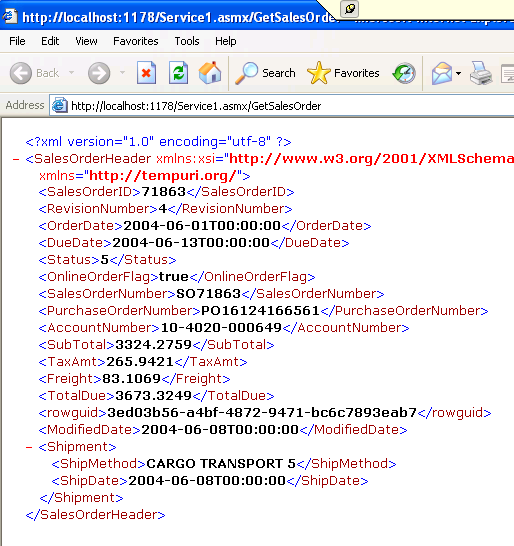
The payload for this does not have an EntityKey in it:

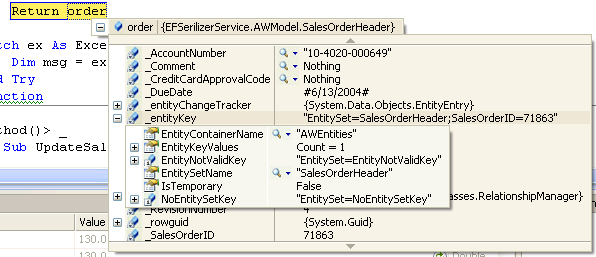
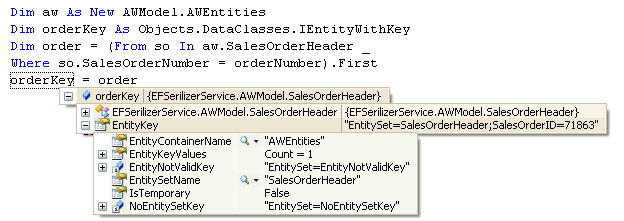
But I still wanted to see about serializing the key, since I was told that I should be able to do that with the independent key. So digging back into the code, I went looking for the EntityKey. I can see it in debug ,

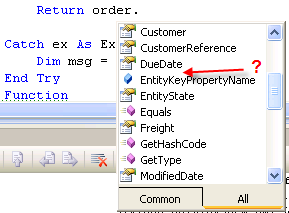
but I couldn’t get at it in code.

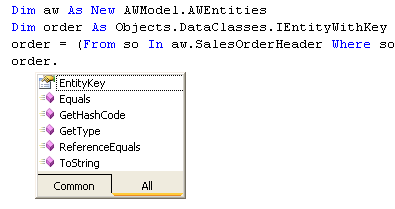
This is where I got a look at the IEntitywithKey interface. This interface ONLY exposes the EntityKey.

So now I can get at the EntityKey and can even pull the two together:

However, even if I modified the method so that it returns an EntityKey, there’s a problem problem generating the WSDL and the proxy. Again, not the planned effect, but hopefully a bug.

So I will set this aside for now. (Darn)

There’s still much to look at here including the BinarySerialization.

My biggest interest in serializing entities if for writing multi-tiered applications where entities need to cross machine boundaries and will likely have update conflicts to contend with. I’m personally most interested in Web Services & WCF as this is how I write my smart client applications.

Since we can attach externally created entities to an ObjectContext, this leads to using services to capture entities coming in from a client app and the doing DML operations (update, insert, delete). Attach requires an Entity that implements IEntitywithKey, but AttachTo does not. Nevertheless, when it comes to Updates, the biggest conundrum will be dealing with concurrency and persisting original values somewhere. This is where the EntityKey will be a benefit. We won’t have to go looking for the matching entity, the object service should do that for us.

LINQ to SQL has an override for Attach that allows passing in the original entity and the existing entity, so that it’s own SaveChanges method will be able to determine the modified state of each property. Entity Framework does not have this yet, so finding the most efficient way to handle this is yet to come.

But hey, it’s a holiday weekend and I’ll just have to leave this for another time.= because the sun just came out.