Programmatic access to the real time stylus is one of the real OOOH AAAAH features of the Tablet PC SDK 1.7. Larry O’Brien, who is a real tablet developer guru, has written an article on DevX that really digs into this wondrous API. This is not something that you would use in a typical data entry application, but I challenge you go check it out, think out of the box a little, and dream up some interesting scenarios. Aren’t you tired of writing data entry applications anyway? 🙂
Category Archives: Tablet
Agilix InfiNotes — Windows Journal like control for developers
If I wasn’t going on vacation tomorrow, I’d be playing with this new beta product that was released today from Agilix, who is on the forefront of broad market tablet app development with their widely used GoBinder application.
Drag & Drop note taking functionality in your tablet app. Cool.
I already know two things I want to test it out in…
But I really need to go pack now…
Cool Cool Cool Tablet PC Feature
I just think being able to take gobs of handwritten notes in Journal and then SEARCH them for specific words is pretty darned cool.
And…you they can be upsidedown or sideways, even.
Tablet App design
Please, don’ t make me use menus in my tablet applications.
One of the big revamps I did while dogfooding my blogging application was in the place where you can draw and change things like colors, pen width, ink or erase, etc I made everything available to just click on right on the screen. I got sick of the extra clicks. It’s really beautiful. Similar to what Paint does. (yes I’m still working out my stupid 24×24 icon problem…)
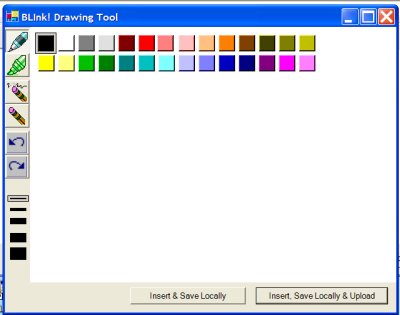
I did something similar in the doodling app on the web. Even if you can’t ink, you can see what I’m talking about here: www.thedatafarm.com/doodle.aspx.
Toshiba M200 notes
Since the power was out (again! uggh) for a few hours this morning, I used the time to snuggle up to my Toshiba M200 and see if we couldn’t become better friends. Poor Toshiba, still having to live in the shadow of the Acer. I discovered a lot of interesting features (lots of really handy utilities) that I was unaware of. And I finally figured out what that wired “cross-hair” button was for. Oops – my app finished compiling. Later.
Tablet PC 2005 Edition wins the heart of WinSuperSite’s Paul Thurrott
by way of whatisnew.com
In time, this once skeptical reviewer will be but one of the many users converted to the platform.
–Paul Thurrott
August 30, 2004
His entire review is just one big rave! read more
MSDN article on Inking Web Applications
Shawn van Ness has another article on Tablet PC development (will soon be on the MSDN Tablet PC Developer Center page) This one is on ink enabled web apps.
oh NOW they publish it. AFTER I had to figure it out all myself. 🙂 (Umm with some help from Shawn and Casey and Stefan on the side …)
The end of Shawn’s article poses this question:
Only one burning question remains: who will the first to Ink-enable their blog?
what, no doodles?
Geeze, I added a gallery to my doodle page so that you can save your web ink doodles and show the world. There is only one so far that wasn’t either a test by me or the result of me begging my husband to do one.
VS2005 debugging on tabletpc?
On whatisnew.com, Lora points out a (reprinted) InfoWorld article by Tom Yager on VS2005. In it he says: “While testing remote debugging, I learned how well a Tablet PC works as a debugging console” but he does not elaborate. I wonder what he means? I don’t have these bits on my tablet, as I am using it for current tablet development (VS2003), testing and presenting, so I haven’t experienced the combination of VS2005 and tabletpc. However (and this is big) I have no expectation of programming in tablet mode – not when I can type as fast as I do!
Outlook Add In for Tablet PC
Josh Einstein(Einstein Technologies) has an Outlook add-in called Tablet Enhancements for Outlook that allows you to ink directly into the contact, appointment or task forms and then recognize when you are done. I am going to check this out (there is a demo, and the product is only $20.
Here’s a review on TabletPCBuzz.com from someone who has already tried it out and is a real TabletPC user.
I don’t use the contacts, appts and tasks so much that I would need this, however. I am curious to see his approach to data entry forms on a tablet.
The problem is, the TIP is VERY handy, but it’s also very nice to write directly on a form, in the entry boxes. We had a long discussion about this at the Tablet PC DevLab, with Markus Egger leading the way. Markus is is also frustrated with having to choose one or the other and we would love to find a logical way to merge the two functions. Here is an editorial in Code Magazine where he digs into this problem.