I’ve been loving Visual Studio 2012’s SQL Server Object Explorer (SSOE) instead of always jumping out to SQL Server Management Studio (SSMS) to do database management. SSOE covers many (not all) common tasks…and many more than VS’s Server Explorer let’s you do.
But I spent an embarrassing amount of time trying to figure out how to easily connect an MDF file to my SQL Server 2012 LocalDB instance because, duh …I was doing it wrong! Over and over and over again.
SSOE lets you inspect databases that are already attached to localdb and it lets you create new localdb databases. I couldn’t figure out how to attach to an existing database.
Finally, some brain cells returned to my skull and I went over to VS’s Server Explorer and attached the database there (and provided a nice logical name rather than ending up with the rangy file-path-as-database-name).
Once it was attached to localdb, then I could see it in SSOE and actually access it in my app using a normal connection string.
Just “duh” for how much time I spent on this.
It was important to me because I need to distribute sample solutions along with existing databases and I want the database files in the solution folder and *simple* steps I could relay to users to make sure they could use them when they want to debug and test out the solution themselves. I’m perennially looking for a simpler way to do this. I’ve used SQL Express, SQL CE, database scripts, packaged exes, you name it. And I always spend hours trying to do it in a way that it’s really simple for the dev who is trying out my sample solution.
Oh and one more trick for you about localdb
I have always had a problem remembering forward slash vs. back slash. Here’s a blog post from 2006 as evidence! So connecting to localdb is always a challenge because you specify it as (localdb)\v11.0.
My little secret to get the back slash correct is visual:
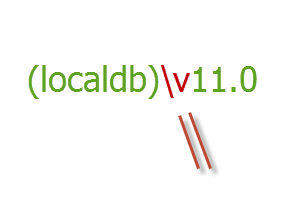
I know it’s totally dorky, but I just make sure that the slash is parallel to the first part of the “v”. Hey, it works for me, what can I say? 🙂
 Sign up for my newsletter so you don't miss my conference & Pluralsight course announcements!
What if you forget which part of the v it is parallel with? Maybe it was the second part, not the first part?
😉
When that time comes, it might be a sign for a new lifestyle. 🙂
Phew! Been programming nearly 20 years and thought it was only me that struggled with slashes 😉
Hey Julie your material are very importance. I followed MVC 3 and acquired lots. Kenyan
I am not a programmer but I have this SQL subject this session and have to prepare for it. What all topics should be covered in it?
And has anyone studied from this course http://www.wiziq.com/course/125-comprehensive-introduction-to-sql of SQL tutorial online?? or tell me any other guidance…
would really appreciate help
Great tips, I had the same issue. =)
To attach a database Using Transact-SQL
1)Connect to the Database Engine.
2)From the Standard bar, click New Query.
3)Use the CREATE DATABASE statement with the FOR ATTACH close.
Copy and paste the following example into the query window and click Execute. This example attaches the files of the AdventureWorks2012 database and renames the database to MyAdventureWorks.
CREATE DATABASE MyAdventureWorks
ON (FILENAME = ‘C:\MySQLServer\AdventureWorks_Data.mdf’),
(FILENAME = ‘C:\MySQLServer\AdventureWorks_Log.ldf’)
FOR ATTACH;
Does it work with LocalDB?
I just got over the same problem using a very long method.
I also prefer VS over SSMS. I had tried T-SQL from inside VS, no luck. Then, succeeded by Creating a new database in VS and importing data from the .mdf file using SQL Server 2016 Import and Export Data.
I googled : “Cannot attach database from Visual Studio”, and tried your method, which is the fastest.
So when are you going to write a blog about how to use LocalDB in Websites? I use VS 2010 and I have created a website using Webforms so how do I link to the database so that people can view info like tax rates or currency rates in a web page?
you can’t deploy a localdb. It is for development only.
Hi Julie,
I am struggling with moving .mdf file from one server to another server.
Currently we are using Sqlexpress (winforms application) which creates a .mdf file for each user on their machines. Now the user’s are going to use VDIs and they may switch between servers to connect to VDIs.
Is LocalDB an option for this scenario, if not what would be the issues with using LocalDB fro production users (with individual .mdf files).
I am new to LOcalDB and not sure if LocalDB’s .mdf file can be moved y attach/detach option.
Any advice will be greatly appreciated.