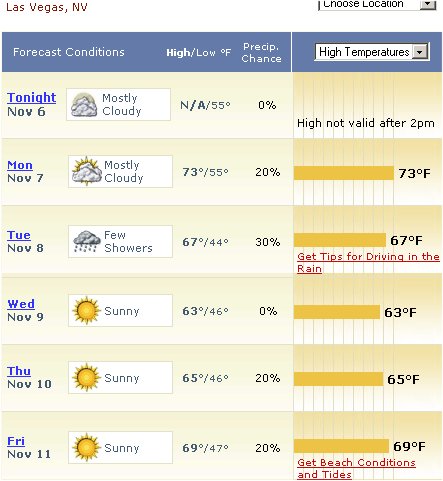
If you are going to DevConnections and plan to get outdoors:
Don’t Forget: www.acehaid.org
If you are going to DevConnections and plan to get outdoors:
Don’t Forget: www.acehaid.org
The rules for using Query Notification have finally settled after evolving through all of the betas and ctps. Here they are copied and pasted directly from the msdn help files:
Applications that use query notification features need to take into account the following special considerations.
Query notifications only support certain Transact-SQL statements.
First, to support notifications, queries must not contain:
Derived tables.
Rowset functions.
The UNION operator.
Subqueries.
Outer or self-joins.
The TOP clause.
The DISTINCT keyword.
A COUNT(*) aggregate.
AVG, MAX, MIN, STDEV, STDEVP, VAR, or VARP aggregates.
User-defined aggregates.
A SUM function that references a nullable expression.
The full-text predicates CONTAINS or FREETEXT.
A COMPUTE or COMPUTE BY clause.
Aggregate expressions if GROUP BY is not specified in a select list. If GROUP BY is specified, the select list must contain a COUNT_BIG(*) expression, and cannot specify HAVING, CUBE, or ROLLUP.
An INTO clause.
Conditions that will preclude results from changing (e.g. WHERE 1=0).
FOR BROWSE (or be running with SET NO_BROWSETABLE ON).
A READPAST locking hint.
Second, queries must not reference:
Temporal tables or table variables.
Tables or views from other databases or servers.
Any other views or table-valued functions.
Any system tables or views.
Any nondeterministic function, including ranking and windowing functions.
Any server global variables.
Any Service Broker queue.
Synonyms.
Finally, queries must reference a base table or view.
An application that uses Query Notifications must take into consideration cases where a notification occurs immediately. When data is changed on the server, a notification message will be sent to the appropriate Service Broker queue. Applications need to reregister to receive additional notifications. Therefore, if a data set is updated quickly by multiple applications, an application could receive a notification, retrieve the data, and then get another update notification almost immediately after the cache has been refreshed. Applications that use Query Notifications must be written to take this case into account. If an application uses data that is constantly updated, another strategy for caching data may be more appropriate.
If multiple modifications are made to a set of data with a registered notification request, and those changes occur within a transaction, only a single notification event will be sent.
An application will not receive notifications from an instance of SQL Server that uses the Local System account as the service account.
Posted from BLInk!
Don’t Forget: www.acehaid.org
I might be speaking at some pennsylvania groups this summer for INETA. I mapped them out on Virtual Earth so I could visualize where they were relative to one another, then it was easy to share the scratchpad with the user group leaders and Nancy Mesquita who is the coordinator so they could see the same map..
Very handy.
Don’t Forget: www.acehaid.org
This is an attempt to alleviate a problem that I have had a few times when presenting. Even though I check the time constantly during my talk (and will be using a travel clock from now on rather than my watch – great tip from Kate Gregory and also they were provided for us at TechEd), I have, on a few occasions gotten so involved with the talk that I couldn’t even remember what time it started or when it was supposed to end. Stupid, right? Hey, let’s just call it “passion”! You should be thrilled that I am so enthralled, eh? 🙂
Well, since I am aware that this is a problem, rather than just saying “well, that’s silly, I can remember next time” I have a better plan of attack!
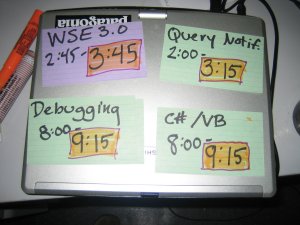
No, they are not glued to my laptop. Just laid out on top of it for the photo op.
What this means of course is that I will be making some last minute changes to my presentation computer 1 day before I do my What’s new in WSE3.0 session at DevConnections. Hey, this is bleeding edge, right? I am willing to take the risk… 🙂
Currently I am running VS2005 RTM with the October CTP bits and having only one issue (which may or may not be related to the out of synch bits).
What is that issue you ask? I can’t seem to do encryption and signing when my webservice is on IIS. When it’s on the development web server, all is well. When I move it to the webservice, I get some wierd problem regarding “decryption” from the Cryptography API. (“Error occurred while decoding OAEP padding”.) I have given all necessary permissions to the ASPNET account for reading the web server certificate and even as a last straw, gave “Everyone” full access to it. Hopefully, I will either get an answer to my question about this problem on the newsgroup or it will mysteriously disappear when I install the RTM bits. Or… I will have to skip that particular demo :-(, but since that session is in one of the 60 minute slots, that might be a good thing.
Don’t Forget: www.acehaid.org