By way of the Burlington Free Press
More info here: http://www.greenmtn.edu/gmcjournal/index.asp
We had a wee scare last night flying from Washington/Dulles into Burlington (on my way home from a quick trip to San Diego to do an INETA talk … that blog post is still on my laptop :-)).
It was a late night flight, due to land at 11:30pm in Burlington.
Five miles before we got to Burlington, the airplane’s monitoring system reported excessive heat in one of the front brakes. The worst case scenario was that on touchdown or cruising down the runway, the brake could catch fire and it was quite close to the engine so…scary potential.
The flight attendants (both young and neither had yet been initiated with an emergency landing before this) had to prepare us very quickly with the news and for an emergency landing. Tighten the seat-belts, tuck into a ball, brace yourself against the seat in front of you (I had a wall that was a little far away). There was no time really for much else. They did a fabulous job.
I live with a general disbelief in anything bad happening to me or my loved ones. My parents have both survived minor bouts with cancer; my father has been in two car accidents where the car was totalled and he walked away; my husband cracked his head open on a rock face while we were hiking and while there was a LOT of blood, missing teeth, a scalped scalp and huge gashes to be stapled up, he recovered perfectly and they even shoved his teeth back into his gums and they remain there today. My Newfoundlands are living to ripe old ages beyond the norm for this breed of dogs.
So yes, I live in a little fantasy bubble world.
And because of that, while I was certainly shaking a little, I didn’t really think that anything bad would really happen. And it didn’t.
We landed. Nothing seemed to happen out of the ordinary. We did an emergency evacuation of the plane because the potential for fire and explosion still remained. Since I was up front I just went down the stairs like I normally would (vs. jumping off the wing like a lot of other people had to). Nobody was hurt. The plane didn’t catch fire.
There was a lot of excitement on the runway. Many firetrucks and emergency vehicles and two guys in Hazmat outfits who looked like astronauts inspecting the plane.
It struck me as odd that I was the only person who walked VERY far away from the plane (you know, just in case.). I just kept going further and further out in the field by the runway. And an hour later, I was allowed to go back on the plane to get my stuff out of the storage bin and I headed home.
One poor girl had been so terrified (possibly she has some past experience that this too closely resembled) that she couldn’t stop crying for at least an hour. She had her boyfriend there to comfort her.
So, I got another day out of it. Didn’t even bother calling my husband since it was nearly midnight; I knew he was sleeping and all I had to report was “Hi honey. I’m here. The plane didn’t crash or blow up and I’m still alive. Talk to you later.” But I call him with that report after every single flight, which means generally twice in a day, since most of my flights include one stop over. So it didn’t seem necessary to wake him up for that.
One of the very difficult to solve problems in .NET client & web service solutions is sharing custom objects between the web service and the client.
Here’s the scenario.
You have a business layer with some serializable objects. Let’s say the namespace is “MyLovelyBAL” and the object is “MyLovelyObject”.
You have an operation in your web service that returns one of those objects.
Now you build a client, say a Windows Forms app (“MyWinApp”) that will call into that Web Service, and you are not savvy enough to use a tool like thinktecture’s WSCF. 🙂 Therefore you “Add Web Reference” and point to the web service you built. In doing so, you are asked to give a name to the proxy. Let’s call that “MyWSProxy”.
In your WIndows Forms app, you also have a reference to the assembly that contains MyLovelyBAL.MyLovelyObject.
Now it’s time to write some code.
You instantiate the proxy and request a lovelyobject.
Dim myproxy = New MyWSProxy.Service
Dim MyLovelyBAL.MyLovelyObject=myproxy.GetMyLovelyOBject
But it fails telling you that you can’t cast a MyWinApp.MyWSProxy.MyLovelyObject to a MyLovelyBAL.MyLovelyObject.
And then you will begin on a journey to hell, which might include reading this article on Schema Providers which is not for the feint of heart.
So just forget it. It’s 2007! We have WCF.
You can go into your project where you define the MyLovelyObject class and give it a DataContract attribute and give it’s properties (that you want to expose) DataMember attributes. Your interface operation (and any operations that implement it) will return a MyLovelyBAL.MyLovelyObject object.
And when you Add Service Reference to your windows forms app, there is no namespace replacement. A “MyLovelyObject” is always coming from MyLovelyBAL and this is oh, so lovely. The way it oughtta be!
You know I learned this the hard way. And I will be seeing Michele Leroux Bustamante tomorrow who will first bop me on the head for waiting so long to use WCF and the sit me down and have me read her fabulous book Learning WCF, (which I had in my hands long enough to raffle off at VTdotNET last week BOO HOO) cover to cover. It’s about time!
As we plug away on the prototype, the Astoria team is building brand new code for the real product and right now they are trying to finalize the URI query syntax and looking for your input. Read more….
[A New DevLife post]
I ran into what felt like a brick wall today trying to install Vista onto a VPC and finally found a way to accomplish it. Read more…
[A New DevLife post]
Boy am I excited about this.
Timothy Ng is on the VB team and wrote the recent MSDN Magazine article on Lambda Expressions for VB developers. I understood lambdas better than ever after reading the article … finally something from the VB perspective.
His two talks are:
LINQ-ing your data
In this session, I will explore how LINQ will change the way you think about data in your applications. In particular, I will explore how LINQ provides a higher abstraction for accessing your data, provides a common abstraction across data domains, and allows for simplified data transformations. I will focus on LINQ to XML as the transformation technology, and the various XML features that are available in VB.
LINQ from the Ground Up
In this session, I will explore the fundamentals of LINQ by examining how the various language features (such as extension methods, type inference, lambda expressions, and anonymous types) form the foundation for LINQ. I will share some of the experiences that the VB compiler team had while building LINQ, in hopes that it will help you build your applications on LINQ. Examples will be in VB, but this talk applies to C# folks who are interested in learning how the fundamentals work as well. All language concepts apply to both VB and C#.
I sure wish I was seeing these before I do my LINQ talk in San Diego on Tuesday! 🙂
Richard Hale Shaw will be doing some pretty cool LINQ talks too which will be a C# focus.
Before I learned that Tim was coming, I was already excited about the Code Camp speaker roster. This will be the first time that Jesse Liberty and Fritz Onion (who are “local” in about the same way that I am local… well, I guess Fritz’s drive is even longer than mine). Jesse recently started working for Microsoft (see? I managed not to say “swallowed the red pill”!) and he is “da man” at Microsoft on Silverlight. Fritz is a true ASP.NET plumber who amazed us all with his book Essential ASP.NET in the .NET 1.0 days and again with the updated version for ASP.NET 2.0, because it explained HOW ASP.NET actually worked and he continues to spelunk on our behalves.
There are already almost 40 sessions listed with tons of amazing expertise on display.
I’ll be doing a talk on Astoria, a session on using Entity Framework in multi-tiered apps (and getting a little nervous that nobody seems to be doing an Intro to entity framework session) and a session on ASP.NET Databinding with LINQ.
I don’t like not knowing how something works, so I just had to dig further into how Astoria services see requests for queries versus Updates, Deletes and Inserts.
In my previous post, I dug into the assembly with reflector and could see that a PUT was used for updates, DELETE for deletes and POST for inserts.
I turned tracing on for the Astoria service and pushed the trace info to a log file. You can see how to do that at the end of this post.
Looking at the messages, you can see the METHOD and the query operators but not the main call. 🙁
For example if I made a call to service.svc/Customers the message looks like this. I’ve stripped out WebHeader information from the message.
<HttpRequest xmlns=”http://schemas.microsoft.com/2004/06/ServiceModel/Management/MessageTrace“>
<Method>GET</Method>
<QueryString></QueryString>
</HttpRequest>
I don’t see that I called the Customers “operation”.
If I request service.svc/Customers[52], it’s the same. I don’t see the Customers and I don’t see the ID i’ve passed in.
If I use a query operator as in service.svc/Customers[City eq Seattle], it’s still not exposed. Now I’m getting frustrated. I know I’ll have to dig deeper at some point, or bribe Pablo to show me someday.
But for now here’s a little gratification. If I create my own Service Operation which takes a query string, now there is something to see. My service operation is CustomersbyCity. the call looks like this
service.svc//CustomersByCity?city=London
The message looks like this
<
HttpRequest xmlns=”http://schemas.microsoft.com/2004/06/ServiceModel/Management/MessageTrace“>When I use my little console app as a client and do some inserting and deleting, I can see the methods coming up the pipe, remember, the Astoria.Client.dll translates the function (insert/update/delete) into a Method.
<
HttpRequest xmlns=”http://schemas.microsoft.com/2004/06/ServiceModel/Management/MessageTrace“>So, only MILDLY interesting to me (because I can’t get in deep enough yet) and probably COMPLETELY uninteresting to most everyone else. But it was fun digging around and also learning how to use some of the WCF tool. Here by the way is how I got to see the messages.
Modify the web.config to “Turn On” tracing and messaging. You can do it manually or with a tool.
<system.diagnostics>
<sources>
<source name=“System.ServiceModel.MessageLogging”>
<listeners>
<add name=“messages”
type=“System.Diagnostics.XmlWriterTraceListener”
initializeData=“c:\logs\messages.svclog” />
</listeners>
</source>
</sources>
</system.diagnostics>
<system.serviceModel>
<diagnostics>
<messageLogging logEntireMessage=“true” logMessagesAtServiceLevel=“true”
logMessagesAtTransportLevel=“true” />
</diagnostics>
</system.serviceModel>
You can use the WCF Config tool in Visual Studio 2008 to configure this. Right click on the web.config and choose Edit WCF Configuration. Here are screenshots of the settings that created the above in my web.config.
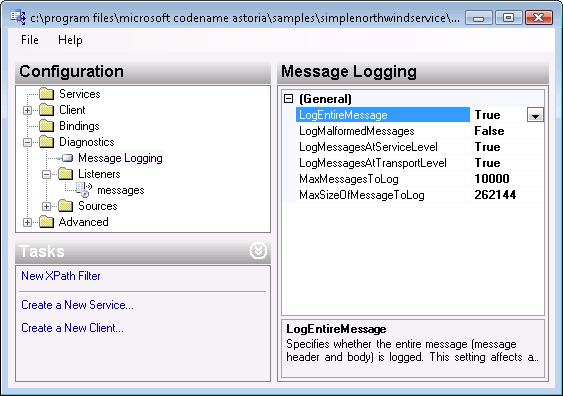
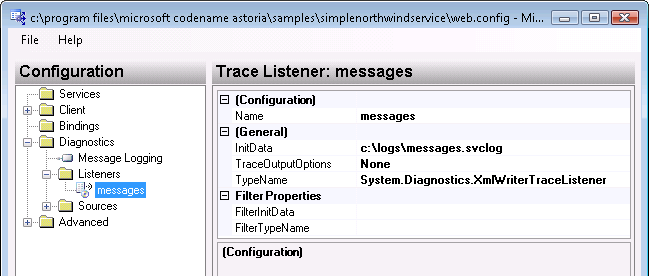
If you are using the Web Dev server, you need to stop that server so that the trace actually gets written to the file before you can look at it.
Once the file is created, you can look at it using the Service Trace Viewer which you can find in the SDK Tools (available from Start/Program Files/Microsoft Windows SDK for Visual Studio).
I got bored with querying Astoria in the browser and and wanted to see how to use it in an application, so I opened up the sample console app that comes with the bits and started poking around and was astonished at what I saw.
You can create an new WebDataContext based on the Astoria data service.
WebDataContext is like an ObjectContext. Here’s what it exposes:
namespace Microsoft.Astoria.Client
{
public class WebDataContext : IDisposable
{
public WebDataContext(string uri);
public string BaseUri { get; }
public ICredentials Credentials { get; set; }
public void Add(object obj, string entitySet);
public void Attach(object obj, string entityKey, ObjectState state);
public WebDataQuery<T> CreateQuery<T>(string queryString);
public WebDataQuery<T> CreateQuery<T>(string queryString, QueryOption queryOptions);
public void Delete(object obj);
public string[] GetEntitySets();
public void MarkModified(object obj);
public void SaveChanges();
}
}
So, you can create a WebDataContext
WebDataContext ctx = new WebDataContext(“http://localhost:50000/northwind.svc”);
then query it
Category beverages =add a new object to the ObjectContext
Category newcategory = new Category();And then (this is the part that is sick and I want to rip open the covers and see how they are pulling this off!), call SaveChanges on the context!
ctx.SaveChanges();
Of course, you can update and delete, too.So, I wanted to see what’s going on here. It’s REALLY important to understand that we’re looking at prototype bits. THe production code that they are working on now will be different, though the concepts and use will be relative to what we can play with today.
You can’t get any hints by adding ?WSDL to the end of the uri. Rembmer withi a default asotira service, there are no operations. It’s all based on interpreting the URI. So I opened up Reflector and pointed to the key assembly.
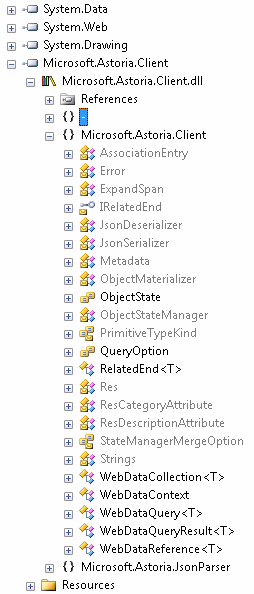
SaveChanges calls a method called SendHttpEntityUpdate which sends up the object and the key and based on the operation calls a request method. So if you are adding, it sends a POST. If you are deleting, it sends DELETE and if you are modifying it sends PUT. The dll used by the service checks which method you pushed up (there’s an enum for ReceiveEntityOperations) and processes the incoming data accordingly.
Neat!
So of course there will be the usual million concerns about this. There are definitely credentials built into these operations and all kinds of ways to limit what is available thorugh the web service. And there’s so much I don’t know yet, so don’t judge solely on what you are seeing here.
If you don’t have a .NET Astoria client, you can just construct the POST, PUT and DELETE URIs. I can’t say how to do that quite yet though. 😉 (Not that it’s a secret. I just don’t know how yet.)
But it’s still darned cool. Nice job folks (and don’t forget Alex who was key in getting Astoria going before he left Microsoft! )
I find it helpful to use the browser to visualize immediate cause and effect of queries to an Astoria web data service. THere’s so much more that you can do when you are really using this in applications, though.
In the documentation there’s a list of query operators:
The doc explains each of these in more detail.
Here for example, I can get a specific customer and all of their sales order headers. (Make sure you have MultipleActiveResultSets=true in your connection string in order to do this. That allows the db to return more than one result on the same connection string .. a feature added in that we first acquired with .NET 2.0 and SS2005.)
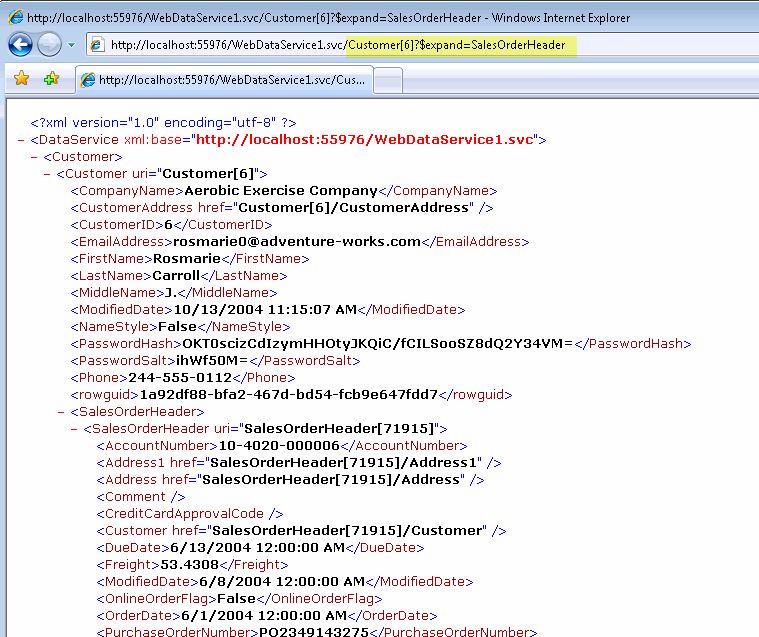
I can drill even further to return the SalesOrderDetail data form the SalesOrderHeader using this URI:
http://localhost:55976/WebDataService1.svc/Customer[6]?$expand=SalesOrderHeader.SalesOrderDetail
Here’s an example of using skip
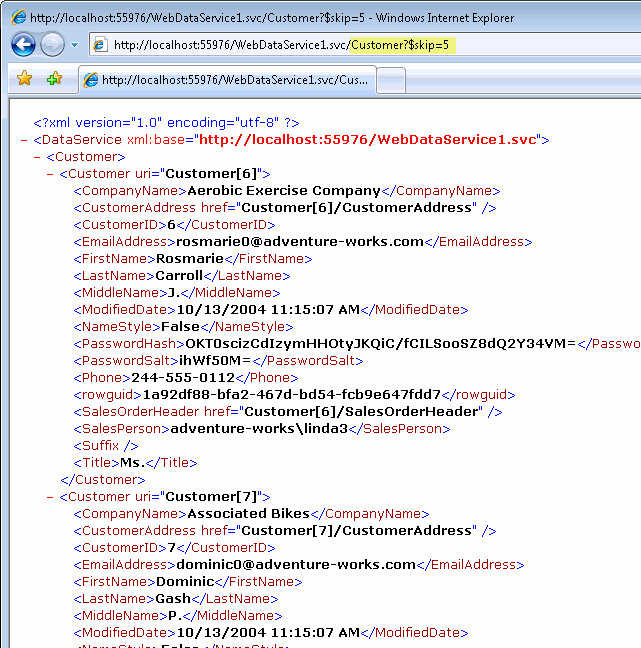
Looking at the non-xml formats is tough in Internet Explorer, at least with JSON as IE doesn’t know how to display the response. There are a few ways around this.
1) (bit of a hack :-))
Add this into the appSettings seciton of web.config
<add key=”EnableAstoriaJSONP” value=”true”/>
and then browse your service in Firefox, Firefox will ask you waht you want to view the response in, choose notepad and you can see the json response. Read the caveats about JSONP in the Astoria documentation.
2) Use the helper tool which is an HTML page here [ http://astoria.sandbox.live.com/tools/raw.htm ]. You can’t use this online (I know ’cause I tried in my impatience!). You need to download it and add it into your project. It will then properly parse and display results.
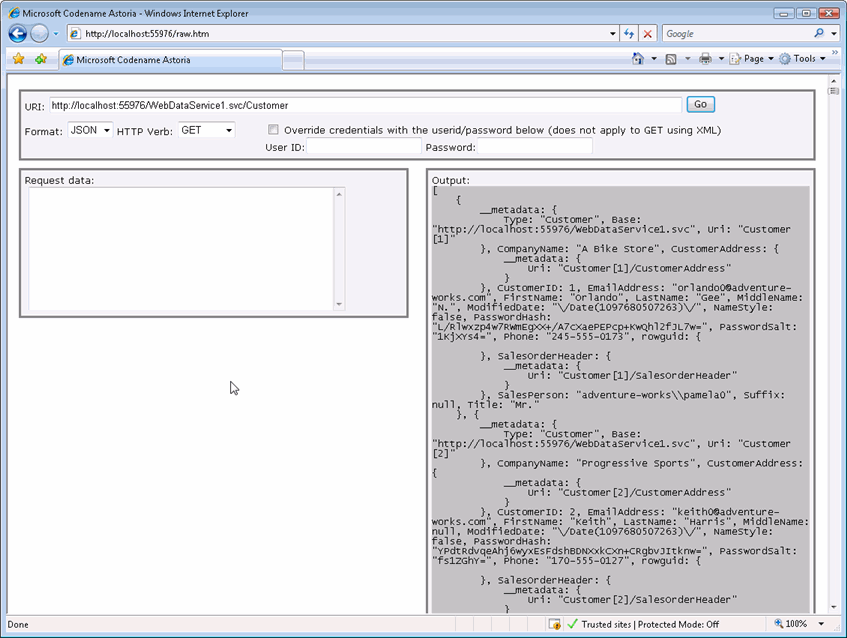
So all this is just about querying, the “R” (read) in CRUD. Wait till you see the C, U & D. Watch for another post.
Here’s a quick start for checking out astoria. See my blog post “what the heck is astoria” if necessary. 🙂
Requirements:
VS2008 Beta 2
Entity Framework Beta 2
Entity Framework Tools August CTP
Astoria CTP September refresh (which works with VS2008 Beta 2)
Note that I had to do this in XP. I’m having a wierd problem in Vista around the ASPNETCompatibilityEnabled setting in web.config. You can follow the discussion of that if you are interested in this forum thread. The thread is accidentally a combination of Kevin Hoffman’s issues with IIS and my issue with Cassini. They don’t seem to be related problems.
1. Start a new web application project (not website) in VS2008.
2. Add an ADO.NET Entity Data Model using the projects Add New Item dialog.
If you haven’t used the wizard before, you can see this blog post.
The basic steps are
Add a Web Data Service.
Add New Item, choose Web Data Service. It’s in the main section (Visual Basic/ C#, not categorized into Data or Web templates) down on the bottom, alphabetical. 🙂
The services code view should open up. Note the TODO for the class. All you need to do is replace the stub [class name]
(VB)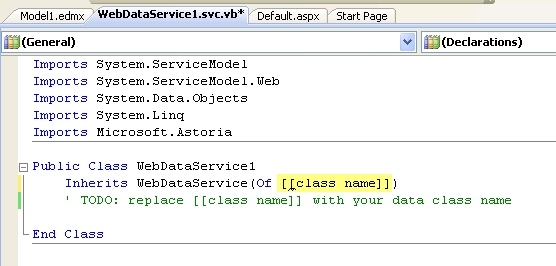
(C#)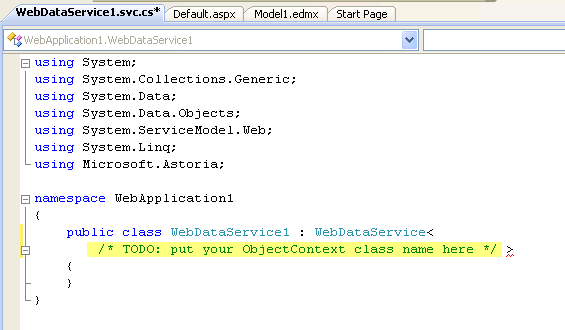
with the name of your entity wrapper class created in the model. THe model code gens a class file.
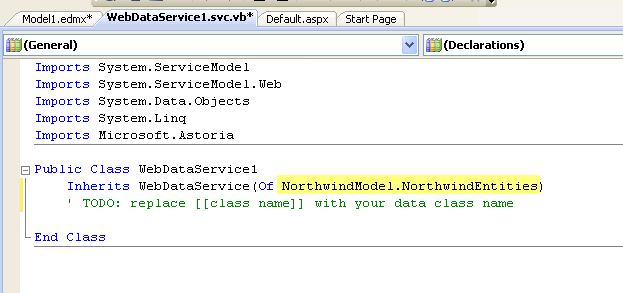
You can open up the model in teh designer and then see it’s Namespace and Entity Container Name in the properties.
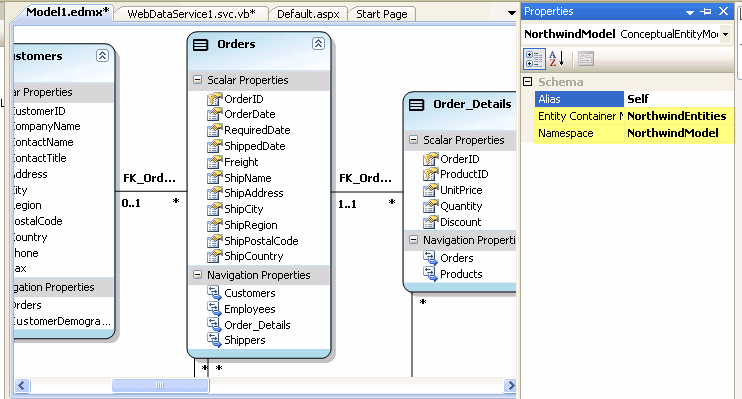
That’s it! Now you can browse the web service directly (eg. right click on svc file in solution explorer and View in Browser) and start looking at how the data is exposed through the EDM.
My What the Heck is Astoria post walks through some quick query scenarios to give you an idea of what you can do.
This is just the tip of the iceberg of course. See the Astoria Team blog for more info.