Monthly Archives: September 2007

What the heck is Astoria?

I’ll be doing a session on Astoria at REMIX Boston 07 (10/8-10/9) and at the New England Code Camp (9/29-9/30).

What is Astoria?

Astoria exposes data as web services through an Entity Framework Data Model. Once exposed, you can use URI based syntax to query data through the conceptual layer of the entity data model. You can control what is and isn’t exposed and you can also do inserts, updates and deletes. The results can be output in a number of formats including JSON and ATOM.

It’s simplest to understand this by looking at some queries in a web browser. The Astoria CTP add-in for Visual Studio 2008 Beta 2 has a template for creating a Web Data Service that looks like a WCF service. It only needs one class to expose the whole kit n’ caboodle and that class inherits from WebDataService, a generic class. You merely need to tell that class that the type it is dealing with is the Entities class exposed by an Entity Data Model that you have created. The class doesn’t even have any code in it.

  public class northwind : WebDataService<NorthwindModel.NorthwindEntities>
    {
    }

Then you can just make calls to that service and start playing with the query syntax.

The base service exposes the list of entities in the model (http://mysite/myservice.svc). The payload is just a raw XML representation of the data. There will be payloads for different formats, such as JSON, ATOM and more. See this Astoria team blog post for more info.
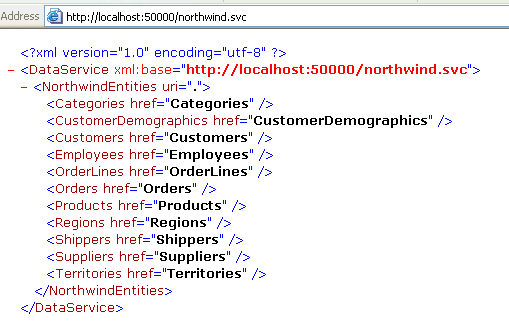
Then you can start drilling in. Here for example, I have asked for the Categories entities. It will return all entities with their details.
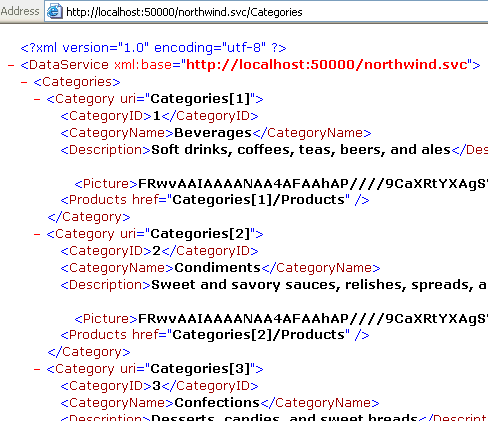
Now you can start seeing the URIs that are displayed to show you how to drill further into data. When looking at it in the browser, you might want to click on those URIs, but remember, in a real app this is not how you will be working with the results of the service call. 🙂 Note that you can see how to get to the related Products data although it is not pulled in automatically. That’s no different than how Entity Framework works by default – deferred loading of related data.

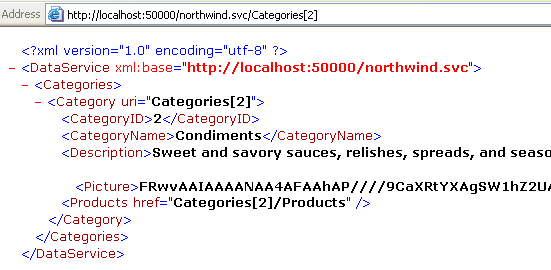
So let’s try the Category uri for categoryID 2.
And then get the products for that category.
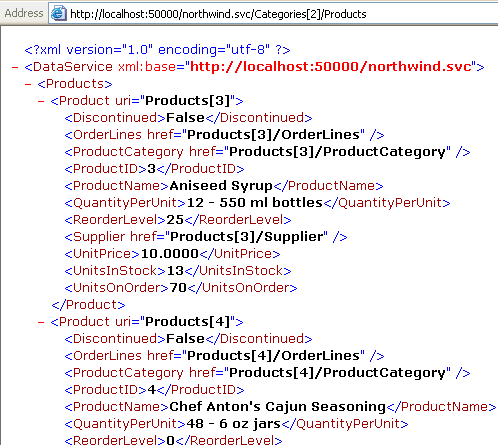
So you can see now the basic concept of what Astoria is doing. I am not forced to write a billion operations in my web service to expose my data every which way. I don’t have to deal with building xmldocuments to return data that can be consumed by anyone, not just .NET clients that can deal with serialized datasets. With proper security in place and the possibility of customizing what is and isn’t exposed (and how), consumers of my data can now have easy access to do all kinds of reporting, mash-ups and more. The fact that any consumer will know what to do with any data that is exposed via an astoria web data service is huge.

You can learn more about Astoria by following the Astoria Team blog.
How many programmers does it take to change a $20?

When Vermont.NET does not have a sponsor to cover the cost of pizza & soda, the attendees pay for their own – $5 each. This was the case at Monday’s meeting. Additionally, we were doing a fundrasing raffle for the first time ever, using a license to Infragistics NetAdvantage that was donated by Infragistics. The raffle was $5. There were about 25 people at the meeting.

Usually, collecting the money is a subtle thing that happens in the background and I have not even had to do it in years as another user group member has been grabbing the cash on my behalf. But I was doing it on Monday and wouldn’t you know it, but everyone had 20’s. Nobody seemed to have change. In over 5 years and 70 meetings, this has never happened before. It took a good 15 minutes or more to get it all sorted out. While I’m laughing about it now, it was totally chatoic and embarrassing at the time. We had a bunch of new attendees and our speaker, Mark Mullin (who helped come up with change for a 20) from New Hampshire. I could only imagine what they were thinking!

So my lesson? I guess from now on, I’ll just have to add in “20’s not accepted”.


Three great MSDN LINQ resources for VB developers

While there are many great LINQ resources for VB, I happened to read/watch/see these and wanted to be sure to point them out.

1) Lisa Feigenbaum’s LINQ Best Practices webcast. Lisa is on the VB team. This webcast is full of great insights and tips.

2) Timothy Ng’s Basic Instincts: Lambda Expressions article in the current (Sept 07) issue of MSDN Magazine. I’ve spent so much time trying to interpret lambda articles written in C#. Having one written specifically for VB devs is awesome and this article gently leads you into the complexities in a very easy to comprehend way.

3) 101 LINQ Samples for VB (yay!) was posted a few weeks ago. LINQ to Objects, to SQL, to XML and to DataSets. Don’t go looking for LINQ to Entities yet though.


Two Vermont Software Companies on Inc’s 5000 list

Inc’s 5000 list was recently released and among the 9 Vermont companies on the list there are two software companies, both based in South Burlington.

 iTechUS ranked 113 on the whole list and #11 in IT companies. In New England it is ranked #1 in the IT Services companies. www.itechus.com

Dealer.com ranked 578 in the full list. While they are a software company, their industry is listed as advertising and marketing. In that category they are #55. www.dealer.com

Astoria CTP Refresh for VS 2008 Beta 2 is out

Just a quick pointer to Pablo Castro’s announcement that a new CTP for Astoria is out that will work with vS2008 Beta2.

An important note, this is a refresh of the CTP, which is based on the early prototype. The actual production code that they are working on is a totally different set of bits. Hmm, for safetey’s sake, I better just quote Pablo:

NOTE: let me stress that this is a refresh of the May CTP, which is based on the initial prototype of Astoria. All of the features/design options we’re discussing here in this blog (e.g. last post about payload formats) are in the context of the production version of Astoria which we are in the process of building. The production version incorporates a ton of feedback that we received over the last few months plus our own more detailed thinking of what should the system look like. So expect to see quite a few differences between the CTP and the production code once we start shipping the production version. The principles will all be the same, but the details will vary.

Vermont IT Jobs: Web Application Developer in Middlebury (great company to work for!)

This a job with one of my mentoring clients, Co-Operative Insurance. I absolutely love going to their office and working with these people. It’s a small team in a large company. Nice, friendly folks. And it’s in Middlebury which is a great place to work.

Web Application Development

Excellent opportunity for a qualified programmer with web application design, development, and implementation experience!

Work on the complete product development lifecycle of our B2B extranet, including requirements gathering, technical design specification creation, coding, testing, deployment, post-production support, documentation and maintenance.

Must have 2-5 years’ development experience with Visual Studio 2003/2005 as well as JavaScript, (X)HTML, ASP.net, VB.net and XML. Pluses include insurance industry knowledge and experience with CSS and with version control software such as SourceSafe or Vault. Solid UI design skills get you multiple pluses.

To join our hard-working, fun IS team in producing quality apps, you must be an organized, self-motivating team player, an excellent communicator and attentive to detail. You must be willing and able to work both independently and with a team, depending on the assignment.

Co-operative Insurance Companies is a $50 million property and casualty insurer in VT and NH.  We offer a competitive benefits package and a schedule that allows for work/life balance.

For immediate consideration, please forward a copy of your resume to jobs@ciui.net.

Mark Mullin on WCF & SOA at Vermont .NET tonight

We are really looking forward to this talk by Mark Mullin tonight at VTdotNET!

We also have some great WCF books to give away: Learning WCF by Michele Leroux Bustamante (thanks OReilly and INETA) and Pro WCF: Practical Microsoft SOA Implementation from APress.

Thanks to Infragistics, we will be raffling off two licenses to NetAdvantage for .NET. One of the raffles will actually be a fund-raising raffle.

We also have shirts and swag courtesy of CodeZone and piles of CoDe Magazine and aspnetPRO to give away.

And thanks to Verio’s sponsorship of INETA, I am able to offer Verio’s free webhosting to Vermont .NET members who show up at the meeting tonight.

Since it’s such a nice day (and I have just absolutely NO work to do ;-)), and Mark is being so generous with his time (driving up from New Hampshire) and cash (there’s gas $ and hotel involved), I am going to take him on a 1.5 hour cruise on Lake Champlain aboard the Spirit of the Ethan Allen this afternoon. Hey, running a user group is HARD work, y’know?

Silverlight Ink – Searching in Google

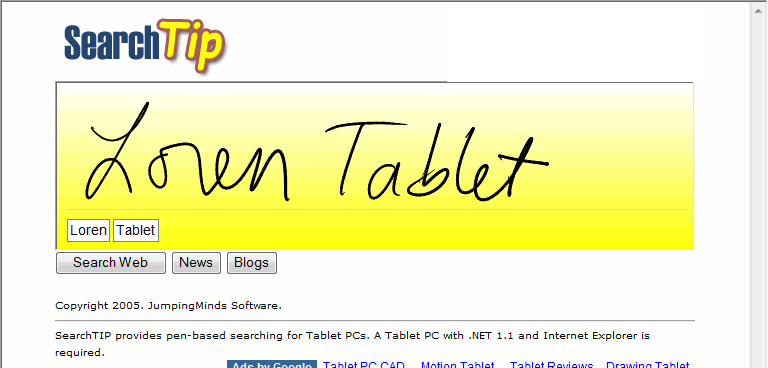
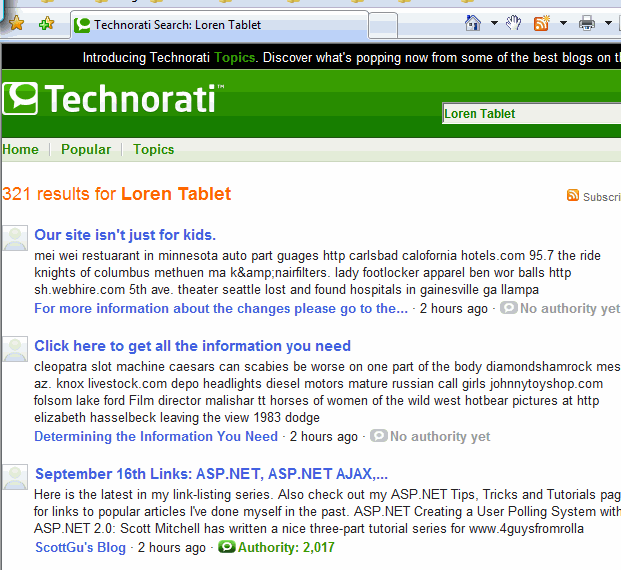
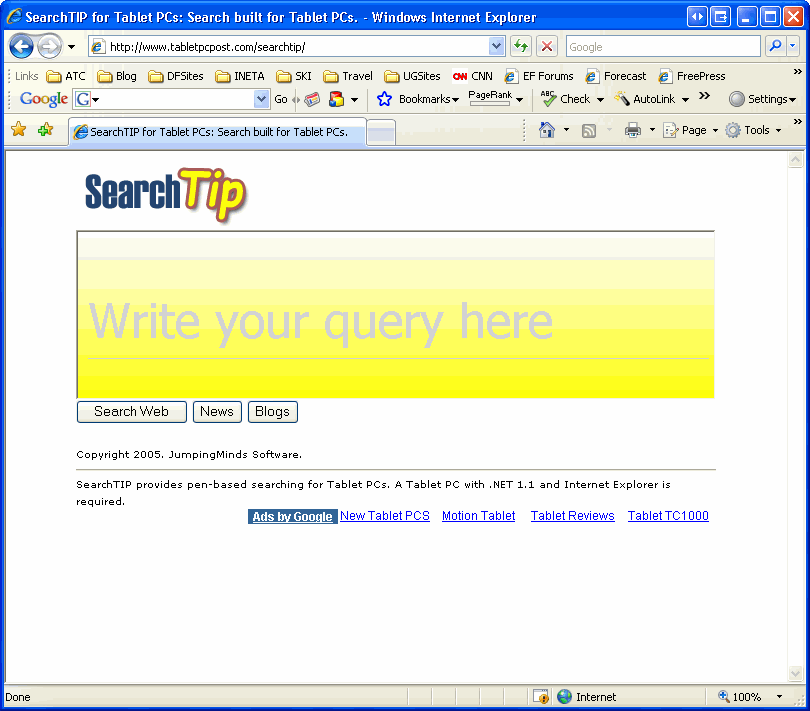
Loren Heiny has been working on a cool Silverlight annotation app to user Silverlight and a stylus to do Google and Technorati searches. It’s called SearchTip and is live on TabletPC Post.

There is a lot that is really interesting about this. (And it’s visually appealing too!) First of all, he has a YouTube video where he compares using this (earlier version) on a Mac to using Inkwell on the Mac (when you have a tablet ala Wacom attached to the Mac) and demonstrates the superiority of Microsoft’s handwriting recognition. I was lucky enough to attend an SDR at Microsoft a few years ago where the man who ran the whole reco team explained to us how they made it all work. I can’t imagine anybody being able to come close to their investment or acheivement with handwriting recognition, so it was great to see Loren being able to really compare apples to apples (no pun originally intended, but oh well!)

Next is the fact that Loren is doing handwriting recognition from the InkPresenter in Silverlight. Not an easy feat. Once the reco is done, the result can get passed to a google service and voila you get your results displayed.

Loren has done some amazing work with the Tablet APIs for a number of years and always thinks out of the box. So I love that he’s taking his ideas and applying them to Silverlight.


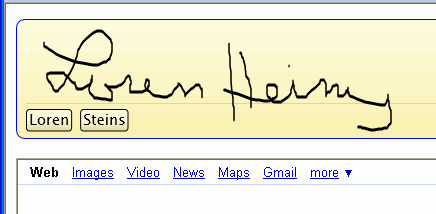
Of course, you don’t need a tabletpc to draw in silverlight, but as awesome as the recognition is, I don’t think it’s fair to ask it to recognize mouse drawn handwriting. But it’s not bad. Reco returns a list of guesses, sorted by best to worst. Here I’m using an earlier version which does google searching and trying it with my mouse on a regular (non-tablet) desktop.

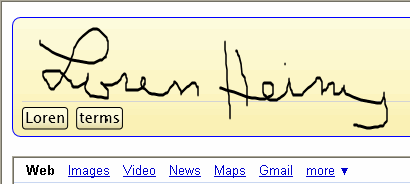
So you can click on the guess (I clicked on Steins) and it will show you the next guess on it’s list. Heinz was next, then a few more clicks (just to see) got me off the track. oops. This is not a reflection of the reco or of Loren’s app. I’m only playing around with the mouse for fun (and laziness since my tablet is upstairs.) So while the reco may not be great when you aren’t using a stylus which has about 10 times the resolution as a mouse, Silverlight’s ability to collect the ink data from the mouse is still pretty impressive.

You can see Loren doing this. and how impressive it truly is using a Tablet, in his YouTube demo video.

You can clear your writing with the x, and of course, when you have the correct reco displayed, click Search.

Using LINQ to query Outlook emails joined with SQL data

I watched part 2 of Jim Wooley’s ASP.NET Podcast show on LINQ and was really impressed with the creativity of his examples. Having dug deeply in order to write LINQ in Action along with Fabrice Marguerie and Steve Eichert, he’s way past the how-to basics and able to see the bigger picture of leveraging LINQ.

In his demo, he starts with some simple querying of the file system – a good demonstration of using linq against objects, but by the time he gets to the end of the demo, he is using JOIN to build queries that combine file system info with data pulled from the database.

I knew I wanted to do something like that but I couldn’t just copy him, no matter how flattering. So I thought about it for a while… what data is on my computer that I might want to extend with some database data? Then I thought of Outlook.

Thankfully, John Goalby had already written some posts on querying Outlook data with LINQ. So I was well on my way!

I created a few new email accounts for some employees of companies in AdventureWorksLT and sent emails to myself with their accounts. Then I created contact records for them in Outlook in my own account, making sure that I typed in the company names to match the database. Now I had some test data.

First I tested out a query where I joined MailItems from my inbox with ContactItems from my contact. (Note that I did this in VB since John’s examples are in C#, so this gives a little more sample code for people to discover.)

Dim ol As Outlook._Application = New Outlook.Application
Dim inbox = ol.ActiveExplorer().Session.GetDefaultFolder(Outlook.OlDefaultFolders.olFolderInbox)

Dim contactfolder As Outlook.MAPIFolder = ol.ActiveExplorer.Session.GetDefaultFolder(Outlook.OlDefaultFolders.olFolderContacts)

Dim emails = 
From email In inbox.Items.OfType(Of Outlook.MailItem)() Select email
Dim contacts = From contact In contactfolder.Items.OfType(Of Outlook.ContactItem)() Select contact

Dim
emailswithcompany = From email In emails Join contact In contacts _
    On email.SenderEmailAddress Equals contact.Email1Address _
    Select email, contact.CompanyName

For Each emailwithco In emailswithcompany
    Debug.Print(String.Format(“{0} from {1}: {2}”, _
       emailwithco.email.SenderName, emailwithco.CompanyName, emailwithco.email.Subject))
Next

This worked fine. I got a list of the sender and subject from the emails and company names from the contact records.

  • Katherine Harding from Sharp Bikes: Order 40 Shifters
  • John Harding from Sharp Bikes: modification to recent order
  • Keith Harris from Progressive Sports: vendor appreciation party

Then I queried the database and did a JOIN with the above results. It was funny to see how the types and subtypes kept growing as I built this up in layers. It’s nice to have things organized, but if I were starting from scratch, I might do this a bit differently so that my resulting types aren’t so complex*.

Dim awdc As New awlinqDataContext
Dim custSalesPerson = From cust In awdc.AWCustomers Select cust.CompanyName, cust.SalesPerson
Dim emailswithcompanysp = From emailco In emailswithcompany _
   Join cust In custSalesPerson _
   On cust.CompanyName Equals emailco.CompanyName _
   Select emailco, cust.SalesPerson

For Each emailwithcosalesp In emailswithcompanysp 
  Debug.Print(String.Format(“{0} from {1}: {2}” & NewLine & “SalesPerson:{3}”, _
    emailwithcosalesp.emailco.email.SenderName, _
    emailwithcosalesp.emailco.CompanyName, _
    emailwithcosalesp.emailco.email.Subject, _
    emailwithcosalesp.SalesPerson))
Next

And voila!

  • Katherine Harding from Sharp Bikes: Order 40 Shifters
    SalesPerson:adventure-works\josé1
  • John Harding from Sharp Bikes: modification to recent order
    SalesPerson:adventure-works\josé1
  • Keith Harris from Progressive Sports: vendor appreciation party
    SalesPerson:adventure-works\david8

Now I could write an app that can distribute email to the correct sales people when they come into a general mail box! Well, I supposed I could have done it prior to having LINQ (or maybe in Exchange which I know nothing about), just with a lot more effort!

*I couldn’t resist streamlining the final solution.

Dim ol As Outlook._Application = New Outlook.Application
Dim inbox = ol.ActiveExplorer().Session.GetDefaultFolder(Outlook.OlDefaultFolders.olFolderInbox)
Dim contactfolder As Outlook.MAPIFolder = ol.ActiveExplorer.Session.GetDefaultFolder(Outlook.OlDefaultFolders.olFolderContacts)
Dim emails = From email In inbox.Items.OfType(Of Outlook.MailItem)() Select email
Dim contacts = From contact In contactfolder.Items.OfType(Of Outlook.ContactItem)() Select contact
Dim awdc As New awlinqDataContext
Dim custSalesPerson = From cust In awdc.AWCustomers Select cust.CompanyName, cust.SalesPerson

‘now query across emails, contacts and custSalesPerson in one query

Dim emailcontactsp = From email In emails Join contact In contacts _
  On email.SenderEmailAddress Equals contact.Email1Address _
  Join custsalesp In custSalesPerson On contact.CompanyName Equals custsalesp.CompanyName _
  Select email, contact.CompanyName, custsalesp.SalesPerson

For Each ecsp In emailcontactsp
Debug.Print(String.Format(“{0} from {1}: {2}” & NewLine & “SalesPerson:{3}”, _
   ecsp.email.SenderName, _
   ecsp.CompanyName, _
   ecsp.email.Subject, _
   ecsp.SalesPerson))
Next