While there are lots of awesome new features in VB9 and C#3.0, everything has taken a back seat to LINQ. I am, however, growing more and more fond of extension methods. Read more…
[A new DevLife post]
While there are lots of awesome new features in VB9 and C#3.0, everything has taken a back seat to LINQ. I am, however, growing more and more fond of extension methods. Read more…
[A new DevLife post]
I’ve been snooping around the web and found links for many of the db vendors (and 3rd party vendors) to try to watch their own news about what they are doing for Entity Framework.
Here’s Dave Sceppa’s list of companies working on EF providers and interleaved with his list are my best stabs at a blog or page on their website to watch:
Providers Targeting Publicly Available Versions Within Three Months of RTM · Core Lab – Providing connectivity to Oracle, MySQL, PostgreSQL and SQLite databases Core Lab does not seem to have a blog but here is their News page · IBM – Providing connectivity to both IBM DB2 data server and Informix Dynamic Server (IDS) databases Took some digging, but here’s the guy responsible for letting non-IBM developers use IBM’s databases: Grant Hutchinson’s blog. · MySQL is opensource. The best resource I think to watch is Planet MySQL, which is an aggregated feed of various MySQL bloggers. · Npgsql – Providing connectivity to PostgreSQL database versions 7.3+ and 8.x Npgsql stands for .NET Provider for PostgreSQL. Opensource. Here’s the project page for the .NET projects. Also, they were very excited about their Entity Framework provider getting in the news! · OpenLink Software – Providing connectivity to Oracle, Informix, Ingres, Sybase, MySQL, PostgreSQL, DB2, Progress and Microsoft SQL Server databases, and any data source accessible via OpenLink ODBC or JDBC bridge drivers · hmmmm??? I found Phoenix Software International, but nothing seemingly related here… · Sybase – Providing connectivity to SQL Anywhere databases Here’s the SQLAnywhere launch page · VistaDB Software – Providing connectivity to VistaDB databases * – The providers in the list above are also working towards publicly available versions of their providers to work with Beta 3 of the Entity Framework. Providers Targeting Publicly Available Versions in 2008 · DataDirect Technologies – Providing connectivity to multiple data stores including Oracle, Sybase, Microsoft SQL Server and DB2 via DataDirect Connect® for ADO.NET None other than Jonathan Bruce! 🙂 · Firebird – Providing connectivity to Firebird databases Firebird is open source. HEre is the Firebird Community News website. |
And, missing from Dave’s list is Oracle.
I’m watching Christopher Shay’s blog for any news.
Yes, you are reading this on a dasBlog site and I love dasBlog, but I spent the Christmas holiday playing with the public beta of Graffiti and I really do think they have nailed it for a lightweight CMS/blogging system.
Out of the box, it is really simple to use, but don’t let it’s simplicity fool you. It is so customizable on two levels. For any end user, the widgets are fabulous and take no braincells to use. For those adept in CSS and HTML, the themes can be customized very deeply. The macros expose gobs of functionality and the views are really easy to leverage. I was able to give the site my own look by starting with one of the available themes, then replacing most of the image files that are used in the theme.
I believe that in using Graffiti, I’m getting a really good taste of either MVP or MVC here.
Also, the fact that you can just plop in an Access database (default) or other database without having to set up SQL Server if you don’t want to is a big advantage. This closes the gap between one of the important features of dasBlog – all of the content is stored in files so there’s no need to deal with SQL Server – and something like Community Server which requires a database. However, my blog is now made of up over 1300 separate xml files. This definitely makes me nervous. In fact, I looked at CS first, but was stopped by the fact that you have to host the database independently. I didn’t see a way to just add the tables and other elements into my existing hosted database.
I’ve been building something that is not even going to be used as a blog, but a mini-site where I can aggregate some particular blog posts and other content.
One tip regarding the Access database I can share is this. If you want to test Graffiti out locally and you are using Vista, there are a show-stopper issues with permissions to MDB files in IIS7. I spent hours trying to get around it and finally gave up. I was able to open and run it in VS2008 using the web development server instead. When I FTPd everything to my webhost (which means IIS6) there were no problems at all using the Access file. I ended up doing 98% of my customization on the hosted site anyway.
No, it’s not what you think I was going to say…
But David Sceppa from the EF team is working on one and it’s on the MSPress website!
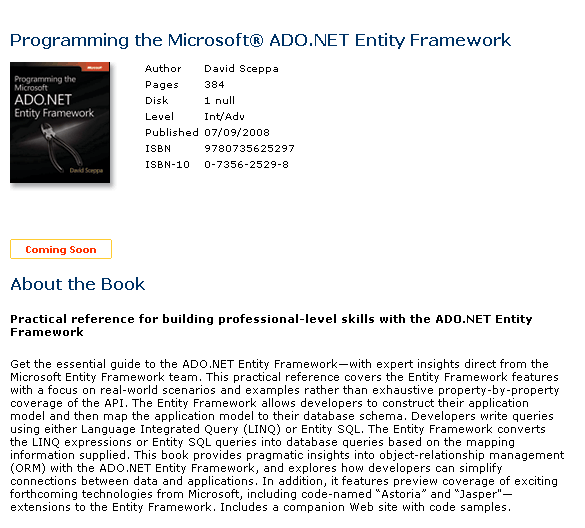
Which made me go to amazon and look some more and wouldn’t you know I found a few more…
Not surprised that Roger’s at work on a book!
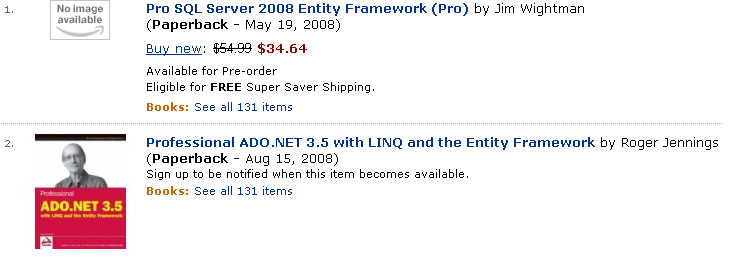
Perhaps there will be more… only time will tell! 🙂
Last spring, I ran into Don Box in the hallways at MIX07.
I hadn’t seen him in quite a while and asked what he had been up to lately in his wizard’s tower.
Though he couldn’t really talk about what he was doing, he did say that he was working on some cool new stuff and having fun.
I had a quick fantasy about suggesting in a blog post that perhaps Don was working on the next version of Visual Basic, which would have been, of course, a completely insane idea. Don has a bit of a history with VB and I have a bit of a history of calling him out for public jibes at VB (which were likely more innocent than they sounded….).
On the other hand, it was definitely painful to sit in a WCF session a number of years ago where he had been clearly coerced to code in VB (after he was swayed to actually use Visual Studio rather than emacs in public ;-)), though the audience was composed of about 95% C# programmers. I felt badly for him, though he managed to have a little fun with it.
Again, it was no more than a silly idea that crossed my mind, provide me with a momentary evil grin and then it was forgotten, because it could so easily be taken out of context.
Who knew my silly little idea was closer to the truth than I could ever have dreamed? Not to suggest that he is, in fact, working on VBX, but he certainly is whistling (or is that singing) a different tune when it comes to VB these days.
Check out this Channel 9 video with Don Box, Chris Anderson and Amanda Silver!
You can read more of Don’s new-found VB love over on his blog (and look for some posts about the fact that his team is hiring!)
I have spent a lot of time thinking about Entity Framework in web applications and in SOA and worrying about performance, serialization and concurrency.
But I haven’t spent a lot of time worrying about these things with respect to client apps (winforms and WPF).
In a great thread started by Nick in the forums where he was asking about keeping huge lists around in an application without having to hit the db over and over, both Danny Simmons and I assumed he was talking about web apps and started down the whole serialization/caching path.
But it turned out that Nick was worried about a WPF app which changes everything when you are thinking about performance.
In the end, Danny gave this great guidance (with my highlight):
“The context is safe to keep around as long as you are careful to make sure that it is always used only on a single thread (put it into thread local storage and have one copy for each thread if you need multiple threads). The connection will open and close automatically as needed so you don’t need to worry about holding a connection open. Long-running contexts are the expected pattern for rich client apps—just not the right plan for asp.net scenarios and the like where you want the server to be as stateless as possible.”
Yesterday was the first break – I broke a promise to myself that I was going to take a few hours out to go skiing. I never did.
Right now we have the most phenomenal snow in Vermont…highly unusual for December (it’s still Fall, y’know) and everyone who loves snow wants to enjoy it while they can just in case.
So today I was determined not to break my promise. I didn’t leave until 1 hour later than I wanted, but I left. I got to Mad River, put on my boots and defogged my goggles with the great defogger cloth I bought instead of buying new goggles last year. But I noticed there was a 1 inch crack in my goggles. Oh well. I put them on anyway, went outside, grabbed my skis and walked over to the single chair where I put them on. First the right, then the left. Something looked funny on the left. My binding was BROKEN! There’s a big plastic piece that pulls the cable tight around the boot and it was cracked. But I could still clamp down and it seemed solid.
Just in case, I went to the ski shop and they said that it would be way too dangerous to ski on them. Arrgh. We are talking PERFECT PERFECT packed powder conditions, 30 degrees and no wind. And I couldn ski. Rather than renting skis and skiing anyway, I drove down the mountain in to Waitsfield and dropped off my skis at a local ski place to get the bindings either fixed or replaced overnight.
Then I drove home and figured I’d go ski in my woods instead.
I took out my brand new back country boots that I’ve only worn 3 times so far. They are new fangled hightech boots and the zip up (similar to cross-country boots now). The zipper pull broke off in my hand.
I managed to zip it up anyway and I finally got out to do one loop in the woods with no more breaks and got back to the house before dark. The snow was so perfect, it was worth all the effort.
But geeze loueeze – that was starting to push it!
I wrote a series of Astoria posts based on the preview and have been thinking about updating them for ADO.NET Data Services, but it seems that it would be pretty redundant considering that we have three great resources already doing the same:
Mike Taulty has two posts now in a series: ADO.NET Data Services – Getting Started (2)
Guy Burstein is writing a series:ADO.Net Data Services Part 2 – Using Service Operations with WebGet
Jonathan Carter is writing series: ADO.NET Data Services Part 1: Services
Thanks guys. That means I can go do something else…
Note: This blog post explains theory as well as steps to implementing the stored proc. If you read my blog regularly, you are used to this.
11/30/09:Anoter note! Don’t miss the fact that this is for the verison of EF in VS2008 SP1. Things have been greatly improved in VS2010. Check out this *much newer* post: http://thedatafarm.wpengine.com/blog/data-access/a-big-step-for-stored-procedures-in-ef4/
As with the previous CTP Wizard, the Wizard in the new EF Tools (CTP2) will create functions in the Store Layer of the model to represent stored procedures in the database that the wizard is building a model from.
And as with the previous CTP, that’s all you get. It doesn’t implement it all the way through to the conceptual layer to be used in your applications. The documentation for the previous CTP showed how to complete DML stored procedures (Insert, Update & Delete) but not SELECT stored procedures that return data. So, I wrote a blog post in September that describes how to implement a SELECT stored procedure in EDM.
With the new tools, the Insert/Update/Delete functions are very simple to create now. Which is great. Select stored procedures with results that match an entity is also a breeze (see Guy Burstein’s blog post that walks through these).
But as of yet, there is no help for the Select stored procs that return miscellaneous results.
Therefore I wanted to update the instructions since you can do a few more things with the wizard for this. But you’ll still need to work with the raw XML of the EDMX file.
Let’s start with a simple example.
There is a stored procedure that I added to the AdventureWorksLT db that takes a year as a parameter and returns a list of Company Names with their total sales for the year. The resulting schema contains TotalSales, CustomerID and CompanyName. This result set doesn’t line up with any tables/views in the db or entities in my conceptual layer.
When the EDM is generated from the database the stored proc is realized in the StoreLayer. You can see this in two ways.
The Model Browser
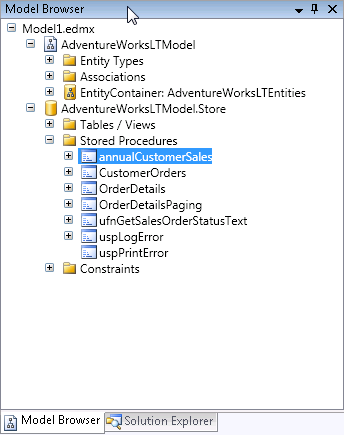
Or in the raw xml of the EDMX file, in the Storage Section:
<Function Name="annualCustomerSales" Aggregate="false" BuiltIn="false" NiladicFunction="false" IsComposable="false" ParameterTypeSemantics="AllowImplicitConversion" Schema="dbo"> <Parameter Name="fiscalyear" Type="char" Mode="In" /> </Function>
You can see that it does not determine the output parameters, which would be a daunting task to build a parser for.
So you need to create the following:
1) An entity that matches the schema of the results (TotalSales, CustomerID, CompanyName)
2) A function in the conceptual layer that maps back to the function in the store layer (called an import function)
3) Every entity needs to map to something in the store layer, therefore you need a fake table in the store layer that matches the entity in the conceptual layer .
4) The entity in the store layer needs an entity set
5) Lastly, the entity in the conceptual layer needs to map back to the entity in the store layer.
#3 through #5 are extraneous to what we are trying to do, but EDM has rules that need to be followed, so we need to throw all that extra stuff in there. It would be great if we could somehow just map the function to the entity – or if we could just use the function and return an anonymous type. But we can’t. So, let’s just move forward.
This seems like a lot of steps, but once you do it, it will make sense.
Step 1) You can create entities using the designer, so this isn’t so bad. Create a new entity and add the properties that are returned in the results. Here’s what mine looks like:
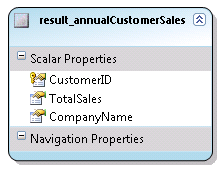
The customerID is flagged as a Key for the entity. An EntitySet will automatically be created. In my model it was named "result_annualCustomerSalesSet". Be sure to set the properties of the properties correctly (type, length, etc.) You can use properties of other entities in the model for clues as to what those values should be.
Save the model.
Step 2) Create an import function. In the Model Browser (right click in the designer and choose Model Browser if it isn’t visible), locate the stored procedure inside the Store layer (see screenshot above for a reminder). Right click on the stored proc and choose Create Function Import. You’ll get a screen where you need to fill out the Function Import Name and select an entity from a drop down list.
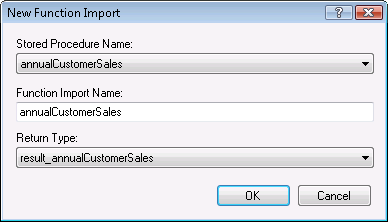
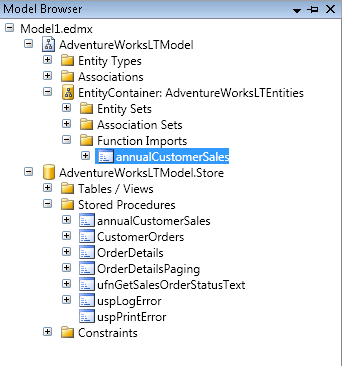
After you hit okay, the EDM will be updated and you will see the function import in the Model Browser.
Note that if the results matched an existing entity (a mapped entity, that is) you would be finished here.
Step 3) Create an Entity in the Store Layer that the result_annualCustomerSales entity will get mapped to. I cheat a little here by copying and pasting the Entity from the conceptual layer into the store layer then make appropriate edits.
In the conceptual layer it looks like this:
    After pasting this into the store layer section with the other EntityType elements, I edit so that the
store entity looks like this
<EntityType Name="result_annualCustomerSales"> <Key> <PropertyRef Name="CustomerID" /> </Key> <Property Name="CustomerID" Type="Int32" Nullable="false" /> <Property Name="TotalSales" Type="Decimal" Nullable="true"
Precision="19" Scale="4" /> <Property Name="CompanyName" Type="String" Nullable="true"
MaxLength="128" Unicode="true" FixedLength="false" /> </EntityType>
<EntityType Name="result_annualCustomerSales">
<Key>
<PropertyRef Name="CustomerID" />
</Key>
<Property Name="CustomerID" Type="int" Nullable="false" />
<Property Name="TotalSales" Type="money" Nullable="true" />
<Property Name="CompanyName" Type="nvarchar" Nullable="true" />
</EntityType>
If you need help determining what the property properties (eg type) should be, look at some of the other Entity Types in the store model for clues. I use the same trick with the conceptual entity to figure out precision and scale for the TotalSales property.
Step 4) You also need the EntitySet in the store layer. Copy and paste that, too.
Entity Set in Conceptual Layer<EntitySet Name="result_annualCustomerSalesSet"EntityType="AdventureWorksLTModel.result_annualCustomerSales" />Entity Set in Store Layer<EntitySet Name="result_annualCustomerSalesSet"
EntityType="AdventureWorksLTModel.Store.result_annualCustomerSales"Schema="dbo"/>
Almost done!
Step 5) Map the Conceptual Entity to the Store Entity.
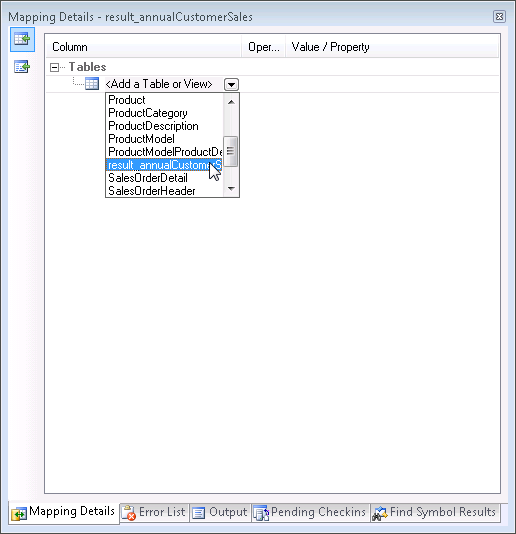
If the Mapping Details are not showing, click anywhere in the designer and choose Mapping Details. By default it will show up in the same area as the error list, etc. in the IDE.
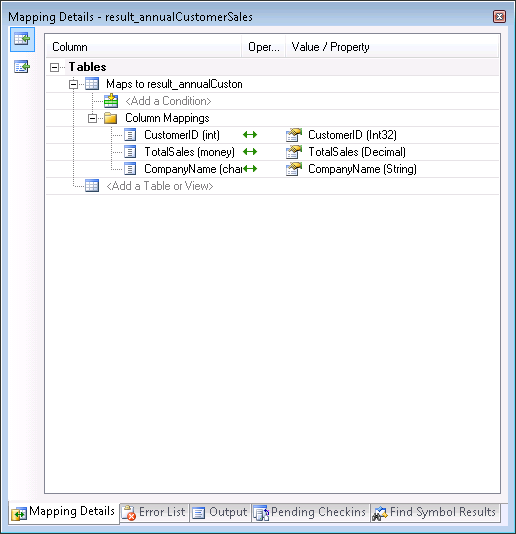
In the designer, select the new Entity. You will see a little info about it in the Mapping Details window. Drop down the list for "Add a Table or View" and choose the table definition you created in the store layer.
All matching properties will automatically be mapped.
FINALLY YOU ARE DONE!
Now let’s go to the code and see the sproc in action!
Dim aw As New AdventureWorksLTModel.AdventureWorksLTEntities
Dim qsales = aw.annualCustomerSales("2004")
For Each cust In qsales
Console.WriteLine(String.Format("{0}: Sales= {1:C}", cust.CompanyName, cust.TotalSales))
Next
Here’s a bit of the output
Aerobic Exercise Company: Sales= $2,361.64
Bulk Discount Store: Sales= $98,138.21
Eastside Department Store: Sales= $92,663.56
Coalition Bike Company: Sales= $2,669.32
Instruments and Parts Company: Sales= $70,698.99
Many Bikes Store: Sales= $81,834.98
Closest Bicycle Store: Sales= $39,531.61
West Side Mart: Sales= $87.09
Riding Cycles: Sales= $86,222.81
Futuristic Bikes: Sales= $272.65
Vigorous Sports Store: Sales= $1,170.54
Thrilling Bike Tours: Sales= $15,275.20
Trailblazing Sports: Sales= $45,992.37
Paints and Solvents Company: Sales= $14,017.91
Channel Outlet: Sales= $608.18
Thrifty Parts and Sales: Sales= $1,379.17
Engineered Bike Systems: Sales= $3,754.97
Essential Bike Works: Sales= $45.20