Geek story of the day!
http://www.cnn.com/2007/TECH/science/12/13/northern.lights.ap/index.html
Geek story of the day!
http://www.cnn.com/2007/TECH/science/12/13/northern.lights.ap/index.html
When I was at ReMix Boston in early October, I remember that Stan Shultes told me that someone was doing user group presentation on Entity Framework in Florida but couldn’t think of the person’s name at the moment. Shortly afterwards, I had an email conversation with someone who had asked an interesting question on the ADO.NET forums and when he said he lived in Florida, I correctly put two and two together. It was Jonathan Carter who had been doing the presentations.
I met Jonathan a few weeks later at an SDR at Microsoft and, although I’m used to how young many programmers seem to me now (it’s all relative … only because I”m so friggin’ old now ;-)), I was surprised how young he was, but oh so smart. And of course, we had our passion for Entity Framework and Astoria in common!
This didn’t go unnoticed and now Jonathan is wearing a blue badge! He is now the technical evangelist for Visual Studio and .NET Framework – a pretty impressive position to start with.
You can read more about Jonathan’s new job here and then check out the rest of his blog because he’s been blogging up a storm.
I’ve been using the GetObjectStateEntry method for a while so that I can view and interact with the state of a particular entity that I have in hand.
Today I used the plural version of this method for the first time and boy do I like it!
GetObjectStateEntries takes as a parameter an EntityState enum: Added, Modified, Deleted, Unchanged or Detached.
It provides a perfect opportunity to do some work on entities prior to hitting the datastore during a save changes event.
For example, if you have an entity with a property to track the modification date you could update that property any time any other property in the entity is changed which might be wasteful. But with the GetObjectStateEntries method, I am able to just update the Modified Date property on all changed objects at once just before I save changes.
Here’s some code for dealing with the Customer entity that is derived directly from the customer table in the AdventureWorks database.
Now, this poses an architectural question and you may want to put this particular business logic elsewhere, but it’s merely a demonstration of what you can do with this method.
Because the generated classes are partial classes, I just create another partial class for my AdventureWorksLTEntities class and intercept the SaveChanges method. Then I grab all of the modified objects, use the Entity property to filter just Customers, then changed the Modified Date property. Next I grab the Added objects, change the Modified Date and also add in a default password hash and password salt. These are required for customer rows. (Read more about hashing passwords here on Beth Massi’s blog.)
Namespace AdventureWorksLTModel
Partial Public Class AdventureWorksLTEntities
Private Sub AdventureWorksLTEntities_SavingChanges(ByVal sender As Object, ByVal e As System.EventArgs) Handles Me.SavingChanges
Dim changedEntities = Me.ObjectStateManager.GetObjectStateEntries(EntityState.Modified)
For Each stateEntryEntity In changedEntities
If TypeOf stateEntryEntity.Entity Is Customer Then
Dim cust As Customer = stateEntryEntity.Entity
cust.ModifiedDate = Now
End If
Next
Dim addedEntities = Me.ObjectStateManager.GetObjectStateEntries(EntityState.Added)
For Each stateEntryEntity In addedEntities
If stateEntryEntity.Entity.GetType() Is Customer Then
Dim cust As Customer = stateEntryEntity.Entity
cust.ModifiedDate = Now
‘password hash cannot be null
‘for demo purposes just put a default string in there
Dim strPassword As String = “p@ssw0rd”
Dim encoder As New System.Text.UTF8Encoding()
Dim SHA1Hasher As New Security.Cryptography.SHA1CryptoServiceProvider
Dim hashedBytes As Byte() = SHA1Hasher.ComputeHash(encoder.GetBytes(strPassword))
cust.PasswordHash = Convert.ToBase64String(hashedBytes)
‘customer table also needs salt for hash
Dim buffer() As Byte = New Byte(5) {}
Dim rng As New System.Security.Cryptography.RNGCryptoServiceProvider()
rng.GetBytes(buffer)
cust.PasswordSalt = Convert.ToBase64String(buffer)
End If
Next
End Sub
End Class
End Namespace
I have a feeling that this existed in Beta2, but I have updated both of my boxes and don’t feel like digging into a VPC just to verify.
One of the changes with the new CTP release of ADO.NET Data Services (formerly Astoria) is that you can create a service against any iQueryable, not just Entity Framework. This is huge.
Roger Jennings points to Guy Burstein’s how-to with Astoria (I guess it’s time to update my own now outdated posts) and makes the following comment:
“Like Andy Conrad, Guy uses LINQ to SQL instead of the Entity Framework as the data source. I have the feeling this substitution will become universal, at least until RDBMS vendors other than Microsoft deliver EntityClient data providers.”
So this bugs me a little. Why? Because the issue is that right now, Entity Framework only works with SQL Server. But hello, what do you people think LINQ to SQL works with? It’s called LINQ to SQL for a reason! 😉
Okay, rant over, back to work…
I’ve done this demo many times in conference and user group sessions. Someone on the ADO.NET forums asked how to do it and I thought I would just do a quick tutorial with screenshots.
What this Tutorial does is demonstrate how to create and use a data source from a particular entity in the model. I’m just doing simple drag and drop and no filtering or anything here with the goal of just a quick basic walkthrough for getting started.
Start by creating a Windows Application.
Add an Entity Data Model.
Select Data from the menu and choose Add New Data Source
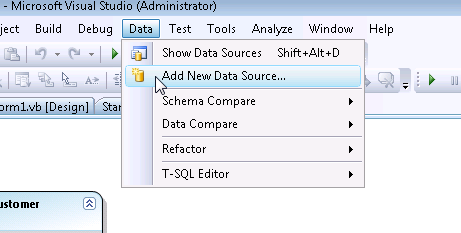
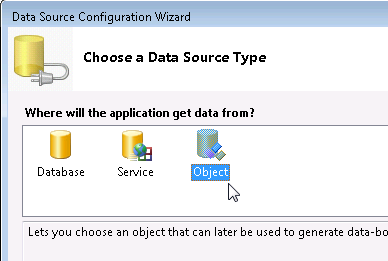
In the first page of the wizard, choose Object as your Data Source Type.
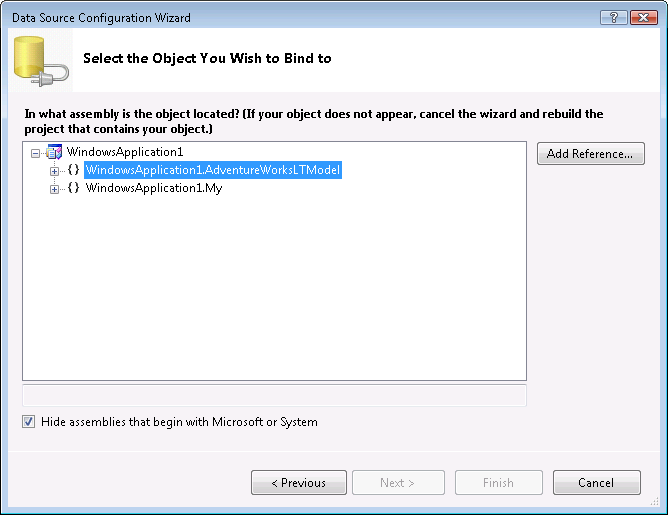
The next screen of the wizard will show the namespaces in the current solution. Open up the namespace for the application
then choose the entity which you want to use as a Data Source. I will pick customer.
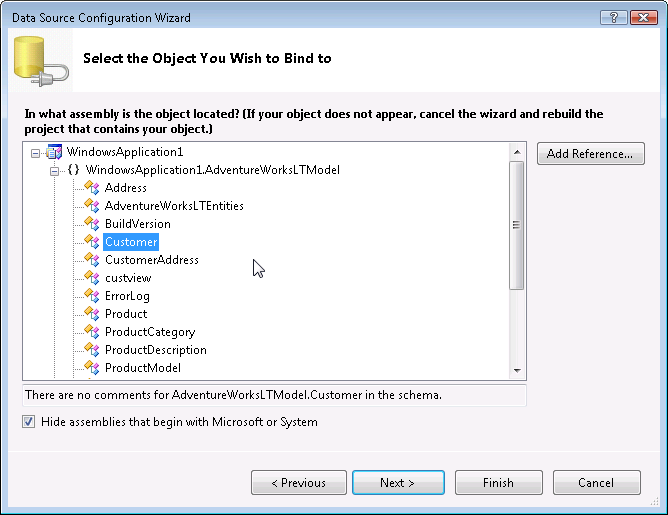
Then you can Finish the Wizard.
Now to get easy access to the datasource, go back to the menu and choose Show Data Sources from the Data menu.
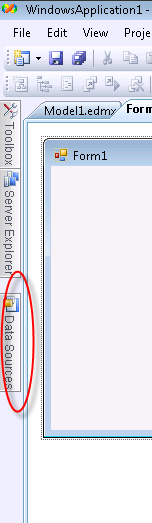
The DataSources Window will be placed in your IDE in it’s default location. Mine docks with the windows on the left.
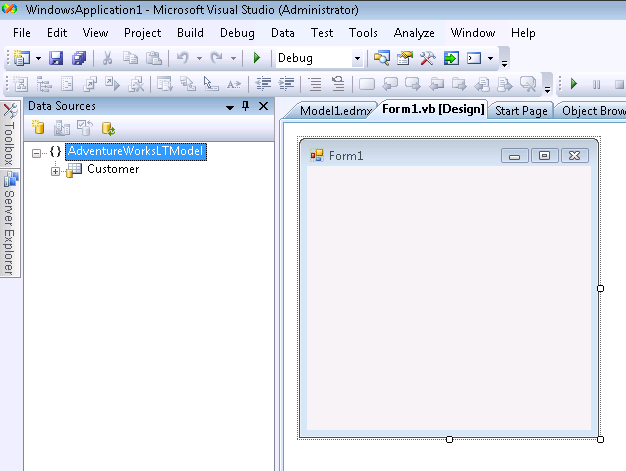
When it’s not pinned it gets tucked away with the others. You can undock it and put it wherever you want.
I can now drag and drop the customer data source onto the windows form to get the automatic DataGridView and Navigation toolbar (this is normal behavior for DataSource and not specific to Entity Framework).
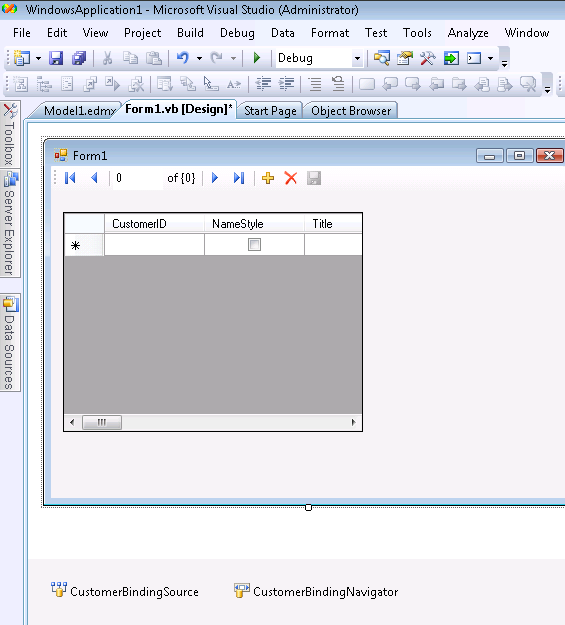
There are a few more steps to actually getting user interaction with this. You need to populate the Binding Source and if you want to edit, you’ll need to add a little code to the save button on the toolbar.
You’ll need to enable the BindingNavigatorSaveButton (just click the save icon on the navigator toolbar and change it’s Enabled property to True). Additionally, you’ll probably want to format the grid which you can do easily from it’s SmartTag and more thoroughly through the properties window.
Here’s what the code behind looks like in my form enabling me to view, add, delete, edit and save data.
Imports WindowsApplication1.AdventureWorksLTModel
  Public Class Form1
   Private aw As AdventureWorksLTEntities
   Private Sub Form1_Load(ByVal sender As System.Object, ByVal e As System.EventArgs) _
    Handles MyBase.Load
     aw = New AdventureWorksLTEntities
     CustomerBindingSource.DataSource = aw.Customer.OrderBy(Function(cust) cust.CompanyName)
   End Sub
   Private Sub CustomerBindingNavigatorSaveItem_Click(ByVal sender As System.Object, _
   ByVal e As System.EventArgs) Handles CustomerBindingNavigatorSaveItem.Click
     aw.SaveChanges()
   End Sub
 End Class
Note that because the AdventureWorks Customer table has the following constraints: ModifiedDate must be a valid date value and the PasswordHash and PasswordSalt fields cannot be Null, I have extended the entity class to take care of these things when SaveChanges is called.
Ann DeMarle is the director of the Emergent Media Center at Champlain College in Vermont. She has started blogging at http://emergentmediacenter.blogspot.com and I look forward to her great insights!
I was honored to be invited by Ann to participate in a Degree Advisory Council for this program.
Finally it’s real live production bits to play with!!
In addition to finally using real bits, key to this release are the finalization of response formats (XML by way of ATOM and JSON), security, an AJAX client, querying with LINQ when you are using one of the clients. THere’s a lot more.
Mike Flasko published 4 blog posts on the Astoria Team weblog yesterday:
ADO.NET Data Services (“Project Astoria”) CTP is Released
Viewing Data Services Responses Using Atom Serialization in Internet ExplorerADO.NET Data Services Dec2007 CTP – Validation and Access Control
While I was at my parent’s house helping out with their THIRTY-FOUR new newfie pups, Tasha was at home hitting an amazing milestone! She turned 14 years old. This is very old for a newfie. While she isn’t the athletic young girl she used to be thanks to arthritis, she is still full of it! Barking every morning to make sure everyone in the neighborhood knows “I’m still here!”, eating like a champ and full of desire (though not the ability) to go down to the road and see what there is to see. I spent years keeping her from getting hit by cars. Now that she’s old, I finally don’t have to worry about that any more. Her eyesight and hearing seem to be fine and she gets acupuncture to help out with the arthritis since her back legs are quite stiff. It’s hard to get up, get down and to walk. Not so hard that she’s not willing though although she hasn’t been doing stairs for a few years now. Every day I watch her so carefully to make sure that I’m not being selfish.
Here’s a picture of her today. A little scruffy because it’s basically impossible to give her a bath as we can’t make her stand for a long time. We can’t get her upstairs to our easy access shower to try to bathe her there either and now it’s too cold to bathe her outdoors. But she doesn’t mind and neither do we. She’s 98!

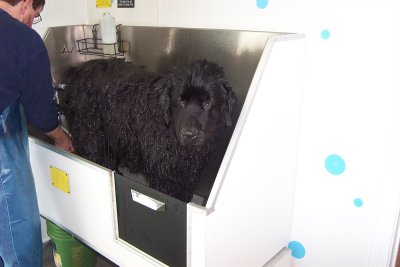
A little less than four years ago, I took some pics when we were giving Tasha a bath at our local (wonderful) pet store that has a great setup. Even then she was old for a newf at 10 and standing for a long time was a little problematic. But look how cute she is!
No less amazing is Daisy who will be 13 in a few more weeks.

At the Mix n Mash earlier this week, I asked Scott Guthrie what his opinion was about developers having to deal with SO many new technologies coming out from Microsoft at such a rapid pace.
His recommendation was to pick what is core to your work, or what you are really good at or really vested in and then ignore the rest.
Easier said than done.
Even if we follow ONLY his blog, we have myriad technologies in our faces. It’s very hard to predict the future. I am currently “ignoring’ .NET 3.0 (WPF, WCF & Workflow), MVC, AJAX Control Kit, SQL Server 2008, a huge chunk of Silverlight. Granted MVC is far out. Volta just showed up. Astoria is plowing ahead without me at the moment. Surface is astounding. And there’s so much more.
It’s very frustrating because this isn’t Lays potato chips. The one I ignore may have been the one that will make a difference in my ability to support a future client.
What Scott is suggesting is akin to watching t.v. without a remote! 🙂 We’ll see how it goes…
We just got a call from my mom on her way home from the vet with the last of the three litters! Bumper had eleven puppies. We can’t wait to see them.
You can keep an eye on things at my parent’s website: Blue Heaven Kennels.
Here’s a picture of the mommy, Bumper, at a dog show.
.jpg)