Daily Archives: April 2, 2008

Publish Powerpoint to Word to add notes to handouts

I’m in SHOCK. I just learned about this option that I’ve always wanted in poweropint.

When I present I always print out a set of 3 per page handouts then write notes to myself about demos in the area to the right.

I often lose or throw away my notes and kick myself next time I want to do the presentation.

I came across Tip #2448 – Creating Custom PowerPoint Handouts in MS Word  on the web when I finally entered the right combination of words in google and realized that the functino exists RIGHT IN Powerpoint. In Powerpoint 2007 it’s in the Publish menu.

ObjectQuery, LINQ to Entities and IQueryable

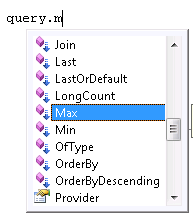
The return type of a LINQ query is an IQueryable, even a LINQ to Entities query.

Here is a screenshot of a LINQ to Entities query at design time (code is NOT being debugged).

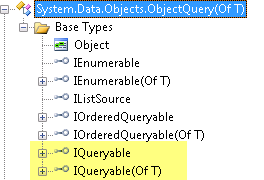
But when the query has been processed, it’s no longer an IQueryable, but an ObjectQuery.

What’s going on here?

At design time, the compiler recognizes that it’s a LINQ query and therefore assumes the return will be an IQueryable.

However LINQ to Entities queries are sent to ObjectServices which return an ObjectQuery, so after it’s processed, it is actually an ObjectQuery.

So, since it’s an ObjectQuery after all, wouldn’t it be nice to leverage ObjectQuery features like MergeOptions on a LINQ to Entities query? You can!

But how? At design time, the query is an IQueryable, not an ObjectQuery and doesn’t have MergeOptions.

No worries. ObjectQuery implements IQueryable.

So you can cast the LINQ to Entities query to an ObjectQuery, set the MergeOption and, as Jeffrey Palermo would say, party on the LINQ to Entities query (though he may not be likely to say that in the context of Entity Framework ;-)).

Using context As New AdventureWorksLTEntitiesDim query = From c In context.Customer Where c.LastName.StartsWith(“S”)Dim objquery = CType(query, ObjectQuery(Of Customer))objquery.MergeOption = MergeOption.OverwriteChangesDim cust = query.ToList.FirstConsole.WriteLine(cust.LastName)cust.LastName = cust.LastName.Trim & “___XYZ”cust = query.ToList.FirstConsole.WriteLine(cust.LastName)End Using

Notice that I’m still performing the operations against the  LINQ query after I cast it to the ObjectQuery.

I could also have done something like

Dim custs = objquery.Execute(MergeOption.OverwriteChanges)

Thanks to Danny for reminding me about the casting! The blog post is intended to lock it into my brain.

Compiled Queries in Entity Framework

I was fiddling with compiled queries yesterday and thought I would share what I saw as results. This is anything but laboratory benchmark testing so take it for what it’s worth. I did only a very simple query to start with, finding SalesOrders whose total is greater than a given number.

You can do this with Entity SQL or LINQ to Entities. Here is my LINQ to Entities compiled query:

Dim compQuery = CompiledQuery.Compile(Of AdventureWorksLTEntities, Decimal,
 IQueryable(Of SalesOrderHeader))( _
 Function(ctx As AdventureWorksLTEntities, total As Decimal) _
 From order In ctx.SalesOrderHeader _Where (order.TotalDue >= total) _
 Select order)

To interpret this, Compile’s signature looks like this:

Compile(list of args, returntype)(delegate)

It takes a list of arguments and a return type then performs an operation (defined in the delegate) on the arguments. I’m defiining this compilation to recieve an AdventureWorksLTEntities instance and a decimal and the return will be an IQueryable of SalesOrderHeaders.

VB
CompiledQuery.Compile(Of AdventureWorksLTEntities, Decimal, _ IQueryable(Of SalesOrderHeader))
C#
CompiledQuery.Compile<AdventureWorksLTEntities, Decimal, IQueryable<SalesOrderHeader>>

For the delegate, I use a labmda epxression that says what to do with the parameters which is to build the query.

VB
(Function(ctx As AdventureWorksLTEntities, total As Decimal) _
From order In ctx.SalesOrderHeader _
Where (order.TotalDue >= total) _
Select order)

c#
(ctx, total) => 
from order in ctx.SalesOrderHeader
where (order.TotalDue >= total)
select order)


The whole query is tied to a variable

Dim myCompiledQuery=CompiledQuery.Compile(....

Then when I want to run the query, I invoke it and pass in the parameters


Dim AWEntities As New AdventureWorksLTEntities
Dim orderTotal=200
Dim orders As ObjectQuery(Of SalesOrderHeader) = compQuery.Invoke(AWEntities, orderTotal)

The first time the compiled query is run, it still has to compile, but after that it uses the results of the compilation and can swap in the parameters without needing to recreate the generated command tree.

You can see a big difference between running the query without pre-compilation and running it with the compiled query.
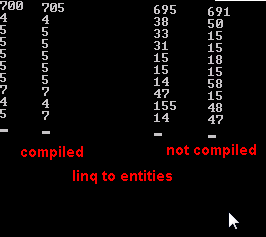
Brian Dawson does some more intense testing and compares LINQ to Entities to Entity SQL as well in this blog post. But I just needed to actually do it myself, rather than only reading about it.

LINQ to SQL also has compiled queries. Rico Mariani has a series of posts on this starting here.


MVC with Visual Basic video series

Bill Burrows has created a series of videos on MVC and is now working on a new series based on Scott Guthrie’s MVC tutorial posts (which are all in C#) but using VB instead. I was surprised to find a pointer to my recent MVC post as a “rare example” of MVC with VB (and it’s only one little post so I found that to be sad) so I’m happy Bill is doing these. It gives a leg up to VB developers who find it hard to try to learn something that is VERY new and convert the C# syntax in their brain at the same time.

Here’s the list of topics covered

  An Overview of the MVC Pattern
  Setting up the MVC Preview Environment
  URL Routing
  Setting up New Pages
  MVC Controller Actions 
  Creating HTML in Views 
  MVC – Putting it all together

Thanks to Beth for the heads up.