All posts by Julie

Why can’t I Edit or Delete my Data Service data?

I spent waaaaaay too much time on this problem yesterday and wanted to share the solution, or more accurately, the workaround.

I’m creating an Azure hosted Data Service and to as a consumer, an Azure hosted MVC application.

My app allows users to query, create, edit and delete data.

I have the permission set properly in the data service.  In fact, in desperation I completely opened up the service’s permissions with

config.SetEntitySetAccessRule("*", EntitySetRights.All);

But calling SaveChanges when there was a modification or delete involved always threw an error: Access is Denied and in some situations a 404 page not found.

When you develop Azure apps in Visual Studio, you do so with Visual Studio running as an Admin and the Azure tools use IIS to host the local emulator. I so rarely develop against IIS anymore. I mostly just use the development server (aka cassini) that shows up as localhost with a port number, e.g., localhost:37.

By default IIS locks down calls to POST, MERGE and DELETE  (e.g. update and delete).

It took me a long time to even realize this but Chris Woodruff asked about that.

So I went into IIS and even saw that “All Verbs” was checked in the Handler Mappings and decided that wasn’t the problem.

Eventually I went back and explicitly added PUT, POST,MERGE,DELETE, GET in the verbs list.

But the problem still didn’t go away.

I deployed the app to see if Azure would have the same problem and unfortunately it did.

I did a lot of whining (begging for ideas) on twitter and some email lists and none of the suggestions I got were panning out.

Today I was very fortunate to have Shayne Burgess and Phani Raj from Microsoft take a look at the problem and Phani suggested to use the workaround that the WCF Data Services team created for this exact problem – when POST is being honored (e.g. insert) but PUT, MERGE and DELETE are being rejected by the server.

There is a property on the DataServiceContext called UsePostTunneling.

Setting it to true will essentially trick the request into thinking it’s a POST and then when the request got the server, saying “haha, just kidding it’s a MERGE or DELETE”. (My twisted explanation…Phani’s was more technical.)

This did the trick both locally and on Azure. But it is a workaround and our hope is to eventually discover the root cause of the problem.

Here’s a blog post by Marcelo Lopez Ruis about the property:

http://blogs.msdn.com/b/marcelolr/archive/2008/08/20/post-tunneling-in-ado-net-data-services.aspx

Hopefully my blog post has some search terms that will help others find it who have the same problem. In all of the searching I did, I never came across post tunneling though I do remember seeing something about flipping POST and PUT in a request header but the context was not inline with my problem enough for me to recognize it as a path to the solution.

Code First/Entity Framework 4.1 Videos and Articles on MSDN

Currently, 8 of the 10 videos on Code First and EF 4.1 I have already created for MSDN are online but they are not easy to find.

Three of them are on the msdn.com/data/videos page. The others have not been placed there yet although you can find links to the videos at msdn.com/data/ef and then from the videos to the articles.

Here are direct links to all of the videos and related articles that are currently online.

  1. Building an MVC 3 App with Code First and Entity Framework 4.1  Whitepaper     Video
  2. Building an MVC 3 App with Model First and Entity Framework 4.1 Whitepaper    Video
  3. Building an MVC 3 App with Database First and Entity Framework 4.1   Whitepaper    Video
  4. Code First Data Annotation   video     article
  5. Code First Relationship Fluent API  video   article not online yet
  6. Code First Database Initializers      video   article not online yet
  7. Validation in Code First and DbContext:  video   article  (note 4/15: MSDN’s EF page points to the annotations content, but I found the correct links 🙂 )
  8. Code First: Mapping Fluent API:  video   article not online yet
  9. DBContext Change Tracker API: video & article not online yet
  10. Code First and WCF Data Services: video & article not online yet

Samples?

I have provided C# and VB samples to go with each section. The samples are already online for the first three and are available from the pages with the articles, not the videos.

Monday May 2, 2011: There seems to be a problem with the videos on MSDN’s website. I have contacted MSDN. They are aware of the problem and trying to resolve it. Sorry. I just created the videos and have nothing to do with the hosting. 😉 Will modify this blog post when the problem has been resolved.  All better now! (8pm EST May 2)

MVC 3 and EF 4.1 Code First: Here are my classes, now you do the rest, kthxbai

One of the announcements this morning at MIX11 was the MVC 3 Tools Update.

Phil Haack has a blog post about them here: http://haacked.com/archive/2011/04/12/introducing-asp-net-mvc-3-tools-update.aspx

I’m really happy to see that the newest MVC 3 Tools for Visual Studio embrace Entity Framework 4.1 in a big way, using the newly released EF 4.1 Code First as the default model for drag & drop MVC apps.

You can truly now get away with this scenario.

  1. Create some classes.
  2. Create an MVC 3 project.
  3. Reference the classes.
  4. Create one or more controllers based on those classes.
    The tooling will pull in Entity Framework 4.1, create a DbContext, build the controller, build the views and add the appropriate code into the controllers to interface between the database and the views.
  5. Change the routing from Home to your model in global.asax.
  6. Run the app.
    Running the app will trigger code first to create a database if it does not yet exist.

Result: a working app with full database interaction around the one or more controllers from your domain classes.

It’s not ready to deploy on, say, the Bank of America website, but it’s a pretty darned good start.

Here’s a closer look.

I start with a few classes in their own project, and for simplicity, I’ll just use the Blog & Post classes that I used for the MSDN Code FIrst video series I created.

domainclasses

Then I add in a new MVC 3 project, using all defaults (Internet Application and Razor view engine).

Notice that the template added in a reference to the EF 4.1 assembly (EntityFramework) and the core EF 4.0 assembly (System.Data.Entity).

references

I make a reference to the DomainClasses assembly and then – important step!! – build the solution.

Now for a controller.

Right click on the Controllers folder and from the context menu, choose Add and then Controller.

Check out the new dialog:

addcontroller

Template has a new option (and it’s the default): Controller with read/write actions and views, using Entity Framework.

Now when you add a controller you can get all of the views for free, rather than having to explicitly create them one at a time.

And “using Entity Framework” is a very new twist.

The next two options are why I had to build the solution. I want it to see the classes in my other project. I’ll choose Blog.

And now Data context class – also very new here. I don’t have one so I’ll choose <New Data Context> from the drop down

newdc

which will prompt me to name it

newdc2

which I do:

newdc3


newcontroller


After clicking add, the templates go to work. I sit back and relax for a moment.

When it’s finished here’s what I have…

newmodelcontroller


The template added a new controller class, a new model context and a new set of views for my blog.

The context class inherits from EF 4.1 DbContext and exposes a DbSet of blogs. It also has some notes related to code first’s auto database generation

context


The controller is much smarter than the controller’s created by the previous tooling. Rather than simply creating the method signatures, it uses Entity Framework 4.1 code to provide the base interaction for each method. This is because I chose the create controller “using Entity Framework” option. It creates a class level instance of the context named “db” and uses that in the methods. It uses clean DbContext code such as the Find method which searches on the primary key field for the value you pass in. It uses the very nice Entry method to attach an edited Blog and change it’s state to Edited before saving. It uses the Find and Remove to perform a delete. Personally, I mimic the Edit method (Entry.State=Deleted) to save a trip to the database, but this works too.

namespace MVC3BlogTest.Controllers
{ 
    public class BlogController : Controller
    {
        private BlogDomainContext db = new BlogDomainContext();

        public ViewResult Index()
        {
            return View(db.Blogs.ToList());
        }

        public ViewResult Details(int id)
        {
            Blog blog = db.Blogs.Find(id);
            return View(blog);
        }

        public ActionResult Create()
        {
            return View();
        } 

        [HttpPost]
        public ActionResult Create(Blog blog)
        {
            if (ModelState.IsValid)
            {
                db.Blogs.Add(blog);
                db.SaveChanges();
                return RedirectToAction("Index");  
            }

            return View(blog);
        }
        
        public ActionResult Edit(int id)
        {
            Blog blog = db.Blogs.Find(id);
            return View(blog);
        }

        [HttpPost]
        public ActionResult Edit(Blog blog)
        {
            if (ModelState.IsValid)
            {
                db.Entry(blog).State = EntityState.Modified;
                db.SaveChanges();
                return RedirectToAction("Index");
            }
            return View(blog);
        }

        public ActionResult Delete(int id)
        {
            Blog blog = db.Blogs.Find(id);
            return View(blog);
        }

        [HttpPost, ActionName("Delete")]
        public ActionResult DeleteConfirmed(int id)
        {            
            Blog blog = db.Blogs.Find(id);
            db.Blogs.Remove(blog);
            db.SaveChanges();
            return RedirectToAction("Index");
        }

        protected override void Dispose(bool disposing)
        {
            db.Dispose();
            base.Dispose(disposing);
        }
    }
}

The views are already built…to defaults.

Since the default model uses code first, it will create a database for me so all I have to do now is run the app – AFTER I change the default route in global.asax from”Home” to “Blog".


route


and finally : F5 (run the app)

blog1 blog2


blog3 blog4

Now I’ll add a new controller for Post with ONE difference. I want my context to manage both Blog and Post classes because they are related. So rather than creating another context, I use the existing context.

postcontroller

This wizard modifies the BlogDomainContext to add in a DbSet for Post classes.

contextwithpost

It doesn’t go back and change the Blog views so that you can navigate from a blog to a post. You’ll have to do that yourself. But the template DOES recognize the reference inside the post class back to blog and uses that in the default views that it generates for example:

post1

post2

post3


These templates provide a great starting point for MVC 3 newbies.

There’s a lot of refactoring I’d want to do, however, they are *templates* which means you can modify the template so that it generates things more to your liking. Or wait for someone else to do it. Smile I’m sure you’ll find plenty of great templates that incorporate more advanced patterns and practices available via nuget as soon as people get their hands on this stuff.
Capturing Code First Fluent API ValidationResults to Display in MVC 3

If you’ve been using code first, you may be aware  that you can add validations such as Required or MaxLength to your classes using DataAnnotations, e.g.,

[Required]
public string Title{get ;set;}

or using the fluent API:

modelBuilder.Entity<Blog>().Property(p => p.Title).IsRequired();

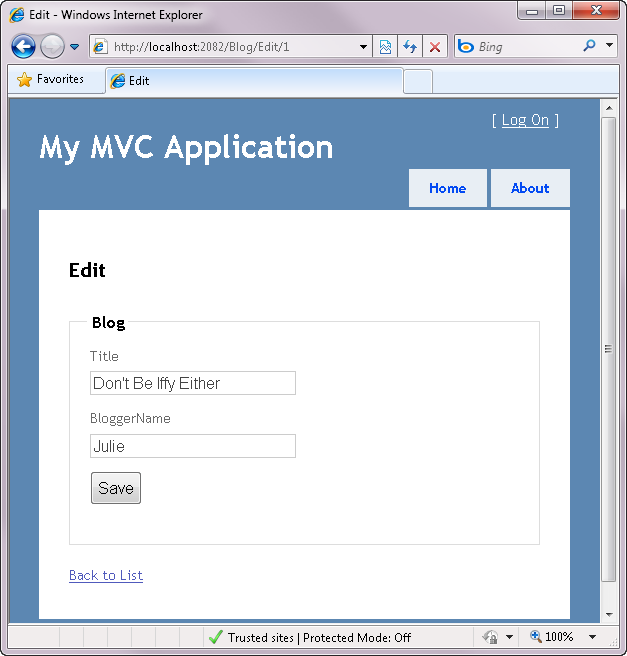
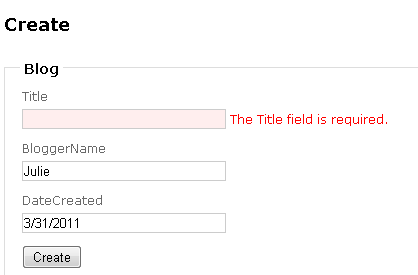
MVC 3 also recognizes Data Annotations, and the validation defined in the [Required] annotation will flow through to the UI seamlessly.

BLOG POST titlerequired


But MVC 3 doesn’t recognize the the fluent api validation. The controller is aware of them but MVC isn’t able to automatically access them for some reason that I just cannot figure out.

Here for example is an Edit method in a controller class:

[HttpPost]
public ActionResult Edit(int id, Blog blog)
{
    try
    {
        db.Entry(blog).State = EntityState.Modified;
        db.SaveChanges();
        return RedirectToAction("Index");
    }
    catch
{
return View(); } }

An alternate patter is to use ModelState.IsValid. But the validation problem discovered by the fluent api is not caught here!

With a method like this:

  [HttpPost]
        public ActionResult Edit(Blog blog)
        {
            if (ModelState.IsValid)
            {
                db.Entry(blog).State = EntityState.Modified;
                db.SaveChanges();
                return RedirectToAction("Index");
            }
            return View(blog);
        }

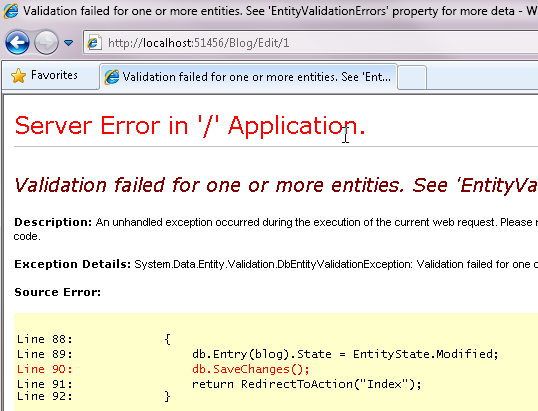
You’ll get an ugly error

BLOG POST error

because you have no exception handler.

If you were to capture the exception and inspect the ValidationResult, it looks exactly the same as the ValidationResult returned by the DataAnnotation validation failure. In the following code, it is the error variable that I’m inspecting to check the result.

    catch(Exception ex)
    {
        if (ex is System.Data.Entity.Validation.DbEntityValidationException)
        {
            var ve = ex as DbEntityValidationException;
            var error = ve.EntityValidationErrors.First().ValidationErrors.First();
        }
        return View();
    }   

I spent quite a lot of time looking at the error and couldn’t figure out why MVC wasn’t displaying the message. Finally I started debugging the view itself and poking around saw that the model contained error information in the first case (data annotation) but not in the second (fluent api).

So I returned to the exception and manually stuffed the error I discovered into the View’s model.

    catch(Exception ex)
    {
        if (ex is System.Data.Entity.Validation.DbEntityValidationException)
        {
            var ve = ex as DbEntityValidationException;
            var error = ve.EntityValidationErrors.First().ValidationErrors.First();
            this.ModelState.AddModelError(error.PropertyName, error.ErrorMessage);         }
        return View();
    }

With that, my error message was displayed.

Finally, I tweaked the handler to capture all possible errors for that entity, not just the first one:

catch (DbEntityValidationException ex)
{
        var errors = ex.EntityValidationErrors.First(); //.ValidationErrors.First();
        foreach (var propertyError in errors.ValidationErrors)
        {
            this.ModelState.AddModelError
(propertyError.PropertyName, propertyError.ErrorMessage); } return View(); }

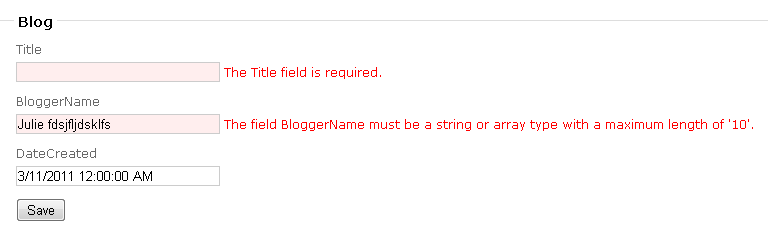
Here now is the view that is capturing not just title is required but a maxlength attribute I added to the blogger’s name property:

BLOG POST maxlength

In my testing, I found that if I use ModelState.IsValid and the exception handler I wouldn’t catch the fluent api excption if there was also a required validation problem (not sure why you would use both, but I checked anyway). But if I skip the IsValid, both problems will be detected in the exception handler.

EF 4.1 also lets you validate using the ValidateEntity method override of DbContext. MVC won’t automatically recognize these either but the exception handler will be sure the model has the validation error information.

Vermont IT Jobs: .NET Developer in Stowe Vermont

Living and working in Stowe, Vermont sounds like a fantasy to me but here it is:

www.inntopia.com

Inntopia is a leading provider of travel reservation technology to the destination travel market, with an emphasis on reservation systems for the snowsports industry.
Inntopia team members share a passion for their work, a love of outdoor adventures and a sense of humor. We are experiencing explosive growth, and are looking to grow the team.
Inntopia offers a great benefits package, flex-time scheduling and highly competitive wages in our Stowe, Vermont office. Visit us at www.inntopia.com.

Please reply to this posting with your resume and cover letter if interested.

JOB DESCRIPTION
This person will be responsible for the design, development, testing, debugging and documentation of web based applications to satisfy the requirements of one or more functional areas of the Inntopia system. This may include hands-on new development as well as support, maintenance or enhancement of existing applications. The individual will work closely with internal and external clients to identify and specify business requirements and processes; researches and evaluates alternative solutions and makes recommendations. The individual will be involved in the full project life cycle while working with project managers to take requirements through design, development, QA, and implementation.

REQUIRED TECHNOLOGY EXPERTISE
2+ years experience in at least 2 of the following technologies:
• ASP.NET/C#
• SQL/T-SQL
• XML
• XSL/XPath
• XHTML/DHTML
• AJAX / JavaScript
• SOAP/Web Services

SOFTWARE TOOLS
Familiarity with the at least 2 of the following development applications:
• Microsoft Visual Studio .NET 2008
• Microsoft SQL Server 2005
• XMLSpy
• ApexSQL Edit
• Visio
REQUIRED SKILLS
• Ability to develop and maintain software on Microsoft .NET platform
• Ability to develop software in a group or independently
• Ability to develop software in accordance with OWASP Secure Coding Practices
• Ability to write software specifications outlining design requirements
• Comfort with direct communication with all levels of technical and business resources
• Self-managing self-motivated learner with good written and oral communication skills
ADDITIONAL BENEFICIAL SKILLS
• Travel/hospitality industry experience
• Experience with high-volume transactional accounting systems (accounts receivable and accounts payable)
• Experience with complex pricing and commission structures
• Experience with security protocols (i.e. OWASP Top Ten, PCI Compliance, and data encryption standards)
• Experience with software development process management
• Experience developing multi-lingual web applications

Contact

John Spencer
Director of Software Development
Inntopia
jspencer@inntopia.com
www.inntopia.com

Round tripping a timestamp field with EF4.1 Code First and MVC 3

MVC is by definition stateless so how do you deal with timestamp that needs to be persisted across post backs in order to be used for concurrency checking?

Here’s how I’m achieving this using EF4.1 (RC), Code First and MVC 3.

I have a class, Blog.

Blog has a byte array property called TimeStamp, that I’ve marked with the code first DataAnnotation, Timestamp:

[TimeStamp]
public byte[] TimeStamp{get; set;}

If you letting CF generate the database you’ll get the following field as a result of the combination of byte array and TimeStamp attribute:

blogposttimestamp

So the database will do the right thing thanks to the timestamp (aka rowversion) data type – update that property any time the row changes.

EF will do the right thing, too, thanks to the annotation – use the original TImeStamp value for updates & deletes and refresh it as needed –if it’s available, that is.

But none of this will work out of the box with MVC. You need to be sure that MVC gives you the original timestamp value when it’s time to call update.

So…first we’ll have to assume that I’m passing a blog entity to my Edit view.

       public ActionResult Edit(int id)
       {
           var blogToEdit=someMechanismForGettingThatBlogInstance();
           return View(blogToEdit); 
       }

In my Edit view I need to make sure that the TimeStamp property value of this Blog instance is known by the form.

I’m using this razor based code in my view to keep track of that value:

[after posting this, Kathleen Dollard made me think h arder about this and I realized that MVC 3 provides an even simpler way thanks to the HiddenFor helper…edits noted]

@Html.Hidden("OriginalTimeStamp",Model.TimeStamp)
@Html.HiddenFor(model => model.TimeStamp)
 

This will ensure that the original timestamp value stays in the timestamp property even though I’m not displaying it in the form.

When I post back, I can access that value this way:

        [HttpPost]         public ActionResult Edit(byte[] originalTimeStamp, Blog blog)         {          

When I post back, Entity Framework can access still get at the original timestamp value in the blog object that’s passed back through model binding.

        [HttpPost]
        public ActionResult Edit(Blog blog)
        {

Then, in the code I use to attach that edited blog to a context and update it, I can grab that originalTimeStamp value and shove it into the blog instance using Entry.Property.OriginalValue, like so, EF will recognize the timestamp value and use it in the update. (No need to explicitly set the original value now that I’ve already got it.)

  db.Entry(blog).State = System.Data.EntityState.Modified;
  db.Entry(blog).Property(b => b.TimeStamp).OriginalValue = originalTimeStamp;   db.SaveChanges();

After making the Dollard-encouraged modification, I verified that the timestamp was being used in the update:

set [Title] = @0, [BloggerName] = @1, [BlogDetail_DateCreated] = @2, [BlogDescription] = @3
where (([PrimaryTrackingKey] = @4) and ([TimeStamp] = @5))
select [TimeStamp]
from [dbo].[InternalBlogs]
where @@ROWCOUNT > 0 and [PrimaryTrackingKey] = @4′,N’@0 nvarchar(128),@1 nvarchar(10),@2 datetime2(7),@3 nvarchar(max) ,@4 int,@5 binary(8)’,@0=N’My Code First Blog’,@1=N’Julie’,@2=’2011-03-01 00:00:00′,@3=N’All about code first’,@4=1,@5=0x0000000000001771

You can use the same pattern with any property that you want to use for concurrency even if it is not a timestamp. However, you should use the [ConcurrencyCheck] annotation. The Timestamp annotation is only for byte arrays and can only be used once in a given class.

If you use ConcurrencyCheck on an editable property, you’ll need to use a hidden element (not hiddenfor) to retain the value of that property separately, otherwise EF will use the value coming from the form as the original property then grab it s a parameter of the Edit post back method and finally, use Entry.Property.OriginalValue (all that crossed out stuff Smile)  to shove the value back into the entity before saving changes.

The next video in my series of EF4.1 videos for MSDN (each accompanied by articles) is on Annotations. It’s already gone through the review pipeline and should be online soon. It does have an example of using the TimeStamp annotation but doesn’t go into detail about using that in an MVC 3 application, so I hope this additional post is helpful.

Seeding a Database With EF4.1 Code First

Based on an email in my inbox, I wanted to point out the key to overriding the Database Initializer that seeds a newly generated database when you use EF 4.1 code first.

The Seed method takes whatever you put in the context and saves it to the database. So in your override, you don’t need to call SaveChanges but you DO need to be sure to call the base Seed method at the end.

Here’s some sample code that I’m using in the code first & EF 4.1 videos & articles  I’m working on for MSDN (3 online, more coming). This particular one is targeted for when a model change causes the database to be dropped and recreated.


public class BlogContextInitializer
: DropCreateDatabaseIfModelChanges<BlogContext> { protected override void Seed(BlogContext context) { //create sample data and attach it to the context.
   new List<Blog>
   {
    new Blog { BloggerName = "Julie", Title = "My Code First Blog",
               BlogDetail=new BlogDetails{Description="About code first",
DateCreated=new System.DateTime(2011,3,1)} ,Posts=new List<Post>{
new Post {
Title="ForeignKeyAttribute Annotation",
DateCreated=System.DateTime.Now,
Content="Mark navigation property with ForeignKey"}} }, new Blog { BloggerName = "Ingemaar", Title = "My Life as a Blog", BlogDetail=new BlogDetails{
Description="Random tidbits",
DateCreated=new System.DateTime(2011,1,1)}}, new Blog { BloggerName = "Sampson", Title = "Tweeting for Dogs", BlogDetail=new BlogDetails{
Description="How to tweet without opposable thumbs",
DateCreated=new System.DateTime(2011,2,1)}} }.ForEach(b => context.Blogs.Add(b));
   base.Seed(context);  }
}

Somewhere in your startup code, e.g., global.asax in a website, main in an app, you also need to be sure to tell EF to use this overload:

System.Data.Entity.Database.SetInitializer(new BlogContextInitializer());


New EF4 & EF4.1 content on MSDN

I’ve been busily writing and recording screencasts about Entity Framework 4 and 4.1 for MSDN and some of the fruits of my labor are finally online. Although there is much more to come.

1) Drag & Drop Databinding with the Entity Framework and WPF
Learn how developers can use the Entity Framework to easily build WPF windows or even master detail windows with WPF with little or even no code at all.

2) Building an MVC 3 App with Code First and Entity Framework 4.1
In this whitepaper, Julie Lerman walks through creating a simple MVC 3 application using Entity Framework’s code first technology to describe the classes and manage all data access.

3) Building an MVC 3 App with Model First and Entity Framework 4.1
In this whitepaper, Julie Lerman walks through creating a simple MVC 3 application using Entity Framework’s model first workflow and how to use features introduced in Entity Framework 4.1 DbContext API to write the data access code.

4) Building an MVC 3 App with Database First and Entity Framework 4.1
In this whitepaper, Julie Lerman walks through creating a simple MVC 3 application using Entity Framework’s database first workflow and how to use features introduced in Entity Framework 4.1 DbContext API to write data access code.

Links & Resources from 24HOP Presentation

•Programming Entity Framework, 2nd Ed, O’Reilly Media www.learnentityframework.com

•MSDN Data Dev Center (www.msdn.com/data)

•SQL Server Developer Center, Database Connectivity http://msdn.microsoft.com/en-us/sqlserver/connectivity

•EF Team Blog: http://blogs.msdn.com/adonet 

•Improvements to Generated SQL in .NET 4.0 May, 2010
http://blogs.msdn.com/b/adonet/archive/2010/05/10/improvements-to-generated-sql-in-net-4-0.aspx

•LINQ to SQL & Entity Framework: Panacea or evil incarnate? –Bob Beauchemin 2008 6-Part Blog Series

http://www.sqlskills.com/BLOGS/BOBB

Vermont IT Jobs: Software Test Engineer, Burlington area, 1 year contract

Software Test Engineer

This is a 1 year contract, must be US Citizen or Green Card.

BS Degree

Minimum of 3 years experience

Candidate should have the following experience:

Team environment developing test cases for functional software requirements, candidate will design and write scripts for automated requirements based functional test of complex GUI software.

*Silverlight applications

*Silverlight Unit Test Framework

*Process Oriented Environment

*.NET

*C#, Silverlight, WPF, & XAML

*Windows Powershell

Experience writing test documentation, plans procedures, and reports

Experience debugging test scripts

If interest please call Judi Tingley at 1-877-334-7700 ext. 247

Judi M. Tingley
Senior Technical Recruiter
Advanced Technology Innovation Corporation
EMAIL:    judi@advancedtechno.com