All posts by Julie

Vermont ranked as the smartest state in the country

I found this article by way of VT blogger, Mark Chadwick.

Vermont ranked as smartest state in the country

BARRE, Vt. —Vermont is the brightest state in the country, according to a Kansas publisher.

Morgan Quitno Press ranked Vermont at the top of the list, ahead of Connecticut, which was second, followed by Massachusetts, New Jersey and Maine.

“Vermont shines in many key areas of education,” said Scott Morgan, president of Morgan Quitno Press. “A high percentage of its students excel in reading, writing and math. In addition, schools in Vermont have smaller class sizes and lower pupil-teacher ratios than in most other states.”

The publisher compiled its yearly list of the smartest states measuring 21 factors.

Last year, Vermont ranked third, and second the year before.

Arizona was at the bottom of the list, below Mississippi, New Mexico, Nevada and California.

The publisher also says Vermont is the healthiest state, the second safest and the third most livable.

That was nice to hear after seeing Fortune’s (I think that’s where it was, but I can’t find it) list showing Vermont as the #6 most unfriendly state when it comes to taxes – 6th highest ratio of taxes vs. household income.

Don’t Forget: www.acehaid.org

great little demo on hosting winforms controls in asp.net

MSDN Nuggets has a bunch of short videos (similar to hte great 10 minute groktalks) on how to do a variety of things in .net.

I caught this one by Mike Taulty that is on hosting windows forms controls in asp.net. What I really liked is the way he demonstrated the code access security issues that you have to be aware of. Rather than saying “don’t do this”, he did do it and showed what happens. Nice.

Follow the above link and look for “Hosting a WinForms Control on an ASP.NET web page”.

One thing that really surprised me was seeing Mike’s email on the beginning of the video. I had no idea he worked for Microsoft!

Don’t Forget: www.acehaid.org

VS2005/SQL Server 2005 RTM Query Notification Rules

The rules for using Query Notification have finally settled after evolving through all of the betas and ctps. Here they are copied and pasted directly from the msdn help files:

Applications that use query notification features need to take into account the following special considerations.

Valid Queries

Query notifications only support certain Transact-SQL statements.

First, to support notifications, queries must not contain:

  • Derived tables.

  • Rowset functions.

  • The UNION operator.

  • Subqueries.

  • Outer or self-joins.

  • The TOP clause.

  • The DISTINCT keyword.

  • A COUNT(*) aggregate.

  • AVG, MAX, MIN, STDEV, STDEVP, VAR, or VARP aggregates.

  • User-defined aggregates.

  • A SUM function that references a nullable expression.

  • The full-text predicates CONTAINS or FREETEXT.

  • A COMPUTE or COMPUTE BY clause.

  • Aggregate expressions if GROUP BY is not specified in a select list. If GROUP BY is specified, the select list must contain a COUNT_BIG(*) expression, and cannot specify HAVING, CUBE, or ROLLUP.

  • An INTO clause.

  • Conditions that will preclude results from changing (e.g. WHERE 1=0).

  • FOR BROWSE (or be running with SET NO_BROWSETABLE ON).

  • A READPAST locking hint.

Second, queries must not reference:

  • Temporal tables or table variables.

  • Tables or views from other databases or servers.

  • Any other views or table-valued functions.

  • Any system tables or views.

  • Any nondeterministic function, including ranking and windowing functions.

  • Any server global variables.

  • Any Service Broker queue.

  • Synonyms.

Finally, queries must reference a base table or view.

Rapid Updates

An application that uses Query Notifications must take into consideration cases where a notification occurs immediately. When data is changed on the server, a notification message will be sent to the appropriate Service Broker queue. Applications need to reregister to receive additional notifications. Therefore, if a data set is updated quickly by multiple applications, an application could receive a notification, retrieve the data, and then get another update notification almost immediately after the cache has been refreshed. Applications that use Query Notifications must be written to take this case into account. If an application uses data that is constantly updated, another strategy for caching data may be more appropriate.

Transactions

If multiple modifications are made to a set of data with a registered notification request, and those changes occur within a transaction, only a single notification event will be sent.

Service Account for SQL Server

An application will not receive notifications from an instance of SQL Server that uses the Local System account as the service account.

Posted from BLInk!

Caching at the middle tier – hey, I did it!

I’m reviewing my demo that I built for caching data at the middle tier that is part of my query notification session at DevConnections next week – and had a funny moment. I wrote this a while ago and am just revisiting it and felt pretty impressed with myself when I saw how it worked. It’s a little complex but now it seems simple. I used what I learned watching Pablo Castro’s DAT320 session that I have on my TechEd 2005 video as the basis for this. I watched him do it in the video and translated the concepts into a simpler version using VB. I had to deal with some differences in the way static variables interact with shared methods in VB that had me pretty confused (as I’m not so adept with that)  – very different than how Pablo did it in his C# demo. But I did get it working and now have a big satisfied grin on my face. And next week I get to share (show it off) with attendees of my session.

Don’t Forget: www.acehaid.org

My new presentation aid

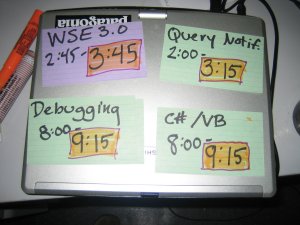
This is an attempt to alleviate a problem that I have had a few times when presenting. Even though I check the time constantly during my talk (and will be using a travel clock from now on rather than my watch – great tip from Kate Gregory and also they were provided for us at TechEd), I have, on a few occasions gotten so involved with the talk that I couldn’t even remember what time it started or when it was supposed to end. Stupid, right? Hey, let’s just call it “passion”! You should be thrilled that I am so enthralled, eh? 🙂

Well, since I am aware that this is a problem, rather than just saying “well, that’s silly, I can remember next time” I have a better plan of attack!


 No, they are not glued to my laptop. Just laid out on top of it for the photo op.


Don’t Forget: www.acehaid.org

WSE 3.0 to be release on launch day!

yippee!!

What this means of course is that I will be making some last minute changes to my presentation computer 1 day before I do my What’s new in WSE3.0 session at DevConnections. Hey, this is bleeding edge, right? I am willing to take the risk… 🙂

Currently I am running VS2005 RTM with the October CTP bits and having only one issue (which may or may not be related to the out of synch bits).

What is that issue you ask? I can’t seem to do encryption and signing when my webservice is on IIS. When it’s on the development web server, all is well. When I move it to the webservice, I get some wierd problem regarding “decryption” from the Cryptography API. (“Error occurred while decoding OAEP padding”.)  I have given all necessary permissions to the ASPNET account for reading the web server certificate and even as a last straw, gave “Everyone” full access to it. Hopefully, I will either get an answer to my question about this problem on the newsgroup or it will mysteriously disappear when I install the RTM bits. Or… I will have to skip that particular demo :-(, but since that session is in one of the 60 minute slots, that might be a good thing.

Don’t Forget: www.acehaid.org

TCP Tracing and WSE 3.0 – aha! Now I get it.

One of the interesting new features of WSE 3.0 is the use of MTOM and ability to transmit binary data as a Mime attachment. I have seen a few demos of this (one in Mark Fussell’s overview video, the other, a grok talk by John Bristowe) where they used different tcp tracing tools (check out this one from Simon Fell) to see what is truly happening to the attachment over the wire. Last month I tried using the tool that Mark had demo’d with and could never get it to work. Today I used the TCPTrace tool (that’s Simon’s) and was not seeing any messages come through the tcp trace.

This was because, as we all know by now, I am NOT a plumber. I could see Mark setting the Url to a different port in his demo, but when I did that, I was getting an error that my Addressing Actor (on port 8080) was not the same as the real service endpoint (on port 1932).

Mark’s article on What’s new in WSE3.0 even says “if you want to try this out, don’t forget to change the URI” but I could not figure out how.

After some googling I was noticing repeated references not only to Actor but to Via. This finally helped me find the solution.

The goal here (normally only explained in passing by all those plumbers who grok this stuff) is to create an extra little pipe for the message to go through. The trace tool can read from that pipe. We have to lay the one end of the pipe at the true service endpoint (in my case, the one that is on port 1932) and the other end of the pipe we can put on any port we want (I think any ol’ one, but I have mostly seen 8080 used and that’s what I am using myself.). In code, we tell the client where the true endpoint is (the Actor) and the port that we are detouring through (called the Via) . Then the message goes through that pipe where tcp trace is listening and does eventually get poured out into the actual web service. (This happens in reverse also).

So to make it happen, after creating a reference to the proxy in the client, we shove in this information about redirecting the ports:

‘be sure to reference the Addressing namespace

Imports Microsoft.Web.Services3.Addressing

dim wsproxy as new MyWebService()
wsproxy.Destination=new EndpointReference(new Uri(“http://localhost:1932/MyService/MyService.asmx), new Uri(“http://localhost:8080/MyService/MyService.asmx))

Then I tell the tracing utility to listen on port 8080 (my “Via” or detour) and that the destination is at localhost:1932.

And it works. And now I understand it – which I didn’t when I started. Just kept hitting my head with that plumber’s wrench until I figured it out.

Don’t Forget: www.acehaid.org