All posts by Julie

Vermont IT Jobs: Web & Database Programmer Analyst in White River Junction

clip_image002

RESOURCE SYSTEMS GROUP is a multi-disciplinary, employee-owned consulting firm providing insightful consulting services for the planning, analysis, and management of transportation, natural resources, technology, and business. We design sophisticated approaches to collecting, modeling, and communicating meaningful, nuanced data that organizations and governments at every level can use to make informed policy and operational decisions. More than just analysts, scientists, and engineers, we’re communicators. Our study results are clear, concise, and directly applicable to a client’s particular questions and challenges. Recognized as one of the “Best Places to Work in Vermont” for the 4th consecutive year and named as one of the “Best Workplaces for Commuters”, RSG employees enjoy excellent benefits, flexible hours, a commitment to creating a sustainable workplace, and opportunities for advancement. We are an equal-opportunity/affirmative action employer. Please visit www.rsginc.com for more information on Resource Systems Group.

Associate – Programmer/Analyst (Web & Database)

White River Junction, VT or Salt Lake City, UT

This newly-created position is part of the software development group of the Technology Solutions Practice.  General responsibilities include developing and maintaining diverse web applications for RSG’s business and research-oriented projects, as well as assisting in the design, coding, and testing of technical solutions. The ideal candidate will possess outstanding computer, analytical and quantitative skills and must demonstrate flexibility in day-to-day work. In addition, we require the following qualifications:

  • Bachelor’s degree in computer science, engineering, math or similarly  quantitative field of study
  • 1 to 2 years experience in software development methodologies
  • Proficient in .NET or similar enterprise framework
  • Knowledge of database structures and basic relational database concepts (MS SQL)
  • Demonstrates basic knowledge of object and component methodology and technology
  • Possesses basic knowledge of classes, components, objects, and interfaces
  • Experience with desktop, client/server, and Internet applications and architectures
  • Experience with web design usability, HTML, and client-side scripting a plus
  • Activity in open source development a plus

Please submit resume and cover letter to the Director of Human Resources via our website employment page at http://www.rsginc.com/home/jobs/.

Some Visual Studio tips I picked up recently

Earlier this month, Rob Hale presented at the Vermont.NET User Group on what he learned at PDC. There was a lot of great information; but oddly, two tiny little Visual Studio features stood out for me.

One is not even new to VS2010.

Recent Project Tricks on Start Page

There are a zillion new productivity features in VS2010 but this one had escaped me (and surely a few thousand others as well).

In VS2008, I modified my startup settings so that I didn’t have to look at the start page. I will absolutely leave it in place in VS2010.

I really like the way the recent projects are displayed on the VS2010 Start Page, but did you know that you can control how those projects are displayed?

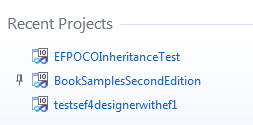
You can PIN projects that you want to stay on the start page and unpin them when they are  no longer necessary.

Just by hovering your mouse over to the space to the left of the project, the pin will appear and you can click it to pin the project down.


image


image

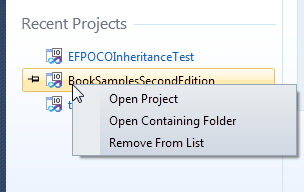
You can also remove projects from the list and open their containing folder right from the start page.

image

Block Selection in Code Editor

Another IDE trick Rob showed us is not even new to VS2010 – block selection – which can be used vertically.

If you hold down the alt key while dragging your mouse across and down, you can highlight text vertically.

Rob pointed out a useful example.

Say you have some repeated code, such as instantiating some objects with values, but you need to change something

Here, I have used ALT and dragged down in front of the F of FirstName. Notice the faint blue line. I could drag across and highlight text in a column if I wanted also.

image

Now I start typing to add in the ModifiedDate property.

image

Whatever I type is mirrored in all of the rows of my selected block. Really cool.

Recent Project Templates

Matt Kleinwaks brought this one up on a listserv today and I was again, surprised. This one is new to VS2010 but I had overlooked it.

Visual Studio remembers which project templates you have used recently and make it easy for you to select them.

I’ve never paid attention to the Recent Templates section much less ever clicked on it an opened it up. Matt wrote up a quick blog post about it this morning, so I’ll just point you over there if you need your eyes opened to this little feature: Avoid Template Overload in VS2010

So many tips & tricks

I have a few of the wonderful VS Tips & Tricks books written by various authors. Maybe I should place them on the kitchen counter and make a habit learn new tricks while I’m eating breakfast or lunch.

Leveraging VS2010’s Entity Data Model Designer for .NET 3.5 Projects

One of the benefits of Visual Studio’s multi-targeting is that if you are still stuck using the .NET 3.5 version of Entity Framework and are unable to move to EF4 (so sad), you can still get the new designer goodies for a .NET 3.5 project.  Remember that the designer is a VS2010 feature, not a .NET 4.0 feature.

Be sure to select .NET 3.5 when you create your project:

image

When you add the model, you’ll notice that the foreign key checkbox is disabled. FK support is not only an EF4 designer feature but it is dependent on .NET 4. But you can still get the much needed pluralization support.

 image

Once the model is created, you can take advantage of new designer features such as the complex type support. Complex tyeps existed in .NET 3.5 but the designer did not support them making it painful to take advantage of them.

image

image

Here is that complex type in an entity that was retrieved from the database.

image

Model First works too:

image

Not every new designer feature will work with an older model though.

T4 code generation won’t. You can select “Create Code Generation Item” from the context menu, but no templates will be available.

image

EF 3.5 uses a different type of code generation.

Function Import will NOT provide the nifty EF4 support for mapping stored procedure results to Complex Types:

image

Without the Foreign Key support, the model will use what’s called “Independent Associations” in other words, the same type of associations that we were limited to in .NET 3.5 where the association was dependent on the mappings.

Even though the designer has a referential constraint in the properties window, you can’t build it with this model because the foreign key is not available.

image

(With an EF4 model, you can use either Independent Associations or Foreign Key Associations.)

So if you are stuck building EF v3.5 apps (oh please please move to EF4, life will be SO much happier!), you can still get a lot of benefit from using VS2010’s designer.

Vermont IT Jobs: 10 .NET & DBA positions at Vermont Software Company

I got a note today from a recruiter trying to help a local software company hire a bunch of .NET developers and DBAs! SHe didn’t say where in Vermont. I can only Burlington or Middlebury area, but you never know…

I am working with a dynamic software company in Vermont that is looking to hire 10 people in their IT group.  This company is growing exponentially, and has a wide array of positions open, from Senior DBAs to Senior and Junior Software Engineers, and Systems Engineers and Systems Analysts.  They are looking for people with strong "hands-on" experience with .NET software development and expertise in web application and web services development. 

These are salaried, fully benefited positions, and they are looking to hire Software Engineers over the next few months. 

Please contact Jane Robitaille at jrobit@cox.net.

A snowy little jaunt in the woods

If you live in New England, you know we are getting lots of absolutely lovely soft fluffy snow. And it’s not finished yet. It hasn’t stopped snowing so we are expecting even more by the end of tomorrow.

Rich and I went skiing in our woods and up through our neighbor’s fields this afternoon.

Here are a few pictures to share.

skiing 001
Heading into the woods behind our house

 skiing 002
Winter wonderland

skiing 003
Hey, where’d my skis go? And my boots? I’m standing where I skiid yesterday. So it’s a new foot of fluff on top of a packed trail.


 skiing 004   skiing 005
Back up the series of hills of our neighbor’s fields after skiing down down down.


 skiing 006
In the woods again, ready to make another loop.

Vermont IT Jobs: ASP.NET Developer Position in Burlington

Vermont Oxford Network is looking for web developer.

ASP.NET Developer
We are looking for a motivated ASP.NET (VB) developer to join us in building testable business object-based web applications. We build and maintain a range of web, windows forms and Microsoft Access applications for our network of hospitals using Microsoft Technologies. More and more of our emphasis is on web applications and we will be starting to migrate some of our internal applications to web applications.
Our development team believes in using continuous integration and iterative testing. Unit testing and automated test suites are becoming core strengths of the team.

Applicants should be experienced with CSS and TSQL. Experience with Microsoft Access and unit testing a plus. We offer a good working environment, the opportunity to work with a professional IT team and competitive salary and benefits.

Please mail or email your resume and cover letter by January 15, 2010.

Vermont Oxford Network
33 Kilburn St
Burlington, VT 05401
mail@vtoxford.org

A message from your sponsor: Single and SingleOrDefault are supported in EF4

Just a friendly reminder that I’m passing on from one of the tech reviewers of my book who (thankfully) noticed that I had left a note in there about Single & SingleOrDefault not being supported.

They were not in .NET 3.5 SP1 Entity Framework, but they are now supported in EF4.

Single is the way to go when you only expect one item to be in your result set.

As noted by many, the benefit of Single is highlighted in testing. Single expects only one item to be in the result set. If there are more, then an exception is thrown and this can help you discover logic errors in your application.

For a list of supported & unsupported LINQ methods used (or not used) in LINQ to ENtities, see the MSDN Topic: Supported and Unsupported LINQ Methods (LINQ to Entities)

Sampson the Draft Dog

Sampson has been happily wearing a back pack for months now when we go on hikes.

fall hike 023

It’s a Ruffwear Palisades pack. We love this pack. The packs are removable and what’s left is a decent, comfy, well-fitting harness.

W’e’ve known for a while that Sampson is a good candidate for doing draft work. We don’t have the proper harness yet, but for his first pulling, the back pack harness was sufficient.

We just had a wicked storm and the wind was blowing very hard for over 24 hours. There were a lot of trees down along the trail in our woods. THat won’t do since soon we’ll be skiing back there and until then this is where we walk the dog.

Here’s one spot where there were over 6 trees down. Many of them came up by their roots. That’s what you’re seeing with the arrows on the right – root beds.The ones on the left are across the trail. As usual, it was a friggin poplar that came down but took a nice spruce and another tree along with it.

binghamton and trail work at home 008 (Small)

About 20 feet up the trail were two more big trees across the trail.

Sampson and down trees

Rich needed to bring his chainsaw and other tools back there. Finally he has a little assistance!

first time puling

Sampson didn’t mind it a bit. He barely seemed to notice. He’s a natural!

samspon ready to go

On the way back, I was the brake-man, using an extra bungee cord to be sure the sled didn’t slide right into our baby’s behind.

Just a caveat about the sled, rope, harness setup. This is far from optimal. The rope was rubbing against his sides a bit but it was a short walk in the woods today.

The proper drafting harness protects the dog much more and the weight attaches behind him. Here’s an example: http://alpineoutfitters.net/Secure/Scripts/prodView.asp?idproduct=18. We actually have a harness that says it’s X-L and it is much too small so we have to get another.

Agile Entity Framework 4 Repository Part 5: IObjectSet and Include

  1. Agile Entity Framework 4 Repository: Part 1- Model and POCO Classes
  2. Agile Entity Framework 4 Repository: Part 2- The Repository
  3. Agile EF4 Repository: Part 3 -Fine Tuning the Repository
  4. Agile EF4 Repository: Part 4: Compiled LINQ Queries
  5. Agile Entity Framework 4 Repository Part 5: IObjectSet and Include
  6. Agile Entity Framework 4 Repository: Part 6: Mocks & Unit Tests

In Part 2 of this blog series, I created a context interface, IBAGAContext, that returns IObjectSet types rather than ObjectSet types from the EntitySets.

Example:

     IObjectSet<Contact> Contacts{get;}
     IObjectSet<Customer> Customers {get;}
    

IObjectSet is the new EF4 interface that is used to create the ObjectSets returned by the default context.

For a point of comparison, here’s a method from a default code generated context:

 public ObjectSet<Activity> Activities
        {
            get
            {
                if ((_Activities == null))
                {
                    _Activities = base.CreateObjectSet<Activity>("Activities");
                }
                return _Activities;
            }
        }
        private ObjectSet<Activity> _Activities;

ObjectSet implements IObjectSet which provides it with set operations. It also inherits from QueryObject which gives it lots of EF capabilities. One of the methods that come with QueryObject is Include which provides eager loading.

context.Customers.Include(“Orders”) blah blah

(A few people, including Matthieu Mezil, have created overloads for Include that take lambdas instead of magic strings. Here’s Matthieu’s second of two posts which contains a link to the first: Entity Framework Include with Function Next. Additionally, Jamie Philips had a lambda function for EF1 that allowed further filtering. Last time we talked, he reported that it wasn’t working with EF4 POCOs.)

But Include is not available with IObjectSet.

In a recent comment, Nick asked how I was using Include on an IObjectSet.I realize I neglected to add that into the relevant post.

With nods to Jamie Phillips again, Include came from his POCO sample when he and I co-presented back-to-back EF4 POCO sessions at the New England Code Camp in October.

Jamie created an Include extension method to replace the Include supplied by the ObjectQuery. I placed the method in a separate class file in the same project that contains the model and the BAGAContext file because it simply calls the real ObjectQuery.Include.

namespace ExtensionMethods
{
  public static class MyExtensions
  {
    public static IQueryable<TSource> Include<TSource>
      (this IQueryable<TSource> source, string path)
    {
      var objectQuery = source as ObjectQuery<TSource>;
      if (objectQuery != null)
      {
        return objectQuery.Include(path);
      }
      return source;
    }
  }
}

In the repositories in Part 3 of this series, this is how I was able to use the Include method.

Jamie did write a follow-up post about the problem with the lambdas and POCO classes: Include() Extension Method and POCO

N-Tier Methods in Entity Framework 4 – Use with Care

One of the things I struggled with in n-Tier apps in EFv1 was the options for reconstructing entity state on the server side in order to call SaveChanges when modified data was passed in from the client.

The options were to hit the database to get a set of current server values and then apply updates to those or to just attach the incoming data and iterate through each property marking it as modified so that SaveChanges would be able to construct an Update.

The problem with the former was the extra hit to the database. That made me crazy.

The problem with the latter is that I was marking every property as modified even when they weren’t and that made me crazier. Admittedly not really worse than the first.

If you’ve seen the WCF chapter in my book, you’ll know I opted for the extra database hit.

In EF4, there are new state methods. In addition to ApplyPropertyChanges (from v1) being renamed to ApplyCurrentValues and acquiring a sibling, ApplyOriginalValues, there is the ChangeState method. I explored the impact of these methods in my Sept/Oct 2009 CoDe Magazine article, What’s New in Entity Framework 4? Part 1: API Changes .

I want to focus now on using ChangeState to set an entity to Modified.

This is similar to walking through each property and marking it modified. The concept is that you are saying “this entity is modified” without having to specify exactly what was modified. Every property is marked as modified and every property will be included in an update statement.

But what if every property was not supplied?

What if you have a client app that allows users to edit a few fields of a contact record. And…the client app is a website which means that when the user hits a Save button and the page posts back, there’s no original contact object. So in order to save, in one layer or other, some code constructs a contact to return to the server/repository. Here’s the code:

Contact c = new Contact {ContactID= Convert.ToInt32(IDLabel.Text),
        FirstName = TextBox1.Text, LastName = TextBox2.Text,
        ModifiedDate = DateTime.Now, State = State.Modified };

I have a state property in there because this is a POCO object and I can put whatever I want in it. 🙂 Plus I use the state property to help me out when I get to the server side.

Looks okay, but what if I told you there is also a Title property in this class?

Because the UI developer didn’t populate that value, on the server, the assumption will be that Title is null. When you call ChangeState(EntityStateModified), that null will be seen as the value to be used for the update. Take a look at part of the update method sent to the database. It’s setting Title=null.

exec sp_executesql 
N'update [dbo].[Contact] set [FirstName] = @0, [LastName] = @1, [Title] = null, [ModifiedDate] = @2 where...

This is not to say that there’s anything wrong with the ChangeState method (or ApplyCurrentValues/ApplyOriginalValues, which will do the same thing). THe point (as always) is that you really need to be aware of what’s going on.

My worry is that I can’t really control what’s happening on the consumer side. It’s such a critical rule. I don’t want to “solve” it by making all of my properties non-nullable. (Can you imagine? 🙂 )

So it means that I have to think carefully about how and where I use these methods because I may not always have control of the state of what’s being passed in.

I was getting accustomed to the idea of just marking all of the properties modified and living with the inefficient update. One inefficient trip to the database is more cost effective than two trips to the database.

There’s always the CACHING option. But that gets really sticky with multiple users and graphs and lazy loading etc. I know I can cache my POCOs, even my graphs, or just values if I want… easily enough. I was just hoping to avoid that extra layer for now.

So I either have to make the consumer cross-their-heart-and-hope-to-die-promise to return the entire object back to me with the correct values or I have to go back to using some of the options from EFv1 – hit the database, manually (and selectively) mark each properites as modified or pass original values around.