All posts by Julie

Vs2010 IntelliTrace and Entity Framework Database Interaction

I knew that Intellitrace existed, but not until I saw Nikhil Kotahari’s tweet from PDC09

Cool VS demo – intellitrace – see your db queries, and track it back to your LINQ code #pdc09

did I think to look at what IntelliTrace reports with respect to Entity Framework database interaction.

I fired up a sample that executed a query and then demanded some lazy loading to take place.

IntelliTrace picked up the explicit query execution but not the queries executed by lazy loading. They must be too deep in the pipeline.

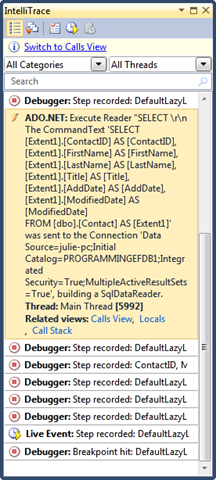
In the screenshot below, tracing is displayed from the top to the bottom. I can see the step just before the query is executed , the actual command that was sent to the database and then a number of steps after that.

image

By the time the 8 steps were hit after the first query, my code had performed two hits to the database for lazy loading. So unfortunately, IntelliTrace is not picking them up.

I checked what happens with an explicit load (e.g., myContact.Addresses.Load()) and I can see the query in IntelliTrace. The first query (highlighted) is the explicit query, the second one, expanded, is the result of the call to Load.

image

I ran another bit of code that did an update via SaveChanges, and IntelliTrace did pick up the database call.

image

Of course, now that I have EFProf, I can see each and every call to the db, including Lazy loading calls, plus I get extra bells & whistles.

Self-Contained Entity Framework Models and ASP.NET Dynamic Data

In an earlier post, I wrote about the new awesomeness that ASP.NET 4.0’s Dynamic Data brings to many to many relationships.

I frequently notice that most DD demos demonstrate creating the data model within the same project as the DD website.

Even though a typical Dynamic Data app is for RAD development and isn’t focused on application architecture (come on, the data access is buried in the UI), I still can’t bare to store my model inside of the UI project. All of my EF Entity Data Model’s are housed in their own projects.

This is not a problem at all for a Dynamic Data site. Like any other project that leverages an EDM in a separate project, you only need to perform three steps to point to the external model:

  1. Add a reference to the project that contains the data model
  2. Add a reference to System.Data.Entity.dll
  3. If it’s the executing app (in this case it is), provide the EntityConnection string, most typically by adding it into the web.config file

For Dynamic Data, there is one additional consideration that I was torn over.

I have my model in it’s own project because I like to be able to reuse it in other applications.

In a DD site, I typically do  not expose the *entire* model for the scaffold (e.g., for use in the dynamic application). Instead, I set ScaffoldAllTables to false in the global asax file:

 DefaultModel.RegisterContext(typeof(MyEDM.MyEntities), 
new ContextConfiguration() { ScaffoldAllTables = false });

and explicitly mark the classes which I want to include with the scaffold attribute:

[ScaffoldTable(true)]

And here is where I run into the conundrum.

The ScaffoldTable attribute is something that I specifically want for the Dynamic Data site. It’s not needed by any other apps that might be using my model. The only way to add it to the generated class in my model project is to use partial classes. As far a I know*, partial classes need to be in the same project as the rest of the partial classes so that the compiler can pull them all together. That means, I’m forced to “dirty” my model project with the attributes that are meaningless to any other application that might also use my model. Fortunately, the ScaffoldTable attribute is in System.ComponentModel.DataAnnotations, not System.Web.DynamicData, so it doesn’t feel so bad. I suppose that because I’ve been focused on repositories and MVC lately, this is why I’m feeling so anal about this and perhaps it’s overkill.

My first instinct, because I was looking for separation, was to put the partial classes with the attributes into the dynamic data project, but of course I was quickly reminded by the error message telling me that I had ScaffoldAllTables set to false but I had not designated any classes to be used, that the extra partial class logic was not getting picked up by my classes because it was in the wrong project. So I bit my tongue and put them where they belonged, into the model’s project.

An approach that I’m considering is having different code generation templates for my model, so that I can generate entity classes to be used in different applications. Even so, I wouldn’t automatically mark all of the entities as a ScaffoldTable anyway. So I’ll have to think a bit more about that if I’m going to really worry about implementing it.

In the meantime, the key takeaway here is that you can have the model in a separate project to be used by Dynamic Data apps and you can specify which entities to use. You just need to include the partial classes with the ScaffoldTable attributes in the EDM’s project, not the Dynamic Data project where you might think you really want them to be.

*just a small caveat on the partial classes rule in case something changed in .NET 4.0 that I’m unaware of.  I don’t know how they would pull it off, but hey, you never know! 🙂

An Improved Entity Framework Tip for EF4 thanks to Zeeshan

In my EF Tips & Tricks talk that I just did at DevConnections, I have a suggestion to reduce redundant methods where you might expose queries to generate reference lists.

E.g.

static List<CustomerType> CustomerTypeList(MyEntities context)
  {
    return context.CustomerTypes.OrderBy(ct => ct.Type).ToList();
  }

static List<States> StatesList(MyEntities context)
  {
    return context.States.OrderBy(ct => ct.StateName).ToList();
  }

Instead I have a single generic method, GetRefernenceList<TEntity> that uses some tricks with Entity SQL and MetadataWorkspace  to dynamically build the query and return the requested list.

This is still the right way to do it in VS2008. However, Zeeshan Hirani suggested to me that with EF4, there’s a better way – the new CreateObjectSet method.

This let’s me pass in the entity type and create a queryable set.

A simple version would be:

public List<TEntity> ReturnSomeObjects<TEntity>()

{ context.CreateObjectSet<TEntity>(); }

Easy peasie.

Now what if I want to provide a field for sorting. I could use functional programming to pass in and use a strongly typed property to sort on. Alternatively, I could pass in a string and append a Query Builder method to the object set.

context.CreateObjectSet<TEntity>().OrderBy(“it.” + sortproperty)

Sweet. Much easier than dealing with MetadataWorkspace.

Thanks for getting me to think a little harder on this, Zeeshan!

My Twitter Notes from Scott Guthrie Keynote at DevConnections

Here are my twitter notes from the Scott Gutrhie keynote at DevConnections yesterday morning.

I have just done a quick copy/paste job. Read them from the bottom up!

 VS2010 Generate Class on the fly: RT @bsuzy: @julielermanvt excellent video on that here http://bit.ly/3J0AzW (via http://bit.ly/YTDwU)

  •  
  •  


  • and.. @scottgu is repeating that LINQ to SQL is FULLY SUPPORTED in .NET 4 . Not a new message, but people believe him. Glad when he says it


  •   #devconnections – @scottgu so far showing some of the awesome improvements to the text editing (searching, etc) in VS2010 IDE from TweetDeck

  •   in @scottgu keynote at #devconnections – vs2010 & asp.net 4. not a lot of people (who have normal lives) here have installed the beta yet
  • and no onto ASP.NET MVC (@scottgu at #devconnections…..)

    Notes from Scott Guthrie ASP.NET 4/VS2010 keynote

    Update: Added the tweets to a blog post here.

    I’m at DevConnections and sat in on Scott Guthrie’s keynote.

    I tweeted a lot of notes throughout the session.

    http://www.twitter.com/julielermanvt

    I’ll try to consolidate them at some point.

    There’s a lot coming from te #devconnections hash on twitter. You don’t need to have an account to read this stuff. I didn’t use the hashtag on all of my tweets from the session, thoughI tried.

    Oredev Wrap-Up

    The hard part about going from one conference to the next is the lack of closure. Not that Oredev was bad and I need closure, but I would like to process it a little bit.

    This was my third conference in Sweden in the past 2 years, but the first that was in the cool small city of Malmo. Malmo is just across the Oresund Strait from Copenhagen. I took the train from the Copenhagen airport to downtown Malmo and because the train goes under the famous bridge and then through a tunnel, I really had no idea what an amazing trip I was taking.

    We stayed downtown right off the old square that is the center of Malmo. The first night there, the speakers were treated to a dinner hosted in Malmo’s beautiful old city hall where we were also greeted by town officials and given a history lesson which was pretty cool. The dinner began with a traditional soup that was a little startling to many but delicious.

    Prior to dinner, Magnus Maartensen and his wife were generous enough to host a cocktail party in their apartment that was also in the historic square for the speakers in the .NET track. This was great since I got to see lots of friends (and as always, make some new ones).

    Oredev is much bigger than many of the European conferences I have spoken at. To begin with there were 120 speakers, 14 tracks and I think about 1000 attendees. Fourteen tracks! And what I love is that this is much broader than a MS tech conference. .NET was just one of the 14 tracks. I met folks from the IPhone world, lots of Google employees, people who invent languages, people who invent software patterns.

    I had breakfast with an IPhone speaker who said he wrote some IPhone apps for the company he works for. I checked his bio later. The company was AT&T and the guy has been on TED for god’s sake!

    The meals during the conference were all served with sustainable plates and “silverware”. Plates were made of banana leaves. (We tried not to contemplate the carbon footprint of getting those to Sweden…) and the forks were wooden (?).

    When I was first asked to submit talks to Oredev I was hesitant. I considered this a mecca for Agile and Domain Driven developers and thought I would get stoned because of my work with Entity Framework. But thanks to the big changes in EF4, I decided it would be the perfect venue to begin shifting my presentations to those about using EF in an agile way. So I accepted. Who knew what to expect?

    Well, in addition to having a wonderful time doing my Agile Development with EF4 talk, something else really cool happened. I sat down with Oren Eini and
    “helped” him create a version of his fabulous nHibernate and Linq to SQL profiler that would work with Entity Framework. Helped is in quotes because I mostly played the muse. Oren’s brain works much too fast for anyone  (well at least for me) to keep up with him. He’d show me an error message and as I was reading it, he would say “Oh I know!” and pull the laptop back in front of him and resume his mad coding. You can read more about EFProf on Oren’s blog.

    Thanks to my new perspective on agile development, I’ve been getting more interested in MVC. It was cool to meet Trygve Reenskaug, the inventor of MVC. But I was also really happy to be able to spend some time talking with Scott Allen who has done a lot to help mere mortals understand ASP.NET MVC.

    I returned from Oredev feeling the Agile love and getting more drawn into MVC as the way to develop well architected web applications. More to the point, now that I have my nice Repository pattern for EF, MVC makes it fun to plug it into! 🙂

    And now,I’ve been home for two days, am just recovering from the jetlag, and head tomorrow to Las Vegas (3 hour time zone difference) for DevConnections. I love DevConnections which is why they are able to leave Vermont at a beautiful time of year to go to Vegas (which I don’t love).

    I will be doing three talks – completely different than those I did at Oredev, but all on Entity Framework 4. I’ve already figured out which talk justifies showing off EFProf since I have the only build outside of Oren’s computer right on my laptop.

    I have also told the organizers that if they find themselves with an empty slot, I’ll be happy to do my Agile EF4 talk.

    I know I need a lot more links in this post but time to get back to prep for DevConnections!
    MSDN Guidance on ASP.NET MVC vs WebForms and its Impact on my EF + ASP.NET Work

    Last year at the fall 2008 DevConnections conference, I was very happy to hear Scott Guthrie providing a clear message about web forms vs. MVC in ASP.NET 4.0.

    Now, I am seeing something that is new for MSDN Documentation, not only similar clarity but actual guidance on when Microsoft suggests to use one over the other.

    You’ll find this in two places.

    First, in the ASP.NET MVC Overview topic. In this document, their is a list of advantages of MVC and a list of advantages of web forms apps.

    Next, in the topic titled Compatibility of ASP.NET Web Forms and ASP.NET MVC, there is a short list of strengths of web forms and another of the strengths of MVC. Following this are short lists of asp.net features that are compatible with MVC and then those that are incompatible with MVC.

    Key from the overview doc:

    Line of Business web apps

    • Web Forms “preserves state over HTTP, which benefits line-of-business Web application development.”

    Web Forms for RAD and MVC for granular control??

    • Web Forms “works well for small teams of Web developers and designers who want to take advantage of the large number of components available for rapid application development.”
    • Web Forms “in general … is less complex for application development".”
    • MVC is for “large teams of developers and for Web designers who need a high degree of control over the application behavior.

    Test Driven Development

    • MVC “provides better support for test-driven development (TDD).”

    The bottom line?

    There’s a way of reading the documentation that might cause you to summarize that Web Forms is for RAD development and MVC is for serious application development. Does that mean the line of business apps do not belong on the web because they require us to use session state and any web developer in his/her right mind would not want to incorporate session state in their applications? Well, the problems that pop up when you start considering session state on distributed servers suggests that the answer to this question is “yes”. But ASP.NET developers never really had an option before.

    Remember that ASP.NET was created so that windows developers could write web apps, and that’s why things like session state and view state are so critical in web forms. They are potentially cumbersome to deal with and easily misused.

    MVC goes back to a more purist form of web development which is state-less. But a stateless environment doesn’t lend itself well to having large units of work which we have gotten used to in LOB apps.

    On the other hand, even the documentation says that you will have a lot more work ahead of you if you want to work with MVC. First of all, there’s a major paradigm shift from web forms, especially for those who don’t come from a web background prior to ASP.NET.

    Where does this leave me?

    This leaves me much more curious about MVC and thinking that I may shift my focus of attempting to design serious web app that use Entity Framework from web forms to MVC. It also leaves me nervous since it also might mean a major last minute change to one of my DevConnections presentations this week. It will be hard because leveraging MVC to demo another technology depends on the audience having a general understanding of MVC which is not something that I can expect at all. Now if my session were 4 or 5 hours long, it would be a different story.

    ASP.NET 4.0 Dynamic Data and Many to Many Entity Framework Entities

    Even though I’m a much bigger fan of distributed apps than using UI bound data binding, it’s still important for me to know how these various tools work – especially since I need to write about them in my updated E.F. book. 😉

    I did not play much with Dynamic Data controls in VS2008 and just made a cool discovery in VS2010 Beta 2. This may not even be new, but as I’m sitting 30,000+ feet over the Atlantic ocean, I don’t have access to VS2008 at the moment to check.

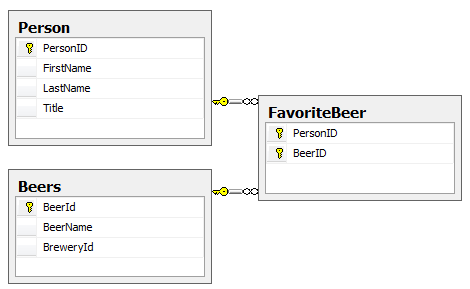
    I have a database that has a join table between two other tables.

    m2mdatabase

    Because the join table has only the keys of the tables that it is joining (and no other fields such as “AddedDate”, etc.), the EDM Wizard is able to create a many to many relationship between them and hide the join table. (If there were additional fields in the database table, then there would be a join entity in the model.)

    m2mmodel

    I just created a new Dynamic Data website using all of the defaults except for one. Rather than automatically using every entity in the model, I selected specific entities to include in the site. Other than this, I have done absolutely no customization.

    When I ran the app and opened up the People page, I was surprised to see the names of the individual beers listed in the Beer column.

    m2mPerson

    But I was even more surprised when I chose to Edit the person and saw how brilliantly the Dynamic Data templates handled the Entity Data Model’s many to many relationship.

    m2meditperson

    I am going to have to stop turning my nose up at these tools, though I may still have to pinch my nose for Mr. lePieu and his choice of beers. (Better get some Magic Hat onto that list!)

    For RAD website development, this is pretty impressive stuff!

    Lost Newfie (dog) in Bedford Mass

    There’s an alert out from a heart broken person who’s 5 year old Newfie disappeared.

    It’s possible that the dog was stolen and I’m just helping get the word out.

    clip_image001

    She is a 5 yr old  black newfie with a very tiny spot of white hair on the top of her head – about 10-20 hairs. Her name is baby  She is a near sighted vision dog and has only been away from home before this sunday  only 3 days in her life.

    I have the contact info of the owner.

    New Entity Framework Feature CTP for VS2010 Beta 2

    The EF team just released the newest version of the Feature CTP that is now compatible with VS2010 Beta2. Hooray for compatibility, but more importantly, we can now work with a greatly enhanced version of the Code Only feature and Self-Tracking Entities. Code-Only is the API that allows you to use EF without a model at all. Self-Tracking Entities provides tracking for entities across WCF Services and their clients .

    I’ll talk a bit about Code Only here, which will be of great interest to Domain Driven  Developers.

    Under the covers, EF depends on the metadata for a model. Code Only will create this metadata on the fly based on your classes.

    Code Only uses convention over configuration. First with convention, it builds the metadata using whatever it finds in your classes combined with a set of assumptions. However, you can do some major tweaking to those assumptions and force it, through configuration, to define the metadata more to your liking. there are two important benefits to this. the first is that if you are leveraging code-only’s ability to generate DDL and therefore define your database schema, you can have more control over how inheritance is "translated” in to tables, more control over attributes of columns, tables and constraints as well as constraints between tables.

    The configuration is not done through attributes, but through code.

    Here’s a very simple example.

    By convention, Code Only will use any property named “ID” as an identifying property (EntityKey) as well as the presumed primary key in the back end data store. However, if you don’t happen to follow this pattern in naming your identity properties, then you can instruct code only which property to use as the identifier.

    ContextBuilder is the class that knows how to build the ObjectContext and metadata from your classes.

    This code modifies how the entity for the Category class should be configured beyond the initial assumptions. Specifically, it uses the HasKey property to define that the CID property should be used as the key rather than ID (which doesn’t exist in the Category class).

    builder.Entity<Category>()
                .HasKey(c => c.CID);

    This is merely the tip of the iceberg.

    The ADO.NET team has a list of improvements to Code Only and Self-Tracking Entities to look for and will be providing detailed walkthroughs of the new features in their blog post ADO.Net Entity Framework Community Technology Preview Released!

    You can get the new bits here: update of the Entity Framework Feature CTP