A great resource from the WPF SDK Blog
All posts by Julie
When LINQ’s power really sinks in
There’s a big difference between looking for a problem to solve with LINQ vs realizing LINQ will solve the problem at hand. Patrik Lowendahl had his “aha!” moment recently. Read more….
[A New DevLife post]
ADO.NET Performance improvements in VS2008
I have been waiting for this information for quite some time! Read more…
[A New DevLife post]
[quote]Bikini contest leads to suspension of Hooters’ liquor license[quote]
Yes, it’s true. Right here in Burlington. Apparently it got a little “out of control”.
Entity Framework MSDN Webcast on Wednesday (Jan 30)
Mike Pizzo from the Data Programmability team is doing a webcast on Wednesday.
MSDN Webcast: Programming LINQ and the ADO.NET Entity Framework (Level 200)
Event ID: 1032364888
Register Online
Language(s): English.
Product(s): SQL Server.
Audience(s): Developer.
Duration: 60 Minutes
Start Date: Wednesday, January 30, 2008 11:00 AM Pacific Time (US & Canada)
Event Overview
Language Integrated Query (LINQ) introduces an exciting new way for applications to build strongly typed queries that are deeply integrated into the programming language. The ADO.NET Entity Framework allows applications and services to work in terms of an application-oriented Entity Data Model, decoupling the application’s data model from the storage considerations of the relational schema. Join this webcast to see how these two technologies work together to change the way applications work with data.
Presenter: Michael Pizzo, Principal Architect, Microsoft Corporation
Michael Pizzo is a principal architect on the Data Programmability Team at Microsoft. He has been at the forefront of data access for the last 17 of his 20 years at Microsoft, including contributing to Open Database Connectivity (ODBC), Object Linking and Embedding Database (OLEDB), ADO, ADO.NET and now the Entity Framework. Michael has been a member of the ANSI X3H2 Database Standards Group and a U.S. representative in the International Standards Organization (ISO) meeting that approved the SQLCLI as an extension to SQL92.
View other sessions from: SQL Server 2008: Develop Strong Database Applications
If you have questions or feedback, contact us.
Binding EF data to the (free) Xceed WPF Data Grid
I thought I would give the Xceed WPF DataGrid (it’s free!) a whirl with Entity Framework databinding. So far I have only explored the basics – no anonymous types or sprocs and I am only working with a READ-ONLY scenario. (I did notice something in their docs about being able to modify and delete but not add when binding to LINQ to SQL queries.) I have, however, at least used a multi-level object graph.
Here’s what I’ve come up with.
Add the grid
- Drop an Xceed WPF DataGrid on a WPF Window
Preparing the data
- I created an EDM from AdventureWOrksLT. The namespace is awModel and the EntityContainer is awEntities. I also fixed up some naming, plurazing the EntitySets and the navigation properties that point to collections. (This is my standard routine when creating EDMs)
- In the Loaded event for the WIndow, add the following
Dim aw = New awModel.awEntitiesMe.DataGridControl1.ItemsSource = From ord In aw.SalesOrderHeaders.Include(“Customer”) _
Select ord
Setting up the grid for Databinding
If you’ve never used WPF, or done databinding in WPF, there are definitely a lot of new things to learn! The easiest thing to do for now is just copy and paste all of this XAML below.
Here’s what the entire XAML looks like.
<Window x:Class=”Window2″
xmlns=”http://schemas.microsoft.com/winfx/2006/xaml/presentation”
xmlns:x=”http://schemas.microsoft.com/winfx/2006/xaml”
Title=”Window2″ Height=”300″ Width=”300″ Name=”Window1″ xmlns:xcdg=”http://schemas.xceed.com/wpf/xaml/datagrid”
xmlns:local=”clr-namespace:WpfApplication1.awModel”>
<Grid>
<Grid.Resources>
<DataTemplate DataType=”{x:Type local:SalesOrderHeader}”>
<TextBlock Text=”{Binding TotalDue}”/>
</DataTemplate>
<DataTemplate DataType=”{x:Type local:Customer}”>
<TextBlock Text=”{Binding Customer.CompanyName}”/>
</DataTemplate>
</Grid.Resources>
<xcdg:DataGridControl Margin=”10,9,4,0″ Name=”DataGridControl1″ ItemsSource=”{Binding}” >
<xcdg:DataGridControl.Columns>
<xcdg:Column FieldName=”Customer.CompanyName” Title=”Company” />
<xcdg:Column FieldName=”TotalDue” Title=”Total Due”/>
</xcdg:DataGridControl.Columns>
</xcdg:DataGridControl>
</Grid>
</Window>
The xml namespace tag xdcg get’s added automatically when you drop the DataGrid on the window.
The xml namespace tag “local” is something I added. It’s necessary for subsequent references to classes from my EDM. Intellisense will help you pick the right namespace (your app and your model name) if you start with clr-namespace:.
In my query, I queried for SalesOrderHeaders plus their customer EntityRefs. In the DataTemplates, you can see that I’m referencing the actual object model types and then binding to the property from the SalesOrderHeader that is returned in my query. “TotalDue” gets me “SalesOrderHeader.TotalDue” and “Customer.CompanyName” gets me “SalesOrderHeader.Customer.CompanyName”. The DataTemplate provides binding to the data source (defined in the ItemsSource setting in the code above). Then the DataGrid column tie back to the bindings by way of the FieldName property.
Run the app
Note that I did not sort in my query. I wanted to demonstrate the grid’s built in sorting , but for some reason it’s not working in this scenario (stay tuned…I’ll get to the bottom of that).

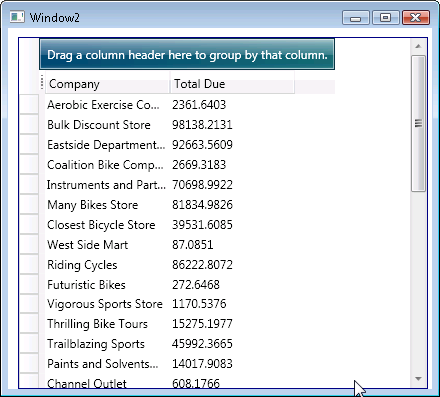
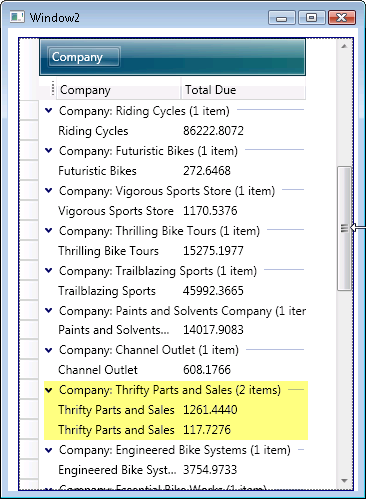
The automatic grouping does work, though. AdventureWorksLT is not great for seeing this. Only Thrifty Parts and Sales happens to have more than one order.
What Visual Studio Developers should know about Crystal Reports 2008
I spent a lot of time playing (and just attempting to play) with the new CR2008. Both what’s included out of the box with Visual Studio 2008 and their standalone application. There were a lot of surprises. I wrote an article about everything I learned about things like backwards compatiblitiy, integration into different versions of Visual STudio, etc. It’s here on ASPAlliance: What Visual Studio Developers Should Know About Crystal Reports 2008
SQL Server delay does not impact Entity Framework
A question came up in the EF forums today asking if the delay of SQL Server 2008’s release will mean EF will be delayed.
The two are not related.
There is a misconception that Entity Framework is tied to SQL Server 2008. It’s definitely not. These are .NET APIs and will work with many database providers (when those providers are written).
As far as I know, the official word on EF’s release remains “1st half of 2008”. Something tells me that won’t be any time in January. 😉
Coughing and Microphones
Yesterday I did a fun session at the Vermont 3.0 event titled: “Software Developer: Career or Addiction?”.
I’ve had a bad chest cold for 2 weeks and yesterday was actually better day for me than these past weeks.
I took all I could to prevent coughing.
The talks were all being recorded by the local public access channel.
Apparently, according to DanZ (who was standing near the area where the video feed was being monitoried) what coughing I did do (and I don’t recall caughing UP anything, as gross as he makes it sound – eeeew) sounded seriously nasty over the mic. I’m definitely not looking forward to hearing that.
Throughout the day, every time I met someone who wanted to shake hands I had to tell them “oh, no, you do NOT want to touch me”. I even passed up shaking hands with Sen. Bernie Sanders. I didn’t want to be responsible for passing this cruddy cold onto him! (or anyone)
And Dan, thanks for not stealing my car! 😉
You don’t have to work at Google or even live in California to have a tech job where you can play ping pong
Eve Sollberger is a video blogger for Seven Days. She recently visited the new 65,000 square foot office of Dealer.Com, one of vermont’s fastest growing companies. DDC builds websites for car dealers around the country and is one of the top in their industry. They were recognized in September by Inc magazine as being one of the fastest growing private companies in the country. DDC is great for Vermont and Vermont has definitely been great for them. Their new facilities are clearly loved by their employees as you can see in Eva’s video. There’s even a gym (with tennis courts) and an organic cafe.
There are lots of cool tech companies here. Yesterday’s Vermont 3.0 Creative Tech career jam showed that off. I’ll be blogging (and linking) more about that PHENOMENALLY SUCCESSFUL event shortly.