All posts by Julie

Nullables in VB – must read article

There is a lot of potential for using nullables incorrectly in VS2008 in Visual Basic without even realizing there’s a problem, or encountering a problem that makes no sense.

Check Bill McCarthy’s article in the October issue of visual Studio Magazing (not online yet but watch this space) is really helpful for pointing out gotchas.

I had a conversation with Bill recently where i was asking some of these questions and he was happy to be able to say “actually, I just wrote an article about that and it will be out soon.”

Ahh, serendipity.

Resources for LINQ talk at San Diego .NET

Last week I did something that may have seemed  a little silly to some, but was a great deal of fun. I left my house at 7am, drove to the airport, flew all the way across the country (from the northeast corner of the U.S. to the southwest corner) to San Diego to give a 2 hour presentaiton to the San Diego Dot Net user group on behalf of INETA.

The silly part was that I spent about 15 hours on 4 different planes to give a 2 hour talk. But I loved doing it!

Frankly, 15 hours on planes gives me more productive work time than I have when I’m working in my home office. Probably a good 10 extra hours! No phone, no email, no distractions. I’m stuck on a plane with my laptop and hopefully a movie that I have no interest in seeing and I can just work work work! Well, the movie on the way out was good and it even made me cry (darn I hate that). On the way back it was Fantastic Four – no interest whatsoever.

The other great part about this trip was that I got to spend some great quality time with a friend as well as  an hour by the ocean on Wednesday morning before heading to the airport to return home.

And of course, I got to do one of my most favorite things – present at a user group  on a topic that I find fascinating. My talk was about LINQ. Originally I had hoped to “practice” a talk on ASP.NET Databinding with LINQ that I’ll be doing in November at DevConnections.  I had added some introductory LINQ information to the beginning of the talk as Brian Loesgen, the group leader, told me in advance that they haven’t had a LINQ talk yet.

At the start of the meeting, I asked for a show of hands on who had used LINQ already – only two people. So I ended up focusing on the intro part and just showing some of the databinding quickly at the end. The intro stuff includes the always fascinating language enhancements that enable LINQ and then a quick tour of all of the LINQ “flavors” – objects, datasets, xml, entities and of course, LINQ to SQL. That is a lot of fun to go over.

I made the executive decision to try to write some C# code on the fly, which never goes well – especially at bed time. If you consider the time zone difference I started the talk at 10pm. But I aim to entertain, and I certainly didn’t disappoint much to a bit of embarrassment on my part. Semi-colons are not an issue. I remembered square brackets rather than parens. But this time it was the spacing that got me. VB just takes care of so many little syntax problems you might forget. C# is 100% unforgiving.

Getting past that, I had a blast and managed somehow to wrap up just about on time even though I could have gone on and on for hours more.

Throughout the course of the talk, I mentioned some great articles and resources and wanted to put them all in one place so here they are:

101 LINQ Queries for C#

101 LINQ Queries for VB

Great LINQ overview article by Don Box and Anders Hejlsberg

Lambda Epxressoins article for VB coders

VB Deep Dive articles by Bill McCarthy in Visual studio Magazine – There seems to be no list of all the columns, you have to go look in each issue in the archives. Here is Bill’s blog.

The LINQ Project: consolidated starting point for MSDN materials

LINQ best practices for VB (webcast)

Books I mentioned:

Already published Introducing Microsoft LINQ from MS Press

Coming soon LINQ in Action

Blogs I mentioned:

Roger Jennings

Jim Wooley

LINQ in Action blog

Mike Taulty

Scott Guthrie’s LINQ to SQL post series

XML Serializing Entity Framework entities with their children for SOA

Another challenge in working with tiered solutions (notably web services) that require xml serialization of entity objects is that the xml serializer does not serialize the entire graph. It only gets the main object and drops all of the relations. This is not because Entity Framework is trying to be mean, just related to how XML serialization works. In fact, the binary serialization gets the entire graph. But in the web services scenarios, we need XML.

So how to go about passing the full graph from client to server and back or server to server? I had a few ideas of how to approach this but was given a suggestion by Danny Simmons that would help me create something that would be more aligned with what their thinking on this is.

This solution uses a facade pattern. It is possible because the individual objects are serializable and a generic List is serializable. Conceptually, I take all of the objects in the graph that may start out, for example as:

-Customer
  – Orders

and create Lists of each set of objects then combine those lists into another object. After this is created, the above would look like this

-List(Of Customer)   –> would only contain one
-List(Of Orders)

Deserializing would mean pulling the customer out of the first list, then iterating through the list of orders and adding each order to that customer.

It gets a little more complicated when dealing with deeper graphs.

-Customer
  – Order
     – OrderDetails
  – Order
     -orderDetails

now we need to serialize a bit more carefully

-List(Of Customer)
-List(Of OrderwithDetails)

The OrderswithDetails would be another object that looks like this

-List(Of Order)
-List(Of OrderDetails)

The OrderwithDetails class that implements the facade will need these features:

  1. A property to contain List(Of Order)
  2. A property to contain List(Of OrderDetails)
    1. if we are going deeper then this property should be List(Of OrderDetailswithChildren)
  3. Instantiation code needs to take in the original object and construct the lists
  4. A method that knows how to deserialize the object and return the real object, not the lists of it’s parts
  5. If this is going to be used in a wcf service, the class needs to be marked as a DataContract and the properties should be marked as DataMembers.

Here is what a simple class for serializing/deserializing the orders with their orderDetails (without considering any possible children of orderDetails right now). This is my first pass at this class and therefore it is not generic code that will work with any complex object. However, it does work out the basic logic (and it does work!).

<Serializable()> _
<DataContract()> _
Public Class SalesOrderwithDetailsGraph
Dim _order As List(Of SalesOrderHeader)
Dim _orderdetails As List(Of SalesOrderDetail)

Public Sub New()
‘required for serialization
End Sub

Public Sub New(ByVal salesOrderGraph As SalesOrderHeader)
 _order = New List(Of SalesOrderHeader)
 _order.Add(salesOrderGraph)
 If salesOrderGraph.EntityState <> EntityState.Detached Then
    ‘if I’m just creating the order for the first time and am attached to the context,
    ‘this assumes that I didn’t Include salesorderHeaders in my query – big assumption, but
    ‘it is just for my proof of concept. If it’s detached, then I am already working with a 
    ‘full object and can’t load anyway – that requires a context and a connection
   
salesOrderGraph.SalesOrderDetail.Load()
 End If
 _orderdetails = New List(Of SalesOrderDetail)(salesOrderGraph.SalesOrderDetail)
End Sub

<DataMember()> _
Public Property Order() As List(Of SalesOrderHeader)
 Get
  Return _order
 End Get
 Set(ByVal value As List(Of SalesOrderHeader))
  _order = value
 End Set
End Property

<DataMember()> _
Public Property OrderDetails() As List(Of SalesOrderDetail)
 Get
  Return _orderdetails
 End Get
 Set(ByVal value As List(Of SalesOrderDetail))
  _orderdetails = value
 End Set
End Property

Public Function GetOrderFromGraph() As SalesOrderHeader
 ‘this is to Deserialize
  Dim ord As SalesOrderHeader
 ‘there will only be one header in the object
 ord = _order(0)
 For Each sod As SalesOrderDetail In _orderdetails
  ord.SalesOrderDetail.Add(sod)
 Next
 Return ord
End Function

End Class

Now, if i have a simple scenario where I have a client that requests an order from a web service, mucks with that order, then sends it back to the service for an update, the client can start by retrieving a SalesOrderGraph, deserializing it back to a SalesOrder, then when it’s done, create a SalesOrderGraph from the existing SalesOrder and pass it back up to the Service.

There’s one big missing piece here and I blogged about that yesterday. When the order gets back to the service for an update, if you plan to update through the objectContext, then you will need to manually set the state to modified. You can do this with or without original data (depending on whether or not you care about concurrency). See my blog post about Disconnected Entities.

Lastly, I have actually gone the next step with the above serializer so that i can get a Customer with Orders and OrderDetails. It means bulding a CustomerGraph just as I built the Order Graph, but the children of the Customer will be SalesOrderwithDetailGraph objects, rather than just SalesOrderHeaders. Then you get a recursive thing happening where the customer knows how to work with it’s orders, and each order know how to work with it’s details.

But this post is long enough already, eh?

More on Disconnected Entity Framework

One of the biggest challenges with Entity Framework for updates is that if you want to move objects across tiers, you lose the object’s state. All of the state and change tracking information is maintained by the object context. While entity objects are serializable (xml and binary) and can be transported across tiers, object context is not.


Therefore, if you have objects being managed  by an ObjectContext in one tier, then move them to another tier and attach them to a new ObjectContext, you will have the current data, but nothing else and the object will be seen as “unchanged”.


If you want to use the ObjectContext’s SaveChanges method to do your db updates (I am using the term “update” generically to refer to updates, inserts and deletes, aka “the CUD in CRUD”), nothing will get sent to the server since it’s all seen as unchanged.


There are a few ways we have seen to get around this., but they have all boiled down to this:


Solution #1 Ignore concurrency and perform an inefficient update


Buried in replies by team members in the ADO.NET Orcas forums there is a  conceptual solution that leverages the EntityState object (combined with EF’s MetaDataWorkSpace or reflection) to mark the object as modified and then iterate through ALL of the properties in your object and change their state to “modified”. Now SaveChanges will push all of the current data up to the server.


What I like about this solution:
It’s reusable code that will work with any entity which you throw at it.


What I don’t like about this solution:

1) What is hugely unsatisfying to me is that this is a pure “last data in wins” scenario. While this is probably all that many solutions require, it means that there is no interest in handling any possible conflicts for data that may have changed on the server in between the user’s fetch and subsequent save.

2) Every property is flagged for update. Every property value is sent to SQL Server and every property value is updated in the database. Icch.


Solution #2 Write object update code for every single entity class

Another workaround I came up with was to extend the entity class so that it knows how to update itself. This assumes we have kept the original data hanging around somewhere. For each class, I created a method that takes in the current entity and the original entity, then I have some code that explicitly updates fields that I care about updating. Here’s part of that, where I’m dealing with updates, but not deletes and inserts.
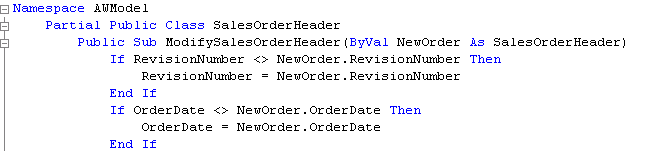


This works – the original order now has the current values updated to the new values and the state is impacted correctly for the properties and the entity itself. Then I can use SaveChanges or other functionality that I’ve exposed in my model such as stored procedures to get the data to the server. The key here is that I can leverage the framework for my DML.


But this solution stinks because I have to write the same method over and over again for every single class.


Solution that I want and finally figured out: Update only relevant properties and have the option to deal with concurrency on a granular level

Mike  Taulty actually pulled this off in this blog post, however I explicitly chose to hold off on reading Mike’s post. 🙂 I didn’t want to be influenced by his methods. What’s interesting is that in the end, we came up with very similar solutions, even though I went down many many paths before I found success! (I’m sure it took me about 10 times as long as it took Mike though.) Some evidence of my doggedness is in Dave Burke’s post about what an un-fun girl I was on Saturday night at code camp.


Updating for efficiency and concurrency


So here’s what I came up with as part of a larger solution of using entity framework in an ASP.NET website, surviving post backs, keeping the original values around and being able to use SaveChanges and also for using entities across tiers (eg web services).


I use reflection and the Entity Framework MetaDataWorkspace to accomplish this.


I’ll write another post about how I’m keeping the original values and surviving the postbacks on the ASP.NET site.


#1 important rule that has been discovered by everyone who is trying to solve this problem in Entity Framework and in LINQ to SQL, use a datetime field in your entity. This can be a field that is already in your database table or a special property exposed only by the conceptual model (or an extension to the entity’s class). If it’s in the database, you’re original data is fine, but you need to be sure to update that field any time you make mods to the properties of the entities. If you create a special property in the EDM, then you’ll also need to set the date when you first retrieve data from the data store.


Below, I am starting with a collection of original objects and a collection of current objects in hand. The collections are generic lists as in List<CustomerEntity>.


Step 1: Get a list of only those objects that have been altered since the data was first retrieved as well as objects to be inserted and objects to be deleted.


LINQ to the rescue!


In my example, origCustList is the List(Of Customer) with the original objects. custList is the List(Of Customer) with the new objects.


Inserts and deletes are not so complicated.


For inserts, I only need to query the current customers for those with no ID.


Dim inserts = custlist.Where(Function(c) (c.CustomerID=0))


Now I only need to add the new customers to my ObjectContext.


For Each insCust In inserts
   myObjContext.AddToCustomer(insCust)
Next


I cheated by using AddToCustomer for the inserts. For a more generic solution, just use the AddObject method instead.


For deletes I query the original customers and find any that don’t have a match in the new customers.


Dim deletes = From oc In origCustList _
 
Where Not 
custlist.Any(Function(c) (c.CustomerID=oc.CustomerID))


Next you need to attach, then delete these objects from the ObjectContext. These steps for delete may not seem intuitive. The object needs to be known by the ObjectContext (therefore you attach it) and then deleting it from the ObjectContext marks it as a record to be deleted when we SaveChanges back to the database.


For Each delCust In deletes
   myObjContext.Attach(delCust)
   myObjContext.DeleteObject(delCust)
Next


Now come the updated cystomers. Here’s where it gets fun!


I’m using LINQ to join on customerid and grab objects that have a newer dateModified value. This is where the date property pays off. Otherwise, I’d have to check every property of every object to see if anything changed.


Dim updates = From oc In origCustList Join cc In custlist _
On
oc.CustomerID Equals cc.CustomerID _
Where oc.ModifiedDate <> cc.ModifiedDate _
Select oc, cc


Now I have a pair of related objects for each modified customer.


In order to emulate a scenario where the objects have been tracked by the ObjectContext from the start, I need to attach the original objects to this new ObjectContext and then make any necessary changes to the objects. I iterate through the collection of object pairs and pass them off to a custom method, updateEntityProperty.


For Each c In updates
  myObjContext.Attach(c.oc)
  updateEntityProperties(aw, c.oc, c.cc)
Next


Here is where the cool stuff happens!


I want to preface this by saying that I tried using the ObjectStateEntry to pull this off, but it didn’t give me quite enough capabilities as I needed for this solution. The class allows you to change the state of the entity to Modified and to change the state of the individual properties to modified, but I also needed to change the values of the properties, which I couldn’t acheive with the state manager (which makes perfect sense – values are not state). [Update – apparently what I needed was in there; I just couldn’t find it and after trying for some time, chose to move on to reflection.] So instead I am using reflection to help me modify the values programmatically. When I do this, the state changes automatically.


Although I didn’t get to use ObjectStateEntry, I am leveraging the MetaDataWorkspace which is also part of the Entity Framework.


Private Sub updateEntityProperties(ByRef context As AdventureWorksModel.AWModel.Entities, ByRef origcust As Customer, ByRef newcust As Customer)


Dim mdw As Data.Metadata.Edm.MetadataWorkspace = context.MetadataWorkspace

‘do an explicit declaration of Edm.EntityType, otherwise custtype becomes an edmtype
‘which doesn’t expose
properties that I want to grab through reflection!

Dim
custtype As Edm.EntityType = _
mdw.GetType(GetType(Customer).Name, “AWModel”, Edm.DataSpace.CSpace)

For
Each p In newcust.GetType.GetProperties ‘<- that’s Reflection at work
   Dim newprop = p.GetValue(newcust, Nothing)
   If newprop Is Nothing Then
     If p.GetValue(origcust, Nothing) IsNot Nothing Then
       p.SetValue(origcust, newprop, Nothing)
     End If
   Else
     If
Not newprop.Equals(p.GetValue(origcust, Nothing)) Then
      ‘if we are here, then the value in new cust is different from the original
      ‘SKIP THIS FOR NOW IF IT’S A PROPERTY COLLECTION –

      ‘TO DO: build in recursive behavior to update property collections as well
      ‘simplest test to see if it’s a property collection or not: straight values are a System
       If newprop.GetType.Namespace = “System” Then
          p.SetValue(origcust, newprop, Nothing)
       End If
     End If
   End If
Next

End Sub


So, this is not quite perfect yet, but it does the job and I’m really happy that I got the concept worked out. I need to do a few more things to make this work generically and I also need to add in recursive mods to this. For example, the Customer has a property collection of addresses. In the above code, I am ignoring them, but I need to make this solution so that if it hits a property collection (this is where I’m testing for a System type – if it’s not system type then it’s a  property collection that is exposing child records) that it calls the same UpdateEntityProperties on that entity as well. SaveChanges will take care of all of the related records that are in the ObjectContext.


While this isn’t a cut & paste solution like Mike’s, i hope that the explanations help you to understand how and why this works. There are quite a lot of lessons that I learned during this exercise.


I have two more patterns that I have worked out which I want to write about. The first is dealing with the state when working in an ASP.NET application (postbacks trash the objectcontext, too) and the other is doing xml serialization on the entire object graph. Danny Simmons gave me a hint for how to approach the graph problem, and I was able to work it out from there.

Emergency! Emergency!

We had a wee scare last night flying from Washington/Dulles into Burlington (on my way home from a quick trip to San Diego to do an INETA talk … that blog post is still on my laptop :-)).

It was a late night flight, due to land at 11:30pm in Burlington.

Five miles before we got to Burlington, the airplane’s monitoring system reported excessive heat in one of the front brakes. The worst case scenario was that on touchdown or cruising down the runway, the brake could catch fire and it was quite close to the engine so…scary potential.

The flight attendants (both young and neither had yet been initiated with an emergency landing before this) had to prepare us very quickly with the news and for an emergency landing. Tighten the seat-belts, tuck into a ball, brace yourself against the seat in front of you (I had a wall that was a little far away). There was no time really for much else. They did a fabulous job.

I live with a general disbelief in anything bad happening to me or my loved ones. My parents have both survived minor bouts with cancer; my father has been in two car accidents where the car was totalled and he walked away; my husband cracked his head open on a rock face while we were hiking and while there was a LOT of blood, missing teeth, a scalped scalp and huge gashes to be stapled up, he recovered perfectly and they even shoved his teeth back into his gums and they remain there today. My Newfoundlands are living to ripe old ages beyond the norm for this breed of dogs.

So yes, I live in a little fantasy bubble world.

And because of that, while I was certainly shaking a little, I didn’t really think that anything bad would really happen. And it didn’t.

We landed. Nothing seemed to happen out of the ordinary. We did an emergency evacuation of the plane because the potential for fire and explosion still remained. Since I was up front I just went down the stairs like I normally would (vs. jumping off the wing like a lot of other people had to). Nobody was hurt. The plane didn’t catch fire.

There was a lot of excitement on the runway. Many firetrucks and emergency vehicles and two guys in Hazmat outfits who looked like astronauts inspecting the plane.

It struck me as odd that I was the only person who walked VERY far away from the plane (you know, just in case.). I just kept going further and further out in the field by the runway.  And an hour later, I was allowed to go back on the plane to get my stuff out of the storage bin and I headed home.

One poor girl had been so terrified (possibly she has some past experience that this too closely resembled) that she couldn’t stop crying for at least an hour. She had her boyfriend there to comfort her.

So, I got another day out of it. Didn’t even bother calling my husband since it was nearly midnight; I knew he was sleeping and all I had to report was “Hi honey. I’m here. The plane didn’t crash or blow up and I’m still alive. Talk to you later.”  But I call him with that report after every single flight, which means generally twice in a day, since most of my flights include one stop over. So it didn’t seem necessary to wake him up for that.

Sharing custom types with client and services apps? Use WCF

One of the very difficult to solve problems in .NET client & web service solutions is sharing custom objects between the web service and the client.

Here’s the scenario.

You have a business layer with some serializable objects. Let’s say the namespace is “MyLovelyBAL” and the object is “MyLovelyObject”.

You have an operation in your web service that returns one of those objects.

Now you build a client, say a Windows Forms app (“MyWinApp”) that will call into that Web Service, and you are not savvy enough to use a tool like thinktecture’s WSCF. 🙂 Therefore you “Add Web Reference” and point to the web service you built. In doing so, you are asked to give a name to the proxy. Let’s call that “MyWSProxy”.

In your WIndows Forms app, you also have a reference to the assembly that contains MyLovelyBAL.MyLovelyObject.

Now it’s time to write some code.

You instantiate the proxy and request a lovelyobject.

Dim myproxy = New MyWSProxy.Service
Dim MyLovelyBAL.MyLovelyObject=myproxy.GetMyLovelyOBject

But it fails telling you that you can’t cast a MyWinApp.MyWSProxy.MyLovelyObject to a MyLovelyBAL.MyLovelyObject.

And then you will begin on a journey to hell, which might include reading this article on Schema Providers which is not for the feint of heart.

So just forget it. It’s 2007! We have WCF.

You can go into your project where you define the MyLovelyObject class and give it a DataContract attribute and give it’s properties (that you want to expose) DataMember attributes. Your interface operation (and any operations that implement it) will return a MyLovelyBAL.MyLovelyObject object.

And when you Add Service Reference to your windows forms app, there is no namespace replacement. A “MyLovelyObject” is always coming from MyLovelyBAL and this is oh, so lovely. The way it oughtta be!

You know I learned this the hard way. And I will be seeing Michele Leroux Bustamante tomorrow who will first bop me on the head for waiting so long to use WCF and the sit me down and have me read her fabulous book Learning WCF, (which I had in my hands long enough to raffle off at VTdotNET last week BOO HOO) cover to cover. It’s about time!