All posts by Julie

Login control website spam – fix some of it with regex

Recently, the VTdotNET website has been getting hit by some robot entering hyperlinks into the password text box of the login form.

ASP.NET catches this on the server side and pushes out this error:

System.Web.HttpRequestValidationException: A potentially dangerous Request.Form value was detected from the client (ctl00$ContentPlaceHolder1$LoginView1$Login1$Password=”<A href=http://…”).

Since I have errors emailed to me, I’m getting a LOT of these emails every day which was annoying.

So, I wanted to trap this on the client side using a validator.

While they may appear to be, login controls are not totally locked up. One of the smart tag options is to “Convert to Template”. Once you do this, you can edit the control all you want.

So I added a RegularExpressionValidator control and entered the following regex for the ValidationExpression:

^((?!href|http).)+$

which won’t allow strings that href or http. Then tied it to the password control and to the ValidationGroup for the whole login control. That way I get the validation during data entry AND when the user hits the login button.

I did the same for the User Name control.

This solved part of the problem. If you went to the actual login page, it was no longer possible to enter hyperlinks and postback. But the spam kept coming. I changed the name of the controls and put some more details in the error handler and saw that the name of the control reported in the error didn’t change and that it wasn’t even coming from the login page. But it was the ONLY login control in the entire website.

Then I got a little education from some who are less naive than I about the evil ways of spammers. Ryan Trudelle-Shwarz, Adam Sills and Dave Wanta filled out the picture for me. It’s a nasty type of comment spam where a robot collects the postback info from your site and no longer needs to return there to do the actual entry and postback. There is still some mystery here for me since there never was a login control on the home page, but as Ryan suggested, the simplest thing to do is just filter out those errors so that I don’t have to get them in my email box and forget about them.

ASP.NET Forum user keanxsoul has done some detective work along these lines and offers an interesting explanation about how the spammers are actually doing this.
 

Story of a Mac Powerbook that got run over by a truck on the highway and survived

No, this isn’t “I used a Mac and survived”, but a great story about my neighbor’sMac powerbook that went through hell and survived.  I should qualify “neighbor”. He lives nearby, though I don’t think we’ve ever met. But he is a blacksmith who’s beautiful work you can see here on his site

He left it on top of his truck when he left his house last week and didn’t realize it until he arrived at his destination about 50 miles away. It had fallen off the car while he was driving down the road and yes, got run over. He posted a message on the local FrontPorchForum in case anyone saw it. I even called my husband to ask him to keep an eye on it on the way home.

Amazingly, some very nice person found it and brought it to Small Dog Electronics in Burlington who was able to track Jim down. More amazingly, it still works!

Jim blogged about this on Small Dog’s website. You can read a Jim’s story here and check out the bent up but still functioning powerbook.

Vermont IT Jobs: ASP.NET Developer in Colchester

.NET  Job Description: 


Work in a team environment in the development of web portal and ASP.NET
applications for major client projects.

Strong foundation in the concepts of web based application development
Experience with ASP.NET (C# or VB.NET) using the Visual Studio development
environment; SQL server 2000/2005; (X)HTML and XML
Strong understanding of the SDLC
Client side development in JavaScript; and a comfort with Object Oriented
development methods
Creative, self starter
Passion/ability to learn/Flexible
Team and solutions oriented
Bachelor’s degree in a related field (computer science, MIS, electrical engineering)
Demonstrated experience and understanding of multi-channel distribution business
models
Professional services experience
B2C e-commerce experience
Technical certifications and training

CONTACT:

Paul Mewis BSc (Hons)
Senior Recruiter, S.Com
Suite 2525, One Post Street

San Francisco

CA 94104

Tel: 415 627 1892

Fax: 415 989 0450

globalpeoplesolutions
Email: Paul.Mewis@scomusa.com
www: www.scom.com

Speaking at two Michigan .NET User Groups in July

Okay, I lied. I thought I was staying home all summer, but it turns out that the Greater Lansing User Group had a request in to INETA and it just so happens that their July meeting date falls the same week as the famous Ann Arbor Art Fair that I have always wanted to go to. So, I will be doing an INETA event on Thursday, July 19th in Lansing and as long as I’m going there, I will speak on the previous night at the GANG (Detroit) User Group.

Thanks especially to Bill Wagner and Darrell Hawley for their help in coordinating. Darrell runs the user group in Ann Arbor but their meeting date is weeks before.

I’ll be doing a session on the ADO.NET Entity Framework at both groups.

Embedding Silverlight Annotation in my dasblog post

This was easier than I expected! Go ahead, draw in my blog post! 🙂

(note – If you do not see the drawing surface it’s because this doesn’t seem to work when the blog post is viewed individually. View my entire Silverlight category and it will be rendered properly. I guess I need to keep working on this one…)

This is the Silverlight setup that I used for my tests on this particular page.

I put the javascript and xaml files in the relative folders in my dasblog application:

thedatafarm.com/blog/xaml

thedatafarm.com/blog/js

Then I added the javascript references that are in the header tags of my html page into the header tags of the homeTemplate.blogtemplate file in my blog/themes/myfavetheme folder.

And it just works!

So far this is just letting you draw on the blog page. My persistence code in the later pages of the above mentioned tests use asp.net ajax and I’d have to do some major customization to my dasblog app to incorporate that right now. I pretty much use dasBlog out of the box, so I’m not ready to go down that road. I have lots of other stuff to learn, but this was a fun little exercise!


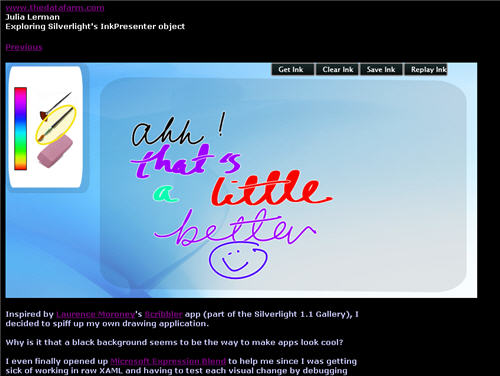
My Silverlight Ink Experiments: Next Step… try to look like a silverlight application

Inspired by the Scribbler app (part of the Silverlight 1.1 Gallery), written by Daniel Cook  & Pete Blois (with some inspiration from Laurence Moroney)  I decided to spiff up my own drawing application.

Why is it that a black background seems to be the way to make apps look cool?

I even finally opened up Microsoft Expression Blend to help me since I was getting sick of working in raw XAML and having to test each visual change by debugging the app. Last time I looked at this product, it frightened me and I closed it quickly. But now that I have done enough of the hand-coded XAML, it was not a huge leap to comprehend how to use Expression Blend and what I could do with it.

One thing that I discovered is that the Background property of the InkPresenter element, while necessary, is not recognized by the designer. So to do the design in Expression, I had to remove that property, then replace it when I wanted to test out the app.

Since my app is still using the v1.0 of Silverlight (and javascript, not .NET), I can’t pull off the slick color picker that is in the Scribbler app. But when it’s time to move to v1.1, I’ll know where to find the code!

Lenovo X60 Thinkpad Battery problems – will there be a new battery recall?

The battery on my 3 month old Lenovo X60 is dead and I am getting the dreaded notice in the power manager “Irreparable damage to the battery has been detected. Replace the battery with the new one.”

In addition to the message in the Power manager, I have the following symptoms:

  • Battery Indicator light is blinking orange
  • Power status says “Plugged in, not charging”
  • Computer shuts down immediately when unplugged (since the battery is dead).

This is not atypical of old batteries that need replacement, but this battery is fairly new and has not been abused in any way.

I attempted a recommended BIOS update but this requires a fully charged battery.

I checked the March 27th battery recall, but my battery was not on the list.

Luckily, I found a comment thread in the LenovoBlogs under a post that is a few months old called “Power Manager.” There is a new string of comments that began a few days ago with other people having this problem. An IBM technician from Vancouver has joined the thread, identifed the problem and is currently seeking a solution.

So if you have found my blog post via searching for a solution to this problem… keep an eye on the comments on the tail end of this post’s comments: http://www.lenovoblogs.com/insidethebox/?p=52.

I like having found the www.LenovoBlogs.com site. It’s a mini “blogs.msdn.com” and a good stab at corporate transparency and accessibility. The product manager’s direct phone number is even published there!

Is “Ink” cooler if we call it “annotating”?

There are a few silverlight demos that use the InkPresenter, though two of them don’t refer to Ink at all…:

The page turning demo has it. You can annotate the pages and that gets remembered during your session. As you flip the pages back and forth, the annotations are incorporated into the effects.

The scribbler demo has it. This is straight drawing. What I love here is the cool pallette.

The Ink Tattoo Studio demo has it. This a fun demo.  On a tabletpc, the pressure of the stylus can be registered by the digitizer.I saw a version of this app that said “Ouch!” if the pressure got too high. Otherwise, the tattoo tool buzzes.