Oh, that’s where RUN went in Vista

WHen I got VIsta, I jsut started using it. None of this studying business for me, no sir. SO of course, I have no idea where many functions are or how to use so many of the new features (or even what they are). I find them by chance or necessity or just osmosis.

One thing I never really knew was what happened to the Run command. I figured maybe they decided it was a bad idea because it used to be up front and center in XP and earlier version fo windows
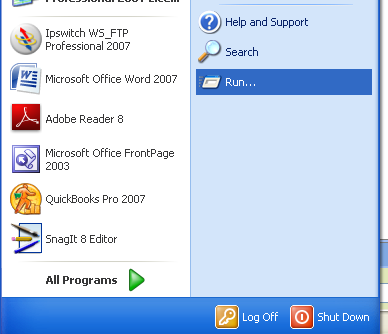
But I knew where the “Command Prompt” was in Vista, so I never bothered looking for the Run option.

Just now I was looking for the Magnifier function – I know I saw it once (again, by accident), so I opened up the start menu, then accessories, and what did I notice? My old friend “Run”!
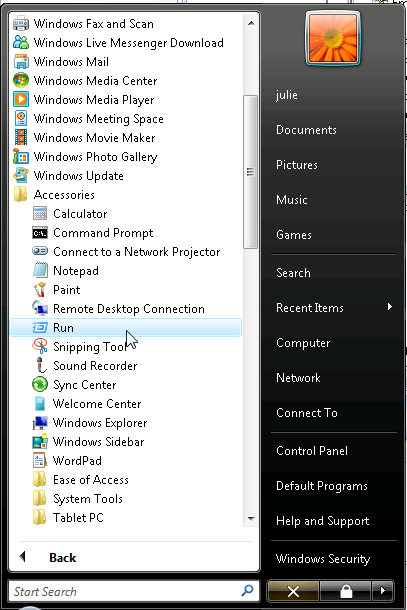
So back to the Magnifier. I found it easily enough using the Search (see I know a few things in Vista), but that still didn’t tell me where in the menu it lives. But I also am familiar with one of my favorite little Vista utilities, the “Open File Location” option in the context menu, which helped me see that the Magnifier is in Ease of Access
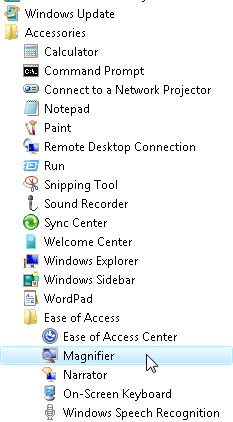
Now, if only I could remember what I wanted the Magnifier for to begin with!

Bill gates “last day” video from CES

Thanks to Mike Taulty for keeping me in the loop. For some reason, when linking directly to the video, the sound was wierd, so here’s the MSN video site where you’ll have to watch a 5 second ad first. It’s worth it!

This is funny and it is always a great reminder to see Bill Gates sense of humor and his ability to laugh at himself. I think when we had the meeting with him last month, none of us were thinking of this – we were all so serious. Sheesh!

LINQ – Learn by example

Roger Jennings writes about issues with finding examples of complex LINQ to XML queries. Boy have I been there and done that. One of the problems with learning LINQ is that you have two options

1) learn LINQ very deeply so you can do what you need

or

2) learn by example

With LINQ, I tend to start with a need, do what I can until I hit a wall, then look for examples that will help me and use them to learn even more. But it means that there needs to be a LOT of examples.

I have often likened learning LINQ as well as learning Entity SQL to learning T-SQL. Learning T-SQL has, for me, been an evolution which has occurred over some ten years. I still have to look up the Cast & Convert topic 99% of the time in the docs whenever I need to convert a datetime to a desired char format.

Even if there were 1001 examples, I know that there will always be something I want to do that I can’t find an example for and will have to rely on gaining a better understanding of LINQ in order to accomplish it.

EF Mapping to Read Stored Procs, another twist

Entity Framework easily supports mapping to read stored procedures when the query results match up with an existing entity in the model. If your query results don’t, then you have to create a new read only entity and entity set in the CSDL and a new “fake table” entity and entity set in the SSDL and then you can do the mappings. (I show how to do that in this blog post.)

Chris Snyder found a new twist. What if the result matches an entity, but some of the fields inthe result have been renamed? Unless you wanted to create a read only entity to match it. But then you won’t get the change tracking benefits of a entity with a key.

Microsoft hires another Entity Framework/Astoria nut

Jonathan Carter was very interested in Entity Framework and Astoria. Last month, he started working for Microsoft as an Technical Evangelist. So he gets paid to share his excitement about these and other .NET technologies.

Guy Burstein was very interested in Entity Framewrok and Astoria writing lots of posts about the two topics. Today Guy announced that he has started working for Microsoft Israel with the Developer & Platform and Adoption team. He too says he has found the sweet spot of getting paid to do something that you are good at and love.

Congrats!!