Category Archives: Data Access

Links & Resources from 24HOP Presentation

•Programming Entity Framework, 2nd Ed, O’Reilly Media www.learnentityframework.com

•MSDN Data Dev Center (www.msdn.com/data)

•SQL Server Developer Center, Database Connectivity http://msdn.microsoft.com/en-us/sqlserver/connectivity

•EF Team Blog: http://blogs.msdn.com/adonet 

•Improvements to Generated SQL in .NET 4.0 May, 2010
http://blogs.msdn.com/b/adonet/archive/2010/05/10/improvements-to-generated-sql-in-net-4-0.aspx

•LINQ to SQL & Entity Framework: Panacea or evil incarnate? –Bob Beauchemin 2008 6-Part Blog Series

http://www.sqlskills.com/BLOGS/BOBB

Looking at EF4 CTP5 in Parts: Part 4–Working with New and Existing Databases in Code First

One of the neat features of Code First  in CTP5 for those who are starting from total scratch…no database at all.. is that there is default behavior for working with a database. You don’t even need a database connection string. If you do not specify a connection string anywhere …code or config…then Code First will make a presumption about the database.  THe default presumption is that the database is the same name as your context class and is a local SQL Server Express instance.

Here’s an example.

I’ve got a context class called AWEntities.

namespace CTP5_Modeling
{

  public partial class AWEntities : DbContext
  {
    public DbSet<Customer> Customers { get; set; }
    public DbSet<Product> Products { get; set; }
    public DbSet<Detail> Details { get; set; }
    public DbSet<Order> Orders { get; set; }
  }
}

When I instantiate that class:

var context = new AWEntities();

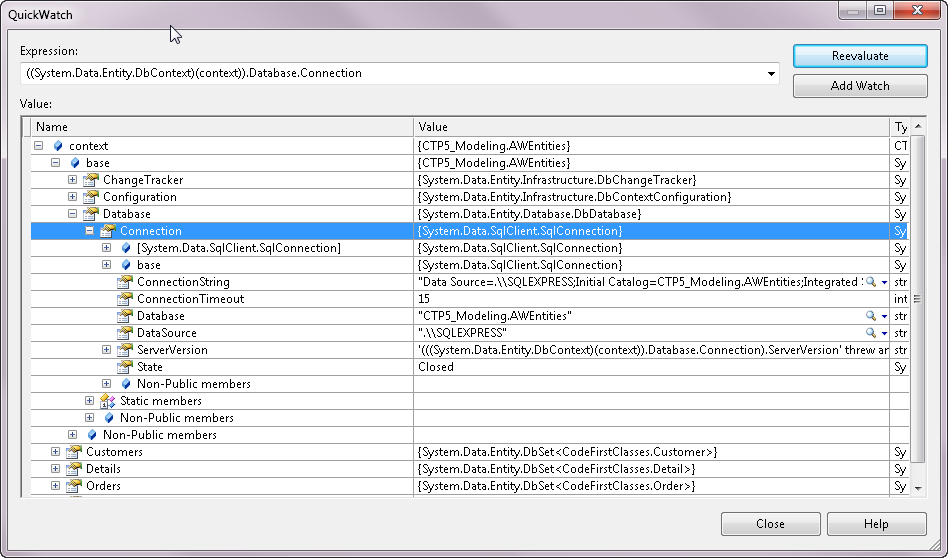
You can see, in this debugger screenshot of the context, the database connection string that is created when there is no other available:

defaultdatabase


It presumes the database has the name of the class’ namespace plus name, CTP5_Modeling.AWEntities and that it’s SQL Express.

If the database doesn’t already exist, it will create it for you.

dbcreated

And by default, any time you instantiate the context again, it will check to be sure that your code first classes still line up with the schema of that database.

If not, you’ll get an error like this:

modelchanged

Now what if you want your code first classes to work with an existing database.

Step #1, you’ll need your database connection string, of course. Not an EntityConnection  string, but a regular database connection string.

Just to be clear, here is a typical EntityConnection String:

<add name="AWEntities"
           connectionString="metadata=res://*/Model.csdl|res://*/Model.ssdl|res://*/Model.msl;
                                                  provider=System.Data.SqlClient;
                                                  provider connection string=&quot;Data Source=.;Initial Catalog=AdventureWorksSuperLT;
                                                                                                                         Integrated Security=True;MultipleActiveResultSets=True&quot;"
                                                  providerName="System.Data.EntityClient" />

With code first, there is no metadata and with not metatadata you won’t need the EntityClient provider.

Here is the connection string  that I’m using for the SQL Server instance of my database:

<add name="AWEntities"
            connectionString="Data Source=.;Initial Catalog=AdventureWorksSuperLT;
                                                    Integrated Security=True;MultipleActiveResultSets=True"
            providerName="System.Data.SqlClient"/>

There’s still one problem. The presumptions that code first will make at runtime about my database (based on my classes) don’t exactly match my database.

For example, I have a Customer class. Code first will presume that the database table has the same name as the EntitySet. The EntitySet will be specified on the fly at runtime by code first as the plural of the class name, e.g., Customers. However my database table name is customers.

I can fix that up with attributes from the using System.ComponentModel.DataAnnotations namespace:

[Table("Customer", SchemaName="SalesLT")]
public partial class Customer
{
}

Notice also that I’m specifying the schema. Otherwise it will default at dbo and my store query will fail when it tries to query against dbo.Customer.

Also, I have simplified names of some classes and some properties.

In the database, there is a table called SalesOrderHeader with a primary key field called SalesOrderID.

The relevant class is called Order with a key field of OrderID. Code first will look for a table called Orders with a SalesOrderID primary key field. SO I have to use attributes to instruct code first.

Here’s a bit of that class with the relevant attributes:

[Table("SalesOrderHeader", SchemaName="SalesLT")]
public partial class Order
{

   [Column(Name="SalesOrderID")]
   public int OrderId { get; set; }

Whether you want CTP5 code first have total ownership of the database or you want it to use your existing database, this should get you started with leveraging the new bits.

Looking at EF4 CTP5 in Parts: Part 3–Easy Access to In-Memory Entities

 Oooh laa laa, my favorite so far.

One of my most oft-repeated bits of EF guidance is that “a query’s job is to execute”.

If you write a query such as

var myquery=context.Customers.Where(c=>Id==24);

Any time you do soomthing with myquery, such as call ToList or Count or bind it to a databinding control, it will be exeucted on the database.

Too many times developers will write that query and execute it and then a little later do something like:

context.Customers.Count

hoping to find out how many customers are in memory.

But context.Customers is a query and a query’s job is to execute, so it will not look in memory. It will look in the database.

Instead you need to look in the ObjectStateManager, pull out the existing objectStateEntries and then navigate back to the in-memory objects with the ObjectStateEntry.Entity property. I even have a clever extension method (yes I was very proud of myself when I thought of it!) that is used in my book samples called ManagedEntities which will do this for you.

Here it is as a regular method, not an extension method.

public IEnumerable<T> ManagedEntities<T>()
 {
     var oses = ObjectStateManager.GetObjectStateEntries();
     return oses.Where(entry => entry.Entity is T)
                .Select(entry => (T)entry.Entity);
 }

Note that my ManagedEntities method also leverages another one of my custom extension methods which is an  overload of GetObjectStateEntries. I leaned on a lot of deep knowledge of EF to write this.

But now in CTP5, the DbContext has a method that does what my ManagedEntities method. It’s called local.

  1.    var context = new AWEntities();
  2.    var customer = context.Customers.Include("Orders").Take(10).ToList();
  3.    var orderEntries = context.Orders.Local;

The 3rd line of code will pull out all of the orders that were put into memory with the previous line of code.

Local makes sense. There will still be a million and one calls to context.ORders by developers who don’t realize that that goes to the database but at least Local is pretty discoverable. More importantly it is a thousand times easier than going through the ObjectStateManager…which is (and  should be) plumbing.

Looking at EF4 CTP5 in Parts: Part 2–Internal Validation

CTP5 provides validation for validator attributes in your classes.

For example, I could apply this attribute to the Customer.CompanyName property:

[MaxLength(20)]
  public string CompanyName { get; set; }
 

How does it get there? If you are using Code First, you can just type it in your class. If you are using code gen, you can modify the T4 template to read the model’s metadata and shove that attribute in there. I actually have an example of this template modification in my book although it writes code for validation, not an attribute, since this feature was not available. (Note: I crossed the last 2 sentences out only because Diego Vega let me know that the validation only works for Code First right now.)

The DbContext class has method, GetValidationErrors which will return any conflicts with your attributes.

Here is that method being used in a test:


public void LongCompanyNameReturnsAValidationError()
    {
      var customer = new Customer {CompanyName = "thisisa reallylong companyname thatshouldnot validate"};
      var context = new AWEntities();
      context.Customers.Add(customer);
      string message = "";
      var error = context.GetValidationErrors().FirstOrDefault().ValidationErrors.FirstOrDefault();
      if (error != null)
      {        message = error.ErrorMessage;      }

      Assert.IsTrue(message.Contains("maximum") && message.Contains("20") && message.Contains("CompanyName") );
    }
  }


The actual error message constructed by EF is “The field CompanyName must be a string or array type with a maximum length of ’20’.”

If these errors get through your code, they will be caught by SaveChanges and exposed in the exception.

(Note: Another update from Diego…by default, this will only work with Added and Modified entities. There’s a ShouldValidateEntity setting that I planned to talk about in a later post that you can use to impact this.)

If you aren’t capturing exceptions you’ll get this

validationerror

The exception is a DbEntityValidationException. You have to drill in to find the actual error.

exception

Why is there a seeming double layer of error collections? They are grouped by entityEntry. So you first have all of the EntityValidationErrors. Then the first one of those is a collection of errors for the ObjectStateEntry that represents the particular Customer instance we are working with. All of the entities being managed by the context are validated before EF attempts to push anything to the database.

Looking at EF4 CTP5 in Parts: Part 1 – A New T4 Template

The Entity Framework 4 CTP5 was just released. There are lots of new features that affect the core use of Entity Framework as well as Code First.

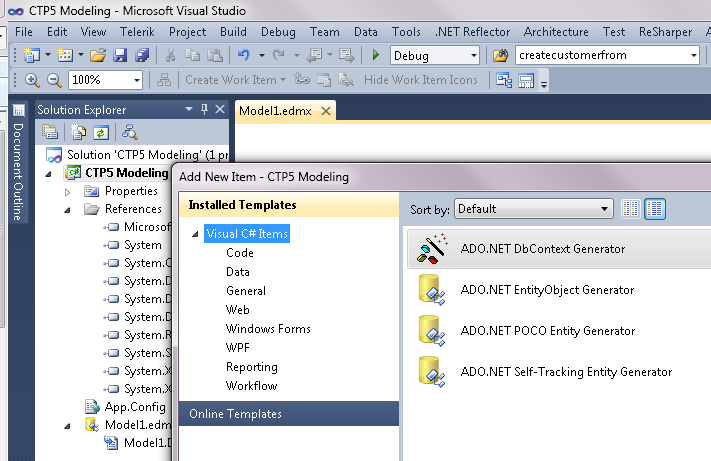
I’ll run through some of these features one blog post at a time. The first is the new T4 Template that gets installed, the ADO.NET DbContext Generator.


T4Template

This creates a more lightweight context that inherits from DbContext. DbContext was introduced in CTP4 and exposes a simpler way of working with most commonly used features of ObjectContext.

generatedcontext


The POCO classes that are generated are much simpler also. Here’s one of the classes. Notice that, unlike the POCO templates we’ve had for a while, these don’t bother with adding in extra logic for two way navigation (the FixupCollection) for the navigation properties.

simpleclasses

Since we don’t need the FixupCollection, the additional file that the POCO template created to define the FixupCollection is still there but it is now empty.

nosupportingcodenecessary

Updating Dates with WPF DatePicker

I spent hours and hours trying to find this piece of information. Finally I was very happy to have Julia Kornich, a technical writer on the EF team, save the day!

By default a DatePicker control does not notify it’s datasource of changes.

Even when you are doing a drag & drop application.

I had a DataGrid where every column but the date columns was pushing changes back to the database.

What was wrong with the DatePicker?

You need to explicitly tell it to do the job with the UpdateSourceTrigger attribute. It is not in the XAML by default. And in order for the notification to happen when the user changes the date, the UpdateSourceTrigger needs to be set to PropertyChanged.

<DatePicker
   SelectedDate="{Binding Path=OrderDate, Mode=TwoWay, 
                          ValidatesOnExceptions=true, 
                          NotifyOnValidationError=true, 
                          UpdateSourceTrigger=PropertyChanged}"

   DataContext="{Binding}"
/>

And there you have it!

Designing Repositories – Now I don’t feel so bad

Last week I was working with a client and we were creating some repositories to use with EF4 entities in her application. I felt kinda dumb because I couldn’t reason out where to put a method to retrieve “child” data, e.g., GetEmployeesForCompany(Company company). The method not only retrieves the employees but attaches them to the company, returning a graph.

My conundrum was should the method call go in to a repository who’s root was Company or the one with the root, Employee?

So I tweeted it but thanks to the 140 char limit, simplified the method to GetEmployeesForCompany(int companyId).

I got a lot of responses very quickly and they went back and forth which only confused me more.

Not until I put them all in this table (below) did I see that generally people were leaning towards returning it from employee.

But the best response was: “The answer is that it depends upon what you’re building – and how it would make most sense to aggregate 😉 i.e. aggregates only make sense in CONTEXT.” Thanks Mikey! 🙂

In the end, I think that I won’t fail by choosing one over the other. The important thing, which for me is also a great benefit of creating repositories, is the fact that I have put some thought into where the method goes and am making an explicit choice that works for me. And that is the lesson I can leave my client with, along with another which I repeated a few times – “I’m not the expert on this topic. We’re just taking baby steps (in the right direction) here.”

Company Employee

only make sense on the Company class, so I’d say Company.

Employee Repo!
I’d say Company Employee rep. Company is just a lookup parameter.
gsin u have emp and comp both as aggr. still, comp might restrict which emp it returns…so i’d put in comp Employee Repo!

I’d go with the company as the aggregate in this case.

I’d go with Employees and calling it GetByCompany(string companyId)
EmloyeeRepo.GetAllForCompany(123
 

I generally go with the convention that a rep only returns the type it is associated with but takes any type as a parameter

  so if reps other than employees returned employees, it would be hard to predict where all the places are that return employees
  your getting a collection of employees and not dealing with a Company object at all, I would put it in employee rep
  employee repository… it’s returning employees
  I’d say employee. You want a collection of employees, not a collection of companies. Think of it as a slippery slope.
 

Since you are getting employee’s, I would put it in the EmployeeRepository.

Code First – It’s not Entity Framework Programming , it’s Just Programming

This is what I’ve realized about using the latest iteration of EF4’s Code First in the EF Feature Pack CTP. (I will keep clarifying that code first and the new EF bits in the CTP are a preview, not for production and subject to change…)

When using code first where you simply create your domain classes and define a DbContext to manage them, Entity Framework quietly slips into the background and does all of it’s work – transforming LINQ queries into store queries, executing them on your behalf, reshaping the query results into your classes, change tracking and then handling persistence to the database.

Between code first’s behind-the-scenes automatic model creation and some of the small but impactful additions to the core API (e.g., DbSet and DbContext), when creating simple applications, you will no longer have to be focused on how to design an Entity Data Model or write Entity Framework code, because most of that will be taken care of you by these new features. Calling context.Customers.Add(myCustomer) doesn’t feel too much different than working with any other collection in .NET. Compare that to context.Customer.AddObject(myCustomer) which your .NET brain fights (just ask Chris Sells :)). Or context.Customers.Remove(myCustomer) which correctly implies that you are removing something from a collection vs. context.Customers.DeleteObject(myCustomer) which is unnatural, but worse, incorrectly suggests that you might be actually deleting this from the database.

While this does feel like an epiphany (oh, it’s just programming) and people like Scott Hanselman are calling code first “the magic EF unicorn”, keep in mind that as you start architecting more complex applications, you’ll still have a lot to understand about the behavior of EF and how to work with it. So, no, I’m not calling “stop the presses” on my book.

Code First will not be for everyone. Many people want and need to build their model by reverse engineering an existing database. Many people like using a modeling tool. That’s why EF has these options and that’s what drove the alignment of the names:

  • Database First
  • Model First
  • Code First

Use what works for you…

What I’m loving about the newest iteration of EF Code First in CTP4

There have been a lot of improvements to code first since CTP3 and in fact, the team has been experimenting with changes to the core Entity Framework APIs that not only support even simpler programming with code first but that we’ll benefit from in an upcoming release of .NET. (No, I don’t know if there will be a service pack and when…)

I have a code first sample in my book, Programming Entity Framework 2nd Edition, that is coming out in August and was lucky with the timing of the CTP4 release because I was able to sneak in an overhaul of that section before the book heads to the printer.

In revising my code sample for that section I was very happy with so many of the API & Code First improvements.

**But first a clarification is important. The version of Entity Framework that is in .NET 4/VS2010 is the current shipping, supported version that you can use in production. What’s in the CTP is simply an early look at what’s coming as it evolves giving us a chance to play with it. This is not something you can deploy and it is also going to evolve with future CTP versions.**

So with that in mind, I went to town on the CTP3 sample.

The first thing that I benefited from was the new stripped down easy access versions of the ObjectContext and ObjectSet.

The new classes, DbContext and DbSet have the same essential functions but don’t expose you to the entire feature set of their big brother & sister. Not everyone needs all of those features. The are not derived from ObjectContext and ObjectSet however, but provide easy access to the full featured versions through a property e.g., DbContext.ObjectContext and DbSet.ObjectSet.

Along with this simplification are simplified terms.

Where ObjectSet has AddObject

context.Customers.AddObject(myCust) – note that Customers in this case is the ObjectSet)

DbSet simply uses Add

context.Customers.Add(MyCust) –>now I’m using Customers as a DbSet).

Another nice trick is how DbSets are created.

ObjectSet has an internal constructor and does not have a parameterless constructor,so you need a backing variable

ObjectSet<Customer> Customers;

and then you need to execute the CreateObjectSet method to create the ObjectSet:

context.CreateObjectSet<Customer>(“Customers”)

DbSet has a constructor so you can use an auto-implemented property

public DbSet<Customer> Customers { get; set; }

Code First gets way easier

It’s true. I cut out gobs of code and moved code to where it belongs.

Code first uses convention over configuration. It looks at your classes and does its best job of inferring a model and a database schema from it (if you are starting from scratch). Your classes don’t always provide enough metadata so you can provide more info to code first through additional configurations. Initially those configurations were programmatic only but now you can also use attributes in your classes (“data annotations”).

Here are two examples.

In my model I have a class called ConferenceTrack. It has an identity property called TrackId. Code first convention looks for “Id” or class name + “Id” as an identity but TrackId doesn’t fit this pattern so I have to tell EF that this is my identity key.

I can do that using code first’s ModelBuilder (formerly called ContextBuilder):

modelBuilder.Entity<ConferenceTrack>().HasKey(ct => ct.TrackId);

In CTP3, I had to execute from the same code that instantiates the context. Bad bad. Now there is an OnModelCreating method that I can use and put that configuration inside that method. The method lives in the context class. I don’t have to call it. The context is smart enough to run it for me.

protected override void OnModelCreating(ModelBuilder modelBuilder)
{
   modelBuilder.Entity<ConferenceTrack>().HasKey(ct => ct.TrackId);
}

Alternatively, I can configure this key right in my class as an attribute of the TrackId property.

    [Key]
    public int TrackId { get; set; }

Definitely simpler. I prefer to keep all of that EF related stuff in the context class so will most likely continue to use the fluent configuration rather than the data annotations.

Boy oh Boy did Relationships Get Easier

In my domain classes, I have a bunch of relationships defined through properties.

E.g.

ConferenceTrack has

public ICollection<Session> Sessions  { get; set; }   (a one-to-many relationship)

Session has

  public ConferenceTrack ConferenceTrack { get; set; }  (a many to one relationship)
  public ICollection<Speaker> Speakers { get; set; } (a many to many relationship)

In CTP3 I had a whole bunch of configurations defined (that were hard to construct and hard to read) so that the model would understand my intent with these relationships. CTP4 is now smart enough to grok my intent based on the domain class properties. And if there’s something that I want that doesn’t follow the convention, then I can add a configuration.

So I removed *all* of the configuration code that described the relationships.

That made me happy.

And EF/Code First figured it all out.

Based on my classes and the single configuration to define the TrackId as the key for conferences, it created this database to persist my data into

ctp4

It worked out all of the relationships. Notice the Sessions_Speakers that it created for the many to many relationship.

Also, I have a class in my domain that is called Workshop and inherits from Session. By default Code First assumes Table Per Hierarchy. It created a discriminator column in the Sessions table which I need to use another configuration for to change its name to IsWorkshop.

There’s more to love about this CTP. You can get coding details from theEntity Framework Design and EF team blog’s newest posts and download the CTP here.

 As I’m learning more about domain driven development and as code first evolves, I’m getting more excited about this upcoming feature of Entity Framework