Congrats to Jim Wooley, Fabrice Marguerie and Steve Eichert! And THANKS for writing it. It’s been a long haul! I have really been anticipating this book!

In my post about rewriting Brad Abram’s MVC + Entity Framework example in VB, I pointed out a better way to query a collection of objects and return their entity references (eg, query products and bring along the category information) without writing a scary query filled with references, checks for nulls, etc.
But there was something bothering me about the query.
I went from this (Brad’s)
List<Product> products =TheProducts.Where(c => c.Category.CategoryName == category).ToList();//prepare the view by explicitly loading the categoriesproducts.FindAll(p => p.Category == null).ForEach(p => p.CategoryReference.Load()); To this
var _prod = Northwind.Categories.
Where(c => c.CategoryName == id).
OrderBy(c => c.CategoryName).
Select(c => c.Products).
First().ToList();
Which gives the same effect of ending up with a set of products and being able to drill into product.category.categoryname, etc.
But that query represents something that Entity Framework is not supposed to do, and I asked Danny Simmons about it.
Entity Framework will not perform actions that you did not request. I selected only products in my projection, yet I also got back categories. It was convenient, but it was against the promise of EF. I didn’t ask for categories.
In the end, a bug was filed, because indeed, that shouldn’t be happening.
However, it’s still VERY easy to explicitly tell EF to bring along a collection (eg if I query categories I can say “and give me those products while your at it) or an entity ref (query products and ask for the category) by using Include.
Here’s the same query for the MVC view even simpler.
var _products = Northwind.Products.Include(“Category”).
Where(p => p.Category.CategoryID == 1).ToList();
I followed the great walkthrough on Brad’s blog showing how to use MVC together with Entity Framework. But I did it my own way – in VB, using a different database and trying to write more effective EF queries. I have a simple solution that renders these views from the AdventureWorksLT database:
Start with a list of customers who have orders in the system (that’s less than 10% of the full customer list)
.png)
Then I can click on a customer and see a list of their orders
Then drill in to see the order details. (The Edit button is not implemented yet, in case you were wondering!)
So here is what’s significantly different from Brad’s walkthrough.
So on the 2nd page, I need to pass in an set of orders with their related Customer entity so that I can have access to the customer name.
On the 3rd page, I need to pass in a set of order details with their related Order entiteis AND the order’s related customer.
Brad achieves this by starting with the desired entity and then using entity references and some scary looking LINQ to Entities queries.
List<Product> products =TheProducts.Where(c => c.Category.CategoryName == category).ToList();//prepare the view by explicitly loading the categoriesproducts.FindAll(p => p.Category == null).ForEach(p => p.CategoryReference.Load()); Only because I’ve spent a lot of time with LINQ to Entities, do I happen to know a little trick.
If I start with the “parent”, i.e. category and query it’s property collection (i.e. products), when I return the property collection, the “parent” entity is still attached.
So taking Brad’s query, I can get the same effect with this query (still in C#):
var _prod = Northwind.Categories.Where(c => c.CategoryName == id).OrderBy(c => c.CategoryName).Select(c => c.Products).First().ToList(); (Update: turns out this only works because of a bug which will get fixed – see THIS POST for an even better way!)
This returns a list of products that belong to the category. However I do not have to do any extra loading to get to Product.Category.CategoryName. Beasue my query began with the Category, it’s already there. (I learned this by trial and error by the way.)
Therefore, in my SalesOrderController (my versoin of his productController), the List ControllerAction code is a little different.
I use the same type of querying to get the order details.
Another thing that I spent some time thinking about and asking about was about the ObjectContext. In a web app you want an ojbectcontext to be as short-lived as possible. I notice that Brad was instantiating in the class level declarations. This is okay because in the background, MVC instantiates the class for each ControllerAction and then disposes it when it’s finished. It doesn’t hang around waiting for another method call. (This is one of the key premises of MVC. As Kevin Hoffman explained to me, it works in “short bursts” long enough to get something out to the browser. I have much to learn!)
Brad uses the CategoryName as the basis for the view creation so that he gets a pretty URL http://host/products/list/Beverages.
I’m still seeing if there is a way around this, but I don’t like querying on a string like this. I like my keys! So I’m passing in CustomerID and SalesOrderID and my urls aren’t as pretty.
Here is what my controller looks like and you can see my queries that populate the Customer List, the customer’s order list and the order’s detail list.
Imports System.Web.MvcImports System.LinqImports MvcApplication.awModelNamespace MvcApplication.Controllers Public Class SalesOrdersControllerInherits System.Web.Mvc.Controller<ControllerAction()> _Sub Index()REM Add Action Logic hereEnd Sub‘example URL:http://localhost:xxxx/SalesOrders/Customers<ControllerAction()> _Public Sub Customers()Using aw = New awEntitiesDim _customers = aw.Customers. _
Where(Function(c) c.SalesOrderHeaders.Any). _
OrderBy(Function(c) c.CompanyName).ToListRenderView(“Customers”, _customers)End UsingEnd Sub‘example URL:http://localhost:xxxx/SalesOrders/List/[CustomerID]<ControllerAction()> _Public Sub List(ByVal id As String)Using aw = New awEntitiesDim _salesorders = (From cust In aw.Customers _Where cust.CustomerID = id _Select cust.SalesOrderHeaders).FirstorDefault.ToListRenderView(“SalesOrdersbyCustomer”, _salesorders)End UsingEnd Sub‘example URL:http://localhost:xxxx/SalesOrders/List/#### (order number)<ControllerAction()> _Public Sub Detail(ByVal id As String)Using aw = New awEntitiesDim _order = (From ord In aw.SalesOrderHeaders.Include(“SalesOrderDetails.Product”) _ Where ord.SalesOrderID = id _ Select ord).FirstDim _order2 = (From cust In aw.Customers.Include(“SalesOrderHeaders.SalesOrderDetails.Product”) _ Where cust.SalesOrderHeaders.Any(Function(so As SalesOrderHeader) so.SalesOrderID = id) _ Select cust.SalesOrderHeaders).First.ToList.FirstRenderView(“SalesOrder”, _order2)End UsingEnd Sub End ClassEnd Namespace The markup is not really different from Brad’s since I can drill from the ViewData into my references (Customer, Product, SalesOrder) thanks to my queries (which make me feel so clever!)
The last page just uses tables to do the trick.
<asp:Content ID=”Content1″ ContentPlaceHolderID=”MainContentPlaceHolder” runat=”server”>
<h2><%=ViewData.Customer.CompanyName%></h2>
<h3>
<%=String.Format(“Sales Order #: {0}”, ViewData.SalesOrderNumber)%>
<%=String.Format(“Order Date: {0:d}”, ViewData.OrderDate)%>
<%=String.Format(“Order Total: {0:C2}”, ViewData.TotalDue)%>
</h3>
<table>
<tr><td style=”width: 225px”>Product</td><td style=”width: 154px”>Quantity</td>
<td style=”width: 256px”>Line Item Total</td></tr>
<% For Each detail As awModel.SalesOrderDetail In ViewData.SalesOrderDetails%>
<tr>
<td style=”width: 225px”><%=detail.Product.Name%></td>
<td align=”center” style=”width: 154px”><%=detail.OrderQty%></td>
<td style=”width: 256px”> <%=String.Format(“{0:C2}”, detail.LineTotal)%></td>
</tr>
<% Next%>
</table>
</asp:Content>
As an aside, this was my first time really playing with client side code in VS2008 and I am enamored of all the intellisense in there!
Jonathan Bruce is the .NET wizard at DataDirect, who makes a variety of data providers for .NET.
Among his Predictions for 2008 in this blog post, he includes these four regarding .NET:
1. Data Services changes becomes universal programming model.
2. IBM files a draws together a set of established JDBC experts to establish LINQ for Java, Java Specification Request (JSR)
3. Dynamic LINQ bridges gap between compile-time type checking available in more static LINQ constructs.
4. LINQ to SQL will be forced to open up their lighter weight model to third-party provider-writers.
The last is especially of interest as I muse about whether 3rd party providers will be writing LINQ providers AND EF providers, or just write EF providers and get the LINQ part for free, even though it may mean a little more effort to developers who want to do the more RAD development offered by LINQ to SQL.
While DataDirect is definitely working on EF providers (Oracle, SyBase, SQL Server and DB2). It certainly sounds like DataDirect is interested in writing direct LINQ providers.
Oh now I am really excited. I’ve been very interested in ASP.NET MVC but have been trying to stay focused on learning Entity Framework.
Now I get to have my cake and eat it too, as Brad Abrams just posted a sample of using the two together.
I’m off to try it out!
A great resource from the WPF SDK Blog
There’s a big difference between looking for a problem to solve with LINQ vs realizing LINQ will solve the problem at hand. Patrik Lowendahl had his “aha!” moment recently. Read more….
[A New DevLife post]
I have been waiting for this information for quite some time! Read more…
[A New DevLife post]
Mike Pizzo from the Data Programmability team is doing a webcast on Wednesday.
MSDN Webcast: Programming LINQ and the ADO.NET Entity Framework (Level 200)
Event ID: 1032364888
Register Online
Language(s): English.
Product(s): SQL Server.
Audience(s): Developer.
Duration: 60 Minutes
Start Date: Wednesday, January 30, 2008 11:00 AM Pacific Time (US & Canada)
Event Overview
Language Integrated Query (LINQ) introduces an exciting new way for applications to build strongly typed queries that are deeply integrated into the programming language. The ADO.NET Entity Framework allows applications and services to work in terms of an application-oriented Entity Data Model, decoupling the application’s data model from the storage considerations of the relational schema. Join this webcast to see how these two technologies work together to change the way applications work with data.
Presenter: Michael Pizzo, Principal Architect, Microsoft Corporation
Michael Pizzo is a principal architect on the Data Programmability Team at Microsoft. He has been at the forefront of data access for the last 17 of his 20 years at Microsoft, including contributing to Open Database Connectivity (ODBC), Object Linking and Embedding Database (OLEDB), ADO, ADO.NET and now the Entity Framework. Michael has been a member of the ANSI X3H2 Database Standards Group and a U.S. representative in the International Standards Organization (ISO) meeting that approved the SQLCLI as an extension to SQL92.
View other sessions from: SQL Server 2008: Develop Strong Database Applications
If you have questions or feedback, contact us.
I thought I would give the Xceed WPF DataGrid (it’s free!) a whirl with Entity Framework databinding. So far I have only explored the basics – no anonymous types or sprocs and I am only working with a READ-ONLY scenario. (I did notice something in their docs about being able to modify and delete but not add when binding to LINQ to SQL queries.) I have, however, at least used a multi-level object graph.
Here’s what I’ve come up with.
Add the grid
Preparing the data
Dim aw = New awModel.awEntitiesMe.DataGridControl1.ItemsSource = From ord In aw.SalesOrderHeaders.Include(“Customer”) _
Select ord
Setting up the grid for Databinding
If you’ve never used WPF, or done databinding in WPF, there are definitely a lot of new things to learn! The easiest thing to do for now is just copy and paste all of this XAML below.
Here’s what the entire XAML looks like.
<Window x:Class=”Window2″
xmlns=”http://schemas.microsoft.com/winfx/2006/xaml/presentation”
xmlns:x=”http://schemas.microsoft.com/winfx/2006/xaml”
Title=”Window2″ Height=”300″ Width=”300″ Name=”Window1″ xmlns:xcdg=”http://schemas.xceed.com/wpf/xaml/datagrid”
xmlns:local=”clr-namespace:WpfApplication1.awModel”>
<Grid>
<Grid.Resources>
<DataTemplate DataType=”{x:Type local:SalesOrderHeader}”>
<TextBlock Text=”{Binding TotalDue}”/>
</DataTemplate>
<DataTemplate DataType=”{x:Type local:Customer}”>
<TextBlock Text=”{Binding Customer.CompanyName}”/>
</DataTemplate>
</Grid.Resources>
<xcdg:DataGridControl Margin=”10,9,4,0″ Name=”DataGridControl1″ ItemsSource=”{Binding}” >
<xcdg:DataGridControl.Columns>
<xcdg:Column FieldName=”Customer.CompanyName” Title=”Company” />
<xcdg:Column FieldName=”TotalDue” Title=”Total Due”/>
</xcdg:DataGridControl.Columns>
</xcdg:DataGridControl>
</Grid>
</Window>
The xml namespace tag xdcg get’s added automatically when you drop the DataGrid on the window.
The xml namespace tag “local” is something I added. It’s necessary for subsequent references to classes from my EDM. Intellisense will help you pick the right namespace (your app and your model name) if you start with clr-namespace:.
In my query, I queried for SalesOrderHeaders plus their customer EntityRefs. In the DataTemplates, you can see that I’m referencing the actual object model types and then binding to the property from the SalesOrderHeader that is returned in my query. “TotalDue” gets me “SalesOrderHeader.TotalDue” and “Customer.CompanyName” gets me “SalesOrderHeader.Customer.CompanyName”. The DataTemplate provides binding to the data source (defined in the ItemsSource setting in the code above). Then the DataGrid column tie back to the bindings by way of the FieldName property.
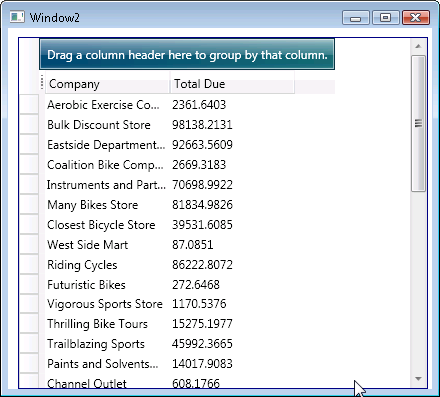
Run the app
Note that I did not sort in my query. I wanted to demonstrate the grid’s built in sorting , but for some reason it’s not working in this scenario (stay tuned…I’ll get to the bottom of that).
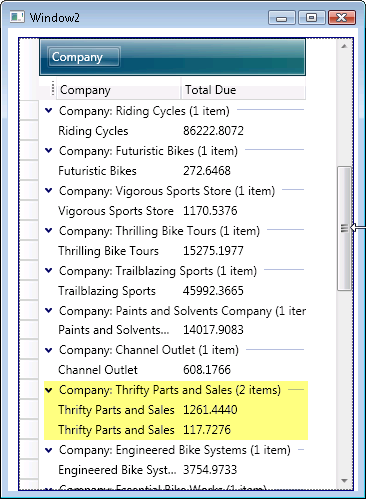
The automatic grouping does work, though. AdventureWorksLT is not great for seeing this. Only Thrifty Parts and Sales happens to have more than one order.
.png)
.png)


