Category Archives: Data Access

QuickStart for building an Astoria data service

Here’s a quick start for checking out astoria. See my  blog post “what the heck is astoria” if necessary. 🙂

Requirements:
VS2008 Beta 2
Entity Framework Beta 2
Entity Framework Tools August CTP
Astoria CTP September refresh (which works with VS2008 Beta 2)

Note that I had to do this in XP. I’m having a wierd problem in Vista around the ASPNETCompatibilityEnabled setting in web.config. You can follow the discussion of that if you are interested in this forum thread. The thread is accidentally a combination of Kevin Hoffman’s issues with IIS and my issue with Cassini. They don’t seem to be related problems.

1. Start a new web application project (not website) in VS2008.

2. Add an ADO.NET Entity Data Model using the projects Add New Item dialog.
If you haven’t used the wizard before, you can see this blog post.
The basic steps are

  • Generate from Database
  • SElect a database (same as doing this for other data UIs in Visual Studio)
  • Just leave default names for things for this quickstart. (I pointed to Northwind in SQL Server and it defaulted at NorthwindModel and NorthwindEntities, etc)
  • Select all database objects (this is the default). This brings in tables, sprocs and views.
  • Then finish and you will see the EDMX file in the solution. You can double click on that to see the conceptual model (one of three parts of the model) in the designer. Note that this is just a simple way of getting a model from a database, the most basic type of conceptual model.

Add a Web Data Service.
Add New Item, choose Web Data Service. It’s in the main section (Visual Basic/ C#, not categorized into Data or Web templates) down on the bottom, alphabetical. 🙂

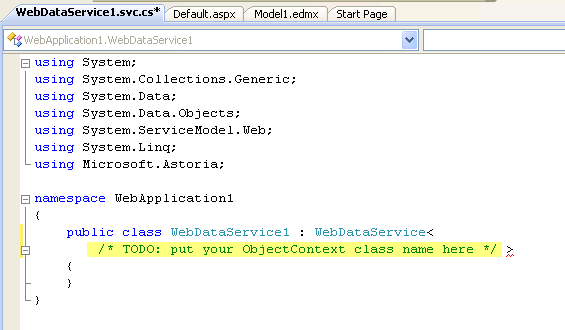
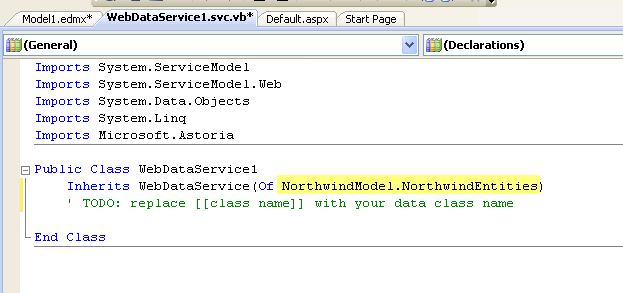
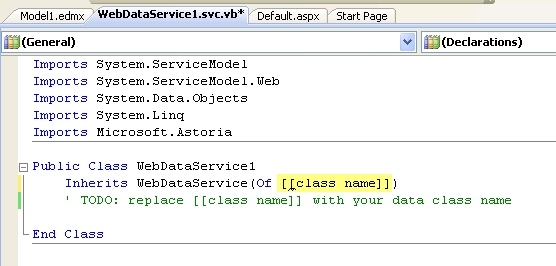
The services code view should open up. Note the TODO for the class. All you need to do is replace the stub [class name]

(VB)

(C#)

with the name of your entity wrapper class created in the model. THe model code gens a class file.
 

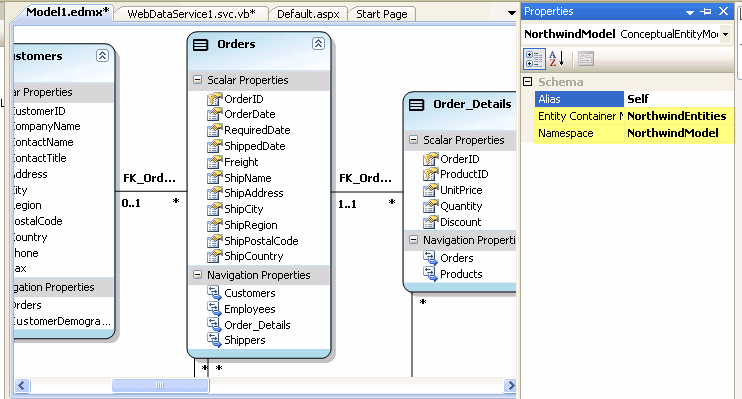
You can open up the model in teh designer and then see it’s Namespace and Entity Container Name in the properties.
 

That’s it! Now you can browse the web service directly (eg. right click on svc file in solution explorer and View in Browser) and start looking at how the data is exposed through the EDM.

My What the Heck is Astoria post walks through some quick query scenarios to give you an idea of what you can do.

This is just the tip of the iceberg of course. See the Astoria Team blog for more info.

What the heck is Astoria?

I’ll be doing a session on Astoria at REMIX Boston 07 (10/8-10/9) and at the New England Code Camp (9/29-9/30).

What is Astoria?

Astoria exposes data as web services through an Entity Framework Data Model. Once exposed, you can use URI based syntax to query data through the conceptual layer of the entity data model. You can control what is and isn’t exposed and you can also do inserts, updates and deletes. The results can be output in a number of formats including JSON and ATOM.

It’s simplest to understand this by looking at some queries in a web browser. The Astoria CTP add-in for Visual Studio 2008 Beta 2 has a template for creating a Web Data Service that looks like a WCF service. It only needs one class to expose the whole kit n’ caboodle and that class inherits from WebDataService, a generic class. You merely need to tell that class that the type it is dealing with is the Entities class exposed by an Entity Data Model that you have created. The class doesn’t even have any code in it.

  public class northwind : WebDataService<NorthwindModel.NorthwindEntities>
    {
    }

Then you can just make calls to that service and start playing with the query syntax.

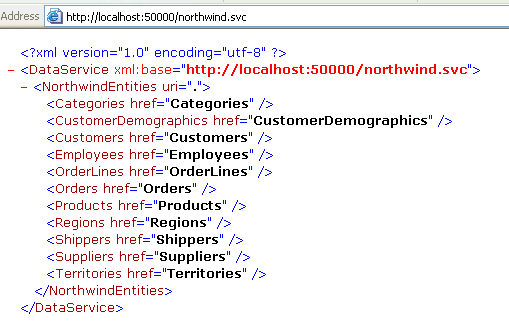
The base service exposes the list of entities in the model (http://mysite/myservice.svc). The payload is just a raw XML representation of the data. There will be payloads for different formats, such as JSON, ATOM and more. See this Astoria team blog post for more info.

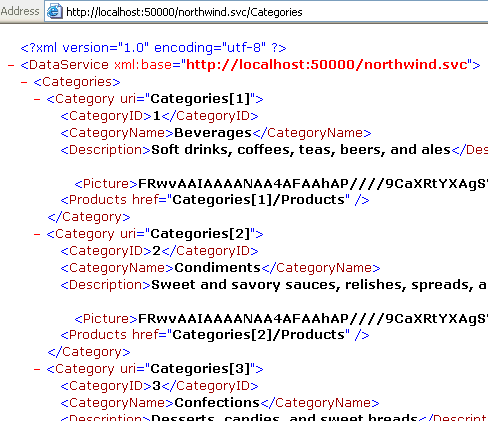
Then you can start drilling in. Here for example, I have asked for the Categories entities. It will return all entities with their details.

Now you can start seeing the URIs that are displayed to show you how to drill further into data. When looking at it in the browser, you might want to click on those URIs, but remember, in a real app this is not how you will be working with the results of the service call. 🙂 Note that you can see how to get to the related Products data although it is not pulled in automatically. That’s no different than how Entity Framework works by default – deferred loading of related data.

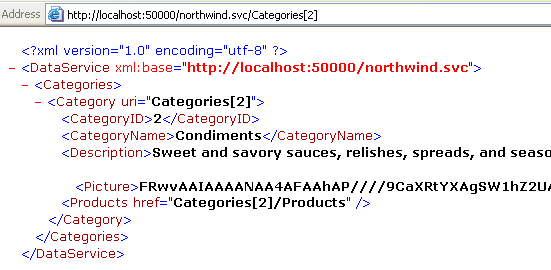
So let’s try the Category uri for categoryID 2.

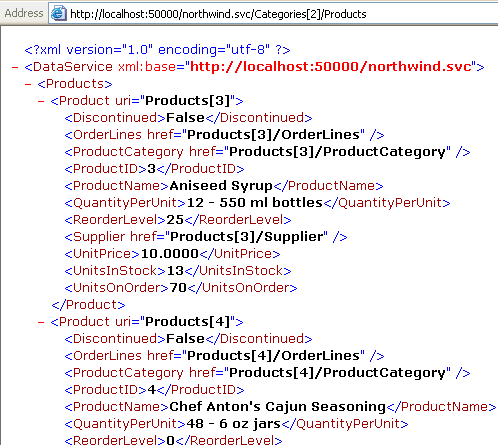
And then get the products for that category.

So you can see now the basic concept of what Astoria is doing. I am not forced to write a billion operations in my web service to expose my data every which way. I don’t have to deal with building xmldocuments to return data that can be consumed by anyone, not just .NET clients that can deal with serialized datasets. With proper security in place and the possibility of customizing what is and isn’t exposed (and how), consumers of my data can now have easy access to do all kinds of reporting, mash-ups and more. The fact that any consumer will know what to do with any data that is exposed via an astoria web data service is huge.

You can learn more about Astoria by following the Astoria Team blog.

Astoria CTP Refresh for VS 2008 Beta 2 is out

Just a quick pointer to Pablo Castro’s announcement that a new CTP for Astoria is out that will work with vS2008 Beta2.

An important note, this is a refresh of the CTP, which is based on the early prototype. The actual production code that they are working on is a totally different set of bits. Hmm, for safetey’s sake, I better just quote Pablo:

NOTE: let me stress that this is a refresh of the May CTP, which is based on the initial prototype of Astoria. All of the features/design options we’re discussing here in this blog (e.g. last post about payload formats) are in the context of the production version of Astoria which we are in the process of building. The production version incorporates a ton of feedback that we received over the last few months plus our own more detailed thinking of what should the system look like. So expect to see quite a few differences between the CTP and the production code once we start shipping the production version. The principles will all be the same, but the details will vary.

Using LINQ to query Outlook emails joined with SQL data

I watched part 2 of Jim Wooley’s ASP.NET Podcast show on LINQ and was really impressed with the creativity of his examples. Having dug deeply in order to write LINQ in Action along with Fabrice Marguerie and Steve Eichert, he’s way past the how-to basics and able to see the bigger picture of leveraging LINQ.

In his demo, he starts with some simple querying of the file system – a good demonstration of using linq against objects, but by the time he gets to the end of the demo, he is using JOIN to build queries that combine file system info with data pulled from the database.

I knew I wanted to do something like that but I couldn’t just copy him, no matter how flattering. So I thought about it for a while… what data is on my computer that I might want to extend with some database data? Then I thought of Outlook.

Thankfully, John Goalby had already written some posts on querying Outlook data with LINQ. So I was well on my way!

I created a few new email accounts for some employees of companies in AdventureWorksLT and sent emails to myself with their accounts. Then I created contact records for them in Outlook in my own account, making sure that I typed in the company names to match the database. Now I had some test data.

First I tested out a query where I joined MailItems from my inbox with ContactItems from my contact. (Note that I did this in VB since John’s examples are in C#, so this gives a little more sample code for people to discover.)

Dim ol As Outlook._Application = New Outlook.Application
Dim inbox = ol.ActiveExplorer().Session.GetDefaultFolder(Outlook.OlDefaultFolders.olFolderInbox)

Dim contactfolder As Outlook.MAPIFolder = ol.ActiveExplorer.Session.GetDefaultFolder(Outlook.OlDefaultFolders.olFolderContacts)

Dim emails = 
From email In inbox.Items.OfType(Of Outlook.MailItem)() Select email
Dim contacts = From contact In contactfolder.Items.OfType(Of Outlook.ContactItem)() Select contact

Dim
emailswithcompany = From email In emails Join contact In contacts _
    On email.SenderEmailAddress Equals contact.Email1Address _
    Select email, contact.CompanyName

For Each emailwithco In emailswithcompany
    Debug.Print(String.Format(“{0} from {1}: {2}”, _
       emailwithco.email.SenderName, emailwithco.CompanyName, emailwithco.email.Subject))
Next

This worked fine. I got a list of the sender and subject from the emails and company names from the contact records.

  • Katherine Harding from Sharp Bikes: Order 40 Shifters
  • John Harding from Sharp Bikes: modification to recent order
  • Keith Harris from Progressive Sports: vendor appreciation party

Then I queried the database and did a JOIN with the above results. It was funny to see how the types and subtypes kept growing as I built this up in layers. It’s nice to have things organized, but if I were starting from scratch, I might do this a bit differently so that my resulting types aren’t so complex*.

Dim awdc As New awlinqDataContext
Dim custSalesPerson = From cust In awdc.AWCustomers Select cust.CompanyName, cust.SalesPerson
Dim emailswithcompanysp = From emailco In emailswithcompany _
   Join cust In custSalesPerson _
   On cust.CompanyName Equals emailco.CompanyName _
   Select emailco, cust.SalesPerson

For Each emailwithcosalesp In emailswithcompanysp 
  Debug.Print(String.Format(“{0} from {1}: {2}” & NewLine & “SalesPerson:{3}”, _
    emailwithcosalesp.emailco.email.SenderName, _
    emailwithcosalesp.emailco.CompanyName, _
    emailwithcosalesp.emailco.email.Subject, _
    emailwithcosalesp.SalesPerson))
Next

And voila!

  • Katherine Harding from Sharp Bikes: Order 40 Shifters
    SalesPerson:adventure-works\josé1
  • John Harding from Sharp Bikes: modification to recent order
    SalesPerson:adventure-works\josé1
  • Keith Harris from Progressive Sports: vendor appreciation party
    SalesPerson:adventure-works\david8

Now I could write an app that can distribute email to the correct sales people when they come into a general mail box! Well, I supposed I could have done it prior to having LINQ (or maybe in Exchange which I know nothing about), just with a lot more effort!

*I couldn’t resist streamlining the final solution.

Dim ol As Outlook._Application = New Outlook.Application
Dim inbox = ol.ActiveExplorer().Session.GetDefaultFolder(Outlook.OlDefaultFolders.olFolderInbox)
Dim contactfolder As Outlook.MAPIFolder = ol.ActiveExplorer.Session.GetDefaultFolder(Outlook.OlDefaultFolders.olFolderContacts)
Dim emails = From email In inbox.Items.OfType(Of Outlook.MailItem)() Select email
Dim contacts = From contact In contactfolder.Items.OfType(Of Outlook.ContactItem)() Select contact
Dim awdc As New awlinqDataContext
Dim custSalesPerson = From cust In awdc.AWCustomers Select cust.CompanyName, cust.SalesPerson

‘now query across emails, contacts and custSalesPerson in one query

Dim emailcontactsp = From email In emails Join contact In contacts _
  On email.SenderEmailAddress Equals contact.Email1Address _
  Join custsalesp In custSalesPerson On contact.CompanyName Equals custsalesp.CompanyName _
  Select email, contact.CompanyName, custsalesp.SalesPerson

For Each ecsp In emailcontactsp
Debug.Print(String.Format(“{0} from {1}: {2}” & NewLine & “SalesPerson:{3}”, _
   ecsp.email.SenderName, _
   ecsp.CompanyName, _
   ecsp.email.Subject, _
   ecsp.SalesPerson))
Next
Query Notifications and LINQ to SQL – Well I’ll be, you *can* do it (with caveats)

I’m ashamed that this is STILL on my to-do list as I have probably written and presented more about Query Notification than most people. But I see via Roger Jennings blog that Ryan Dunn has the key of the implementation posted on his blog (by way of a hot tip from Mike Pizzo on the DP* team :-)).

To activate Query Notification, you need to get a query “registered” in SQL Server’s Service Broker then listen for a notification.

ADO.NET 2.0’s SqlDependency class does all the dirty work then all you need to do is create a SqlDependency object and attach it to a SqlCommand before you execute it. When the command gets to the server, the server sees the dependency and sets up the watch and the notification in Service Broker. When SQL Server sees something change that would impact the results of your query, it fires back a notification. SqlDependency has an event handler to catch that notification as well as other properties to interact with it.

SqlNotification is a more low level approach for complex scenarios where you want to have more control over the process. Here you need to create your own listener.

ASP.NET also uses Query Notification with the SqlCacheDependency object as well as dynamically engaging it in the Page directive.

The obvious (if you have played with this stuff) problem here is that with LINQ to SQL, we are not executing the command ourselves. So how do we register a query with service broker and how do we listen for it?

Rather than attaching the SqlDependency to a SqlCommand, you can expliclty wire up some instructions to have the SqlDependency taken along when a call is made to SqlServer. Pretty cool, although I’m already wondering about how I might want to control that. Certainly you don’t want to attempt to register EVERY SINGLE query with Service Broker. Many will fail anyway and when that happens you get an immediate notice about the failure. There are a limited scope of scenarios in which QueryNotification is a benefit (oft-called and infrequently changing data e.g. “states in the u.s.” “categories of items we sell”) and plenty of rules about what is and is not a valid query for notification. With a blanket approach, you could be creating a performance nightmare.

The key is the CallContext class, which is buried in System.Runtime.Remoting.Messaging. I’ve never heard of it before and would never ever have figured this out on my own! Here’s more info on CallContext.

Here’s the critical line of code from Ryan’s post which has a more complete example of using SqlDependency in it’s simplest form, which is always the right place to start.

  System.Runtime.Remoting.Messaging.CallContext.SetData(“MS.SqlDependencyCookie”, dependency.Id)

So now my todo list is getting edited. I will have to see how to control this puppy and also what happens when you use the asp.net page directive.

(*DP=Data Programmability)

LINQ to SQL and stored procedures

I’ve been watching Roger Jennings blog as he forayed into hammering on the use of stored procs in LINQ to SQL. Like a great and supportive pal, I sat on the sidelines while he dug dizzyingly deeper and deeper to try to work out issues with what a stored proc actually returns (different than using LINQ to get dynamic sql) and it’s impact on paging with databound asp.net controls as well as loading children. It also impacts the use of LINQDataSource.

I definitely have an interest as I’m doing some more talks on LINQ and Databinding later this fall.

Today he reports that with the required obsessive persistence (grin) and help from Matt Warren, he’s only solved one of the issues he was running into and 1/4 of another one. (It took me a while to figure out his math on that!)

Here is are the related posts:

Problems Using Stored Procedures for LINQ to SQL Data Retrieval  This post has been updated to reflect his up-to-date findings.

Update and summary of the problem is included at the top of this post LINQ and Entity Framework Posts for 9/14/2007+

On a related front, Mike Taulty has started digging into disconnected LINQ to SQL. Mike is one of the web services gentry in my mind, so I definitely trust his conclusions. Rick Strahl has some interesting posts on it as well. I’ve been trying to work out the same scenarios with Entity Framework (with XML serialization and binary) and the challenges and solutions are pretty similar so there’s a ton that we can learn from each other.

Entities, Viewstate and postback

I was fiddling with Entity Framework in a website and was happy to see how smoothly objects serialize (binary serialization) across postbacks.

Query for one customer along with their SalesOrderHeaders:

  Dim query = (From cust In aw.Customer.Include(“SalesOrderHeader”) Where cust.CustomerID = 151)

Grab that customer into an object:

Note, I’ve found a problem with using .First in the query… Include is not working, so this is a temporary long way around…

  For Each c In query
    cust=c
  Next

Now shove it in viewstate

  ViewState.Add(“mycust”,c)

Postback, then recall the customer:

 cust = ViewState(“mycust”)

Be sure that cust is explicitly cast to a Customer.

You will find that not only is the customer in tact with it’s EntityKey, but all of the SalesOrder headers are there as well. So as far as I can tell, it was retained in its entirety.

Be careful however with assumptions about object state!

If you make a change to the object before adding it to ViewState, when you rehydrate the object, the state information won’t survive. This is expected behavior. The ObjectContext is responsible for managing the state of it’s objects. When you detach, you lose the state.

I’ve been playing with different ways of dealing with that if you care at all about concurrency when you do updates – using SaveChanges or using stored procedures. You can see a very long discussion of this in the forums if you are interested.

Entity Framework’s Danny Simmons will be hanging out at DevConnections

I was happy to see Danny’s blog post this morning that he’ll be coming to DevConnections. He’s not even presenting. But since there will be an entire Data Access track (a day of 4 microsoft talks and then 2 days of third party speakers) and in that track there will be 8 talks that will either be about Entity Framework or will include info on it , AND I’ll be doing a 1/2 day workshop… he knows it will be the place to be to talk about Entity Framework with interested folks!

There will be plenty of folks from the team there and I am envisioning some engaging discussions!


Entity Data Model Associations: Where’s my Foreign Key?


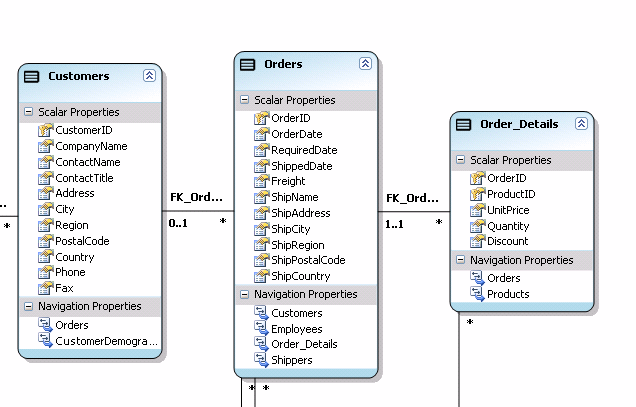
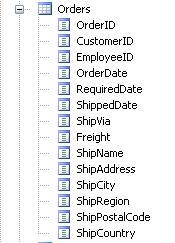
    If you’ve been playing with Entity Framework and used the wizard to create a model from an existing database, you’ll see that the resulting model  looks something like this which is a small portion of the EDM built from Northwind.


    Compare the Orders Entity above to the Order table schema


    and you’ll quickly notice that the foreign keys for CustomerID, EmployeeID and ShipVia are "missing".


    We are used to using foreign keys as a means for defining relationships between tables and realizing them through the joins when we query. In our objects, we use the foreign keys as a means of finding our ways back to another object.


    In the Entity Framework we have a different method of finding our way from one table to another – Associations & Navigations (which come as a team).


    The model is more "holistic" than what we are used to.


    The fact that there is a relationship between Orders & Customers is identified by an association (which in the model is represented by the lines between the entities). The Association is named "FK_Orders_Customers" and describes that in this relationship there will be 0 or 1 customers and many orders. (Though I can’t figure out how any order could be without a customer…)


    So far this is only a part of the puzzle. Still nothing about CustomerID in there.


    Then there are the Navigation properties. If you are working with a Customer entity, it uses it’s Orders navigation property to know that it has a relationship with orders and that relationship is defined by the association.


    Okay so stop there a minute! Why have the Navigation property if we already have the Assocation?

    The association is not part of the customer (nor part of the order). It floats outside of those. So when you are wokring with a customer, you need one of the properties to give you access to the orders, therefore a navigation property. The association is shared because the Orders entity has a property that allows you to navigate over to the customer when you are working with the objects.


    When you create an Order object, while you don’t have Order.CustomerID, you do have Order.Customers, the Navigation property and that gets you to customers without having to say "where order.customerid=customer.customerid"


    (From o In nw.Orders Where o.OrderID = 10281 Select o.Customers).First


    This query will bring back  the customer for the specified order.


    If you looked at the xml which defines the Associaitons and the Navigation proeprties in the conceptual model, you will see that there are still no references to customerid. So how does it work?


    The fact that it is the customerid that is the foreignkey is defined in the Storage model. The Order entity in the storage model has a customerid and the FK_Orders_Customers association in the storage model has a reference to the CustomerID in it’s ReferentialContraint element.


    Finally in the mappings, there is an AssociationSetMapping that very clearly defines that CustomerID is the means for relating Orders and Customers.


    When the data is surfaced in the Conceptual model, all of the relationships have been sorted out and there is no longer (for most intents & purposes) a need to have the customerid in the order entity. We shouldn’t need to use that to navigate between orders and customers.


    Some people beg to differ on that matter.  See this forum thread [http://forums.microsoft.com/MSDN/ShowPost.aspx?PostID=1663304&SiteID=1] and also note that in response to a list of Entity Framwork suggestions by Roger Jennings , Mike Pizzo replies to suggestion #9.


    9. Provide read-only access to foreign key values.

    This is actually a feature I’m fighting to get into our final milestone for V1. Can you describe the scenarios where this is used? Do you need the ability to query on the foreign key value, or simply expose it on the domain object?


    There’s one other thing that needs pointing out here. OrderDetails has an OrderID and a ProductID. So am I full of it? Well, that could be a different topic for debate, but in this case OrderID and ProductID are not only Foreign Keys but they are both Primary Keys in the Order Detail table as well. They become EntityKeys in the OrderDetails entity. Note the primary key icon for the two fields.