Category Archives: Data Access

Entity Framework Visual Modeler in the next CTP/Beta release?

In the same MSDN forum thread that I referred to in my post “Beta2 – Where’s Entity Framework?“, Danny Simmons says (with my emphasis)

Believe me, if there were some way to release it sooner with the level of quality that is needed and including the first CTP of the designer which we have promised will be part of this release, then we most certainly would.

I must have missed the promise in past posts/discussions and had no idea that we were going to get our hands back on the Visual Modeler this soon. While I’m also disappointed not to have the new Entity Framework bits to play with yet, this is really great news!

Beta2 – Where’s Entity Framework?

Since this spring, the Data Programmability team has been clear that Entity Framework is going to be developed along side of VS2008, but won’t be part of the VS2008 install and that Entity Framework will be released after Visual Studio 2008 releases (during the 1st half of 2008 is the narrowest timeframe we’ve been told so far).

In this April 28th post, Mike Pizzo states:

We will continue to ship CTPs and Betas of the ADO.NET Entity Framework that align with Orcas throughout the remainder of this year.

At the beginning of this month we saw how this works. There was a June CTP of VS2008 and a separate CTP of Entity Framework that had to be installed on top of Visual Studio CTP.

I also know that the Beta2 of Entity Framework will be vastly improved over what we saw in the June CTP, so I am very eager to get my hands on it.

So why is it that when I downloaded Beta2 yesterday and opened it up, I still had this hope, this expectation that Entity Framework would be in there? Why was I so disappointed that it wasn’t? Foolish girl.

Since for some reason, I wasn’t able to log into the forums on my computer, when I finally tried it on a different computer (after two days of being “stuck”), I saw that Danny Simmons clarifies the timing:

Since the Entity Framework is now shipping separately from Orcas, the Orcas beta 2 does not include any Entity Framework bits, and unfortunately the existing CTP will also not work with beta 2.  We will, however, have a beta version of the entity framework sometime in August that will work with beta 2 (and have some additional goodies <grin>).

So I’ll have to just keep a stiff upper lip and entertain myself with some of the many other new toys in VS2008, fiddle with Astoria or maybe even just do some of my client work!

Relationship between SQL Server and ADO.NET teams at Microsoft

I’ve always been a little confused about where Data Access fits into the bigger picture of organizational structure. Even when I speak at conferences, nobody knows where to put data access talks. Smart Client? Web Development? Architecture? Database? It covers all of these areas. At DevConnections, the Microsoft talks about the Entity Framework were in the SQL Server track. So basically developers weren’t aware of the talks because the SQL Server schedule was on a different chart than the schedule for ASP Connections and VS Connections.

This is happily fixed for November since we have our very own Data Access track!! I’ll write more about that another time, but you can find the talks listed in both the ASP show and the VS show. 🙂

I also never was really clear on where the ADO.NET Team fit into Microsoft. I know they are in the same building as the SQL Server team. But I always think of ADO.NET being more closely tied with Visual Studio since that’s where I do my data access coding.

In this introductory post for the Astoria Team, Mike Flasko clarifies the relationship, even though he just did so in passing. He refers to the Astoria team as:

part of the “Data Programmability” (DP) team within the SQL Server organization at Microsoft

… “within” …

So, SQL Server owns data access. Interesting. I never really realized that. But it makes sense.

I have always referred to anyone working in data access as the ADO.NET team. That’s wrong. There is a team that is specifically for ADO.NET, but that is within DP. So DP encompasses ADO.NET and Astoria. What else? Digging back to the initial post in the Data Programmability blog (blogs.msdn.com/data), Sam Drucker describes the umbrella of the DP team. Note that this was before Astoria and Jasper so they go under there as well, though Jasper is still an incubator project, not a product.

Sam said (back in June 2006). The highlights are my own so I can count the list.

We have a lot of technologies under our umbrella and no matter what part of the Windows platform you use we’ve got you covered. The team has been building solutions for data programmability for many years, from the early formation of ODBC, the advances of OLEDB, core XML processing support with MSXML, ADO with Visual Basic, TDS and SOAP access to SQL Server, JDBC connectivity, working with Visual Studio on XML editing, XSLT debugging, and of course the new wave of productivity with the .NET Framework with ADO.NET and System.Xml. We also have been a big part of the WinFS project. The main way to get all the details is to visit our MSDN sites: msdn.com/data and msdn.com/xml.

ADO.NET and XML are siblings!

Hey, this is starting to look like the beginnings of one of Roger Jennings’ historical analyses! 🙂

Entity Framework, Some Before & After tidbits

I wanted to see some of the new Beta2 (in the June CTP bits) functionality of Entity Framework so I’ve been poking around. You can see a nice list of what to look for on Danny Simmons’ blog.


One thing that was a huge source of frustration was the inability to support database constraints where a column was both a primary key and also a foreign key of another table. When using the EF Wizard to import database schemas, this would be part of a list of errors that were generated during the model creation and would result in a problem like this:
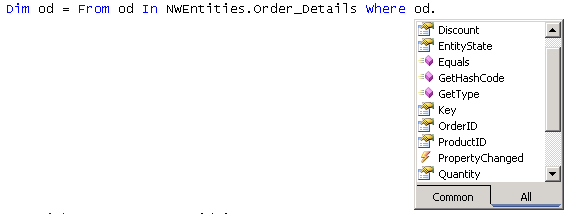
Notice that you can’t get back to the ORDER that owns the Order_Detail.

With the new CTP, that problem goes away.
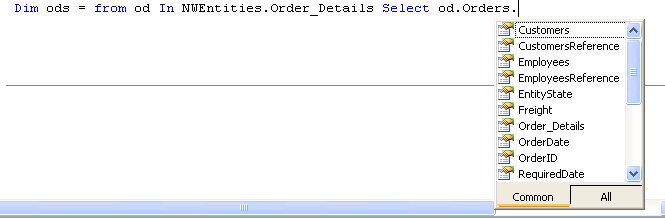
You can’t traverse over Order_details because it is a  collection property, but you can get at properties like Count, etc…

Dim od = From o In NWEntities.Orders Where o.ShipCountry = “Spain” _
Select o.Customers.CompanyName, o.Order_Details.Count


Another thing, of course was the difficulty of working with existing views and stored procedures.

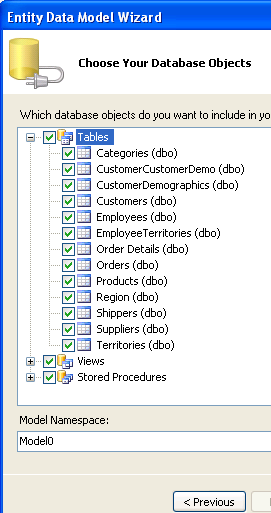
Here’s a before and after of the wizard:
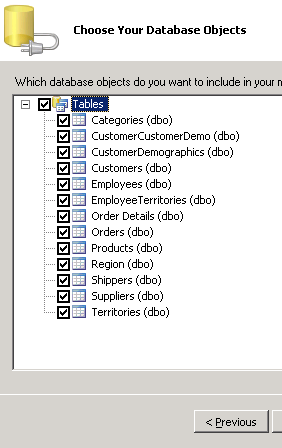


But the sproc and view support goes much deeper.

Unfortunately, I don’t see the wizard carrying the views and stored procs all the way through. If you look at the SSDL, you will see that the views are described as any other table. The stored procs are <function> elements.

While I can’t figure out how to surface the query function, there are also functions to let you use your own sprocs for insert, updates and deletes and tie them into EF’s SaveChanges function. Shyam Pather wrote a post about this a while ago on the ADONET Team blog and now that stuff is in this version along with documentation examples.

Another SPROC goody is the ability to define your own stored procedures in your model without  needing it in the database. Check the DefiningQuery element that goes in the SSDL to achieve this.


Poking around in the CSDL, I see a few changes which tie back to the references.

A Key used to be an attribute of an Entity Type. Now it is an element.

Beta1:   <EntityType Name=”Employees” Key=”EmployeeID”>

CTP:   <EntityType Name=”Employees”>
    <Key>
      <PropertyRef Name=”EmployeeID” />
    </Key>


So that they could do this:

 <EntityType Name=”Order_Details”>
    <Key>
      <PropertyRef Name=”OrderID” />
      <PropertyRef Name=”ProductID” />
    </Key>

Which then enables us to do this:

  <Association Name=”FK_Order_Details_Orders”>
    <End Role=”Orders” Type=”Model.Orders” Multiplicity=”1″ />
    <End Role=”Order_Details” Type=”Model.Order_Details” Multiplicity=”*” />
    <ReferentialConstraint>
      <Principal Role=”Orders”>
        <PropertyRef Name=”OrderID” />
      </Principal>
      <Dependent Role=”Order_Details”>
        <PropertyRef Name=”OrderID” />
      </Dependent>
    </ReferentialConstraint>
  </Association>
  <Association Name=”FK_Order_Details_Products”>
    <End Role=”Products” Type=”Model.Products” Multiplicity=”1″ />
    <End Role=”Order_Details” Type=”Model.Order_Details” Multiplicity=”*” />
    <ReferentialConstraint>
      <Principal Role=”Products”>
        <PropertyRef Name=”ProductID” />
      </Principal>
      <Dependent Role=”Order_Details”>
        <PropertyRef Name=”ProductID” />
      </Dependent>
    </ReferentialConstraint>
  </Association>

Which is describing this from the database:
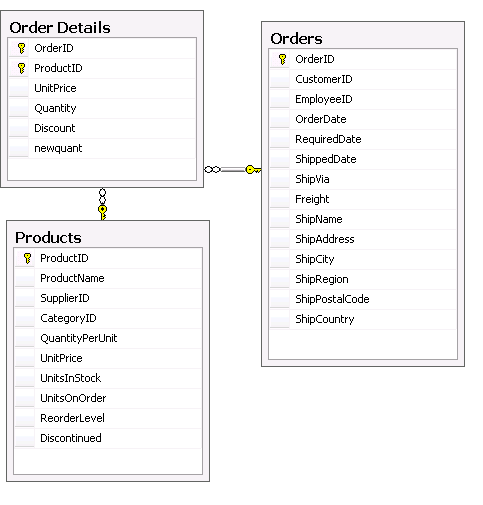

 Speaking of the database, there was mention of the fact that it’s now easier to get at the underlying datastore. I haven’t figured out how though, yet. I looked to see if you could now cast an EntityConnetion to a SqlConnection but that’s not it. I’ll keep an eye out for that. While I was looking though I noticed a bunch of new methods in the ObjectContext such as the pieces that go along with attaching and detaching such as “Addto” methods for each of the entities in the objectContext.


 The last thing I’ll shove into this already long post is that Entity constructors are no longer auto-generated. This will make customization a lot easier (you can read about that in this post from Danny Simmons).

So where we had this in Beta 1:

  Partial Public Class Employees
        Inherits Global.System.Data.Objects.DataClasses.Entity
        ”'<summary>
        ”’Initialize a new Employees object.
        ”'</summary>
        Public Sub New()
            MyBase.New
            ‘Call DoFinalConstruction if this is the most-derived type.
            If (CType(Me,Object).GetType Is GetType(Global.NorthwindModel.Employees)) Then
                Me.DoFinalConstruction
            End If
        End Sub
        ”'<summary>
        ”’Initialize a new Employees object.
        ”'</summary>
        ”'<param name=”employeeID”>Initial value of EmployeeID.</param>
        ”'<param name=”lastName”>Initial value of LastName.</param>
        ”'<param name=”firstName”>Initial value of FirstName.</param>
        Public Sub New(ByVal employeeID As Integer, ByVal lastName As String, ByVal firstName As String)
            MyBase.New
            Me.EmployeeID = employeeID

            Me.LastName = lastName

            Me.FirstName = firstName

            ‘Call DoFinalConstruction if this is the most-derived type.
            If (CType(Me,Object).GetType Is GetType(Global.NorthwindModel.Employees)) Then
                Me.DoFinalConstruction
            End If
        End Sub

Although the constructor is gone (along with the acrobatics that would require creating your own constructors) there is a new method for creating each entity:

     Public Shared Function CreateEmployees(ByVal employeeID As Integer, ByVal lastName As String, ByVal firstName As String) As Employees
            Dim employees As Employees = New Employees
            employees.EmployeeID = employeeID
            employees.LastName = lastName
            employees.FirstName = firstName
            Return employees
        End Function

Using SPAN to query entities in Entity Framework

By default, when querying entities, you need to explicitly use the Load method to get related data. This is often called “lazy loading” and ensure you only get what you ask for rather than having a query return ALL related data automatically. The new SPAN method forces an entity to include specifid children during a query so that you don’t have to load after the fact. READ MORE

[A New DevLife post]


Great detailed list of updates to Entity Framework

Danny Simmons has a great list of changes to Entity Framework that have finally arrived in the latest CTP. These improvements are not insignificant and the list is filled with functionality that many of us have been really looking forward to. I’ feel a little harnessed having to use VWD Express right now and haven’t touched all of these things. But I was happy to see Views & Sprocs listed in the wizard and NOT to have the damn code gen message telling me that associations can’t be created for a key that is both a foreign key and a primary key. That means Orders will be able to find their details again!

The default constructors are gone in the code gen class but it’s hard to see since the code generated class is not exposed in the web site. I was able to find the compiler code version deep down inside of

C:\WINDOWS\Microsoft.NET\Framework\v2.0.50727\Temporary ASP.NET Files\website2\5618daca\5d6fd1a4\Sources_App_Code\model.csdl.[guid-type number].cs.

That’s just the toplevel stuff. I’m looking forward to digging down a little deeper to play with SPAN and well, just about everything on Danny’s list.