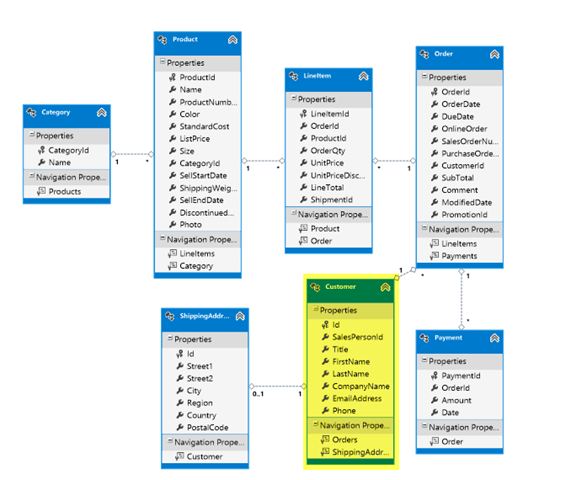
Category Archives: Data Access

How EF6 Enables Mocking DbSets more easily

There’s an interesting change in EF6 that simplifies unit testing when EF is in the way and you don’t want to engage it at all.

EF6 DbSet gained new features. The team had to decide if they would make a breaking change to the existing IDbSet interface or leave that be and just change DbSet. They chose

the latter route. In doing so, they also ensured that we could use the DbSet directly for testing by adding a new constructor.

Here’ you can see the different constructors and how they affect our ability to test.

EF5 DbSet Constructor

The DbSet constructor is tied to a DbContext by way of the InternalQuery that is used internally in the constructor.

internal DbSet(InternalSet<TEntity> internalSet)
   : base((IInternalQuery<TEntity>) internalSet)
 {
   this._internalSet = internalSet;
 }

In  EF5, we also have IDbSet (DbSet derives from this) (and IObjectSet which was introduced in EF4) . These interfaces contain the set operations (Add, Update, Remove and some additional methods through other interfaces) and can be implemented without forcing any ties to EF’s DbContext.

That’s what we’ve used in the past to create fake DbSets for testing scenarios.

EF6 DbSet Constructors

The internal constructor is still there.

    internal DbSet(InternalSet<TEntity> internalSet)
      : base((IInternalQuery<TEntity>) internalSet)
    {
      this._internalSet = internalSet;
    }

But now there is another constructor. It’s protected and only uses an set interface, but not the query interface. This allows mocking frameworks to get access to DbSet and at the same time, benefit from some of the methods added to DbSet for EF6.


  /// <summary>
  /// Creates an instance of a <see cref="T:System.Data.Entity.DbSet`1"/> when called from the constructor of a derived
  ///             type that will be used as a test double for DbSets. Methods and properties that will be used by the
  ///             test double must be implemented by the test double except AsNoTracking, AsStreaming, an Include where
  ///             the default implementation is a no-op.
  /// 
  /// </summary>
  protected DbSet()
    : this((InternalSet<TEntity>) null)
  {
  }

Even if you wanted to create your own fakes (or test doubles) in EF6, you can do that with DbSet now, not IDbSet. IDbSet is still there for backwards compatibility.

There are two detailed documents on MSDN for using EF6 to create Test Doubles and to use with Mocking Frameworks.

You also might find the meeting notes about this change interesting. I sure do! 🙂

I am curious to revisit my work with Telerik’s JustMock. I built some tests with EF5 and JustMock in my Automated Testing for Fraidy Cats course on Pluralsight. When using the paid version, everything just works. But when using JustMock Lite, the free version, it was not able to grok DbSets and you still needed to implement your own fake. I’ll be checking to see if the new DbSet implementation allows the free version of JustMock to mock DbSets on it’s own now.

//update about 20 minutes after initial post. The limitation of JustMock Lite is that it doesn’t support ReturnsCollection which is what you want to emulate the return of a DbSet. So if you’re not willing to pay for your tools, you can use the free version (which has a ton of features) and do a little extra work (create your own test double for DbSet which you can see how to do in MSDN doc I linked to above.

Testing Out the Connection Resiliency Feature into EF6

A few days ago I wrote a blog post about gaining a better understanding of the new connection resiliency feature of EF6. The feature is implemented using an implementation of a new class, IDbExecutionStrategy.

The SQl Server provider that’s bundled with EF6 has a strategy aimed at Windows Azure SQL Database (aka SQL Azure) that is designed to retry a command if a transient connection error is thrown. My blog post listed the transient error messages.

I wanted to see this in action but it’s not simple to make a transient error occur. There was a blog post with sample code for creating a deadlock, but then Glenn Condron on the EF team suggested just throwing the error by leveraging the new EF6 ability to intercept commands & queries headed to the database. It can also intercept data coming back.

A few people have asked how I did this, so I’ll share my setup here.

I played with that a bit and realized that the SqlAzureExecutionStrategy required more than just the correct error code to trigger the retries. It needs a SQLException to throw that error. And a little more banging led me to realize that you can’t just instantiate a SqlException, it has to be done via reflection.

But I don’t give up easily. I found some helpful examples for doing this though it still wasn’t simple. Maybe things have changed, but I finally tweaked teh sample code enough to get what I needed.

Still, I was unsuccessful because EF was first doing it’s initialization tasks and the SqlAzureExecutionStrategy was not responding to errors thrown by those commands. I had to filter those commands out. Then finally, it worked!

There may be an easier way. I know Glenn does this differently. What I have worked out is witnessing the retries but since that’s all I watned to see, I’m not worried about having one of those retries be successful. I know that in the real world, as it’s retrying and the transient connection kicks back in, one of those retries will get through.

So to test out the feature you need four puzzle pieces.

1) Intercept the (non initialization/migration) command

2) Use DbConfiguration to make sure the interception is happening

3) Use DbConfiguration to set up the SqlAzureExecutionStrategy

4) Run an integration test that will attempt one or more queries on the database via EF.

Step 1) Intercept the command and throw the correct error

For this I created a new class, TransientFailureCausingCommandInterceptor, that inherits from IDbCommandInterceptor. There are a number of methods to override. The only one I’m interested in is ReaderExecuting…i.e. a read command is about to execute.

 public class TransientFailureCausingCommandInterceptor : IDbCommandInterceptor
 {
    public void ReaderExecuting(
      DbCommand command, DbCommandInterceptionContext<DbDataReader> interceptionContext)
    {
    }
    etc…

In the command , I filter out commands that are for the database initialization and migration work, in case they are executing.

For any other commands, I write out some info to Debug so I know that a query is about to execute, then I use my helper class to create a fake SQL Exception that throws one of the transient error codes that SqlAzureExecutionStrategy looks for: 10053.

  public void ReaderExecuting(
      DbCommand command, DbCommandInterceptionContext<DbDataReader> interceptionContext)
    {
      if (!(command.CommandText.Contains("serverproperty") 
        || command.CommandText.Contains("_MigrationHistory")))
      {
        Debug.WriteLine("throwing fake exception from interceptor");
        throw SqlExceptionFaker.Error10053;

      }
    }

The SqlExceptionFaker is the magic for throwing a SqlException. It is a twist on  this example I found from Microsoft MVP, Chris Pietschmann. I found some other ways of doing this but , in my opinion, Chris’ was the best of the solutions that I found.

using System.Collections;
using System.Data.SqlClient;
using System.Runtime.Serialization;

namespace SqlExceptions
{
  public static class SqlExceptionFaker
  {
    private static SqlException _error10053;

    public static SqlException Error10053
    {
      get
      {
        if (_error10053 == null)
        {
          _error10053 = Generate(SqlExceptionNumber.TransportLevelReceiving);
        }
        return _error10053;
      }

    }
    public enum SqlExceptionNumber : int
    {
      TimeoutExpired = -2,
      EncryptionNotSupported = 20, 
      LoginError = 64,
      ConnectionInitialization = 233,
      TransportLevelReceiving = 10053,
      TransportLevelSending = 10054, 
      EstablishingConnection = 10060,
      ProcessingRequest = 40143, 
      ServiceBusy = 40501, 
      DatabaseOrServerNotAvailable = 40613
    }

    public static SqlException Generate(SqlExceptionNumber errorNumber)
    {
      return SqlExceptionFaker.Generate((int) errorNumber);
    }

    public static SqlException Generate(int errorNumber)
    {
      var ex = (SqlException) FormatterServices.GetUninitializedObject(typeof (SqlException));

      var errors = GenerateSqlErrorCollection(errorNumber);
      SetPrivateFieldValue(ex, "_errors", errors);
      return ex;
    }

    private static SqlErrorCollection GenerateSqlErrorCollection(int errorNumber)
    {
      var t = typeof (SqlErrorCollection);
      var col = (SqlErrorCollection) FormatterServices.GetUninitializedObject(t);
      SetPrivateFieldValue(col, "errors", new ArrayList());
      var sqlError = GenerateSqlError(errorNumber);
      var method = t.GetMethod(
        "Add",
        System.Reflection.BindingFlags.NonPublic | System.Reflection.BindingFlags.Instance );
      method.Invoke(col, new object[] {sqlError});
      return col;
    }

    private static SqlError GenerateSqlError(int errorNumber)
    {
      var sqlError = (SqlError) FormatterServices.GetUninitializedObject(typeof (SqlError));

      SetPrivateFieldValue(sqlError, "number", errorNumber);
      SetPrivateFieldValue(sqlError, "message", errorNumber.ToString());
      SetPrivateFieldValue(sqlError, "procedure", string.Empty);
      SetPrivateFieldValue(sqlError, "server", string.Empty);
      SetPrivateFieldValue(sqlError, "source", string.Empty);
      SetPrivateFieldValue(sqlError, "win32ErrorCode", errorNumber);

      return sqlError;
    }

    private static void SetPrivateFieldValue(object obj, string field, object val)
    {
      var member = obj.GetType().GetField(
        field,
        System.Reflection.BindingFlags.NonPublic | System.Reflection.BindingFlags.Instance
        );
      member.SetValue(obj, val);
    }
  }
}

Phew!

Step 2) Force the context to use this interceptor

This happens in the lovely new DbConfiguration class. Read more about it here.

public class CustomDbConfiguration : DbConfiguration
{
  public CustomDbConfiguration()
  {
   AddInterceptor(new CasinoModel.TransientFailureCausingCommandInterceptor());
   }
}

Step 3) Make sure your DbConfiguraiton class is wired up in app/web.config in the EntityConnection section:

 <entityFramework codeConfigurationType="DataLayer.DbConfigurations.CustomDbConfiguration,CasinoModel">
  . . .
 </entityFramework>


Step 4) Test

This is a test that works with my model. Notice that my test specifies a connection string. That ensures that my context is using the SQL Azure connection I set up in my config file.

   [TestMethod, TestCategory("Connection Resiliency")]
    public void CanHitSqlAzureDbWithTransientFailure()
    {
      int slotcount = 0;
      using (var context = new CasinoSlotsModel(connectionStringName: "CasinoHotelsAzure"))
      {
        foreach (var casino in context.Casinos)
        {
          context.Entry(casino).Collection(c => c.SlotMachines).Load();
          slotcount += casino.SlotMachines.Count;
        }
      }
      Assert.AreNotEqual(0, slotcount);
    }

The test fails because an exception was thrown – the SqlException that I faked. That’s because an error is getting thrown. When I check the output

The SqlException caused a series of exceptions in response. Notice the nice message from EntityException: “consider using a SqlAzureExecutionStrategy”.

Result Message:
Test method AutomatedTests.UnitTest1.CanHitSqlAzureDbWithTransientFailure threw exception:

System.Data.DataException: An exception occurred while initializing the database. See the InnerException for details. —> System.Data.Entity.Core.EntityException: An exception has been raised that is likely due to a transient failure. If you are connecting to a SQL Azure database consider using SqlAzureExecutionStrategy. —>

System.Data.Entity.Core.EntityCommandExecutionException: An error occurred while executing the command definition. See the inner exception for details. —>

System.Data.SqlClient.SqlException: Exception of type ‘System.Data.SqlClient.SqlException’ was thrown.

Looking at the failed test’s OUTPUT I see the text spit out by the ReaderExecuting method:

image

The method was only hit once, so I see my message only once.

Step 5) Add in the SqlAzureConnectionStretegy to the DbConfiguration file:

 public CustomDbConfiguration()
  {

    AddInterceptor(new CasinoModel.TransientFailureCausingCommandInterceptor());
    SetExecutionStrategy
      (SqlProviderServices.ProviderInvariantName, () => new SqlAzureExecutionStrategy());
   }

Using the default settings of SqlAzureExecutionStrategy will cause 5 retries.

Step 6) Run the test again:

The test hangs for a lot longer than fails. Why longer? The retries! I get 6 messages. The first is the initial problem and the other 5 are for each of the 5 retries.

image

Why does it still fail? Because my setup doesn’t “turn off” the error. That’s fine. I just want to see that it does actually retry.

The exception is different this time. RetryLimitExceededException, max retries (5) , etc…

Result Message:
Test method AutomatedTests.UnitTest1.CanHitSqlAzureDbWithTransientFailure threw exception:

System.Data.DataException: An exception occurred while initializing the database. See the InnerException for details. —> System.Data.Entity.Infrastructure.RetryLimitExceededException: Maximum number of retries (5) exceeded while executing database operations with ‘SqlAzureExecutionStrategy’. See inner exception for the most recent failure. —>

System.Data.Entity.Core.EntityCommandExecutionException: An error occurred while executing the command definition. See the inner exception for details. —>

System.Data.SqlClient.SqlException: Exception of type ‘System.Data.SqlClient.SqlException’ was thrown.

Step 7) Modify the connection retries

Next I’ll change the default of the SqlAzureExecutionStrategy to retry only 3 times.

(SqlProviderServices.ProviderInvariantName, () => new SqlAzureExecutionStrategy(3,new TimeSpan(15)));

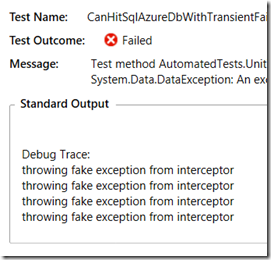
Look at the output after I run the test again. Only 3 retries then it gives up.
image
So that’s it. I’m content to see this feature in action.

I was also happy to see a comment in the previous blog post from a developer who has seen the benefits of this feature already in their production environment.

EF6 Connection Resiliency for SQL Azure* – When does it actually do it’s thing?

*Windows Azure SQL Database makes the blog post title just too darned long!

Followup post: Testing out EF6 Connection Resiliency

I’ve been messing around with the DbExecutionStrategy types in EF6 and trying to force the strategy to kick in.

I spent a horrid amount of time going down the wrong path so thought I would elaborate on the one I’ve been banging on: SqlAzureExecutionStrategy.

I thought that by disconnecting my network connection at the right moment I would be able to see this work. But it turned out that my results were no different in EF5 or with EF6 using it’s DefaulSqlExecutionStrategy (which does not retry).

I finally looked yet again at the description and at some older articles on connection retries for SQL Azure and finally honed in on a critical phrase:

transient failure

A transient failure is one that will most likely correct itself pretty quickly.

Looking at the code for the SqlAzureExecutionStrategy,  you can see the following comment:

/// This execution strategy will retry the operation on <see cref="T:System.TimeoutException"/> 
/// and <see cref="T:System.Data.SqlClient.SqlException"/>
/// if the <see cref="P:System.Data.SqlClient.SqlException.Errors"/> contains any of the following error numbers:
/// 40613, 40501, 40197, 10929, 10928, 10060, 10054, 10053, 233, 64 and 20

Focusing on these errors led me to a number of articles aimed at dealing with this same list of transient failure.

Here is a code sample from the Windows Server AppFabric Customer Advisory Team that contains brief descriptions of the errors:

// SQL Error Code: 40197
// The service has encountered an error processing your request. Please try again.
case 40197:
// SQL Error Code: 40501
// The service is currently busy. Retry the request after 10 seconds.
case 40501:
// SQL Error Code: 10053
// A transport-level error has occurred when receiving results from the server.
// An established connection was aborted by the software in your host machine.
case 10053:
// SQL Error Code: 10054
// A transport-level error has occurred when sending the request to the server.
// (provider: TCP Provider, error: 0 - An existing connection was forcibly closed by the remote host.)
case 10054:
// SQL Error Code: 10060
// A network-related or instance-specific error occurred while establishing a connection to SQL Server.
// The server was not found or was not accessible. Verify that the instance name is correct and that SQL Server
// is configured to allow remote connections. (provider: TCP Provider, error: 0 - A connection attempt failed
// because the connected party did not properly respond after a period of time, or established connection failed
// because connected host has failed to respond.)"}
case 10060:
// SQL Error Code: 40613
// Database XXXX on server YYYY is not currently available. Please retry the connection later. If the problem persists, contact customer
// support, and provide them the session tracing ID of ZZZZZ.
case 40613:
// SQL Error Code: 40143
// The service has encountered an error processing your request. Please try again.
case 40143:
// SQL Error Code: 233
// The client was unable to establish a connection because of an error during connection initialization process before login.
// Possible causes include the following: the client tried to connect to an unsupported version of SQL Server; the server was too busy
// to accept new connections; or there was a resource limitation (insufficient memory or maximum allowed connections) on the server.
// (provider: TCP Provider, error: 0 - An existing connection was forcibly closed by the remote host.)
case 233:
// SQL Error Code: 64
// A connection was successfully established with the server, but then an error occurred during the login process.
// (provider: TCP Provider, error: 0 - The specified network name is no longer available.)
case 64:
// DBNETLIB Error Code: 20
// The instance of SQL Server you attempted to connect to does not support encryption.
case (int)ProcessNetLibErrorCode.EncryptionNotSupported:
  return true;

A TechNet wiki article on handling transient failures from Windows Azure SQL Database, warns:

One thing that’s tricky about retry logic is actually inducing a transient error for testing.

Oh, now they tell me! (I am a pitbull and tried so many things already).

Their solution is to intentionally cause a deadlock.

So the SqlAzureExecutionStrategy builds in the same retry logic that until now we’ve had to hand code (ala the example in the TechNet article or the Customer Advisory Team code sample.

I have no question that it will work. I just really like to demonstrate before and after when I can rather than just regurgitate what I’ve read somewhere. 🙂

Followup post: Testing out EF6 Connection Resiliency

The somewhat super secret MSDN docs on EF6

Along with all of the great info on entityframework.codeplex.com, the MSDN Library has a bunch of documents targeting EF6, currently listed as “Future Version”. There is a “Future Version of EF” page but it doesn’t have links to these articles. And I’ve found some of these to be more current than their related specs on Codeplex.

I’ve only ever found them accidentally via GoogleBing or when bugging someone on the EF team and they send me a link. Since I haven’t found a single location with these links, I am really just selfishly creating this list for myself.

Keep in mind that I may have missed some!

Coding for Domain-Driven Design: Tips for Data-Focused Devs

In honor of the 10th Anniversay of Eric Evan’s book: Domain Driven Design, Tackling Complexity in the Heart of Software (Addison-Wesley Professional, 2003), I’ve written a 3-part series for my MSDN Data Points column.

August 2013: Data Points: Coding for Domain-Driven Design: Tips for Data-Focused Devs

Domain Driven Design can help handle complex behaviors when building software. But for data-driven devs, the change in perspective isn’t always easy. Julie Lerman shares some pointers that helped her get comfortable with DDD.

September 2013:Data Points: Coding for Domain-Driven Design: Tips for Data-Focused Devs, Part 2

In the second column in her series on Domain Driven Design, Julie Lerman shares more tips for data-first developers who are interested in benefiting from some of the coding patterns of DDD.

October 2013: Data Points: Coding for Domain-Driven Design: Tips for Data-Focused Devs, Part 3

Julie Lerman explores two important technical patterns of Domain Driven Design (DDD) coding–unidirectional relationships and the importance of balancing tasks between an aggregate root and a repository–and how they apply to the Object Relational Mapper (ORM), Entity Framework.

What’s that Read_Committed_Snapshot Transaction Support for EF6 About Anyway?

One of the items listed in the EF6 specs is:

  • Default transaction isolation level is changed to READ_COMMITTED_SNAPSHOT for databases created using Code First, potentially allowing for more scalability and fewer deadlocks.


I’m no database wizard, so I have mostly just glazed over that. It’s one of those changes that most devs take for granted…some default setting changed, it’s a better default…okay, thanks… But I’m a bit of a plumber and don’t like to take much for granted. I wanted to see a before and after.

In all honesty, I initially misread this. If I did,I’m sure a few others have as well. I didn’t even know what this transaction level was…but I only know enough to be dangerous about database transaction levels anyway.

So I started by looking to see if EF6 was setting this transaction level in it’s internal code when it created connections to do queries or other commands.

WRONG!

I read more closely and started looking for the database creation code in EF, thinking that it sets this transaction level in order to execute the various commands to create the database and schema.

WRONG AGAIN! 🙂

So I started looking into dbtransactions and there is no such isolation level!

Here’s the documentation:

image

Where is READ COMMITTED SNAPSHOT?

Not there because I was WRONG AGAIN! 🙂

Finally I started noticing that READ_COMMITTED_SNAPSHOT is a SQL Server database setting, not an on the fly setting for a specific transaction. It is an ON/OFF switch. Your database either uses a snapshot or it does not. (Please let me know if I’m wrong about it being SQL Server only. It’s all I’m able to find.)

So it’s a parameter that needs to be set when creating a database. AHA! Up through EF5, EF was ignoring that setting when creating a database. But it turns out that it’s something of a “best practice” to have that setting ON.

What does it mean to have READ_COMMITTED_SNAPSHOT ON for SQL Server database?

Nick Beradi provides a nice explanation in his blog post, Deadlocked!: “read committed snapshot” Explained.

Basically what this does is create a snapshot or read-only database of your current results that is separate from your live database. So when you run a SELECT statement, to read your data, you are reading from a read-only copy of your database. When you change your database, it happens on the live database, and then a new copy or snapshot is created for reading against.

So now, as a plumber, I know how to show before and after. 🙂

Here I’m asking SQL Server what the setting is for my database named EFDataLayer.ThingieContext which was created by EF5:

image

The value is 0. Read_Committed_Snapshot is OFF.

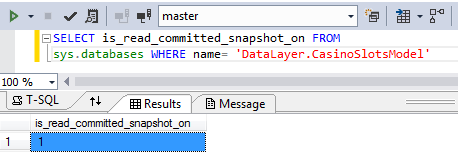
Here’s another one, but this one was created by EF6:

image

The value is 1. Read_Committed_Snapshot is ON.

That’s the change. Most of us will never even notice it. But it will alleviate problems like this one, one of many in stackoverflow (and disregard the response, which is not marked as an answer for a reason 😉 ) http://stackoverflow.com/questions/17529064/using-read-committed-snapshot-with-ef-code-first-5

But I Don’t Want That ON by Default

You can always go to the database and call

ALTER DATABASE MyDatabase
SET READ_COMMITTED_SNAPSHOT OFF

I Just Want to Use Snapshot On-Demand

That’s what the transaction level support is for.

You can always create your own transaction and set the isolation level to SNAPSHOT for specific command execution.

Next Steps?

You have now reached the limit of my Snapshot “expertise”. For more, check out the MSDN doc on Snapshot Isolation in SQL Server or try googlebing or maybe this (#itsATrap!).

Entity Framework, Private Constructors and Private Setters

As I learn more and more from Domain Driven Design, my classes for DDD projects (those that are complex enough to need more than simple CRUD), are shifting from what are referred to as “anemic domain models” and more like “rich domain models”.

The term “anemic domain model” (which I still have an aversion to…the term, that is) refers to a class that doesn’t really do much at all. It has a bunch of properties and maybe some methods. To use them you instantiate or retrieve the object and then populate the properties at will. When working in DDD, the focus is on behaviors, not properties. So you would have methods to control what happens to  your objects and in doing so, constrain the properties so that they are not exposed to be set or modified “willy nilly”.

Here is an extremely simple pair of classes that are designed using some of the techniques I’m learning from DDD:

  public class AThingAsEntity
  {
    private AThingAsEntity(){}  //the private constructor

    public AThingAsEntity(string description, int anInt, string aString)
    {
      Description = description;
      SomeOtherThing = new SomeOtherThing(anInt, aString);
    }

    public int Id { get; private set; }
    public string Description { get; private set; }
    public SomeOtherThing SomeOtherThing { get; set; }

    public void TheOtherThingMustChange(int anInt, string aString)
    {
      SomeOtherThing = new SomeOtherThing(anInt, aString);
    }
  }
  public class SomeOtherThing:ValueObject<SomeOtherThing>
  {
    private int anInt;
    private string aString;

    private SomeOtherThing(){} //the private constructor 
   //this value object’s constructor is internal to prevent random instantiation
internal SomeOtherThing(int anInt, string aString) { AValue = anInt; AnotherValue = aString; } public int AValue { get; private set; } public string AnotherValue { get; private set; } }
 

I’m constraining the class so that anyone who instantiates it is required to pass in some values. And those values all have private setters. There’ s no way to write code like:

var thing=new AThingAsEntity();
thing.Description="oh i'll just put whatever I want in here. heh heh heh. Domain rules be damned";


That’s the way I want to write this class to represent my domain.

In the past week or so, I’ve been asked three separate times (by three different developers) if it’s possible to use this pattern of private setters with EF. The answer is “yes”. Here, let the Doctor confirm that:

And in case you’re curious, I’m doing this with EF5.

Entity Framework requires a parameterless constructor in order to materialize objects returned from queries (or loading). I  have made this concession in my class but notice that it is a private constructor. So I’m still protecting my class. Nobody can access it. But EF is still able to populate this class when I execute queries. And no, I’m not doing some magic to tell EF to use my public constructor. It really uses the private constructor.

I’ll use an integration test to demonstrate.

Note that my test is using an initializer called SeedMyThings to always drop and recreate the database and shove in this seed data:

      new AThingAsEntity("This is MY thing", 42, "That is the meaning of life")

My test sets that initializer so I can perform the test I’m interested which requires some seed data.

[TestClass]
  public class Tests
  {
    public Tests()
    {
      Database.SetInitializer(new SeedMyThings());
    }
    [TestMethod]
    public void EfCanPopulateObjectWithPrivateCtorAndSetters()
    {
      using (var context=new ThingieContext() )
      {
        var thing = context.Things.FirstOrDefault();
        Assert.IsInstanceOfType(thing,typeof(AThingAsEntity));
        Assert.AreNotEqual(0, thing.Id);
        Assert.IsFalse(string.IsNullOrEmpty(thing.Description));
        Assert.IsFalse(string.IsNullOrEmpty(thing.SomeOtherThing.AnotherValue));
      }
    }
  }

I know…all those Asserts…bad tester.  So shoot me. 😉

Anyhooooo…. the test passes. Even with my private ctor and private setters, EF is able to materialize the object and even it’s SomeOtherThing property which is a value object. (which also has a private ctor and private setters). Internally EF is reading the metadata of the model and using reflection to set the values of the properties.

I also want to point out that I had been using a protected constructor. In the past, I am sure I tried private and it didn’t work. (Maybe an earlier version of EF?) But Steve Smith asked me “if setters work as private, why not constructor?” So I tried it and voila, it worked too.

And now, for my first EVER public Git repository. You can find my little sample solution at https://github.com/julielerman/EF_and_Private_CTORs_n_Setters. 🙂

Recommended Order for Watching my Pluralsight Entity Framework Courses

I occasionally get emails asking what order would be best for watching my current Entity Framework courses.

Up through EF4, I recommended watching them in order of the date published, but with the addition of my EF5 course, that has changed.

The most important thing to keep in mind is that most of the older courses are still totally relevant. They cover critical features  of Entity Framework that have not changed (or have *barely* changed) since I published the original course.

So here is my recommendation with some relevant comments since not everyone is starting from the same place:

(BTW if you don’t have a Pluralsight subscription …but they are only $29/month for access so all 650+ courses!! …go to my contact form and shoot me an email. I’ll hook you up with a free trial so you can watch my courses (and the others, too!). But be warned, once you are lured into the goodness of Pluralsight, you’ll want to become a full-fledged subscriber! 🙂 )

Getting Started with Entity Framework 5      (Mar 2013)       4:23 (this is the longest course, the rest are around 2 hrs each)

This is the newest course. This is relevant if you are just starting with EF5 or moving from a previous version. It is an intro course which touches on a lot of topics and digs further into the most important getting started topics. Most importantly, I always point to the relevant course/module where you can dig even further when you’re ready. The course starts with an overview of what EF is and why you may want to use it. It also provides a look at what has changed since earlier version. The course then has individual modules about database first, model first & code first modeling. Since Database and Model first both use the designer, I spend more time in the database first module talking about the new designer features. For the rest of the designer features, you should look at the EF & Data Models course and Designer Supported EDM Customization, though keep in mind that both of those were done with VS2010.

The next module focuses on using the DbContext to interact with your model …understand the basic concept of querying and updating, how EF change tracks etc. It then points to the DbContext course & Querying course for more details.

The last module talks about how to fit EF into your apps …some basic architecture, some tricks and a quick look at EF in various applications (WPF, MVC and a short discussion of mobile apps). There are some more in-depth end-to-end courses that happen to use EF for the data layer in the Pluralsight library as well.

Entity Framework 4.0 By Example (Aug 2010)

This is a compilation of a series of short videos. The last three are still useful. The one on T4 templates with the designer-based model is useful if you are doing database first or model first but keep in mind that with VS2012, the default template used with the designer is now a template that generates simpler (POCO )classes and a DbContext rather than an ObjectContext. You can learn some more data-binding tricks in the 4th model and get a better understanding of POCOs in the final module.

Entity Framework 4.1 – Code First  (Jun 2011)

This will fill in many blanks from the Code First module of the EF5 course. I spend a lot of time talking about various configuration & modeling techniques and they have not changed.

Entity Framework Code First Migrations   (Mar 2012)

I touch on migrations in the EF5 course but this goes much more in-depth. Again, not much has changed since this course. The one notable change (which I pointed out in the EF5 course) is that with EF5, when you are using Automatic Migrations, the seed method gets hit every time database initialization happens, not *only* when something is migrated.

Entity Framework and Data Models   (Nov 2010)

This focuses on Database First and Model First. It uses the designer in VS2010, so some of the newer features added in VS2012 you can see in the Getting STarted with EF5 course but then the rest you can see here.

Designer Supported EDM Customization   (Jan 2011)

If you are using the designer, this is still a very important and relevant course.

Entity Framework 4.1 – DbContext  (Sep 2011)

The DbContext has not changed too dramatically since EF4.1 was released. You can fill in some blanks from the EF5 course with this one.

Querying the Entity Framework     (Feb 2011)

This courses uses the ObjectContext for querying so some things have definitely changed. If you watch it *after* the EF5 & DbContext courses, then you can pick up some querying logic/syntax tricks like grouping, navigation properties and nested queries here. I don’t cover those anywhere else. by the time you get to this course, you should be able to easily see what’s new and useful and skip the rest.

Data Layer Validation with EF 4.1+   (Feb 2012)

This is an important feature of the DbContext and has not changed with the release of EF5. You don’t want to miss this one!

Entity Framework in the Enterprise    (Sep 2012)

This is not a “features” course but one about using EF in enterprise architectures. I did this using Code First and VS2010. But given that it is about architecture & testing, not features & syntax, it does not lose its relevancy. You may even want to watch (or poke around) this course earlier and then watch it again after you’ve gone through some of the more advanced courses so that things like syntax etc will make more sense.


COMING UP!

What’s New in EF6: I will be creating an EF6 course that will focus on what’s new. EF6 mostly brings new advanced features. Hardly any of what’s already there will change. One notable change however is that Code First will support stored procedure mapping. In the EF5 course, I do point out some things about EF6 ..most notably in the first module.

Domain Driven Design: I’ll be co-authoring this course with Steve Smith (who has authored many of the Design Patterns courses in the Pluralsight library). You’ll notice from the EF in the Enterprise course that I’ve been getting more and more involved with DDD. So while this course will focus on DDD, not on EF, we will certainly be using EF in many examples where data access comes into play.

EF6 Beta 1 Tools First Pass is VS EF Designer, Not Power Tools, Yet & I’m Good With That

With EF6, Microsoft (and the community that is helping with this OSS project) is pulling the Entity Framework Designer tools out of the Visual Studio install and making them a part of EF6. While you can add EF6 into a project via NuGet, tooling is a different story. That gets installed via an MSI (maybe eventually via Extensions in visual studio gallery?).

The recent blog post that announced the availability of EF6 Beta 1 and the first pass at the out of band tooling [EF6 Beta 1 Available] said :

  • The EF tooling is included in this preview for the first time for the EF6 release. Our focus with the tooling has been on enabling EF6 support and enabling us to easily ship out-of-band between releases of Visual Studio. The tooling does not included any new features.

My assumption from reading “The tooling does not included any new features” is that what’s in this MSI will only replace the built in VS designer.

Don’t forget that we also have the Entity Framework Power Tools. I recently wrote about my favorite feature of the Power Tools here:

Entity Framework Power Tool Tips to View Model (A Feature I Depend On!). The plan is to incorporate them into the designer so that there is one consolidated tool.

Based on the blog post, I didn’t expect to see any of the Power Tool features in the EF6 Beta 1 Tools.

But someone asked about one of the power tool features on twitter, and even though my confidence was high, I didn’t want to reply with “well I’m pretty sure that the blog post means no”, so I spun up a new virtual machine with VS2012 and installed the new tools.

And as the blog post says: no new features. In other words, the Beta1 is just the same designer that is in Visual Studio.

image

They have so far performed that task of separating the designer and now they can start adding the new features which will be something like what they’ve laid out in the the Tooling Consolidation Feature Specs on codeplex.

Entity Framework Power Tool Tips to View Model (A Feature I Depend On!)

When defining models with Entity Framework’s Code First and a DbContext class, I find the “View Model” feature of the Entity Framework Power Tool completely indispensable. Without it, I only *think* I know what I’ve told EF my model should be but I don’t really know how Code First will interpret the information I’ve provided (class structures, DbSets, configurations).

For example, I may have a set of classes but a DbContext that only specifies a single DbSet:

    public class CustomerServiceContext : DbContext
    {
        public DbSet<Customer> Customers { get; set; }
    }

But because of relationships from Customer to other types and their relationships to even other types, using it’s base rules (convention) Code First interprets your entire model as

image

Another common point of mapping confusion is with relationships. Being able to visualize how Code First interprets the model can show me where, for example, I’ve attempted to define a 1:1 relationship but in fact, I’ve defined a 1:0..1 which will really create problems down the road in my application.

I use the tool to show me where I haven’t configured things properly and fix my mappings (via convention or configurations) until the visual model aligns with my intention.

So I really can’t live without this tool and I show it to everyone I can.

Currently the tool is something you install as an extension to Visual Studio. It’s called Entity Framework Power Tools Beta 3 and it works even wtih the latest update to VS (Visual Studio 2012 Update 2).

While there are other features, with the tool installed, you can point to any class that inherits from DbContext, right click and see “Entity Framework” on the context menu. Select Entity Framework and you’ll see four options. My focus is on the first of these “View Entity Data Model (Read-only).

SNAGHTMLb0b6d0b

But half the time I show it, it doesn’t work and it’s always something I’ve done wrong and forgotten about.

Designer Problems != Modeling Problems

If there is a problem with your model, you’ll get a helpful error message in the output window. This is about what’s wrong with your mappings. One common one is you tried to create a one to one mapping but haven’t given code first enough detail (e.g. it needs to know which is the principal and which is the dependent).

The focus of this blog post however is problems I encounter with getting the tool to perform it’s task.

Most Common Reason that the Designer Fails: Can’t Find the Connection String

Even though the designer is not going to touch the database to generate the view, it still needs to have access to a connection string.

But when it can’t find it, it doesn’t always tell you that it can’t find the connection string.

Typically I get an error message that says: “sequence contains no matching element”.

Another is “Exception has been thrown by the target of an invocation”.

Designer Looks for  the Connection String in the Startup Project of a Solution

This is the A#1 reason that the designer won’t work. It’s a bit of a pain because you don’t really want to set things up for the designer, but for debug mode. It doesn’t matter if the startup project is executable. It just has to be some project with a config file and in the config file, valid connection information ( a connection string or connection info in the Entity Framework section) that EF will look for.

Designer Will Not Look Inside Solution or Project Folders

This is my A#2 reason the designer won’t work. I like to organize my solutions. I organize projects into solution folders and I organize code into project folders. If you config file is in a folder, the designer won’t find it.

My Typical Setup for Success

So I have a separate project in my solution that is NOT inside a folder just to help me use this critical designer tool. Thanks to Vaughn Vernon for helping me find a better name for the project than I had been using that makes it very clear that this has nothing to do with my application at all.

image

So when I need to view a model, as long as I remember to set that project as the startup project in my solution, the designer is able to do it’s job. Here is an example of using this for a context that doesn’t even inherit DbContext directly. It inherits from my own class “BaseContext” which inherits from DbContext. The designer is able show me the visual model even with this extra abstraction.

SNAGHTMLb07a092


Another Weird Error that Is Not About the Connection String: “A constructible type …”

Thanks to Ethan in comments for pointing out this one. I actually had it the day *before* I wrote this post and had forgotten (short term memory issues…old age…excuses excuses 🙂 ).

‘A constructible type deriving from DbContext could not be found in the selected file’.

This was misleading because like Ethan, the fact that I was deriving from BaseContext led me to believe that *this* was the cause for not being able to find the DbContext type. But changing CustomerServiceContext to inherit DbContext directly did not fix my problem.

I found this StackOverflow thread about this error message with a response from Brice Lambson of the EF team that suggested an Visual Studio extension was the issue. I had just added two extensions for spell checking my code and comments. One was HTML Spell Checker (from Microsoft), the other was Multi Language Spell Checker (also from someone at Microsoft). So I thought I would disable one at a time to see if one was the culprit. I happened to pick HTML Spell Checker to disable first and voila, the View Entity Data Model tool worked again (after a VS restart). Fortunately the second extension is the one I had really wanted anyway.  I believe that this problem will be resolved by the time we get the tools integration in EF6.