I love this article.
http://www.microsoft.com/WindowsXP/expertzone/columns/oneal/03december08.asp
I love this article.
http://www.microsoft.com/WindowsXP/expertzone/columns/oneal/03december08.asp
This is probably the most common question that I hear from developers:
“Why do I need to program with the SDK if the tablet already does handwriting recognition? I can just put my existing data entry forms on a tablet pc without having to change a thing and they will work, so what’s the point of learning to program for tablets?“
There is a LOT of information collected when someone works in ink on a TabletPC. The SDK gives you access to this information whether you want to read it, store it or even manipulate it. And there is a lot more to the ink than just handwriting recognition. But even if that is all you are interested, looking at the object model of the tablet api might give you some ideas to think out of the box even with this one particular function.
I’m curious about how other people would answer this question…. what does the API give you that the O/S doesn’t already do on it’s own?
After his trials & tribulations with his stylus at TechEd, Scott went home with 3 styluses (ok – 6 years of Latin in high school tells me that should be stylii or something like that but remember, high school was a looooooong time ago). After I had whipped out a few test posts in Blink! and was more interested in testing my little program than correcting the few mistakes that the reco made, it was pointed out to me that that was a bad thing. Scott has a nice long post that he wrote on the airplane in ink (with reco) that is a much better demonstration. Truly the reco in the newest Tablet OS (the beta that is now part of XP2 SP2 RC1 – uggh another impossible name) is phenomenal. You have to have HORRIBLE handwriting, like me, to mess it up. Even then, it offers help. I just had refused it at the time of my blink posts.
His post started from the realization of how well reco just works and started thinking about the difference between “it just works” and “I got it to work”. Especially with the wireless problems at TechEd.
btw – “wreck-oh”, not “reeeee -koh”
We had a lot of INETA meetings last week and even more additional meetings for the User Group Relations Committee which we are expanding to help handle the growing number of User Group members in North America.
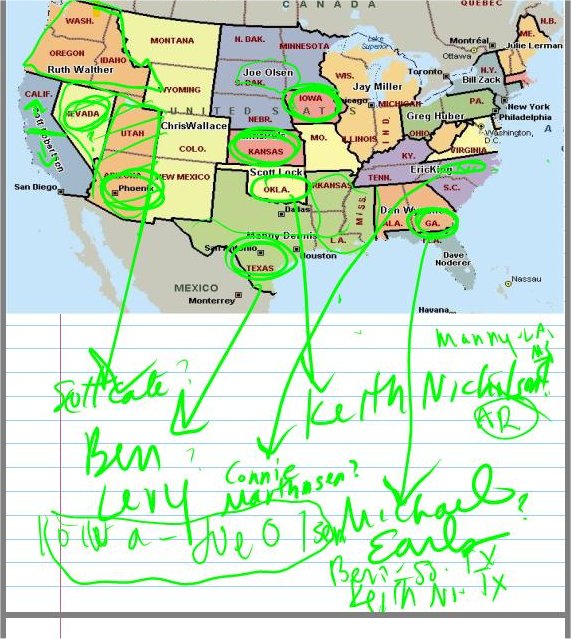
A few months ago I had created a power point map to visualize the distribution of states among our liaisons. With the addition of new volunteers over the course of the week, I copied and pasted that jpeg into Journal and used it to work on while we were discussing how to redistribute states. This is NOT a final list of liaisons per states, but just an example of something I was able to do because I had my tablet that I would never have been able to do with a mouse and keyboard.
And I don’t want any comments about my hen-scratching! 🙂 I am definitely someone whose keyboarding skills far exceed my penmanship these days!
At the Tablet PC BOF at TechEd, Kent Tengels asked about CAD apps and TabletPCs for redlining blue prints on the construction site. Coincidentally, last night my husband, a carpenter, was doing some research on the website for the Journal of Light Construction and came across the program Field2Base which is written to specifically leverage the TabletPC and not only it’s inking capabilities but it’s mobility (though dependent on some type of web connection). I took a look at their demo and thought immediately of Kent. WhatisNew and other’s have pointed this application out before also. So Kent, here’s just something to look at.
Thanks to Regional Director Barry Gervin (and now the lucky employer of Marcie Robillard and John Lam) here are the links to the hands on labs from TechEd.
I was trolling around for them so I could point to the awesome TabletPC hands on Lab that I did on Tuesday but didn’t find them. So thanks not only to Barry, but to Paschal for pointing out Barry’s post.
I’ve been waiting to hear what is going on at the TabletPC Developer events as the make their way around the country and around the world! Check teh schedule (U.S. and international) and register here.
Lora Heiny attended teh training in San Jose, CA yesterday and reports on what developers were asking and what answers they were getting.
Linda Epstein’s TabletPC2 website just had a major face lift. Looks super, Linda. This is another great source of Tablet PC news, reviews, links and other information.
So you have already seen Peter Loforte showing off the cool UI stuff in Lonestar right?
Well I was just checking out Channel 9 to link to that and saw all of thsi new stuff popped on there:
Think about that. “Mobile“ used to mean you can take it with you. Pack it up, bring it somewhere else and then unpack it and sit down and use it. But “mobile“ with a laptop means (this is where you need to picture a doctor doing their rounds with a clipboard) you can walk around and use it.
Also, check out Ward Cunningham on how he came up with the idea for a wiki and Brad Abrams on future innovations in software. (I haven’t checked these two out yet…)
The TabletPC BOF that I am leading on Tuesday at 6:30 pm is about Design Considerations. I wrote a lot about this a while back and Peter Rysavy encapsulated that so nicely in this post here if you want to get some ideas about what some of my own experiences were. Much of this will change with Lonestar which I’m really excited about.
Also, if you have any interest in this topic, go check out the 10 minute Channel 9 video of Peter Loforte showing some really cool U.I. stuff on a tablet with Lonestar (aka TabletPC 2005 something or other)
I had an email from Arin Goldberg today who says he will bring a bunch of TabletPC Team folks to the BOF armed with a boat load of tablets to play with. Whippee. (Okay Arin, now you can’t bag out on this!!! heh heh heh)