How Vermont Code Camp is using EventBrite for Abstract Submission

The Vermont.NET User Group has been using EventBrite.com for monthly meeting registration for the past year. It makes things so easy so that we can know how much pizza to order and also we print out tickets to use for the swag raffle at the end of the meeting.

But for the upcoming Vermont Code Camp (Sept 11, 2010) we also needed to collect abstracts.

After poking around the EventBrite site, I discovered that you can create customized questions in addition to the typical name & address collection. And then I saw that you can tie those questions to a particular ticket.

So I created an attendee ticket and a Speaker Session proposal ticket:


image

Then in the event management page, there is a link to “Collect Customer Information”

image 

The customization form is very clever. I can have questions with answers that are short or long text boxes, option buttons, checkboxes or drop downs and I can define how many choices and what the choices are for those various options. You can add a number of questions. I don’t know what the limit is. I only had 4.

image

There was a place that allowed me to specify which ticket to tie the form to.

Now when someone registers for that second ticket type, they get this form to fill out:

image

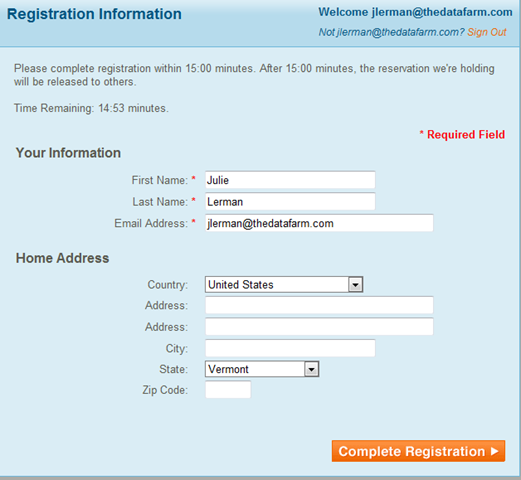
Regular attendees see this registration form:

image

So now we can collect the abstracts and use EventBrite’s management tools to manage those abstracts, including exporting the data for additional tasks as we get closer to the event.

Thanks EventBrite!

What I’m loving about the newest iteration of EF Code First in CTP4

There have been a lot of improvements to code first since CTP3 and in fact, the team has been experimenting with changes to the core Entity Framework APIs that not only support even simpler programming with code first but that we’ll benefit from in an upcoming release of .NET. (No, I don’t know if there will be a service pack and when…)

I have a code first sample in my book, Programming Entity Framework 2nd Edition, that is coming out in August and was lucky with the timing of the CTP4 release because I was able to sneak in an overhaul of that section before the book heads to the printer.

In revising my code sample for that section I was very happy with so many of the API & Code First improvements.

**But first a clarification is important. The version of Entity Framework that is in .NET 4/VS2010 is the current shipping, supported version that you can use in production. What’s in the CTP is simply an early look at what’s coming as it evolves giving us a chance to play with it. This is not something you can deploy and it is also going to evolve with future CTP versions.**

So with that in mind, I went to town on the CTP3 sample.

The first thing that I benefited from was the new stripped down easy access versions of the ObjectContext and ObjectSet.

The new classes, DbContext and DbSet have the same essential functions but don’t expose you to the entire feature set of their big brother & sister. Not everyone needs all of those features. The are not derived from ObjectContext and ObjectSet however, but provide easy access to the full featured versions through a property e.g., DbContext.ObjectContext and DbSet.ObjectSet.

Along with this simplification are simplified terms.

Where ObjectSet has AddObject

context.Customers.AddObject(myCust) – note that Customers in this case is the ObjectSet)

DbSet simply uses Add

context.Customers.Add(MyCust) –>now I’m using Customers as a DbSet).

Another nice trick is how DbSets are created.

ObjectSet has an internal constructor and does not have a parameterless constructor,so you need a backing variable

ObjectSet<Customer> Customers;

and then you need to execute the CreateObjectSet method to create the ObjectSet:

context.CreateObjectSet<Customer>(“Customers”)

DbSet has a constructor so you can use an auto-implemented property

public DbSet<Customer> Customers { get; set; }

Code First gets way easier

It’s true. I cut out gobs of code and moved code to where it belongs.

Code first uses convention over configuration. It looks at your classes and does its best job of inferring a model and a database schema from it (if you are starting from scratch). Your classes don’t always provide enough metadata so you can provide more info to code first through additional configurations. Initially those configurations were programmatic only but now you can also use attributes in your classes (“data annotations”).

Here are two examples.

In my model I have a class called ConferenceTrack. It has an identity property called TrackId. Code first convention looks for “Id” or class name + “Id” as an identity but TrackId doesn’t fit this pattern so I have to tell EF that this is my identity key.

I can do that using code first’s ModelBuilder (formerly called ContextBuilder):

modelBuilder.Entity<ConferenceTrack>().HasKey(ct => ct.TrackId);

In CTP3, I had to execute from the same code that instantiates the context. Bad bad. Now there is an OnModelCreating method that I can use and put that configuration inside that method. The method lives in the context class. I don’t have to call it. The context is smart enough to run it for me.

protected override void OnModelCreating(ModelBuilder modelBuilder)
{
   modelBuilder.Entity<ConferenceTrack>().HasKey(ct => ct.TrackId);
}

Alternatively, I can configure this key right in my class as an attribute of the TrackId property.

    [Key]
    public int TrackId { get; set; }

Definitely simpler. I prefer to keep all of that EF related stuff in the context class so will most likely continue to use the fluent configuration rather than the data annotations.

Boy oh Boy did Relationships Get Easier

In my domain classes, I have a bunch of relationships defined through properties.

E.g.

ConferenceTrack has

public ICollection<Session> Sessions  { get; set; }   (a one-to-many relationship)

Session has

  public ConferenceTrack ConferenceTrack { get; set; }  (a many to one relationship)
  public ICollection<Speaker> Speakers { get; set; } (a many to many relationship)

In CTP3 I had a whole bunch of configurations defined (that were hard to construct and hard to read) so that the model would understand my intent with these relationships. CTP4 is now smart enough to grok my intent based on the domain class properties. And if there’s something that I want that doesn’t follow the convention, then I can add a configuration.

So I removed *all* of the configuration code that described the relationships.

That made me happy.

And EF/Code First figured it all out.

Based on my classes and the single configuration to define the TrackId as the key for conferences, it created this database to persist my data into

ctp4

It worked out all of the relationships. Notice the Sessions_Speakers that it created for the many to many relationship.

Also, I have a class in my domain that is called Workshop and inherits from Session. By default Code First assumes Table Per Hierarchy. It created a discriminator column in the Sessions table which I need to use another configuration for to change its name to IsWorkshop.

There’s more to love about this CTP. You can get coding details from theEntity Framework Design and EF team blog’s newest posts and download the CTP here.

 As I’m learning more about domain driven development and as code first evolves, I’m getting more excited about this upcoming feature of Entity Framework

Creating Models from Databases with Billions of Tables

By now you know I’m prone to exaggeration so that “billions” thing is a stretch, but you get the point hopefully.

Lots of legacy databases have hundreds or even more tables in them.

People building Entity Data Models by reverse engineering a database often bring every table and view from the database into a single model.

Here’s an untouched model built from all of the tables and view of the AdventureWorks database – totalling about 95 entities.

awmodelbig

This is already unmanageable and causes design time performance issues, and it’s not even 100 entities.

I get questions all of the time from developers asking what to do  with large models.

Here is a recent question I got via email":

“I have a database with 150+ tables. Would you break the model up into multiple edmx files?”

My response (with some enhancements for the sake of this blog post):

Yes I would. I have lots of clients working with multiple models. One approach is to think of a model per transaction. E.g., if you have a data entry screen that only needs 6 entities, build a model for that. (That may be exaggerated).

Take a look at:

http://www.ideablade.com/WardsCorner/WardsCorner_home.aspx  scroll down to his large model discussion & demo. Ward and I have come up with the same conclusion. Ward has written something like a dissertation as he goes through the pros & cons of various approaches to the problem.

Also, another approach to consider (with or without breaking up the model) is a different designer that doesn’t try to visualize all of the entities (which makes things so cumbersome with the EDMX designer). LLBLGen Pro is already a great ORM in its own right. But they’ve taken their knowledge and built a deisgner specifically for EF4 with the goal of dealing with larger models.

http://weblogs.asp.net/fbouma/archive/2010/04/28/llblgen-pro-v3-0-with-entity-framework-v4-0-12m-video.aspx

Finally, just as an FYI, I’m guest editing an upcoming issue of DevPro Connections magazine and specifically asked Patrik Lowendahl to write an article on this very topic.

Windows Azure SDK Update 1.2: .NET 4 Support & more

In case you missed it (and are interested) there is an update (came in June) for Windows Azure dev tools. It’s version 1.2 and is supported in VS2008 & VS2010.

(http://www.microsoft.com/downloads/details.aspx?FamilyID=2274a0a8-5d37-4eac-b50a-e197dc340f6f&displaylang=en)

Most important to me is the .NET 4.0 support: now I can use EF4 in Azure services.

Windows Azure Tools for Microsoft Visual Studio 1.2 (June 2010)

Windows Azure Tools for Microsoft Visual Studio extend Visual Studio 2010 and Visual Studio 2008 to enable the creation, configuration, building, debugging, running, packaging and deployment of scalable web applications and services on Windows Azure.
New for version 1.2:

  • Visual Studio 2010 RTM Support: Full support for Visual Studio 2010 RTM.
  • .NET 4 support: Choose to build services targeting either the .NET 3.5 or .NET 4 framework.
  • Cloud storage explorer: Displays a read-only view of Windows Azure tables and blob containers through Server Explorer.
  • Integrated deployment: Deploy services directly from Visual Studio by selecting ‘Publish’ from Solution Explorer.
  • Service monitoring: Keep track of the state of your services through the ‘compute’ node in Server Explorer.
  • IntelliTrace support for services running in the cloud: Adds support for debugging services in the cloud by using the Visual Studio 2010 IntelliTrace feature. This is enabled by using the deployment feature, and logs are retrieved through Server Explorer.

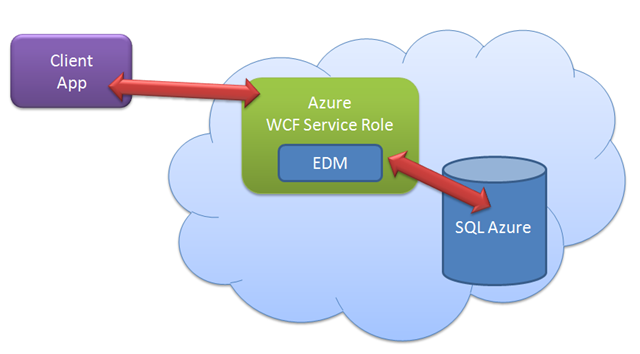
As a test, I just built a new WCF Service Role (verifying that it is, indeed, a .NET 4 project), added a EDM to it (it’s not architecture, it’s a proof of concept) and pointed my EDM to one of my SQL Azure databases. I created a simple service operation to return data via the EDM. Then I created a client app which retrieved the data through that service operation. Easy-peasie.

azuretest

Vermont.NET User Group: Tomorrow night switch to EF4 instead of ASP.NET 4.0

The speaker originally scheduled is ill and can’t make it tomorrow night (would have been a 4 hour drive to Burlington). So rather than cancel the meeting, I will do an Entity Framework 4.0 Intro presentation. I’ll be happy to address more advanced questions once the intro is complete.

We are grateful to have a pizza/soda sponsor, FIT Solutions (www.fitsolutions.us).

Please register at vtdotnet.eventbrite.com so we order enough pizza and you are registered for the raffles. Lots of swag goodies!

When: Monday June 14th, 6-8:30pm

Where: GE Healthcare, 40 IDX Drive, South Burlington, VT

Vermont IT Jobs: C# Developer in Burlington

Senior C# Engineer Qualifications:

  • 5+ years of programming experience
  • Strong C# development skills
  • Thorough grounding in Object-Oriented design principles and design patterns
  • Bachelor’s Degree in Computer Science or related field
  • Strong message-oriented development skills (JMS, MSMQ, TCP/IP, Web Services, etc.)
  • Agile development background (understanding of methodology, terms, and process)
  • Demonstrated teamwork and flexibility in previous work assignments
  • Experience working closely with QA, Documentation, and Technical Support
  • Strong communication skills with technical and non-technical personnel
  • Demonstrated analytic and problem solving skills
  • Candidates must be organized, detail oriented, and professional

Kathie Cheney, PHR
Technical Connection, Inc.
P.O. Box 1402
Burlington, VT 05402
Tel: 802-658-8324
Fax: 802-658-0175
email: vermontjobs@vttechjobs.com

My Inbox: How to save changes coming from disconnected POCOs

I receive a lot of random emails from developers with Entity Framework questions. (This is not a request for more! :)) If I’m too busy to even look or if it’s something I can’t answer off the top of my head, I swallow my pride and ask the person to try the MSDN forums. If the email is from a complete stranger and has gobs and gobs of code that email will surely get a "please try MSDN forums" reply. 

But sometimes I’m not in my usual state of “too much to do” panic and get a question that is short & sweet and I can answer it effortlessly. This is one of those types of questions.

Question from Arda Çetinkaya

Hi;

I am contacting with you with a suggestion of my friend who is one of the best MVPs of Turkey…So I have a small question if you can answer it I will be very happy…

What I am trying to do is updating a poco entity with entity framework…My poco entity is not in context,so I am attaching it first…But no change is done…How can I update my poco entities…If you have any resource for it,I really need it…

Reply

You would have the same problem with EntityObjects as with POCOs. If you are using EF4, then you have a lot of options that you did n ot have in EF1.

Assuming it’s EF4, the simplest is to use the new ObjectContext.ObjectStateManager.ChangeState (might be ChangeObjectState) method. But that means you need to know what the state should be …added, updated or deleted.

That’s just one way and might be just what you need or might not fit your scenario.

If you search for changestate/changeobjectstate and Entity Framework on the web you should find lots of blog posts and articles on this.

Good Luck

julie

Follow-up from Arda 20 minutes later

Thanks a lot for your reply…It helped me to clear it out…

With the following code change, I got it…Thanks a lot…You saved my life (:

 public static void UpdateConfigurationSetting(ConfigurationSetting configurationSettingToUpdate)
{
  try
  {
    using (DBEntities entities = new DBEntities ())
    {
      entities.ConfigurationSetting.Attach(configurationSettingToUpdate);
      ObjectStateEntry entry = entities.ObjectStateManager
.GetObjectStateEntry(configurationSettingToUpdate); entry.ObjectStateManager
.ChangeObjectState(configurationSettingToUpdate, System.Data.EntityState.Modified); entities.SaveChanges(); } } }

June in May?

The Lupine, Phlox & Rhodendron are already in full bloom. Usually that happens while I’m away at TechEd in mid-June so this is very early (lucky me I get to enjoy it this year). Considering that it was only a month ago that we had a spring snow storm, I would have expected things to be late, not early! (Compare the shrubs along the fence in the first picture here with what they looked like in the 2nd photo of the snow storm pics.)

Unfortunately, even though the lupine are early, the bumper crop of dandelions is still hanging in there so the field doesn’t look as nice as it could thanks to all of the dirty white dandelion fluff.

 May 30 1

may 30 2

May 3031

may 30 4


IMG_3433

Programming Entity Framework, 2nd Edition (EF4) Table of Contents

We are closing in on finalizing the 2nd edition of Programming Entity Framework! Although the rough draft chapters are already available through Safari’s Rough Cuts program (here: http://oreilly.com/catalog/9780596807252) I have been editing and reshaping the content since those chapters were published. You can get the final print edition (August 15th or perhaps a bit earlier) at O’Reilly or pre-order it here on Amazon.com (here) (and elsewhere of course!)

I believe that the book will end up being about the same length (app. 800 pages) as the first edition.

Here is the final chapter list:

Chapter 1, “Introducing the ADO.NET Entity Framework”

Chapter 2, “Exploring the Entity Data Model”

Chapter 3, “Querying Entity Data Models”

Chapter 4, “Exploring LINQ to Entities in Greater Depth”

Chapter 5, “Exploring Entity SQL in Greater Depth”

Chapter 6, “Modifying Entities and Saving Changes”

Chapter 7, “Using Stored Procedures with the EDM”

Chapter 8, “Implementing a More Real-World Model”

Chapter 9, “Data Binding with Windows Forms and WPF Applications”

Chapter 10, “Working with Object Services”

Chapter 11, “Customizing Entities”

Chapter 12, “Data Binding with RAD ASP.NET Applications”

Chapter 13, “Creating and Using POCO Entities”

Chapter 14, “Customizing Entity Data Models Using the EDM Designer”

Chapter 15: “Defining EDM Mappings That Are Not Supported by the Designer”

Chapter 16, “Working with Stored Procedures Without Function Mapping or Function Imports*

Chapter 17, “Using EntityObjects in WCF Services”

Chapter 18, “Using POCOs and Self-Tracking Entities in WCF Services”

Chapter 19, “Working with Relationships and Associations”

Chapter 20, “Managing Connections, Transactions, Performance, and More for Real-World Applications”

Chapter 21, “Manipulating Entities with ObjectStateManager and MetadataWorkspace”

Chapter 22, “Handling Exceptions”

Chapter 23, “Planning for Concurrency Problems”

Chapter 24, “Building Persistent Ignorant, Testable Applications”

Chapter 25, “Domain Centric Modeling ”

Chapter 26, “Using Entities in n-Tier Client-Side Applications”

Chapter 27, “Building n-Tier Web Applications”

Appendix A, “Entity Framework Assemblies and Namespaces”

Appendix B, “Data-Binding with Complex Types”

Appendix C, “Additional Details about Entity Data Model Metadata”

* Need to come up with a better title for Ch 16. It’s all the stuff you can do with sprocs & (views too) that aren’t supported by the designer.