I wanted to see some of the new Beta2 (in the June CTP bits) functionality of Entity Framework so I’ve been poking around. You can see a nice list of what to look for on Danny Simmons’ blog.
One thing that was a huge source of frustration was the inability to support database constraints where a column was both a primary key and also a foreign key of another table. When using the EF Wizard to import database schemas, this would be part of a list of errors that were generated during the model creation and would result in a problem like this:
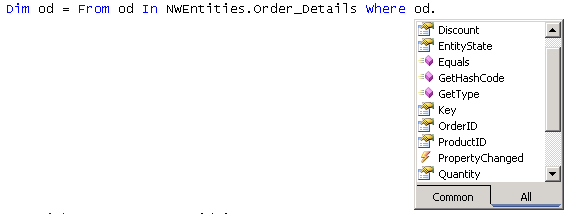
Notice that you can’t get back to the ORDER that owns the Order_Detail.
With the new CTP, that problem goes away.
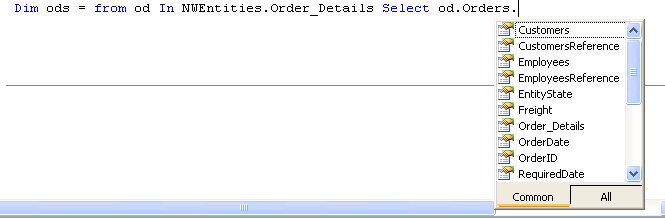
You can’t traverse over Order_details because it is a collection property, but you can get at properties like Count, etc…
Dim od = From o In NWEntities.Orders Where o.ShipCountry = “Spain” _
Select o.Customers.CompanyName, o.Order_Details.Count
Another thing, of course was the difficulty of working with existing views and stored procedures.
Here’s a before and after of the wizard:
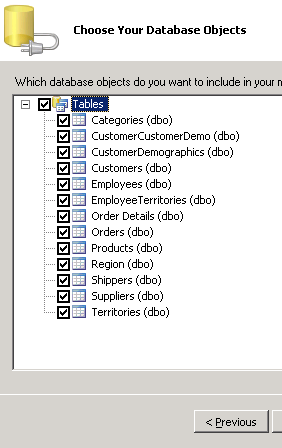
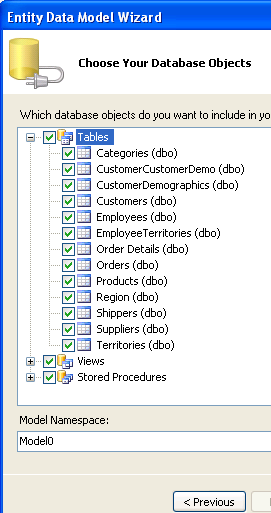
But the sproc and view support goes much deeper.
Unfortunately, I don’t see the wizard carrying the views and stored procs all the way through. If you look at the SSDL, you will see that the views are described as any other table. The stored procs are <function> elements.
While I can’t figure out how to surface the query function, there are also functions to let you use your own sprocs for insert, updates and deletes and tie them into EF’s SaveChanges function. Shyam Pather wrote a post about this a while ago on the ADONET Team blog and now that stuff is in this version along with documentation examples.
Another SPROC goody is the ability to define your own stored procedures in your model without needing it in the database. Check the DefiningQuery element that goes in the SSDL to achieve this.
Poking around in the CSDL, I see a few changes which tie back to the references.
A Key used to be an attribute of an Entity Type. Now it is an element.
Beta1: <EntityType Name=”Employees” Key=”EmployeeID”>
CTP: <EntityType Name=”Employees”>
<Key>
<PropertyRef Name=”EmployeeID” />
</Key>
So that they could do this:
<EntityType Name=”Order_Details”>
<Key>
<PropertyRef Name=”OrderID” />
<PropertyRef Name=”ProductID” />
</Key>
Which then enables us to do this:
<Association Name=”FK_Order_Details_Orders”>
<End Role=”Orders” Type=”Model.Orders” Multiplicity=”1″ />
<End Role=”Order_Details” Type=”Model.Order_Details” Multiplicity=”*” />
<ReferentialConstraint>
<Principal Role=”Orders”>
<PropertyRef Name=”OrderID” />
</Principal>
<Dependent Role=”Order_Details”>
<PropertyRef Name=”OrderID” />
</Dependent>
</ReferentialConstraint>
</Association>
<Association Name=”FK_Order_Details_Products”>
<End Role=”Products” Type=”Model.Products” Multiplicity=”1″ />
<End Role=”Order_Details” Type=”Model.Order_Details” Multiplicity=”*” />
<ReferentialConstraint>
<Principal Role=”Products”>
<PropertyRef Name=”ProductID” />
</Principal>
<Dependent Role=”Order_Details”>
<PropertyRef Name=”ProductID” />
</Dependent>
</ReferentialConstraint>
</Association>
Which is describing this from the database:
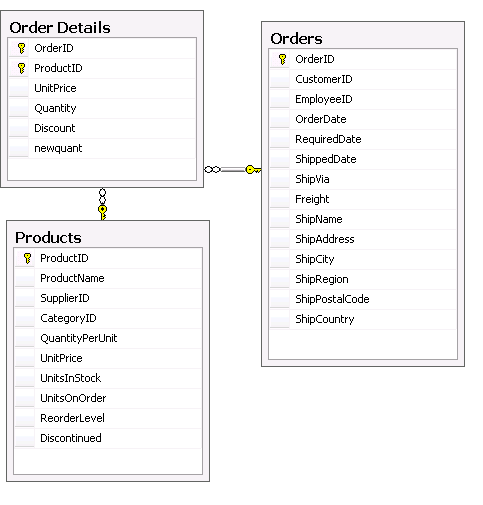
Speaking of the database, there was mention of the fact that it’s now easier to get at the underlying datastore. I haven’t figured out how though, yet. I looked to see if you could now cast an EntityConnetion to a SqlConnection but that’s not it. I’ll keep an eye out for that. While I was looking though I noticed a bunch of new methods in the ObjectContext such as the pieces that go along with attaching and detaching such as “Addto” methods for each of the entities in the objectContext.
The last thing I’ll shove into this already long post is that Entity constructors are no longer auto-generated. This will make customization a lot easier (you can read about that in this post from Danny Simmons).
So where we had this in Beta 1:
Partial Public Class Employees
Inherits Global.System.Data.Objects.DataClasses.Entity
”'<summary>
”’Initialize a new Employees object.
”'</summary>
Public Sub New()
MyBase.New
‘Call DoFinalConstruction if this is the most-derived type.
If (CType(Me,Object).GetType Is GetType(Global.NorthwindModel.Employees)) Then
Me.DoFinalConstruction
End If
End Sub
”'<summary>
”’Initialize a new Employees object.
”'</summary>
”'<param name=”employeeID”>Initial value of EmployeeID.</param>
”'<param name=”lastName”>Initial value of LastName.</param>
”'<param name=”firstName”>Initial value of FirstName.</param>
Public Sub New(ByVal employeeID As Integer, ByVal lastName As String, ByVal firstName As String)
MyBase.New
Me.EmployeeID = employeeID
Me.LastName = lastName
Me.FirstName = firstName
‘Call DoFinalConstruction if this is the most-derived type.
If (CType(Me,Object).GetType Is GetType(Global.NorthwindModel.Employees)) Then
Me.DoFinalConstruction
End If
End Sub
Although the constructor is gone (along with the acrobatics that would require creating your own constructors) there is a new method for creating each entity:
Public Shared Function CreateEmployees(ByVal employeeID As Integer, ByVal lastName As String, ByVal firstName As String) As Employees
Dim employees As Employees = New Employees
employees.EmployeeID = employeeID
employees.LastName = lastName
employees.FirstName = firstName
Return employees
End Function