All posts by Julie

Entity Framework & WCF Data Services June 2011 CTP : Auto Compiled LINQ Queries

Ahh another one of the very awesome features of the new CTP!

Pre-compiled LINQ to Entities queries (LINQ to SQL has them too) are an incredible performance boost. Entity Framework has to a bit of work to read your LINQ to Entities query, then scour through the metadata to figure out what tables & columns are involved, then pass all of that info to the provider (e.g., System.Data.SqlClient) to get a properly constructed store query. If you have queries that you use frequently, even if they have parameters, it is a big benefit to do this once and then reuse the store query.

I’ve written about this a lot. It’s a bit of  a PIA to do especially once you start adding repositories or other abstractions into your application. And the worst part is that they are tied to ObjectContext and you cannot even trick a DbContext into leveraging CompiledQuery. (Believe me I tried and I know the team tried too.)

So, they’ve come up with a whole new way to pre-compile and invoke these queries and the best part is that it all happens under the covers by default. Yahoo!

Plus you can easily turn the feature off (and back on) as needed. With CompiledQuery in .NET 3.5 & .NET 4.0, the cost of compiling a pre-compiling a query that can be invoked later is more expensive than the one time cost of the effort to transform a L2E query into a store query. Auto-Compiled queries work very differently so I don’t know if you need to have the same concern about turning it off for single-use queries. My educated guess is that it’s the same. EF still has to work out the query,then it has to cache it then it has to look for it in the cache. So if won’t benefit from having the store query cached, then why pay the cost of storing and reading from the cache?

I highly recommend reading the EF team’s walk-through on the Auto-Compiled Queries for information on performance and more details about this feature and how it works. Especially the note that this paper says CompiledQuery is still faster.

A bit of testing

I did a small test where I ran a simple query 10 times using the default (compiled) and 10 times where I’ve turned off the compilation. I also started with a set up warmup queries to make sure that none of the queries I was timing would be impacted by EF application startup costs. Here you can see the key parts of my test. Note that I’m using ObjectContext here and that’s where the ContextOptions property lives (same options where you find LazyLoadingEnabled, etc). You can get there from an EF 4.1 DbContext by casting back to an ObjectContext.


  public static void CompiledQueries()
    {
      using (var context = new BAEntities())
      {
        FilteredQuery(context, 3).FirstOrDefault();
        FilteredQuery(context, 100).FirstOrDefault();
        FilteredQuery(context, 113).FirstOrDefault();
        FilteredQuery(context, 196).FirstOrDefault();
      }
    }
    public static void NonCompiledQueries()
    {
      using (var context = new BAEntities())
      {
        context.ContextOptions.DefaultQueryPlanCachingSetting = false;
        FilteredQuery(context, 3).FirstOrDefault();
        FilteredQuery(context, 100).FirstOrDefault();
        FilteredQuery(context, 113).FirstOrDefault();
        FilteredQuery(context, 196).FirstOrDefault();
      }
    }

    internal static IQueryable<Contact> FilteredQuery(BAEntities context, int id)
    {
      var query= from c in context.Contacts.Include("Addresses") where c.ContactID == id select c;
      return query;
    }

I used Visual Studio’s profiling tools to get the time taken for running the compiled queries and for running the queries with the compilation set off.

When I executed each method (CompiledQueries and NonCompiledQueries) 3 times, I found that the total time for the compiled queries ran about 5 times faster than the total time for the non-compiled queries.

When I executed each method 10 times, the compiled queries total time was about 3 times faster than the non-compiled.

Note that these are not benchmark numbers to be used, but just a general idea of the performance savings. The performance gain from using the pre-compiling queries is not news – although again, auto-compiled queries are not as fast as invoking a CompiledQuery. What’s news is that you now get the performance savings for free. Many developers aren’t even aware of the compiled queries. Some are daunted by the code that it takes to create them. And some scenarios are just too hard or in the case of DbContext, impossible, to leverage them.

WCF Data Services

I mentioned data services in the blog post title. Because this compilation is the default, that means that when you build WCF Data Services on top of an Entity Framework model, the services will also automatically get the performance savings as well.

Enjoy!

Entity Framework June 2011 CTP: TPT Inheritance Query Improvements

I want to look at some of the vast array of great improvements coming to EF that are part of the June 2011 CTP that was released yesterday.

Everyone’s going on and on about the enums. Smile

There’s a lot more in there. Not sure how many I’ll cover but first up will be the TPT store query improvements.

I’ll use a ridiculously simple model with code first to demonstrate and I’ll share with you a surprise discovery I made (which began with some head scratching this morning).

Beginning with one base class and a single derived class.

 public class Base
 {

   public int Id { get; set; }
   public string Name { get; set; }

 }

  public class TPTA: Base
  {
    public string PropA { get; set; }
  }

By default, code first does TPH and would create a single database table with both types represented. So I use a fluent mapping to force this to TPT. (Note that you can’t do this configuration with Data Annotations).

  public class Context: DbContext
  {
    public DbSet<Base> Bases { get; set; }

    protected override void OnModelCreating(DbModelBuilder modelBuilder)
    {
      modelBuilder.Entity<Base>().Map<TPTA>(m => m.ToTable("TPTTableA"));
    }

  }

Here’s my query:

 from c in context.Bases select new {c.Id, c.Name};

Notice I’m projecting only fields from the base type.

And the store query that results:

SELECT 
[Extent1].[Id] AS [Id], 
[Extent1].[Name] AS [Name]
FROM [dbo].[Bases] AS [Extent1]

Not really anything wrong there. So what’s the big deal? (This is where I got confused… Smile )

Now I’ll add in another derived type and I’ll modify the configuration to accommodate that as well.

public class TPTB: Base
{
  public string PropB { get; set; }
}

modelBuilder.Entity<Base>().Map<TPTA>(m => m.ToTable("TPTTableA"))
.Map<TPTB>(m => m.ToTable("TPTTableB"));

Execute the query again and look at the store query now!

SELECT 
[Extent1].[Id] AS [Id], 
[Extent1].[Name] AS [Name]
FROM  [dbo].[Bases] AS [Extent1]
LEFT OUTER JOIN  (SELECT 
    [Extent2].[Id] AS [Id]
    FROM [dbo].[TPTTableA] AS [Extent2]
UNION ALL
    SELECT 
    [Extent3].[Id] AS [Id]
    FROM [dbo].[TPTTableB] AS [Extent3]) AS [UnionAll1] ON [Extent1].[Id] = [UnionAll1].[Id]

Egad!

Now, after switching to the new bits (retargeting the project and removing EntityFramework.dll (4.1) and referencing System.Data.Entity.dll (4.2) instead)

The query against the new model (with two derived types) is trimmed back to all that’s truly necessary:

SELECT 
[Extent1].[Id] AS [Id], 
[Extent1].[Name] AS [Name]
FROM [dbo].[Bases] AS [Extent1]

Here’s some worse ugliness in EF 4.0. Forgetting the projection, I’m now querying for all Bases including the two derived types. I.e. “context.Bases”.

SELECT 
CASE WHEN (( NOT (([UnionAll1].[C2] = 1) AND ([UnionAll1].[C2] IS NOT NULL))) 
AND ( NOT (([UnionAll1].[C3] = 1) AND ([UnionAll1].[C3] IS NOT NULL)))) THEN '0X' WHEN (([UnionAll1].[C2] = 1)
AND ([UnionAll1].[C2] IS NOT NULL)) THEN '0X0X' ELSE '0X1X' END AS [C1], [Extent1].[Id] AS [Id], [Extent1].[Name] AS [Name], CASE WHEN (( NOT (([UnionAll1].[C2] = 1) AND ([UnionAll1].[C2] IS NOT NULL))) AND ( NOT (([UnionAll1].[C3] = 1)
AND ([UnionAll1].[C3] IS NOT NULL)))) THEN CAST(NULL AS varchar(1)) WHEN (([UnionAll1].[C2] = 1)
AND ([UnionAll1].[C2] IS NOT NULL)) THEN [UnionAll1].[PropA] END AS [C2], CASE WHEN (( NOT (([UnionAll1].[C2] = 1) AND ([UnionAll1].[C2] IS NOT NULL))) AND ( NOT (([UnionAll1].[C3] = 1)
AND ([UnionAll1].[C3] IS NOT NULL)))) THEN CAST(NULL AS varchar(1)) WHEN (([UnionAll1].[C2] = 1)
AND ([UnionAll1].[C2] IS NOT NULL)) THEN CAST(NULL AS varchar(1)) ELSE [UnionAll1].[C1] END AS [C3] FROM [dbo].[Bases] AS [Extent1] LEFT OUTER JOIN (SELECT [Extent2].[Id] AS [Id], [Extent2].[PropA] AS [PropA], CAST(NULL AS varchar(1)) AS [C1], cast(1 as bit) AS [C2], cast(0 as bit) AS [C3] FROM [dbo].[TPTTableA] AS [Extent2] UNION ALL SELECT [Extent3].[Id] AS [Id], CAST(NULL AS varchar(1)) AS [C1], [Extent3].[PropB] AS [PropB], cast(0 as bit) AS [C2], cast(1 as bit) AS [C3] FROM [dbo].[TPTTableB] AS [Extent3]) AS [UnionAll1] ON [Extent1].[Id] = [UnionAll1].[Id]

And now with the new CTP:

SELECT 
CASE WHEN (( NOT (([Project1].[C1] = 1) AND ([Project1].[C1] IS NOT NULL)))
AND ( NOT (([Project2].[C1] = 1) AND ([Project2].[C1] IS NOT NULL)))) THEN '0X' WHEN (([Project1].[C1] = 1)
AND ([Project1].[C1] IS NOT NULL)) THEN '0X0X' ELSE '0X1X' END AS [C1], [Extent1].[Id] AS [Id], [Extent1].[Name] AS [Name], CASE WHEN (( NOT (([Project1].[C1] = 1) AND ([Project1].[C1] IS NOT NULL))) AND ( NOT (([Project2].[C1] = 1)
AND ([Project2].[C1] IS NOT NULL)))) THEN CAST(NULL AS varchar(1)) WHEN (([Project1].[C1] = 1)
AND ([Project1].[C1] IS NOT NULL)) THEN [Project1].[PropA] END AS [C2], CASE WHEN (( NOT (([Project1].[C1] = 1) AND ([Project1].[C1] IS NOT NULL))) AND ( NOT (([Project2].[C1] = 1)
AND ([Project2].[C1] IS NOT NULL)))) THEN CAST(NULL AS varchar(1)) WHEN (([Project1].[C1] = 1)
AND ([Project1].[C1] IS NOT NULL)) THEN CAST(NULL AS varchar(1)) ELSE [Project2].[PropB] END AS [C3] FROM [dbo].[Bases] AS [Extent1] LEFT OUTER JOIN (SELECT [Extent2].[Id] AS [Id], [Extent2].[PropA] AS [PropA], cast(1 as bit) AS [C1] FROM [dbo].[TPTTableA] AS [Extent2] ) AS [Project1] ON [Extent1].[Id] = [Project1].[Id] LEFT OUTER JOIN (SELECT [Extent3].[Id] AS [Id], [Extent3].[PropB] AS [PropB], cast(1 as bit) AS [C1] FROM [dbo].[TPTTableB] AS [Extent3] ) AS [Project2] ON [Extent1].[Id] = [Project2].[Id]

At first glance you may think “but it’s just as long and just as ugly” but look more closely:

Notice that the first query uses a UNION for the 2nd derived type but the second uses another LEFT OUTER JOIN. Also the “Cast 0 as bit” is gone from the 2nd query. I am not a database performance guru but I’m hoping/guessing that all of the work involved to make this change was oriented towards better performance. Perhaps a DB guru can confirm. Google wasn’t able to. Winking smile

July 6th Update: I talked with Kati Iceva who is the EF query compiler (among other things) goddess on the EF team. She told me that the first query (projecting from the base) is where to look for benefits. The second one is not there yet. The fact that they’ve got the outer joins now rather than the Union and that they lost the extra cast is a setup for some future improvements to TPT queries that they’ll be able to implement. There is a TPT blog post forthcoming on the team blog so but if you’re interested enough in EF to read my blog, you probably read that one (and their EF Design blog) already. Winking smile

I did look at the query execution plans in SSMS. They are different but I’m not qualified to understand the impact.

Here’s the plan from the first query (from EF 4 with the unions)

planfromunions

and the one from the CTP generated query:

planfromctp

EF4 books and EF 4.1

I’ve been asked repeatedly about the viability of my book, Programming Entity Framework, and the other EF4 books out there now that EF 4.1 has been released.

The EF4 books are still totally viable and important if you truly want to learn Entity Framework for the purpose of writing enterprise applications.

Entity Framework 4.1 simply adds two new features to Entity Framework. The first is an additional way to create a model, called “Code First”, the second is a stripped down version of the ObjectContext. They are *awesome* additions for those who like to program this way. And you can always hook back to the ObjectContext if/when you want to get the granular control you will likely need if you’re writing an enterprise app. I love code first and I love the DbContext. But I also love Database First for many scenarios, Model First for many scenarios and the extreme power that the ObjectContext provides me when I want it. And when I’m writing real apps, not just demos, I definitely want the ObjectContext available to me!

But…

The core APIs don’t change.

The need to understand the ins and outs of the conceptual model and mappings doesn’t change.

The need to understand how to use EF in an application shifts at the surface, but if you need to do more than simple drag & drop applications, you’ll need to understand how to work with the underlying API.

The need to understand how EF works and how you can manipulate to improve performance, to do threading, to control transactions does not change.

The need to understand how changes are tracked and how relationships are managed and how to affect those features so that you can make application back ends work the way you want them to does not change.

Currently my recommendation is that if you think you want to use Code First and the DbContext, take a look at what’s in there (great blog posts by EF team at blogs.msdn.com/adonet, a series of 11 short videos (with accompanying articles and download samples) that I created for MSDN at msdn.com/data/ef, a new EF 4.1 course (and more coming) on Pluralsight and many articles & blog posts written by very knowledgeable community members) to learn how to use code first and DbContext when working with EF.

But if you are writing applications with Entity Framework, you’ll still want to learn how to program with it. And for that, you have three great books that you can learn from – all take a different approach and they are quite complementary to each other. Yes, mine is one of them and of course I recommend it. I spent a year on the first edition and another year on the second edition. I worked very hard to learn EF inside and out to help you learn it, too. I also recommend Entity Framework 4.0 Recipes and Entity Framework 4 in Action. Again, these books take a very different approach than mine and in my opinion, the three books complement each other nicely.

In case you think this might be a desperate attempt to sell more books, it is hardly that. Tech book authors get a *very* small royalty per book sold. Tech book writing is not typically a financially rewarding endeavor. Instead, the desperate attempt I’m making is to offer a better explanation for the many people who keep asking me when I will be updating my book to EF 4.1 – a better response than I can provide in the 140 characters on twitter.

The out of band release of EF 4.1 may be followed by others so right now EF is a moving target. Updating Programming Entity Framework to incorporate the new features just doesn’t make sense. I think using the core books to learn EF and then supplementing with the EF 4.1 content that can be produced and shared more quickly (online articles & videos from trusted resources) is your best bet.

Turning off Code First Database Initialization completely

I was using a hack to turn off the Database Initialization for code first. I didn’t want code first to do the model/database comparison, and found the best way I could figure out…I deleted the EDMMetadata table in the database.

Yes, a total hack.

Sergey Barskiy and Rowan Miller straightened me out.

Even though the custom conventions did not make it into EF 4.1, there are still some controls for the default conventions. I had totally forgotten about this. But this gives you one of the ways to turn of the initialization.

You do this in the OnModelCreating override in the context class:

     protected override void OnModelCreating(DbModelBuilder modelBuilder)
     {
        modelBuilder.Conventions.Remove<IncludeMetadataConvention>();
     }

That’s System.Data.Entity.Infrastructure.IncludeMetadataConvention, if you are curious about which namespace I’m using.

The other way is to set the DbInitialization strategy go null (as opposed to letting code first just use the default “CreateDatabaseWhenNotExist”, or using one of the others e.g. “DropCreateDatabaseWhenModelChanges” or even a custom strategy that you’ve created based on one of the built in strategies.

You typically set DbInitialization strategies at application startup, for example in global.asax for web apps and you do the same even if you are setting it to null.

Here’s an example of how to do that given that I have a context class called BlogContext that inherits from DbContext:

 Database.SetInitializer<BlogContext>(null);

MVC3.1 Scaffolding Magic with Database (or Model) First , Not Just Code First

The MVC3.1 scaffolding that was released at Mix can auto-magically create an EF 4.1 DBContext class, the basic CRUD code in your controller and the relevant views all in one fell swoop. (Don’t forget the additional scaffolding tools that will build things more intelligently, i.e. with a Repository (http://blog.stevensanderson.com/2011/01/13/scaffold-your-aspnet-mvc-3-project-with-the-mvcscaffolding-package/).

All of the demos of this, including my own [MVC 3 and EF 4.1 Code First: Here are my classes, now you do the rest, kthxbai] demonstrate the new scaffolding using Code First. In other words, just provide some classes and the scaffold will do the rest, including build the context class.

 I saw a note on twitter from someone asking about using this feature with an EDMX file instead of going the code first way. You can absolutely do that. Here’s a simple demo of how that works and I’m using the in-the-box template in the MVC 3.1 toolkit  — though admittedly, for my own purposes, I’m more likely start with the template that creates a repository.

 1) Start with a class library project where I’ve created a database first EDMX file.

step1dbfirstmodel

2) Use the designer’s “Add Code Generation Item” and select the DbContext T4 template included with Entity Framework 4.1. That will add two templates to the project. The first creates a DbContext and the second creates a set of very simple classes – one for each of the entities in your model.

 step2codegendbcontext    

       step2dbcontextclasses

3) Add an ASP.NET MVC3 project to the solution.

 step4 new mvc

4) Add a reference to the project with the model.

step5 ref model project

5) BUILD THE SOLUTION! This way the Controller wizard will find the classes in the other project.

6) Copy the connection string from the model project’s app.config into the mvc project’s web.config. Step 7 will complain otherwise.

step7 copy connection string

7) Add a new controller to the project. Use the new scaffolding template (Controller with read/write actions and views using EF) and choose the generated class you want the controller for AND the generated context from the other project.

step7 controller

That will create the controller and the views. The controller has all of the super-basic data access code for read/write/update/delete of the class you selected. It’s a start. Smile

step8 create

Almost ready to run but first a bit of house keeping.

8) The most common step to forget! Modify the global.asax which will look for the Home controller by default. Change it so that the routing looks for your new controller.

step9 globalasax

 9) Time to test out the app. Here’s the home page. I did some editing also. It all just works.

volia

I highly recommend checking out the alternate scaffolding templates available in the mvc3 scaffolding package linked to above.

Code First’s Column DataAnnotation and the ORDER attribute

The ColumnAttribute lets you change three things about property mapping to database columns.

  1. The name
  2. The order in which it appears in the field list in the table
  3. The type

If you look at the documentation for ORDER on ColumnAttribute it simply tells you that its “zero-based” and I comletely misundestood that.

I set a property’s order to “1”

[Column("DateStarted",Order=1,TypeName ="date")]
       public DateTime CreateDate { get; set; }

expecting it to magically become the 2nd column listed in the table.

But it was the first.

Here’s why with thanks to David DeWinter for pointing me in the right direction.

The value is relative to all other properties.

And all of the other properties are not 0, 1, 2, 3, etc.

The default is Int32.Max, i.e. 2,147,483,647.

So my DateStarted field had the lowest value after all. It was Order=1 while all of the others were Order=2,147,483,647.

You’d see the effect better if you set the order on a number of the properties. The lowest # you can use is zero, which is where “zero-based” comes in.

Might have been obvious to others, but I was awfully confused. But you know, it’s Friday afternoon….

And I’ve been told the docs will get a clarification. 🙂

Quick Look at Reverse Engineer DB into Code First Classes

The Entity Framework team blogged about the EF Power Tools CTP1 today. One of the intriguing features is the ability to reverse engineer an existing database into a set of code first classes.


I put it to a *very* quick test since it’s way past my bedtime. Smile

After installing the tool and creating a new class library project, I reverse engineered the following tiny simple database:

image

The tool created a bunch of classes grouped into an Entities folder (from tables and views in my db), a set of fluent api mappings grouped into a Mapping folder and a context class. It also added the EntityFramework.dll for EF 4.1 and System.Data.Entity to the project.

image


A quick look at one of the Customer.cs class:

using System;
using System.Collections.Generic;

namespace TestEFPowerToolsCTP1.Entities
{
    public class Customer
    {
        public Customer()
        {
            this.Orders = new List<Order>();
        }

        public int CustomerID { get; set; }
        public string Title { get; set; }
        public string FirstName { get; set; }
        public string MiddleName { get; set; }
        public string LastName { get; set; }
        public string Suffix { get; set; }
        public string CompanyName { get; set; }
        public string SalesPerson { get; set; }
        public string EmailAddress { get; set; }
        public string Phone { get; set; }
        public System.DateTime ModifiedDate { get; set; }
        public byte[] TimeStamp { get; set; }
        public virtual ICollection<Order> Orders { get; set; }
    }
}

The Customer mapping file:

using System;
using System.Data.Entity.ModelConfiguration;
using System.Data.Common;
using System.Data.Entity;
using System.Collections.Generic;
using System.ComponentModel.DataAnnotations;
using TestEFPowerToolsCTP1.Entities;

namespace TestEFPowerToolsCTP1.Mapping
{
    public class CustomerMap : EntityTypeConfiguration<Customer>
    {
        public CustomerMap()
        {
            // Primary Key
            this.HasKey(t => t.CustomerID);

            // Properties
            this.Property(t => t.Title)
                .HasMaxLength(8);
                
            this.Property(t => t.FirstName)
                .IsRequired()
                .HasMaxLength(50);
                
            this.Property(t => t.MiddleName)
                .HasMaxLength(50);
                
            this.Property(t => t.LastName)
                .IsRequired()
                .HasMaxLength(50);
                
            this.Property(t => t.Suffix)
                .HasMaxLength(10);
                
            this.Property(t => t.CompanyName)
                .HasMaxLength(128);
                
            this.Property(t => t.SalesPerson)
                .HasMaxLength(256);
                
            this.Property(t => t.EmailAddress)
                .HasMaxLength(50);
                
            this.Property(t => t.Phone)
                .HasMaxLength(25);
                
            this.Property(t => t.TimeStamp)
                .IsRequired()
                .IsFixedLength()
                .HasMaxLength(8);
                
            // Table & Column Mappings
            this.ToTable("Customers");
            this.Property(t => t.CustomerID).HasColumnName("CustomerID");
            this.Property(t => t.Title).HasColumnName("Title");
            this.Property(t => t.FirstName).HasColumnName("FirstName");
            this.Property(t => t.MiddleName).HasColumnName("MiddleName");
            this.Property(t => t.LastName).HasColumnName("LastName");
            this.Property(t => t.Suffix).HasColumnName("Suffix");
            this.Property(t => t.CompanyName).HasColumnName("CompanyName");
            this.Property(t => t.SalesPerson).HasColumnName("SalesPerson");
            this.Property(t => t.EmailAddress).HasColumnName("EmailAddress");
            this.Property(t => t.Phone).HasColumnName("Phone");
            this.Property(t => t.ModifiedDate).HasColumnName("ModifiedDate");
            this.Property(t => t.TimeStamp).HasColumnName("TimeStamp");
        }
    }
}

and the context:

using System;
using System.Data.Entity;
using System.Data.Entity.Infrastructure;
using TestEFPowerToolsCTP1.Entities;
using TestEFPowerToolsCTP1.Mapping;

namespace TestEFPowerToolsCTP1
{
    public class CustomersContext : DbContext
    {
        static CustomersContext()
        { 
            Database.SetInitializer<CustomersContext>(null);
        }

        public DbSet<Customer> Customers { get; set; }
        public DbSet<LineItem> LineItems { get; set; }
        public DbSet<Order> Orders { get; set; }
        public DbSet<Product> Products { get; set; }
        public DbSet<sysdiagram> sysdiagrams { get; set; }
        public DbSet<custview> custviews { get; set; }
        public DbSet<vSalesOrderDetail> vSalesOrderDetails { get; set; }

        protected override void OnModelCreating(DbModelBuilder modelBuilder)
        {
            modelBuilder.Conventions.Remove<IncludeMetadataConvention>();
            modelBuilder.Configurations.Add(new CustomerMap());
            modelBuilder.Configurations.Add(new LineItemMap());
            modelBuilder.Configurations.Add(new OrderMap());
            modelBuilder.Configurations.Add(new ProductMap());
            modelBuilder.Configurations.Add(new sysdiagramMap());
            modelBuilder.Configurations.Add(new custviewMap());
            modelBuilder.Configurations.Add(new vSalesOrderDetailMap());
        }
    }
}

Very nice!

One of the suggestions in the comments on the team blog post is to be able to select which tables/views get reverse engineered.

Model First, Database First or Code First–Update to Data Points Column

My recent Data Points column in MSDN Magazine (May 2011) provided an overview of the differences between the three workflows for creating an Entity Framework model:

1) Reverse engineer and existing database into an EDMX model

2) Create an EDMX model in the designer and generate a database from that

3) Forego a physical model and use your domain classes along with Entity Framework Code First.

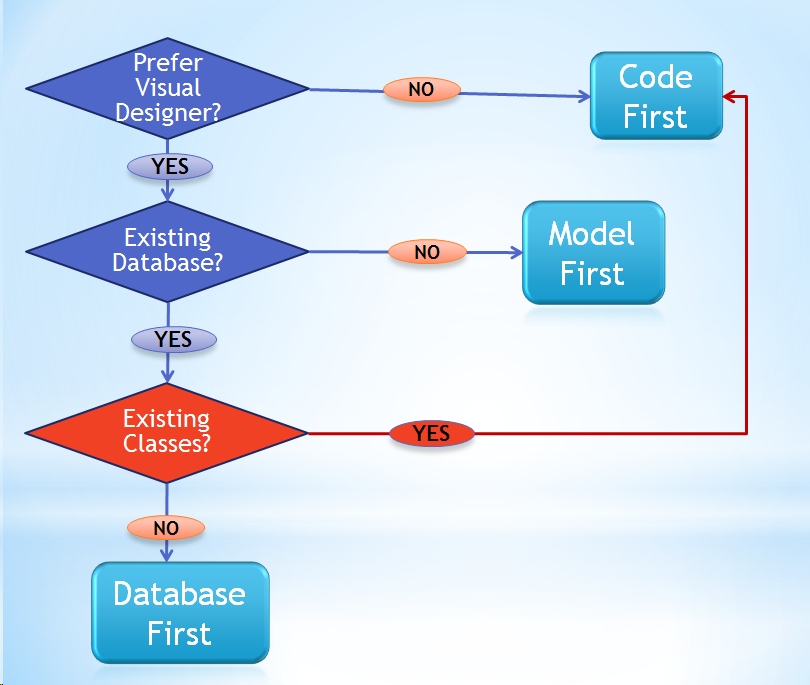
After listing the big differences and discussing pros & cons of the different workflows, I presented a diagram to encapsulate the decision making.

A few days before the article became public, I received an email from a developer asking about how to create a model when he had pre-existing classes and a pre-existing database. The obvious answer (in my mind) was to use Code First. Otherwise, he would have had to try to work out a model that would match his existing classes.

I immediately realized that I did not include that suggestion in the decision tree in the article, so here is that diagram, updated.

The new decisions are in red.

image

I know that even after you’ve said that you prefer a visual designer, I’m still recommending that you don’t use it in this case (point back to code first) but believe me, you’ll most likely be happier in that scenario.

Vermont IT Jobs: .NET Software Engineer, DBA and Architect jobs at Allscripts in Burlington

There are a bunch of dev & database related jobs at Allscripts.com/careers.


Job Title Requisition Number Area Of Interest City State
Data Conversion Consultant OP7675 Client Services Burlington Vermont
Database Administrator OP8095 Development Burlington Vermont
Interface Analyst OP7090 Client Services Burlington Vermont
Interface Architect OP7674 Client Services Burlington Vermont
Interface Architect OP7680 Client Services Burlington Vermont
Interface Implementation Specialist OP7678 Client Services Burlington Vermont
Interface Implementation Specialist OP7679 Client Services Burlington Vermont
Senior Software Engineer OP8270 Development Burlington Vermont
Upgrade Implementation Consultant OP7928 Professional Burlington Vermont
 

Contact their recruiter:

Joanne Henderson | Corporate Recruiter |Allscripts

www.allscripts.com

http://www.allscripts.com/en/company/careers/opportunities.html

http://www.linkedin.com/in/jhenders

Accessing ObjectContext Features from EF 4.1 DbContext

 The Entity Framework 4.1 DbContext is a lightweight version of the EF ObjectContext. It’s simpler to work with thanks t a streamlined surface of properties and methods. It may be just what you’ve always been looking for.

But….

Once in a while you might want to use a random method of the ObjectContext that is not available in the DbContext. .

All is not lost. The EF team built a hook in for you so that you can actually get to the ObjectContext from DbContext. It’s not as simple as a propert however, it requires a bit of casting and more.

When I know I will want the occasional benefit of the ObjectContext, I simply create a property in my DbContext class so it’s easier to get to. 

Here’s what it looks like:


   public class MyContext: DbContext
    {
        public DbSet<Blog> Blogs { get; set; }
       //other dbsets, ctor etc.

        public ObjectContext ObjectContext()
        {
            return (this as IObjectContextAdapter).ObjectContext;
        }
    }

Now when I have an instance of the DbContext, I can use features of the ObjectContext on the fly:

 db.ObjectContext()…..