All posts by Julie

Are you interested in the Jasper project (“Entity Framework on Rails”)

I stole the little EF on Rails quip from Roger Jennings who asked on his blog “what the heck happened to Jasper?” (my words, not his)

Here’s an overview article on Jasper that I wrote a few months ago.

Andy Conrad, who is a PM on that replied that it’s still around and they have an internal revision of the original prototype, but that they need to see more interest in it before really making an investment in it. (Again, my words, not his.)

Check out Roger’s post and Andy’s comment. It’s a shame that the best place to learn things like this is in the comments of 3rd party blogger posts, rather than directly in the team blogs, but iwth the rapid pace that everyone’s moving at these days trying to get Orcas out the door, trying to get Entity Framework and Astoria wrapped up, I’ll take what I can get!

So if you’re interested, let them know. A good place is comments on Andy’s blog or in the Jasper forums.

38 page “Leverage LINQ in ASP.NET 3.5 Projects” article by Roger Jennings

Roger’s post are so chock full of information, it’s easy to miss things on the first read or two but they are alwasy worth returning to, especially as he updates them to keep them accurate.

In a recent post, he pointed to an “article” – 38 pages is quite long for an article – which is part of the WROX BLOX series that you can download for $3.99 Leveraging LINQ in ASP.NET 3.5 projects. Since I am doing a session next week at DevConnections on ASP.NET Databinding with LINQ, I think I’m going to grab this to help enforce or certainly add to what I already have in my head, my demos and my deck! The session is only 75 minutes long, so I guess I can’t just stand up in front of the room and read it out loud.  (just kidding!)

Therefore, back to work!

You can find Roger’s mention of it in this post, which itself is probably a good 38 pages as well.

Another tidbit from the forums.. what’s coming in the EDM Designer

Someone asked a common question in the forums today about being able to update an EDM when the datastore has changed.

Noam Ben-Ami, who is on the team working on the tools, says this:

We are hard at work on this feature right now and hopefully we’ll be able to get it into CTP2 of the designer.

Along with support for stored procedures, it is our highest priority.

So three things to get out of this:

  1. There will (or will probably be…) a CTP2 of the designer. That indicates to me they still have a lot of ideas that they want to implement and are still working out which is why that doesn’t say “Beta”.
  2. There is going to be one (or more?) ways to support db updates in the desiger. I am really curious if we’ll be able to add just “drop” new tables in without actually updating.
  3. Designer support for sprocs is coming. Noam and I talked about this a while back and he described what I thought was a great idea for implementing this. I’m looking to see how that idea evolves.

In the meantime, I wrote a blog post this morning about how to apply db updates using the current version of the designer.

EDM QueryViews vs Defining Queries (and read-only views)

In a recent ADO.NET forum post, someone asked how to do read-only views of data. There were two responses – use a QueryView and use a Defining Query.

What’s the difference?

A Query view is an Entity SQL Query that exists right in your mapping layer. It allows you to solve two problems. THe first is creating complex queries that you don’t want your coders to have to worry about building. You can just build the query in the mapping layer, expose the resulting entity in the conceptual layer and the classes that the developers code & query against will just be there for them to use.

The second benefit is that you can use this to limit access to particular data from the database. For example, if you have a table which has GUIDs or hashed passwords in it, you may not want those to ever be surfaced in the application. You can “filter those out”, by creating a QueryView. FWIW, you could also do this by just deleting the columns in the store layer definition.

The QueryVIew then queries against the storage schema, not directly against your database, and then the results are output to an entity in your conceptual layer. So in effect, it is a different way of mapping between your store layer and your conceptual layer.

The QueryView is part of the EntitySet mapping and looks like this:

  <EntitySetMapping Name=”Categories”>
      <QueryView>
        SELECT VALUE Microsoft.CDP.Samples.Northwind.Category(C.CategoryID, C.CategoryName, C.Description)
          FROM dbo.Categories as C
      </QueryView>
    </EntitySetMapping>

This simple query (note the syntax; it’s an Entity SQL query) is replacing the mapping for Categories. It gets 3 columns from the Category entity in the store model (dbo) and maps the results to the conceptual entity, Category. Remember that I have created a read-only view, so you might not want to use this to just filter out columns if you still need to do updates and want to do them using the mappings (vs. using sprocs to do the updates).

You can also invent new queries and new entities to go along with them.

Defining Query

I love that MIke Pizzo refers to Defining Query as “the ultimate escape hatch“.

Defining Queries are defined in the storage layer. They are really nothing more than database views – directly against the database. So you have a really complicated query that you can’t describe with LINQ or with Entity SQL but you can describe it in TSQL, but and the dba is not around, unable or unwilling (for a variety fo very good reasons) to add a new view into the database for you, you can just create it in the storage layer. In fact, when you run the EDM Wizard against a database and it finds views, the wizard represents these views in the store layer as Defining Queries.

There are two parts to a Defining Query.

The query itself which is an EntitySet in the store model and an Entity in the store model that describes/defines the result set.

The rest of the model then treats the query as it would any other table. You have entities in your conceptual layer and they map to the entity that describes the result set of the Defining Query.

Here’s what one looks like.

<EntitySet Name=custview EntityType=AdventureWorksLTModel.Store.custview>
 
<
DefiningQuery>SELECT [custview].[CustomerID] AS [CustomerID],
  
[custview].[FirstName] AS [FirstName],
  
[custview].[LastName] AS [LastName],
  
[custview].[CompanyName] AS [CompanyName]
  
FROM [dbo].[custview] AS [custview]
 
</DefiningQuery>
</
EntitySet>

And the entity that you will map to

<EntityType Name=custview>
  <
Key>
   <
PropertyRef Name=CustomerID />
   <
PropertyRef Name=FirstName />
   <
PropertyRef Name=LastName />
  </
Key>
  <
Property Name=CustomerID Type=int Nullable=false StoreGeneratedPattern=identity />
  <
Property Name=FirstName Type=nvarchar Nullable=false MaxLength=50 />
  <
Property Name=LastName Type=nvarchar Nullable=false MaxLength=50 />
  <
Property Name=CompanyName Type=nvarchar MaxLength=128 />
</
EntityType>

As I said above, you can then have an entity in your conceptual layer that just maps to this entity and nobody will ever know the difference. Which beg the reminder that this is read-only!

Entity Data Model – What to do when a changes is made in the database

With the current CTP of the ENtity Data Model Tools, there is no way to automatically update or refresh the EDM when a change is made to the data store.

One of the beauties of the EDM is that fixing up the EDM in these cases is not only easy, but it doesn’t need to have any impact on your application, because you can leave the conceptual layer which you program against in tact.

Here’s an example of a minor change (inspired by a question in the forums) in the database and what you need to do today (I keep saying that because I don’t know what the next increments of the tools will bring) to fix up your model.

Scenario: DBA changed fname and lname columns in the Customer table to firstname and lastname.

In a non-EDM application this could be dealt with in a few places, depending on how your db and app are architected:

  • Modify any stored procs and views that spit out those fields so that they now know how to grab firstname and lastname but continue to surface them as fname and lname.
  • Modify the data layer of your application (and redeploy it) so that it now is aware of firstname and lastname. Modify your business layer so that it knows that the properties have to look for firstname and lastname.
  • If your app doesn’t use these layers (hopefully that’s a big “if”), then you need to make those changes even closer to the UI.

In an EDM here’s how you would solve the problem.

  1. Change the column name in the storage schema.
  2. Change the column name in the mapping schema for the two mappings that link those fields.

Step by step

Open up the EDMX in the XML Editor. (Right click on EDMX in the solution explorer, choose open with, then XML Editor).

You can do all of this in the raw xml, which to me is easy. THe current designer does let you change the mappings. SO I will show how to do #1 in the raw xml then #2 using the designer.


Locate the node for the Storage Model. You can find that quickly by searching for it’s comment “SSDL Content” or it’s name “StorageModels”.

IN there, locate the entity that represents the table with the change.

Edit the name of the entity.

Close the EDMX and re-open it in the designer.

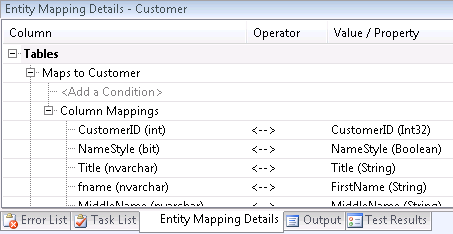
Another part of what makes EDM so great is that when I first created this model, I didn’t like “fname” and “lname” and changed them in my conceptual layer to FIrstName and LastName. At that point, they were properly mapped to the fname and lname columns and all was well.  This is what the mapping looked like before I started making the changes. YOu can see that my db column was called “fname” and my property in my conceptual layer was “FirstName”.

Now that the dba decided to change the column names in the database as well, I just need to remap my FirstName and LastName properties to the newly named database columns.

Select the Customer Entity and then open the Entity Mapping Details. (If you don’t see that page, right click on the model (in the white space) and select SHow Entity Mapping Details.)

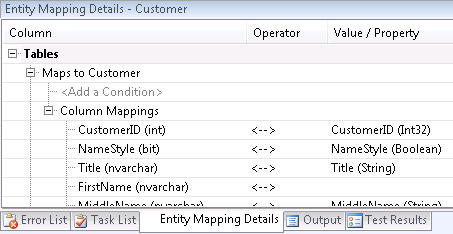
The mapping details shows  you the columns from the storage entity first (e.g. the database table) and then on the right which property in your conceptual entity that column is mapped to.

You’ll see that the columns fname and lname are gone from the mapping and it is now showing you the FirstName and LastName from the store schema, but they aren’t mapped to any properties in your conceptual entity.

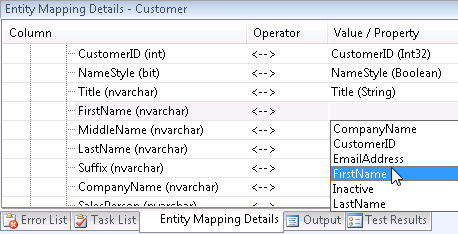
Just drop down the value/property list and it you will see all of the properties in the entity that this is mapped to.

That’s it. And the impact with respect to deployment is that the new versions of the xml files that describe the schema need to be deployed to whatever tier the data layer that needs to know how to do the mappings. The client apps most likely just have the classes that were derived from the conceptual layer and since we didn’t change that part, they don’t need to know anything and can go on their merry way.

A hint of what to look for in Entity Framework Beta3

I’ve found that the best resource for learning about ENtity Framework is in the forums. Today I finally saw a public statement about something I”ve been waiting for for a long time.

Brian Dawson says:

We’ve been working on making the WCF experience, especially with relationships, a much better experience no matter which serialization scheme you choose. Binary serialization has been working already, but in the cases where we are doing other types of serialization, dealing with relationships was tricky and we purposely don’t deal with deep serialization, at least in this release. What we did do was add the EntityKey as a serializational property on the relationship reference. This way, if you serialize Product, you’ll get the EntityKey for Category. You can treat the CategoryReference.EntityKey  similar to a foreign key. Basically, this allows you to fetch entities with the key, and also do updates and deletes without having to rebuild all the dependant ends.  We are targeting Beta3 for some additional information in this specific area.

What he’s talking about is this: when you do binary serliaziont of an object graph (i.e. and entity and anything that is attached to it) you get the whole thing, but if you do xml serialization, you only get the entity. That makes doing web services a nightmare. I have written a few posts about dealing with this using the current Beta 2 bits of Entity Framework. Here’s the critical one : XML Serializing Entity Framework Entities With Their Children For SOA.

Another critical problem is that you lose all of your statemanagement. Here’s a post I wrote about how to recreate state so tha tyou can do updates, etc. More on Disconnected Entity Framework

If you watch the forums you may have noticed that there have been a lot of people hammering on the team. On one thread about this topic which I would not let go, Danny SImmons finally responded:

This thread is getting way out of hand, and clearly we need to get some better guidance together on all of this (a few good blog posts at least).  

So, instead of writing blog posts and guidance (unless you count mine) they went to work on the bits! Happily they are going to make it a lot easier in Beta 3 enabling us to not only rebuild full graphs, but reconstituting the state.

Halfway through Conference Season!

In the past month (plus a few days), I have flown across the country twice (one was an overnight trip to San Diego for an INETA talk, the other was for a few days for some training in Redmond at Microsoft) and driven to Boston twice (4 hours each way, once for COde Camp, and then again for REMIX) and Montreal once for a user group meeting.

STill ahead of me in the next month (plus a few days) are three more cross country trips. Las Vegas for DevConnections, Vancouver for DevTeach and then back to Seattle for another quickie trip.

(And before you ask, no, I am not interviewing. You should know me better than that by now. 🙂 I’m just trying to learn a thing or two and rack up those miles.)

Computerworld story on Vermont’s Software Industry

A few days ago I got an email from the Sr. Editor of ComputerWorld who was interested to learn what had become of the group of Vermont software companies that had banded together a few years ago. He was referring to the Vermont Software Developer Alliance an organization who’s board I have served on since it began over three years ago.

I passed him on to our new Executive Director, Patrick Martell and only days later, this story appeared in Computerworld. Cool!

Green thinking vs. great access: A tale of two high-tech contenders
Ambitious Vermont needs what Westchester County, N. Y., has: broadband

Mapping Associations in the EDM Designer

I had to figure this out, so here are a billion screenshots so anyone who wants to do this will have an easier time of it!

One of the niceties about being able to customize your conceptual models is not having to bother the dba while they are doing important things like indexing tables and optimizing the database. If you find you have some tables that came into your entity data model that have primary/foreign key relationships that were never defined in the database, then the wizard won’t have built associations for you.

Imagine I have two entities, client and title. A client has many titles (kinda like a publisher but I used a different db for my example, so just live with “client”.) The title entity has a property called clientid. I want to build an association between the two

Right click in the model (white area, not on an entity) and you will get a context menu. Select Add, then Association.

This little window will pop up. It will default the two ends populated with the first two alphabetical entities.

Use the dropdowns in End Entity to change the two end points. I made mine CLient and Title.

The multiplicity options are 1, Zero or One and Many. My relationship is that is one to many, but I can have titles that don’t have a client, so I’m choosing 0..1 for the client and * for the title.

I changed the names of the navigation properties. They started out as Title and Client1. When I’m working with a client, I want to see a property called Titles. (Client.TItles) and title only has one client, so these are the names I want, Titles and Client.

Next is a step that may not make sense but you need to delete the “clientid” property in the title entity. Because of this association, the clientid has a job now and doesn’t belong as a property. (This is debatable and there have been requests to modify this rule for EDMs, but right now, that’s the way it works. You can read more about why in this blog post.)

Now to the mappings. We have told the entities that they are related but they don’t know the basis for their relationship. This happens in the mappings where we wire things up to the representation of the database that is part of the EDMX file created by the wizard.

Right click in the model again and choose Show Entity Mapping Details.

You’ll see an almost empty view, that has only Association and under it <Add a Table or View>. Click on Add a Table or View. Choose one of the entities. This is a little confusing here and I have actually made a suggestion in the forums to simplify it, but just go with the flow.

You’ll get a default that shows the end points you identified in the association and most likely you’ll see id’s on the left and id’s on the right. The “id” on the left refers to the property of the end point. The one on the right refers to the column in the database table (literally the store entity, but db table is easier to grok in this case) that you are mapping to. SO that’s why you see that I have changed my mapping so that client’s id property will map to the client id field in “the other end of the association”, e.g. the Title. Then the title end point (End2) will map over to the id of the other endpoint (client).

Now here’s a small bug with the designer, even if I choose clientid from the drop down list under column, it doesn’t stick (remember, the tool is just a preview right now). I originally had gone into the raw xml to fix this, but thanks to a pointer by Philip in the comments, I see how to get around it more easily.

In the drop down, first choose <Delete>. Then there will be no column mapping for the client end point. Now drop down the list again and choosed clientid. This way it stays.

—————————————
I’m going to leave the by-hand notes in here just for educational purposes.

So I had to doctor this up in the raw xml.

Luckily this was at the bottom of the whole xml file.

<AssociationSetMapping Name=ClientTitle TypeName=EFSampleDatabaseModel.ClientTitle StoreEntitySet=Titles >
  <
EndProperty Name=Title
>
    <
ScalarProperty Name=id ColumnName=id
/>
  </
EndProperty
>
  <
EndProperty Name=Client
>
    <
ScalarProperty Name=id ColumnName=clientid
/>
  </
EndProperty
>
  <
Condition ColumnName=clientid IsNull=false
/>
</
AssociationSetMapping>

I’ve bolded the two changes I made. These were originally “id” because of the mapper problem.
—————————————

The condition exists because it makes no sense to map titles that have null clientids.

Now I can write code like this and see the associations working

Dim oc As New EFSampleDatabaseModel.Entities
Dim q = From c In oc.Clients Select c, c.Titles

For Each c In q
  Console.WriteLine(c.Titles.Count)
Next